

Over 60,000 Instagram creators use LinkDM to send automatic DMs. And it’s easy to see why, because it’s one of the cheapest tools you can find. But is it actually any good?
I set up a comment-to-DM automation and a lead form in LinkDM. And I compared it with Manychat, which I’ve used with my clients for years.
Below I’ll share what features it has, what it costs, and whether I’d recommend it for your business.
Our Verdict
Our Verdict
LinkDM is one of the cheapest and easiest tools to automate your Instagram DMs.
When someone comments a keyword on your post or sends you a DM, it replies with a link, a button, an image, a voice memo or a PDF. You set that up in three steps, for one post or for all your posts at once.
On top of that, it can reply to comments from the last 7 days, even ones that came in before you connected it. Manychat, the most popular tool for Instagram automation, can’t do that.
And with lead forms, you ask for someone’s name and email in the DM and send them straight to Kit, Flodesk, Mailchimp or Google Sheets.
It’s great for creators on a tight budget who want to send links and collect emails from their posts

Pros
- Very cheap: 25,000 DMs for $19/month
- Free plan with 1,000 DMs a month
- Set up a comment-to-DM automation in three steps
- Rewind replies to last week’s comments, even from before you connected LinkDM
- Lead forms collect names and emails in the DM
- Send leads to Kit, Flodesk, Mailchimp and Google Sheets
- Buy extra DM credits instead of upgrading your plan
Cons
- No AI
- No inbox to answer conversations yourself
- Built for simple DM automations, not full chatbots
- Rewind and lead forms are only on the paid plans
LinkDM at a Glance
Here are the most interesting features that I found in LinkDM while testing it:
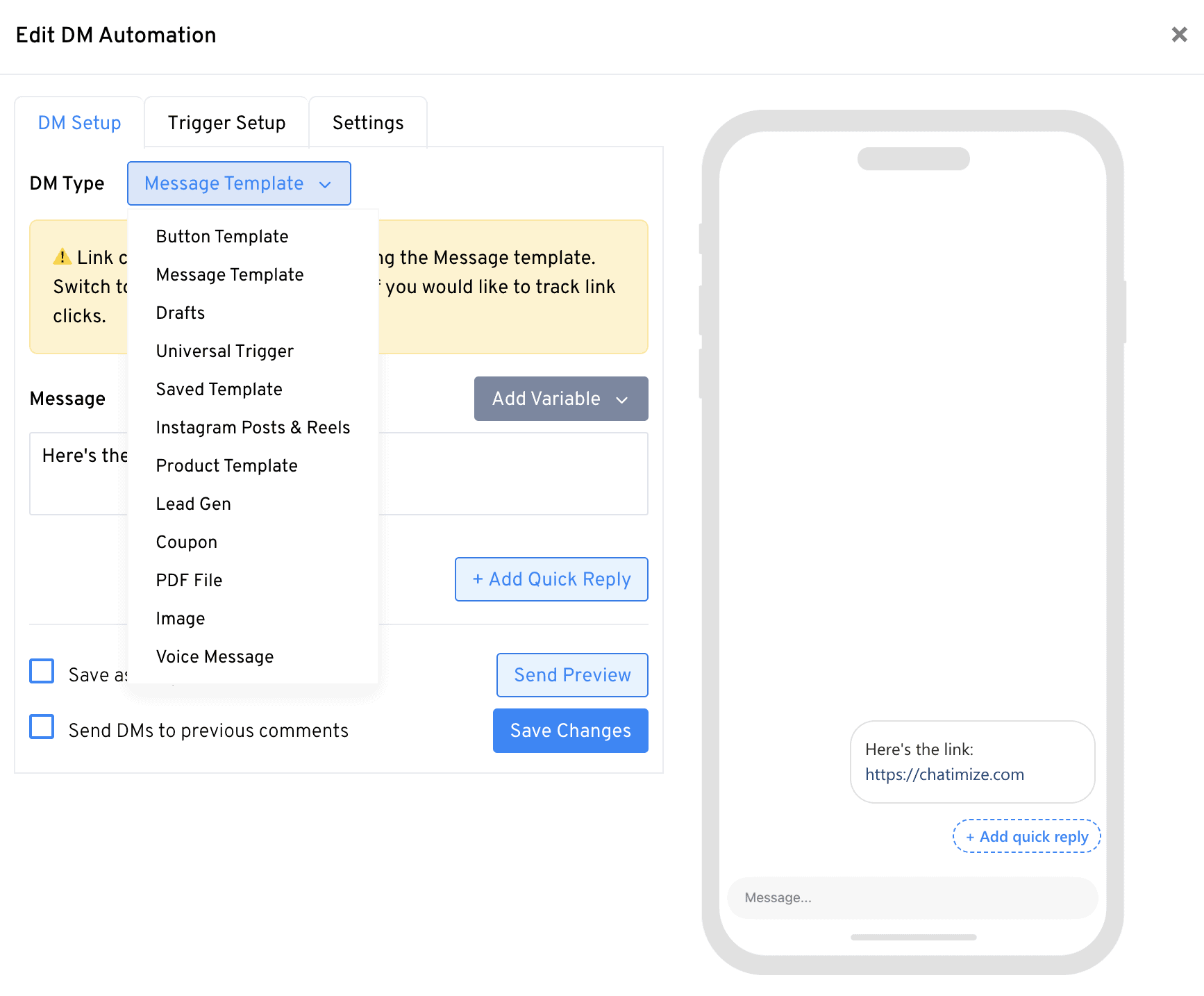
You choose what the DM contains. It can be a message, a button, an image, a voice memo, a PDF and more:
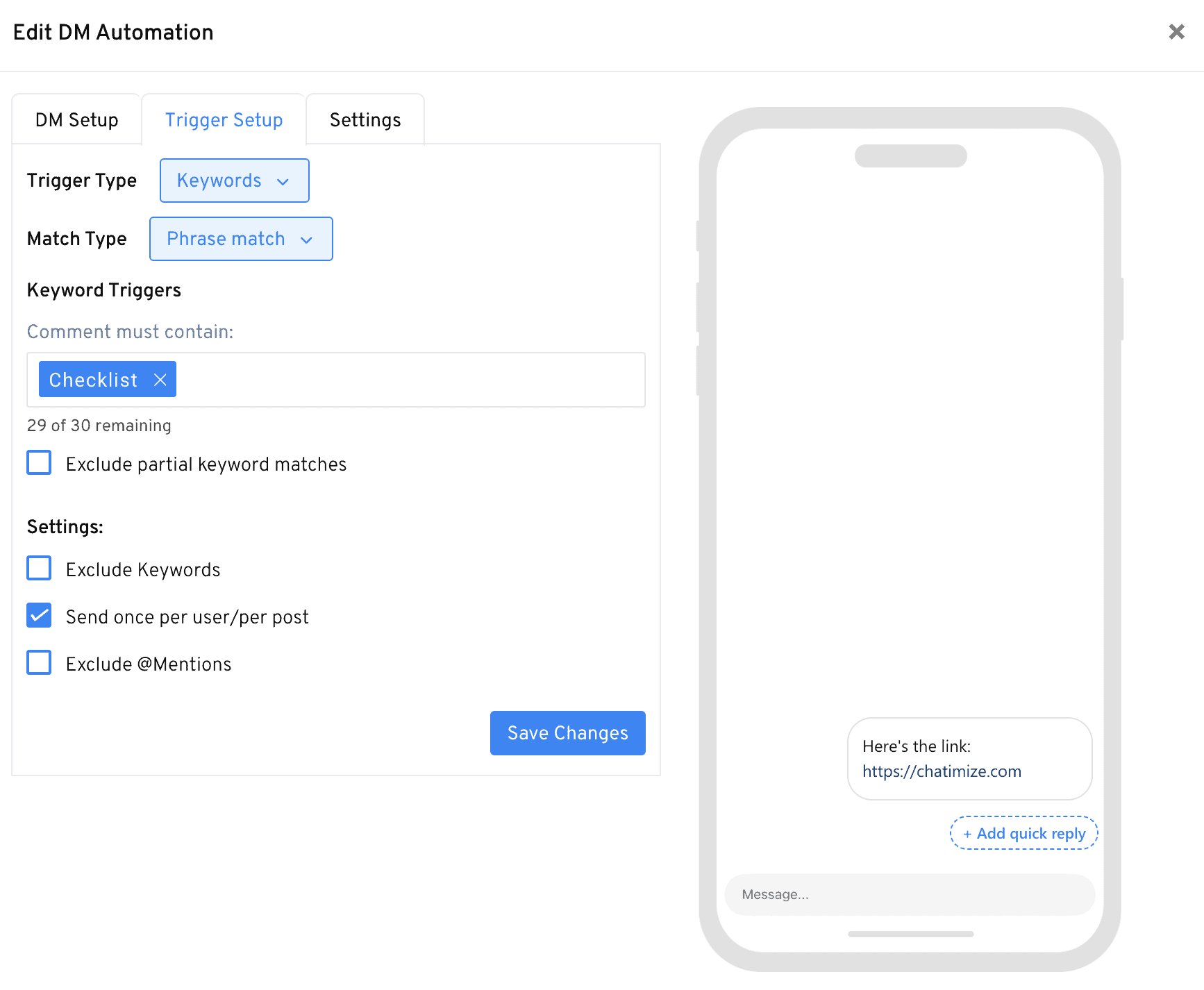
You decide which keyword starts the DM, like “checklist”, and you can exclude keywords you don’t want it to react to:
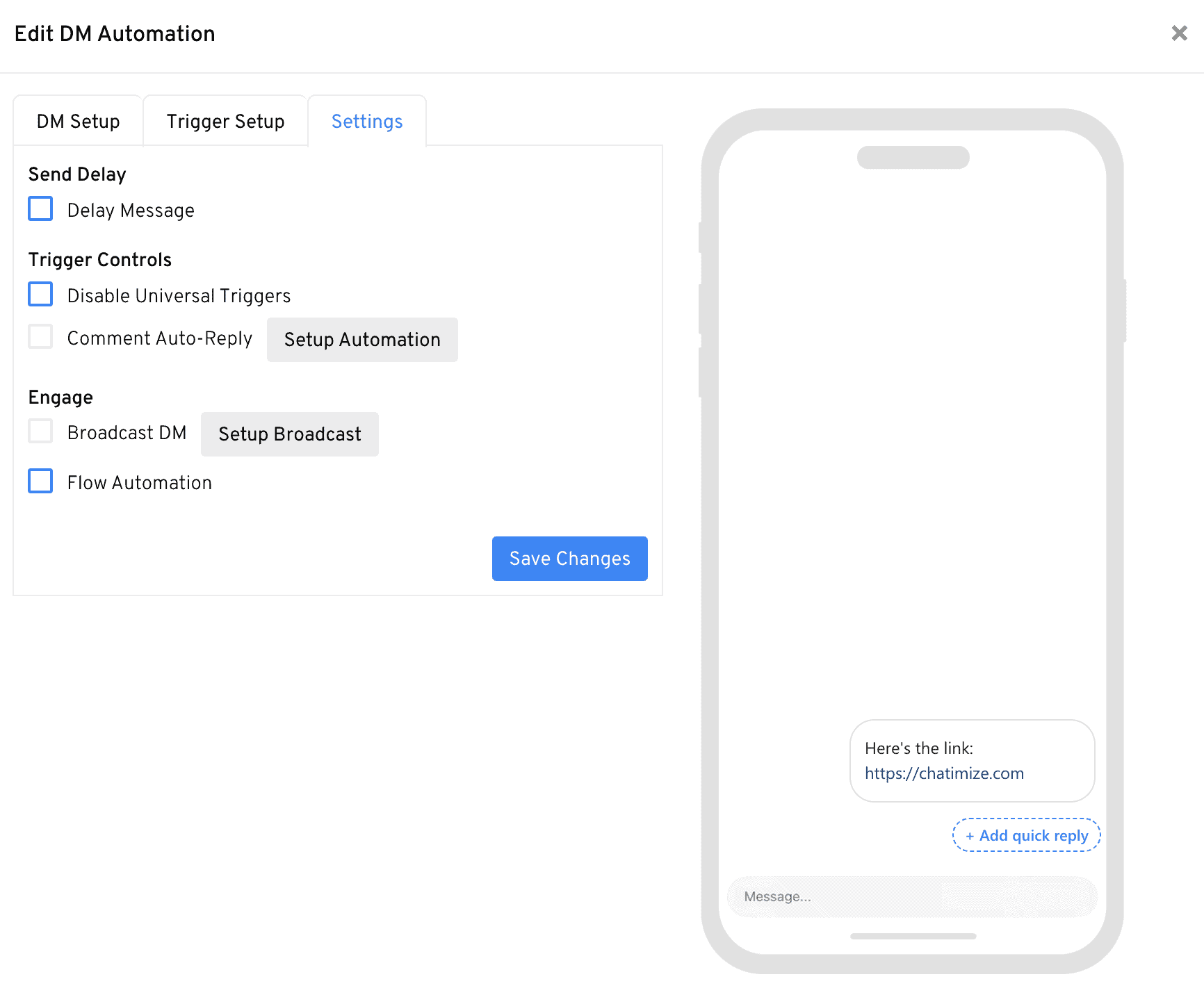
With universal triggers, one automation works on all your posts instead of just one. And every automation has extra settings, like a delay before the DM goes out:
Rewind sends a DM to people who commented in the last 7 days, even before you connected LinkDM, which most tools can’t do:

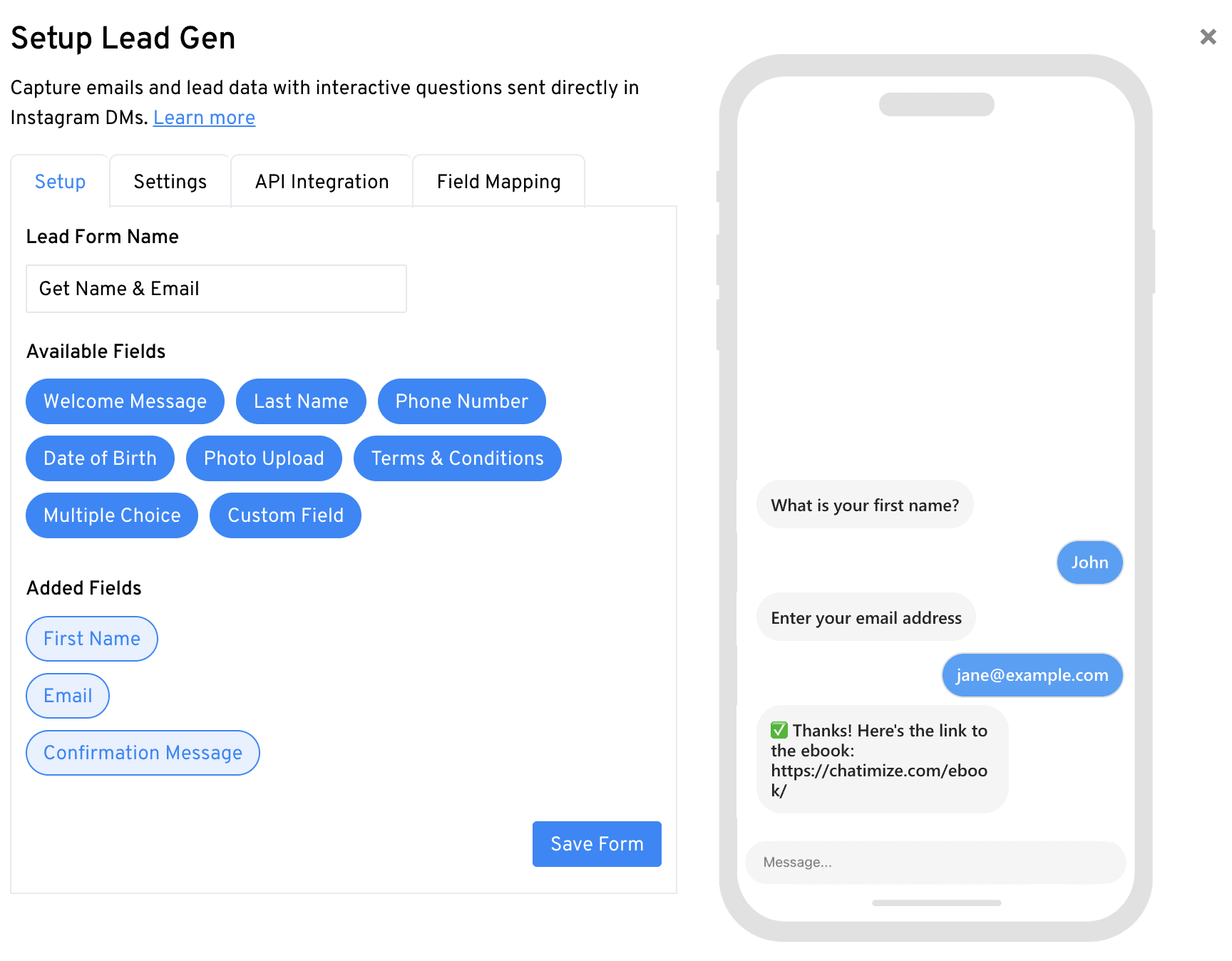
With lead forms, you ask for someone’s name and email right in the DM:
Broadcasts let you message everyone who was active in the last 24 hours:
The names and emails you collect go straight to Kit, Flodesk, Google Sheets or Mailchimp:
Need more DMs than your plan includes? Buy extra DM credits instead of upgrading:
What is LinkDM?
LinkDM is an Instagram automation tool for creators. It isn’t really a chatbot platform, because it does one job: when someone comments on your post or messages you, it sends them a DM.
It does the same for comments on reels, ads and Instagram Live, for story replies, and for comments on Facebook.
And that’s exactly why so many creators on a tight budget use it. They just want to send people a link, and LinkDM does that for a fraction of what bigger tools cost.
This is what setting up a DM automation looks like inside LinkDM:
How to Use LinkDM
LinkDM is super easy to use, and setting up a DM automation only takes three steps:
- DM Setup
- Trigger Setup
- Settings
You start in DM Setup, where you pick the type of DM from a list that goes from a plain message to an image, a voice message or a PDF. A plain message works, but I’d use a button template, because LinkDM only tracks link clicks on buttons:
While you build the DM, the phone on the right shows exactly what your followers will get, so you can check it before it goes live.
The next step is Trigger Setup, where you pick the keyword that starts the DM. For example, if someone comments “checklist” on your post, they get the checklist in their DMs:
Here you can also exclude keywords, and make sure each person only gets the DM once per post.
Finally, Settings lets you add a delay before the DM goes out, or turn off universal triggers for this post:
You can set up an automation for one specific post. But if you use the same keyword on every post, a universal trigger saves you a lot of time, because you set it up once and it works on all your posts.
LinkDM also has flow automations, which send follow-up DMs after the first one, like a reminder when someone didn’t click your link. But I found them hard to understand, so I’d stick with the simple DM automations.
Ease of use How easy it is to build and change things once you’re set up? On a scale of 1 to 5. How easy it is to build and change things once you’re set up? On a scale of 1 to 5. | 5 |
| Setup difficultyHow much technical work it takes to get going. | Easy |
| Average setup timeHow long until your first bot or AI agent is live. | 15 minutes |
| Set up with AIDescribe what you want in a chat, and an AI builds the bot or agent for you. | |
| Test before going liveYou can try the bot or agent yourself before customers see it. | |
| Ease of setupHow easy is it to set up your chatbot? On a scale of 1 to 5. | 4 |
Want to compare LinkDM with 33 other chatbot platforms? Compare them here →
Reply to Old Comments with LinkDM Rewind
Rewind is the one feature that sets LinkDM apart from Manychat. It lets you send a DM to people who commented on your post in the last 7 days, even if that was before you connected LinkDM to Instagram.
And it’s super useful for creators. A lot of my clients came to me after a post had already taken off, and asked: “I already have a thousand comments. Can we still reply to them?”
With Manychat, the answer is no, because it only replies to comments that come in after you connect it. With LinkDM, you just tick Send DMs to previous comments in the DM Setup:
Rewind comes with the Pro plan, so you can’t use it on the free plan.
LinkDM Lead Forms & Integrations
Besides sending links, LinkDM can collect leads right in the DM. With a lead form, you ask for someone’s details one question at a time.
For example, you ask for their first name, then their email, and then send a confirmation message with the link to your ebook:
You can also ask for a last name, a phone number, a date of birth or a multiple-choice answer.
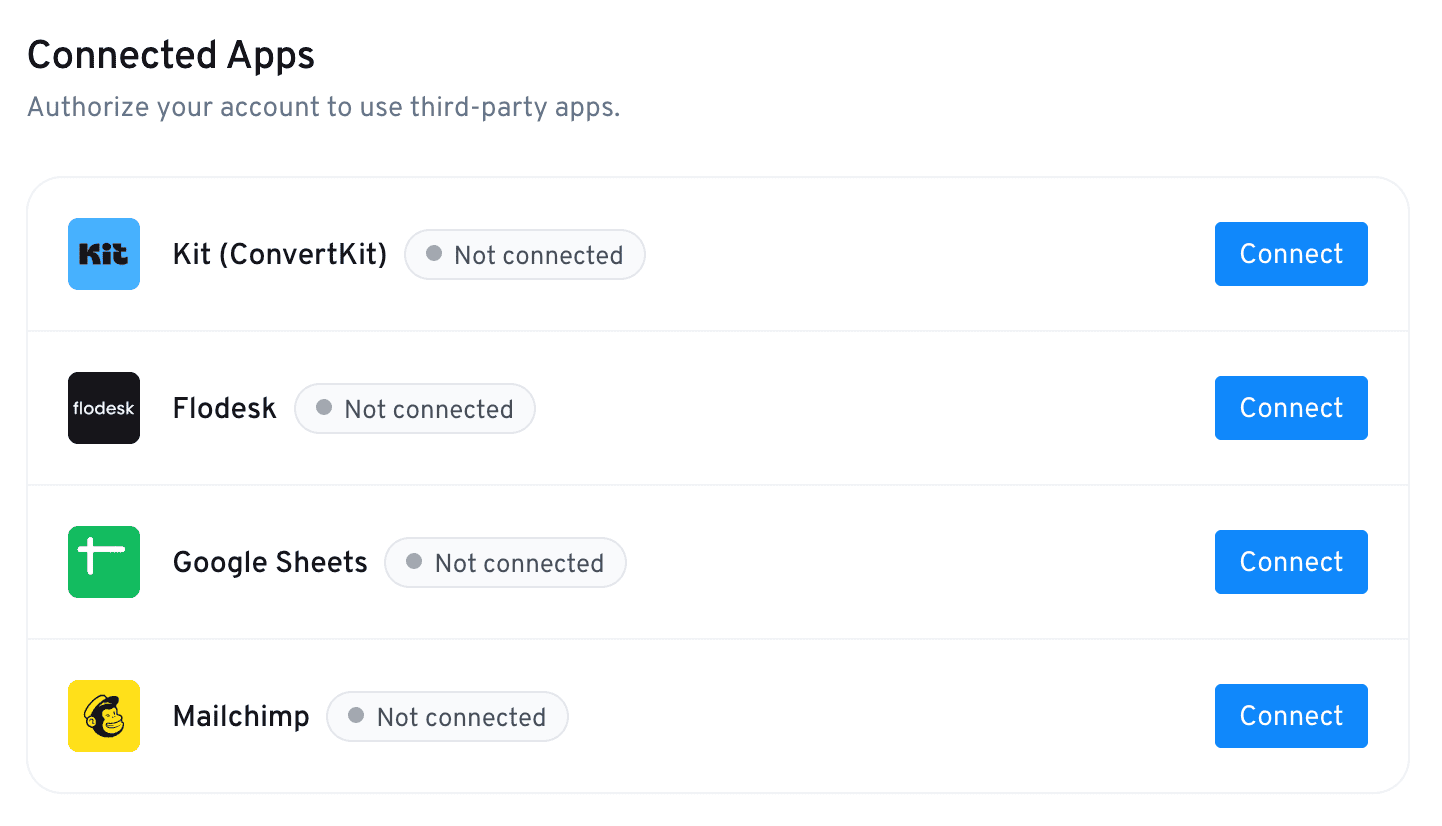
Those leads don’t have to stay in LinkDM. It connects with four tools, so every name and email can go straight to Kit (ConvertKit), Flodesk, Mailchimp or Google Sheets:
Just like Rewind, lead forms need the Pro plan.
LinkDM Broadcasts
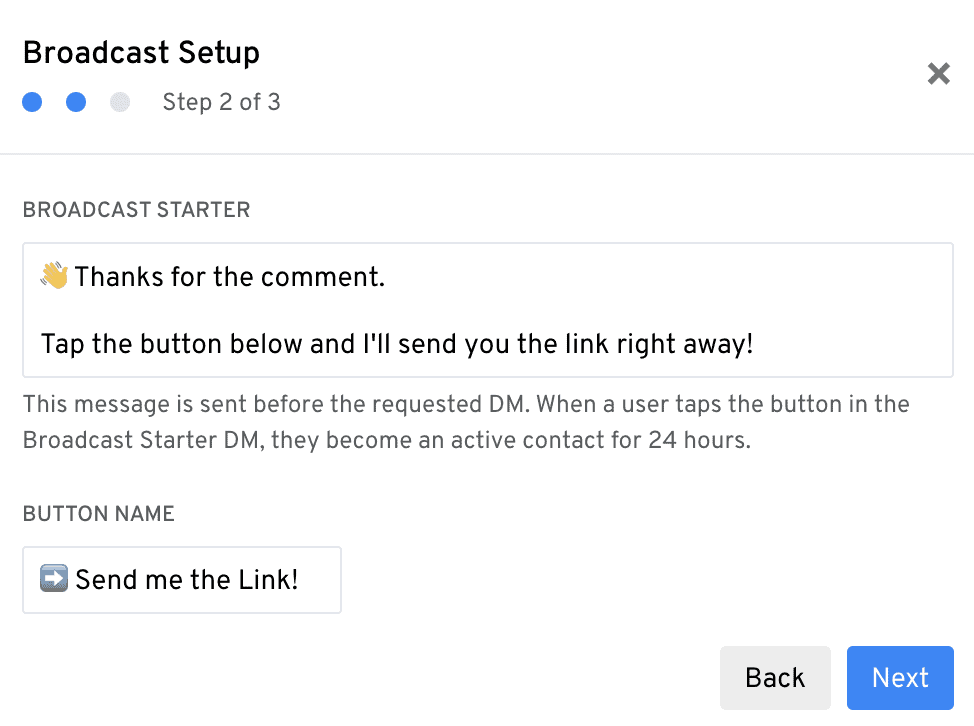
You can also send a broadcast, like a new link to everyone who recently commented on your posts. But it only reaches people who were active in the last 24 hours. That’s because Meta only allows automated messages within 24 hours of someone’s last interaction.
To get people into that group, LinkDM sends a broadcast starter first. When someone taps its button, they count as an active contact for the next 24 hours:
LinkDM Pricing
Pricing is LinkDM’s biggest strength. It has a free plan with 1,000 DMs a month, and paid plans start at $19/month.
The pricing is a lot cheaper than Manychat. Based on Manychat’s pricing, the same 25,000 DMs a month would cost you about $200/month.
Plus, with LinkDM you can get a full refund within 7 days of your first monthly payment.
Buy Extra DM Credits
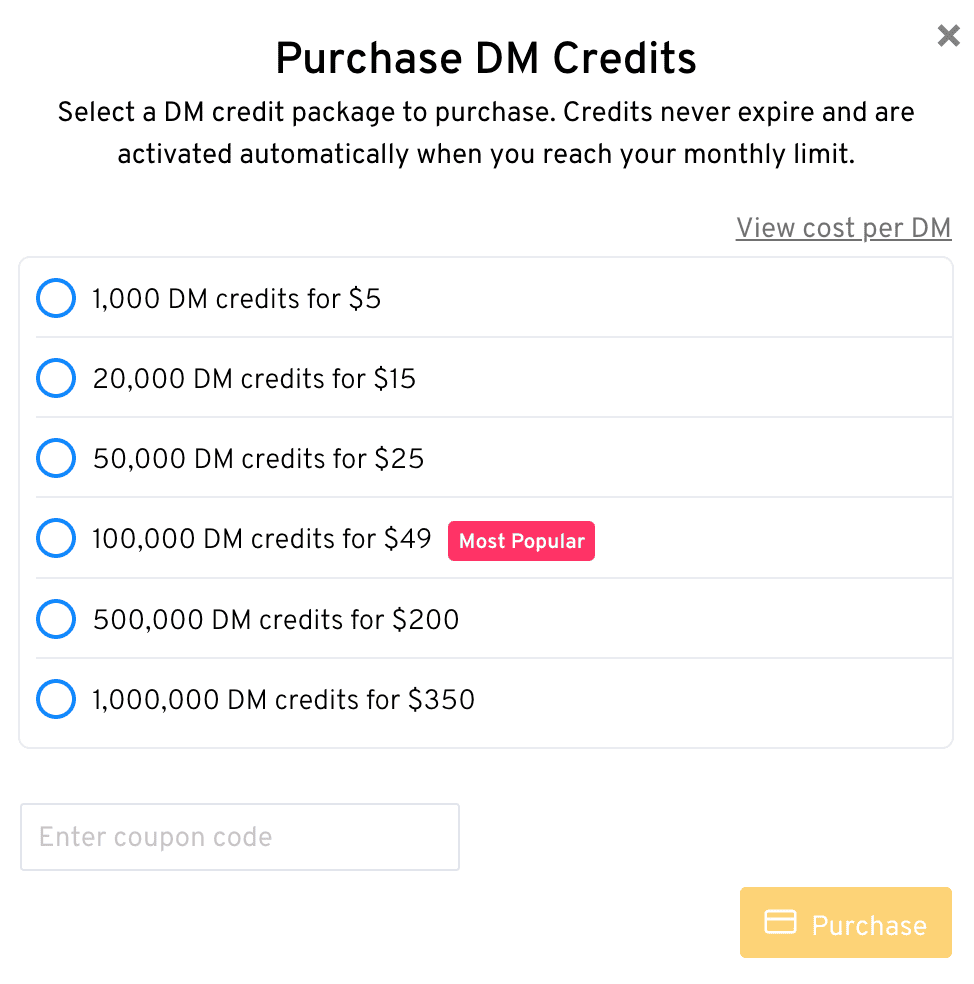
Instead of upgrading when you hit your limit, you can buy extra DM credits. They never expire, and they kick in automatically when you reach your monthly limit.
Each pack is a one-time purchase, from $5 for 1,000 DMs up to $350 for 1,000,000 DMs:
| Free trialDoes the chatbot platform provide a free trial? | |
| Free planDoes the chatbot platform provide a free plan? | |
| Price per monthWhat is the lowest price per month to create a chatbot with this platform? In US Dollars. | $19 |
| Monthly pricing available?Is it possible to pay monthly? | |
| Money back guaranteeIs there a money-back guarantee in case you are not satisfied with the platform? |
Is LinkDM Worth It?
So, should you use LinkDM?
Yes, if you’re a creator who wants to send links and collect emails from your Instagram posts, without paying for a big tool.
It’s super easy to set up, and it costs much less than what you’d pay for Manychat. On top of that, Rewind can still DM last week’s commenters after you connect it. And lead forms grow your email list straight from your DMs.
That’s why I give it a 4 out of 5, which is a high score for a tool that only does one thing.
If that sounds like what you need, click the button below to try LinkDM for free:
But LinkDM has a few drawbacks you should know about:
- There’s no AI, so it can’t answer questions on its own
- There’s no inbox where you can answer conversations yourself
- It’s built for simple DM automations, not full chatbots
- Rewind and lead forms only come with the paid plans, Pro and Platinum+
So if you want an AI that answers your followers’ questions, or you need more advanced automations, LinkDM isn’t the right tool. In that case, have a look at my Manychat review or my list of the best Instagram chatbots.
