

I’ve used Manychat for 6+ years to automate thousands of conversations, generate leads, and drive sales for my clients. For example, my client Claire Bartholic collected 2,602 emails at a 77% conversion rate.
Over the last 6 years, I’ve used Manychat for everything from simple DM automations to more advanced funnels that turn Instagram and Facebook engagement into leads.
But is it still worth using in 2026?
For this Manychat review, I looked at the features that matter most in real-world use: the flow builder, growth tools, marketing automation, AI features, live chat, integrations, and pricing.
More importantly, I tested how well Manychat turns conversations into leads and sales.
I’ll break down what’s good, what’s bad and whether you should use Manychat for your business.
Here’s what I found:
Our Verdict
Our Verdict
Manychat is one of the best chat automation platforms for Instagram, WhatsApp, Facebook and SMS.
What makes it stand out is how easy it is to turn Instagram and Facebook comments into DMs, leads, and sales. The flow builder, live chat and marketing automation tools make it a great fit for creators, agencies and businesses.
It’s super beginner-friendly, since you can create automations in minutes without needing code. But it’s also powerful enough to create more advanced automations as well.
If you want to generate leads from Instagram or Facebook, Manychat is one of the best tools you can use.
It offers both free and paid plans, starting at $17/month. It is a popular choice for those new to chatbots or working with a tight budget.


Pros
- Easy-to-use Flow Builder
- Unlimited Custom Fields & Tags
- Integrates with Facebook, Instagram, WhatsApp, SMS, & Telegram
- Drive Users to Funnels with Growth Tools
- Send Broadcasts, Sequences and Rules
- Built-in Live Chat + Integrations with Zapier and Make
- Built-in AI: Knowledge Base, AI Step, Intents & AI Flow Builder Assistant
Cons
- You need to create separate messages per channel
- It’s hard to translate your chatbot to multiple languages
- AI features can be limited
What is Manychat?
Manychat is a chat automation tool that lets you create chatbots on WhatsApp, Instagram, Facebook, SMS and Telegram.
It helps businesses and individuals automate conversations across a wide range of chatbot use cases. This way, you can get more leads, boost sales and reduce costs.

Manychat features include:
- Flow Builder: Easily create chatbots using a drag-and-drop flow builder.
- Custom Fields: Store contact data in custom fields and share it with other applications, like your CRM or email platform.
- Growth Tools: Drive traffic to your chatbots by using Manychat Growth Tools. For example, if someone comments on your Instagram post, you can automatically start a conversation.
- Broadcasts & Sequences: Businesses can send out broadcasts and sequences. So, you can reach your audience with targeted messages
- Live Chat: Hand over any conversation to a human agent
- Integrations: Manychat integrates with many other tools, such as email platforms, CRMs and Zapier
- Analytics: Track the performance of your chatbot with detailed reports, so you can easily optimize your chatbot
How does Manychat work?
In Manychat, you have several tabs where you can manage your chat automations from:
- Home – General overview of your chatbot and tips on how to get started
- Contacts – Overview of everyone who talked to your chatbot
- Automation – This is where your chat flows and chat automation live
- Live chat – when you hand over a chat from the bot to an agent, here is where you can chat with contacts
- Broadcasting – if you want to send mass messages to your contacts
- Settings – here you control the settings of your chatbot and Manychat account

When you get started with creating your Manychat bot, you’ll start in the Automation tab. Here, you can structure your Manychat automations into folders, so you keep a good overview:

Once you start building automations in Manychat, everything happens inside the Flow Builder.
Each automation in Manychat consists of one (or multiple) triggers and blocks.
A trigger in Manychat is an event that starts your automation. For example, when someone leaves a comment on a Facebook Post.
Manychat blocks determine what happens after triggering the automation.
Adding blocks to your chat automation is super easy, you can just click and drag them in the flow builder:

Here are the most important ones:
- Messages, send content like text, images, buttons, or collect data from users (channel-specific)
- Conditions, personalize conversations using if/then logic based on user data
- Actions, update fields, add tags, trigger integrations, or hand over to live chat
- AI Step, let AI handle parts of the conversation and collect data naturally
- Start Automation, connect different flows together (great for scaling)
- Randomizer, split traffic for A/B testing
In practice, these elements let you build anything from simple reply flows to more advanced funnels with personalization and follow-ups.
And in my experience, the most important elements are Conditions and Actions. These allow you to personalize conversations and turn simple automations into real funnels that drive results for your business.
Additionally, the flow builder has nice features that make it even easier to use. For example, you can click on the Auto-Arrange Steps button. This arranges all the blocks in your chat automation:

Or you can use Ctrl+C / Ctrl+V (CMD for Mac) to copy and paste blocks in your automation, even across browser tabs.
Moreover, you can test your chatbot flows on the channel you are building the automation for (WhatsApp, Facebook, etc). Or, you can test them directly in the Manychat interface:

Manychat has one of the easiest-to-use interfaces I’ve ever seen in a chatbot platform. By using the flow builder, you can set up your first chat automation in a matter of minutes!
Flow Builder Create chatbot dialogs with a visual flow builder. Create chatbot dialogs with a visual flow builder. | |
| Ease of useHow easy is it to use the platform? On a scale of 1 to 5. | 5 |
| Ease of setupHow easy is it to set up your chatbot? On a scale of 1 to 5. | 5 |
| Test chatbotIs it possible to test the chatbot before putting your new flows or changes live? |
Want to compare Manychat with 32 other chatbot platforms? Compare them here →
Manychat Growth Tools: Drive Traffic to your chatbot
If you remember just one thing about Manychat, it’s this: It gives you powerful tools to drive traffic and re-engage your audience.
It’s the main reason I use Manychat for most of my clients, because they have all these marketing tools.
It offers growth tools across all major messaging platforms:
- Facebook: Comment triggers, Ref URLs, Recurring Notifications, Facebook Ads
- Instagram: Story mentions, Comment triggers, Follow-to-DM Trigger, and Ref URLs
- WhatsApp: Message templates
Likewise, it also built-in tools to follow-up:
- Broadcasts: Send mass messages to you audience
- Sequences: Automated drip campaigns
- Rules: Trigger actions based on user actions
Let’s break each of these down:
Broadcasts, Sequences & Rules
In Manychat, you can start conversations by using broadcasts, sequences and rules.
With broadcasts, you can send mass messages to your contacts in Manychat. You can compare it with sending an email newsletter, but on Facebook, Instagram, WhatsApp, Telegram or SMS.
When creating your broadcast, you can determine the automation you want to send and the target audience based on filters:

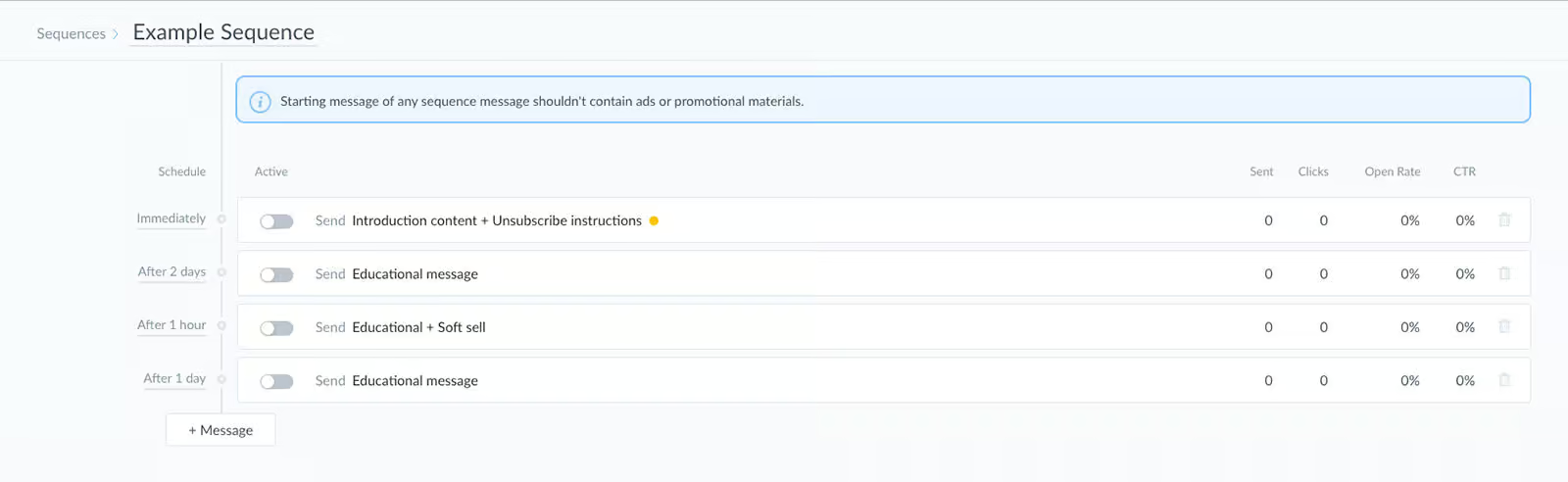
Likewise, you can send sequences in Manychat. With a sequence, you can send a series of messages with a certain time in between.
What I like about the sequences in ManyChat is that they are really organized. You can see the complete sequence in one overview and you also see what message is sent at what time:
Another great feature of Manychat is the Rules. With a Rule, you can automatically do an action when an event happens.
For example, when someone books an appointment, we can send them a reminder 1 day before it:

Growth Tools on Facebook
On Facebook, you can:
- Create Ref URLs that go to specific chat automations
- Automatically reply to Facebook Comments and start a Messenger conversation
- Send one-time notifications
- Send Recurring Notifications
- Connect a Facebook ad to your Messenger chatbot
Growth Tools on Instagram
On Instagram, you can:
- Create Ref URLs that go to specific chat automations
- Automatically reply to Instagram comments and start conversations in the DMs
- Auto DM Anyone who follows your Instagram account
- Send automatic replies to people who mention your account in their Instagram story
- Connect an Instagram Ad to your Instagram chatbot
Growth Tools on WhatsApp
And lastly, Manychat offers Message Templates and Ice breakers on WhatsApp.
By using Message Templates, you can send WhatsApp broadcasts and start conversations with users.
And Ice breakers let you show bubbles at the start of a WhatsApp conversation:

Basically, ManyChat provides almost all the marketing possibilities you need for your chatbot.
The only drawback is that Manychat doesn’t have a chat widget for your website.
Broadcasts Send a message to all or a part of your chatbot users at a specific date and timeSequences Send messages on a pre-defined schedule with a certain time interval between those messagesRules Trigger events based on if-then logic. For example, if email is given by the user, send it to your CRM.Website widget Embed your chatbot as a widget on your website (with your own branding & colors).Send proactive messages on website Can you send pro-active messages on your website with your chatbot?Facebook Ref URL Can you create a URL that goes to a specific flow inside your Facebook chatbot?Auto-Reply to Facebook Comments Automatically reply with your chatbot to users who comment on your Facebook PostsOne-Time Notification Send one-time notifications via Facebook Messenger for a topic that a chatbot user has opted-in forRecurring Notifications Send recurring notifications via Facebook Messenger for a topic that a chatbot user has opted-in forFacebook Ads Start a conversation with your chatbot when someone clicks on a Facebook AdAuto-Reply to Instagram Comments Automatically reply with your chatbot to users who comment on your Instagram PostsInstagram Story Mention Reply Send auto replies to Instagram users who mention your Instagram handle in their Instagram StoriesWhatsApp Message Templates Can you initiate conversations with Message Templates on WhatsApp?
Manychat AI Features
Manychat has many AI features you can use in your chatbot:
- AI Replies: Automatically reply to DMs based on website links and business info
- AI Comments: Auto-reply to comments based on your past reply style
- AI Goals: Follow-up after AI replies and comments to hit specific goals (like growing followers or getting leads)
- AI Step: Let an AI Assistant take over the chat and collect data
- AI Flow Builder Assistant: Auto-generate entire flows from answering a few questions
- AI Intents: Trigger flows based on user’s intent, not just keywords
- Keywords: Auto-reply to messages based on specific words
Let’s cover them one-by-one.
AI Replies
AI replies are the core of Manychat’s new AI engine.
With AI replies, you can train Manychat on website URLs or business info:
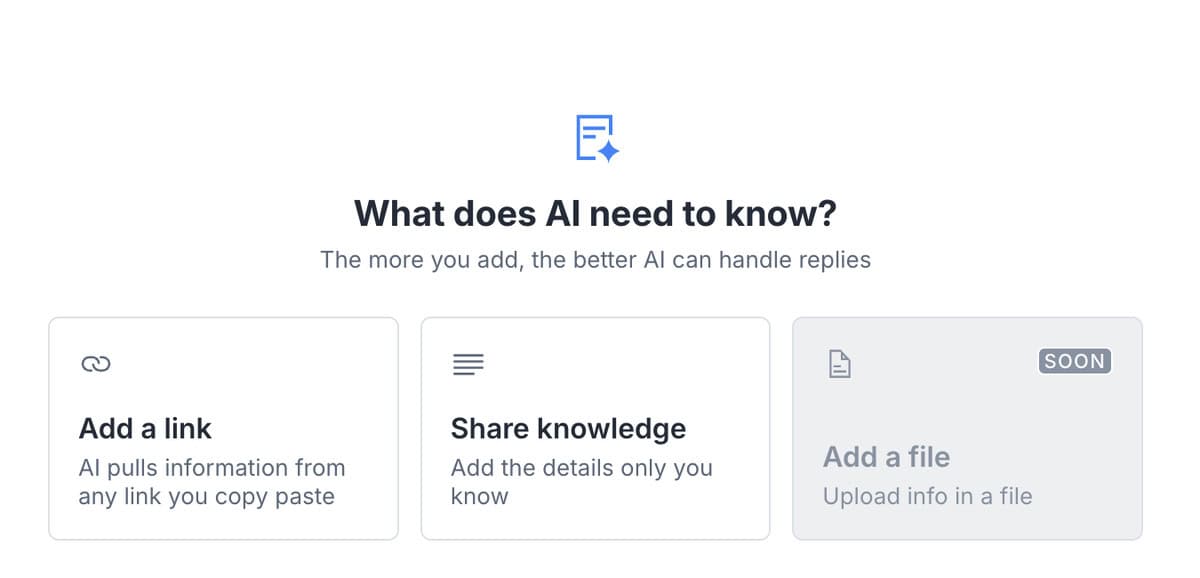
You can simply do this by adding a link or sharing knowledge about your business:
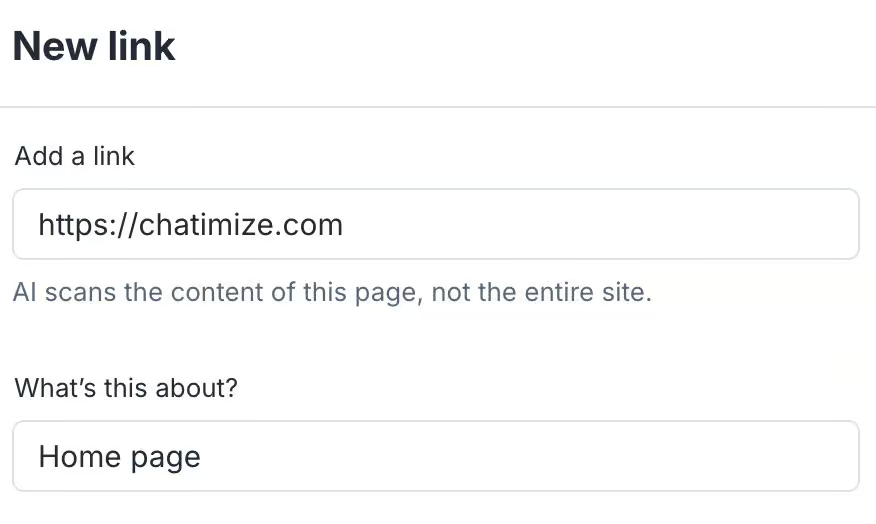
And once it’s trained, Manychat can automatically reply to DMs on Instagram:
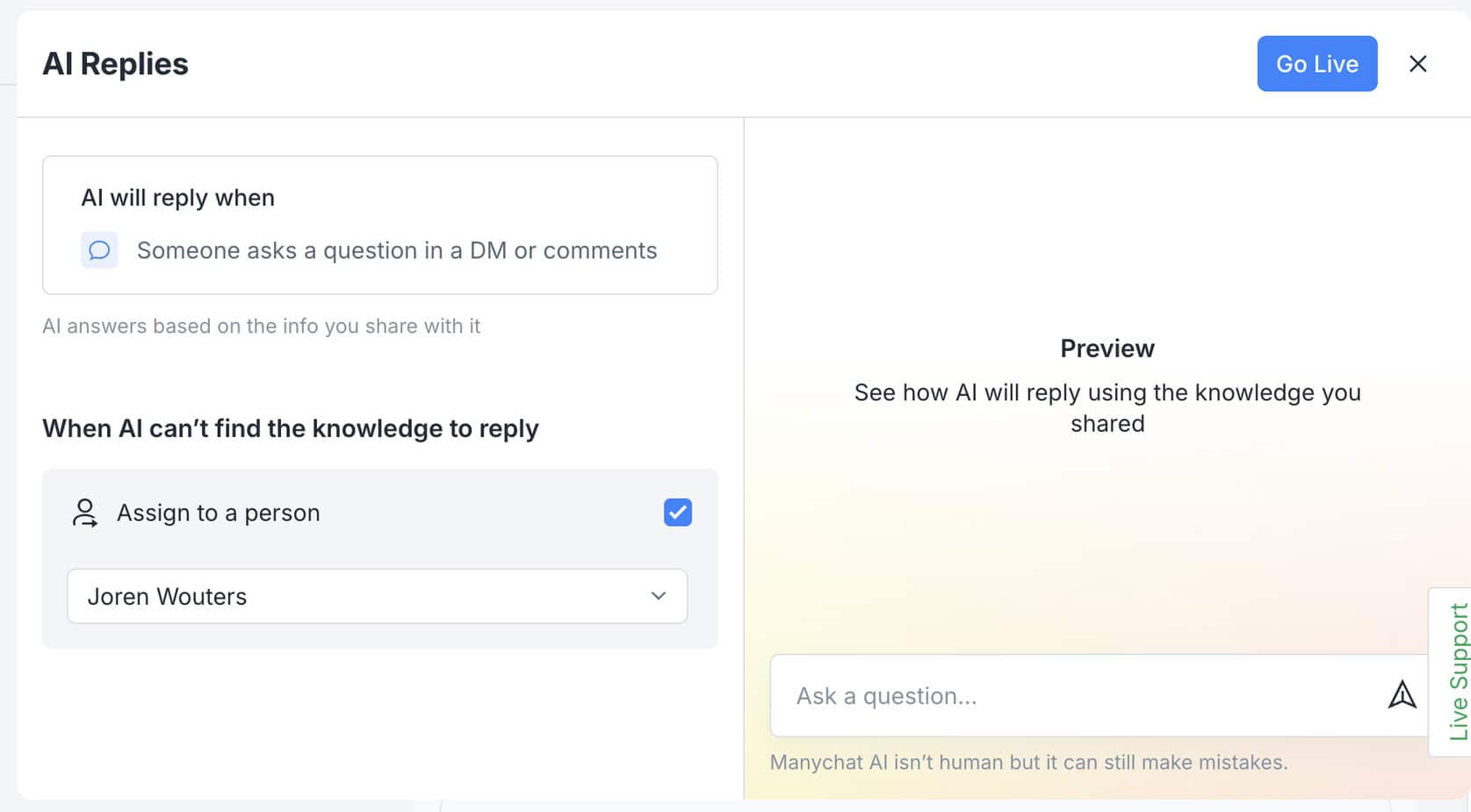
So instead of building flows, you just give AI the right info and it does the work for you.
Note: Manychat AI Replies, AI Comments and AI Goals are currently only available on Instagram.
AI Comments
AI Comments let you automatically reply to Instagram comments using AI.
Here’s what it does:
- Analyzes your past comment replies to learn your style
- Presents a few AI comment replies and asks you to review
- Automatically replies to comments based on your past replies and preferences
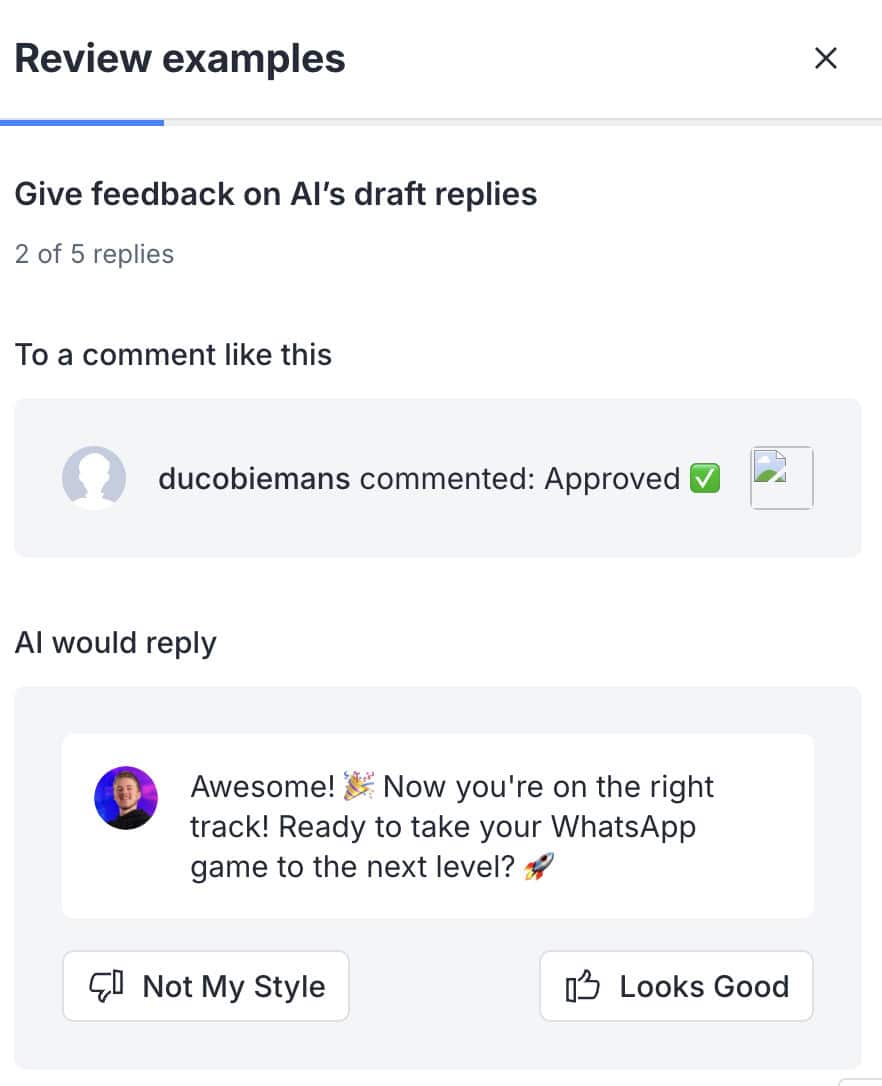
This is super helpful to increase engagement and save time, especially if you get dozens (or hundreds) of comments per post.
Right now, you can only reply to positive comments. But Manychat said they will add more intents in the future.
AI Goals
Once your AI starts replying to DMs or comments, what’s next?
That’s where AI Goals come in.
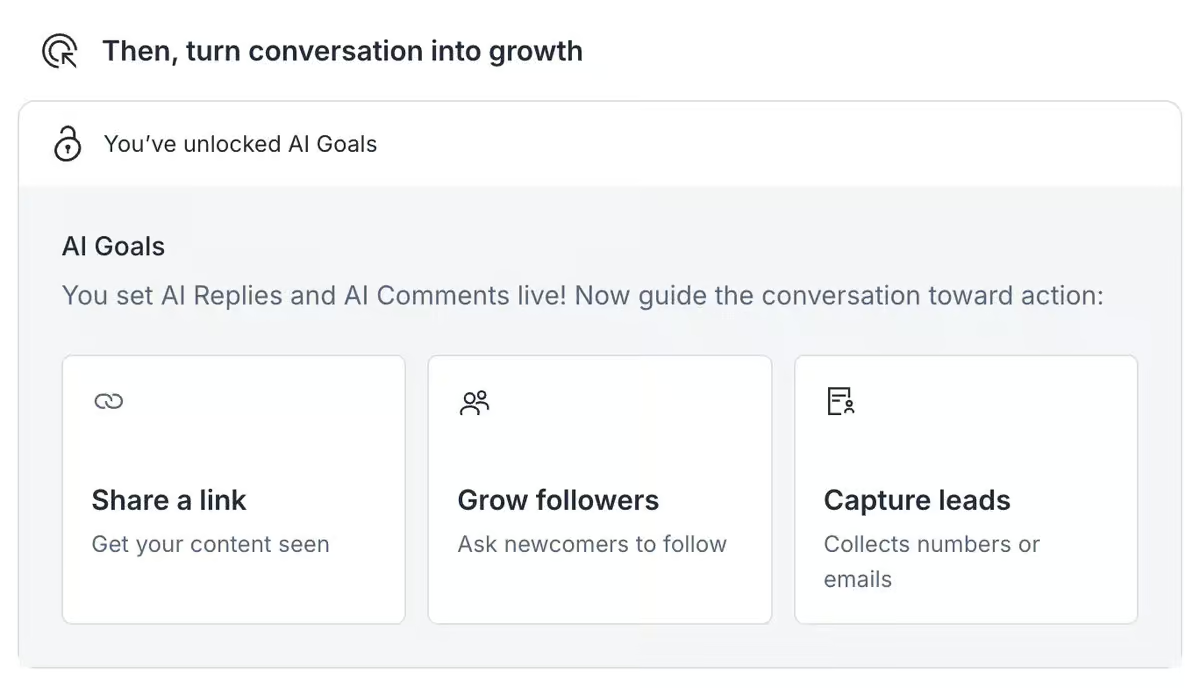
So after Manychat has answered a DM or replied to a comment, it can lead the user to a certain goal.
At this point, you can optimize for three goals:
- Get people to visit your website
- Increase followers
- Collect leads
AI Step
The AI step lets you hand over a conversation to Manychat’s AI to collect data. This is great for handling questions or getting data in a more natural way.
You just have to set:
- The goal of the conversation
- What data to collect
- Where to store the data (e.g. custom fields)

This is especially useful for when users go “off script” or ask questions during the conversation. The AI can then answer those questions (based on your business info) and route them back to the script.
AI Flow Builder Assistant
Furthermore, Manychat provides the AI Flow Builder Assistant. With this assistant, you can answer a few questions. Then, it creates a full automation for you:

AI Intents
Instead of replying to specific words, AI intents let you respond based on the user’s intent.
You just define the intent (Like “order status”) and Manychat will try to match user messages to it:

This can save you a lot of time, because you don’t have to manually enter all the keywords you want to match. You can just enter the intent and Manychat AI can automatically reply to it.
Manychat Keywords
This is the most basic form of automation in Manychat. You can trigger flows based on specific keywords in the user’s message:

Then, you can determine how you match the keyword. For example:
- A message is equal to the keyword
- A message contains the keyword
- A message contains the whole keyword
- A message begins with the keyword
- A message is thumbs up (a standard feature in Facebook Messenger)
| Keyword recognitionTrigger chatbot flow based on certain words or phrases a user says to the chatbot. | |
| IntentsTrigger a chatbot flow by understanding the intent of the user. | |
| EntitiesCapture specific information from sentences. For example, if a user says “veggie pizza”, the chatbot can understand it’s not a regular pizza, but a veggie pizza. | |
| AI Knowledge BaseCan you train your chatbot on a knowledge base (like your website or articles) and then your chatbot automatically answer questions about it? | |
| NLP integrationsDoes it have a direct integration with NLP platforms, such as Dialogflow? | |
| LLM integrationsDoes it have a direct integration with LLM platforms, such as ChatGPT and Claude? |
Manychat Live Chat & Contact Management (Inbox)
Manychat also gives you a built-in Inbox where you can manage and reply to chats manually.
Here, you see all conversations in one place, whether they come from Instagram, Facebook, WhatsApp or SMS. This makes it easy to jump into conversations whenever needed.
One of the most useful features is the ability to take over conversations from your chatbot.
For example, if someone asks a question your automation can’t handle, you can jump in and reply manually. Or you can trigger this automatically in your flows, like when someone asks for support:

Manychat also offers a mobile app for iOS and Android, so you can reply to conversations directly from your phone. This is especially useful for creators or small teams who manage conversations on the go.
If you’re working with a team, you can use auto-assignment rules to automatically distribute conversations across agents.
Besides that, Manychat gives you a full overview of everyone who has interacted with your chatbot:

When you click on one of them, you can see their entire chat history, along with custom fields, tags, and other data you’ve collected:

This is especially useful when working with leads or customers, because you always have context before replying. Instead of starting from scratch, you can see who someone is, what they’ve done, and where they are in your funnel.
You can also use this data to segment your audience and personalize conversations. For example, you can send targeted broadcasts, trigger automations based on behavior, or customize messages based on tags and fields.
In my experience, this combination works really well. You can automate most conversations, but still jump in when needed.
| Contacts overviewCan you see all the contacts that talked to your chatbot in one overview? | |
| Custom fieldStore information from your chatbot users inside fields. For example, you can ask for someone’s email and store it inside the “email” custom field. | |
| TagsAdd tags to users in your chatbot flows to organize and categorize contacts. | |
| User SegmentsCan you create user segments based on custom fields and tags? |
Manychat Pricing Plans
Manychat has a Free plan with basic features, and various paid plans that start at $17/month ($14 annually).
Every paid plan comes with a 14-day free trial. So you can test the features before you pay. There’s also a 30-day money-back guarantee, no questions asked.
Manychat Free vs paid comparison
So, which plan should you actually go with? Here’s how I’d choose:
- Free: Use this to test things out and get a feel for the platform
- Essential: Use this when you’re starting out with DM automation. For example, as a content creator who wants to turn comments and DMs into leads
- Pro: Use this if you’re running a business and want access to everything, like unlimited AI, broadcasts, and WhatsApp
Integrations
Manychat has direct integrations with:
- Zapier
- Make (formerly Integromat)
- Google Sheets
- ActiveCampaign
- MailChimp
- ConvertKit
- HubSpot
Furthermore, ManyChat has its own App store. It allows third-party developers to make their own integrations with ManyChat. Currently, the App Store has 61 apps to extend the functionalities of Manychat:

| Direct integrationsHow many direct integrations does it have with other applications? | 1-10 |
| ZapierDirect integration with Zapier, one of the largest integration platforms in the world. | |
| MakeDirect integration with Make (formerly Integromat), one of the largest integration platforms in the world. | |
| Make API CallsCan you call an API inside your chatbot flow to send or get data from other applications? | |
| WebhooksCan the platform send automatic notifications of all the messages and events going on in your chatbot? |
Channels
With Manychat you can publish your chatbot on:
- Facebook Messenger
- Tiktok (now in Beta)
- Telegram
- SMS
Likewise, you can also send emails and email campaigns with Manychat.
This allows you to make an omnichannel chatbot experience for your users. So for example, when someone gives a certain response on Facebook Messenger, you could send an email based on that response.
With SMS, you need to connect your ManyChat account to a Twilio account. Then, ManyChat will handle the chatbot and chat logic. Twilio will receive and send the text messages (Twilio has extra costs).
Moreover, you can also merge contacts across channels (based on their email or phone number). For example, if someone contacts you via Facebook Messenger and later via Instagram. Manychat can see that it is the same person and merge the contacts.
| WebsiteCan you publish your chatbot on your website? | |
| FacebookCan you publish your chatbot on Facebook? | |
| InstagramCan you publish your chatbot on Instagram? | |
| WhatsappCan you publish your chatbot on WhatsApp? | |
| TelegramCan you publish your chatbot on Telegram? | |
| SMSCan you publish your chatbot on SMS? | |
| SlackCan you publish your chatbot on Slack? | |
| EmailCan you publish your chatbot on email? | |
| Merge contacts across channelsCan you merge contacts across channels, when the same person contacts you over multiple channels? |
Manychat Analytics
Manychat has four types of analytics:
- Manychat Insights
- Automation Analytics
- Conversion Analytics
- Agent Analytics
Below, I will briefly cover them one by one.
Manychat Insights
Manychat has an Insights dashboard that gives general insights into your Manychat account. In this dashboard, you can see how many contacts you have per channel:

And how these contacts have evolved over time:

Automation Analytics (“Flow Analytics”)
Moreover, Manychat also has automation analytics (“Flow analytics”). For each block in your automation, you can see how many contacts it was sent to. You can also see the delivery, open, and click rates (if a message has a button):

By using these flow analytics, you can easily improve your Manychat flows for better conversion.
Conversion Analytics
Also, you can add your own conversion events inside your chat automations. Then, you can see how many people reached those events in a specific period:

And these conversion events are not limited to your chatbot funnels. You can install the Manychat Pixel (like a Facebook Pixel) on your website. It will track conversions from people coming from your chatbot.
For example, when someone clicks on a button in Messenger and then converts on your website, this pixel will track that conversion back to your Manychat account.
Agent Analytics
Manychat also gives you agent analytics on its team plans. With these analytics, you can see how many conversations were resolved by your agents:

And you can also see how many conversations each agent resolved:

So this is great as well!
There are only two drawbacks to the analytics in Manychat:
- There is no overview of unmatched user input. If a user asked question and did not get a response, you cannot get this information in your ManyChat dashboard. This is a disadvantage because it does not allow you to improve the automatic answers of your chatbot.
- It’s not possible to see the flow analytics for a specific period
In general, you can use Manychat’s analytics to see how well your chatbot is performing. This helps you improve your chatbot funnels!
| DashboardDashboard that provides general analytics of your chatbot. | |
| Flow analyticsCan you analyze how users are going through your chatbot flows? | |
| User inputGet the input from users that your chatbot didn’t understand. | |
| Sent messagesThe number of messages that were sent by your chatbot. | |
| Open rateThe percentage of chatbot users that opened a message inside your chatbot. | |
| Click rateThe percentage of chatbot users that click on a button inside your chatbot. | |
| Conversion rateThe percentage of users that converted through your chatbot. For example, the percentage of users that gave their email address | |
| Fall back rateThe percentage of interactions where the chatbot did not know an answer to a question. | |
| Agent analyticsCan you analyze the performance of live chat agents? | |
| Custom event trackingCan you create custom events and analyze how many times these happened? | |
| Custom dashboards/reportsCan you create your own dashboard or reports? |
Templates
ManyChat provides 35 templates that you can directly install to make your chatbot. These include free templates and templates only available for Pro users.
With ManyChat it is possible to make a chatbot template and share it with others. This is really useful when you are making multiple chatbots who do the same thing (for example, Lead generation).
| Number of templatesHow many pre-built templates does the chatbot platform provide? | 35 |
| Make templateCan you make templates yourself? | |
| Share templateCan you share self-created templates with others? |
Support
ManyChat provides extensive tutorials on how to make a chatbot and all the features of their platform. They also have proper documentation and good customer support.
Likewise, Manychat has a community (20K members) where you can ask all kinds of questions and learn more about the platform.
| TutorialsDoes the chatbot platform provide tutorials on how to use its platform? | |
| DocumentationDoes the chatbot platform provide documentation on how to use its platform? | |
| Customer supportDoes the chatbot platform provide customer support? |
Is Manychat worth it?
So, should you use Manychat to create your chat automations?
Yes, you should.
In fact, I use it all the time to create chatbots for my own clients.
Manychat is one of the best chatbot platforms in the world for creating chatbots on Instagram, WhatsApp, Facebook, SMS and Telegram. It’s super beginner-friendly, since you can create automations in minutes without needing code. But it’s also powerful enough to create more advanced automations as well.
What makes it stand out is how easy it is to turn Instagram and Facebook comments into DMs, leads, and sales. The flow builder, live chat and marketing automation tools make it a great fit for creators, agencies and businesses.
And likewise, you can easily connect Manychat to other tools like your email or webinar platform.
If you want to generate leads from Instagram or Facebook, Manychat is one of the best tools you can use. And you can already get it for as low as $17/month.
If you’re convinced, just click on the button below to get my discount code to get 1 Month of the Pro plan for free:
When thinking of drawbacks, I can only imagine three:
- You need to create separate messages per channel. So if you want to create a chatbot on many channels, it’s more work.
- It’s hard to translate your chatbot to multiple languages, because you need to do it manually
- The AI features can be a bit limited. For example, you cannot connect AI Replies to automations, you cannot guide AI comments with a prompt, and the AI Step only works if users follow a specific script
If any of those limitations are dealbreakers for your use case, my breakdown of ManyChat alternatives covers the closest options.
And if you want a quick tutorial on how to use Manychat, I got you covered:

Want to go deeper?
I also run a free Manychat Masterclass where I teach you how to make money with Manychat.
Join the free training here – or check out the full paid community if you’re ready to get the best funnel to turn your audience into sales.
Compare Manychat with others


Frequently Asked Questions
What is ManyChat used for?
Manychat is used for creating fully automated chatbots on platforms like:
- Telegram
- SMS
Manychat is mostly used by small and medium businesses, but also by larger brands, like Nike. You can easily create a chatbot by using the Manychat flow builder and connect it to one of your channels.
Is Manychat safe?
Yes, it is safe to use Manychat. Manychat complies with global security standards, such as the Cloud Security Alliance, ISO/IEC 27001 and SOC 2 Type II.
Moreover, they are also an official Meta Business Partner and compliant with the GDPR and California Privacy Act.
Is ManyChat approved by Instagram?
Yes! Manychat is an official Meta business partner. This means they are 100% approved by Facebook and Instagram.
What are ManyChat growth tools?
Manychat Growth Tools are ways to drive traffic to your Manychat automations. Examples include the Comment Growth Tool, Messenger Ref URL, Customer Chat Widget on your website, Website Modals and JSON Ads.
Is Manychat legit?
Yes, Manychat is legit. Manychat is an official Meta Business partner and one of the largest chatbot platforms in the world. The platform is used by over 100,000 Instagram accounts.
How much do broadcasts costs on Manychat?
This depends per channel. On Facebook and Telegram, broadcasts are free.
On WhatsApp, you need to pay per started conversation. How much this costs, depends on the country of the receiver and the message type. For example, if you send a marketing message to someone in the US, it costs $0.025.
You can find the pricing rate cards here.
Does Manychat work with Shopify or WooCommerce?
Manychat does not have a direct native integration with Shopify or WooCommerce. But you can connect it via Zapier or Make to trigger automations based on:
- Order events
- Abandoned carts
- Customer data
Can I use Manychat for WhatsApp and Instagram at the same time?
Yes. Manychat supports both Instagram and WhatsApp chatbots. However, flows are channel-specific. So you need to build separate automations for each channel. You can’t deploy one flow everywhere.
What is the difference between Manychat and a traditional chatbot platform?
Most traditional chatbot platforms are built for websites and support ticketing. Manychat is built specifically for social messaging channels, like Instagram, WhatsApp and Facebook. Its main strength is turning social engagement (comments, story replies, DMs) into automated funnels.
Can I train Manychat’s AI on my own documents or PDFs?
Currently, Manychat’s AI Replies train on content you add to its Knowledge Base via website URLs and manually entered text. It doesn’t work with uploaded files like PDFs or Word documents.
You can send PDFs in your automated Instagram messages, but those files are delivered to users. They aren’t used as training data. If you need AI training on uploaded documents, go with a different platforms.
Does Manychat support Instagram Story replies as a trigger?
Yes, Manychat provides a dedicated Instagram Story Reply trigger. I starts an automation whenever someone replies to your Story or reacts with an emoji.
Also, there’s a separate Story Mention Reply feature that triggers when users mention your account in their own Stories.
Can I move my Manychat automations to a different account?
Yes, but only the flows, not your audience or chat history. Manychat lets you copy an automation to another page you manage via the three‑dot menu in the Automation/Flows view. Look for “Copy to another page” or “Duplicate to another page” options. You can also use bot cloning or templates if you want to move a whole setup instead of a single flow.
When you do this, the structure of the automation is duplicated on the target page. But the contacts, tags usage, custom fields, Growth Tools, and past conversations stay with the original account. So you’ll need to do a bit of cleanup and re‑wiring after the move.
What happens to my automations if I downgrade from a paid plan to the free plan?
When you cancel a paid plan, your existing flows stay in your workspace, but ManyChat enforces free‑plan limits. You get 25 active contacts per month, and up to 4 live automations and 2 channels. You also have no access to AI, WhatsApp/SMS, broadcasts, or integrations.
Any automation that depends on paid‑only features or exceeds these caps will stop working until you upgrade again. Flows that stay within free‑plan limits continue to work.


You convinced me. Couldn’t find a proper comparison with so many chatbots on the market. Thank you so much, great work.
Glad that I could help, Tristan!
Can a single ManyChat account handle multiple websites or do you get new accounts for each website?
If handling multiple websites, does the paid membership charge by the cumulative number of members from all websites?
Hey David! Yes, a single ManyChat can handle multiple websites. Also, the pricing of ManyChat is determined by the number of subscribers you have. So if users are logging in with Facebook Messenger on your website widget, this increases the number of subscribers (and so the price). If users are logging in as guest on your website widget, I think it does not influence the price.
Hi I’m from Brazil.
Is it possible in manychat to continue with the same whatsaap number for automation?
And if my client no longer wants to continue with the automation, can he recover the number later on a whatsaap account without losing the contacts and conversations he had on Manychat?
Hey Tiago, good question! Currently, this is not possible and ManyChat discourages it to use the same phone number you used before for WhatsApp.