

Tidio is one of the most popular website chatbot tools, but is it actually worth using in 2026?
In this in-depth Tidio review, I cover Tidio’s features, pros and cons, and pricing options. I will also share the ins and outs of the platform and when you should use it to create your chat automations.
Let’s dive in!
Our Verdict
Our Verdict
Tidio is perfect for small and medium businesses looking for a website chatbot with live chat and AI features.
What makes Tidio stand out is how well it combines AI (Lyro), chatbot flows, and live chat in one easy-to-use platform. You can build chatbot flows in minutes, let Lyro auto-answer common questions, and hand conversations over to human agents when needed.
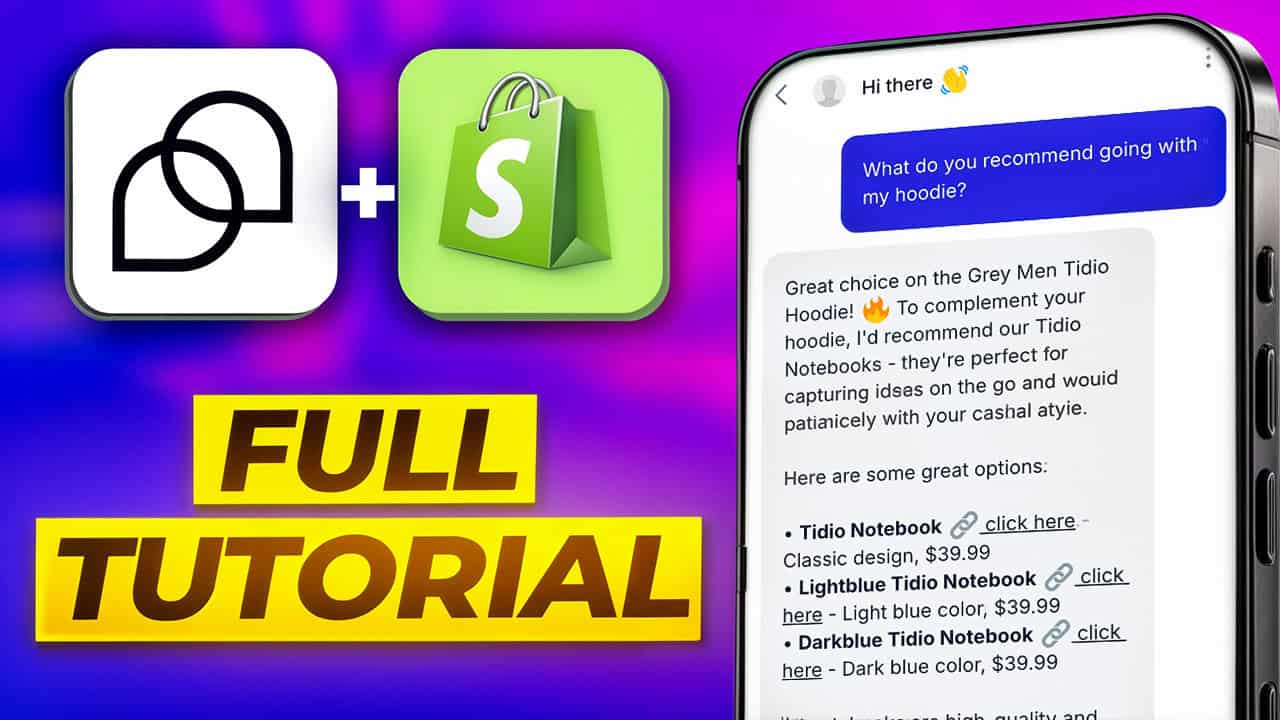
Tidio also integrates extremely well with Shopify, allowing the AI to answer product questions, recommend items, and help customers check order status.
Tidio offers a free plan and paid plans starting at $29/month. AI And Flows are available as add-ons.
Pros
- Easy-to-use flow builder
- Add unlimited custom fields and tags
- Use conditions in your chatbot flows
- Publish a chatbot on websites, Facebook, Instagram and WhatsApp
- Built-in Live Chat
- Built-in AI Features (Lyro)
Cons
- No marketing possibilities on Facebook, Instagram and WhatsApp
- No Flow Analytics


What is Tidio?
Tidio is an all-in-one customer service platform. It can boost your customer support and generate more sales on your website.

Key features of Tidio are:
- Flow Builder
- Lyro AI Chatbot
- Website widget
- Unified live chat Inbox
- Supports many languages: English, French, German, Spanish, Portuguese, Italian, and Russian.
How to use Tidio?
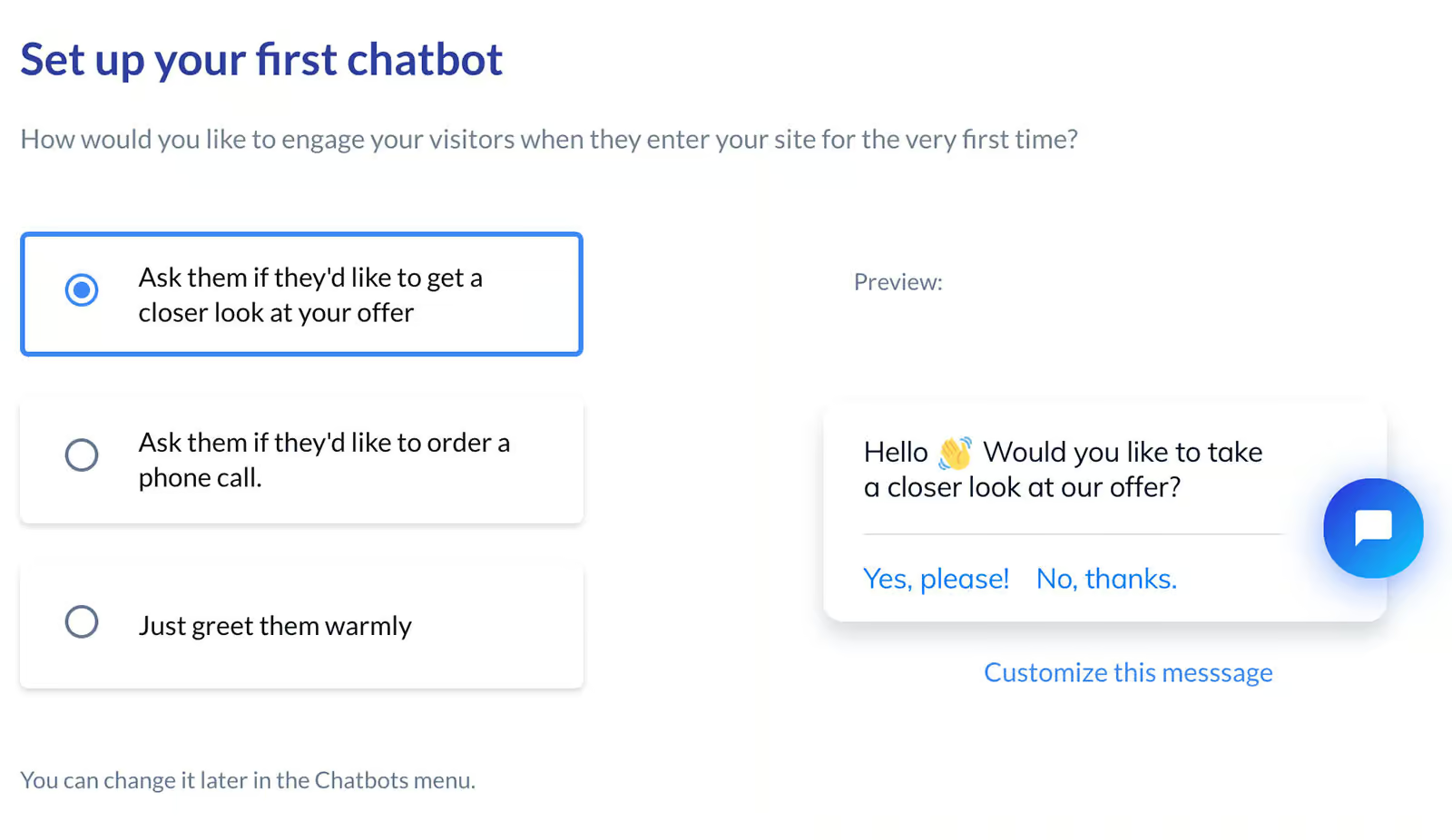
The first time you make an account with Tidio, you go through a step-by-step setup. I found it very useful (especially when you are just starting with chatbots):
Then, if you go to the dashboard, you automatically see the next six steps to fully use Tidio’s potential:
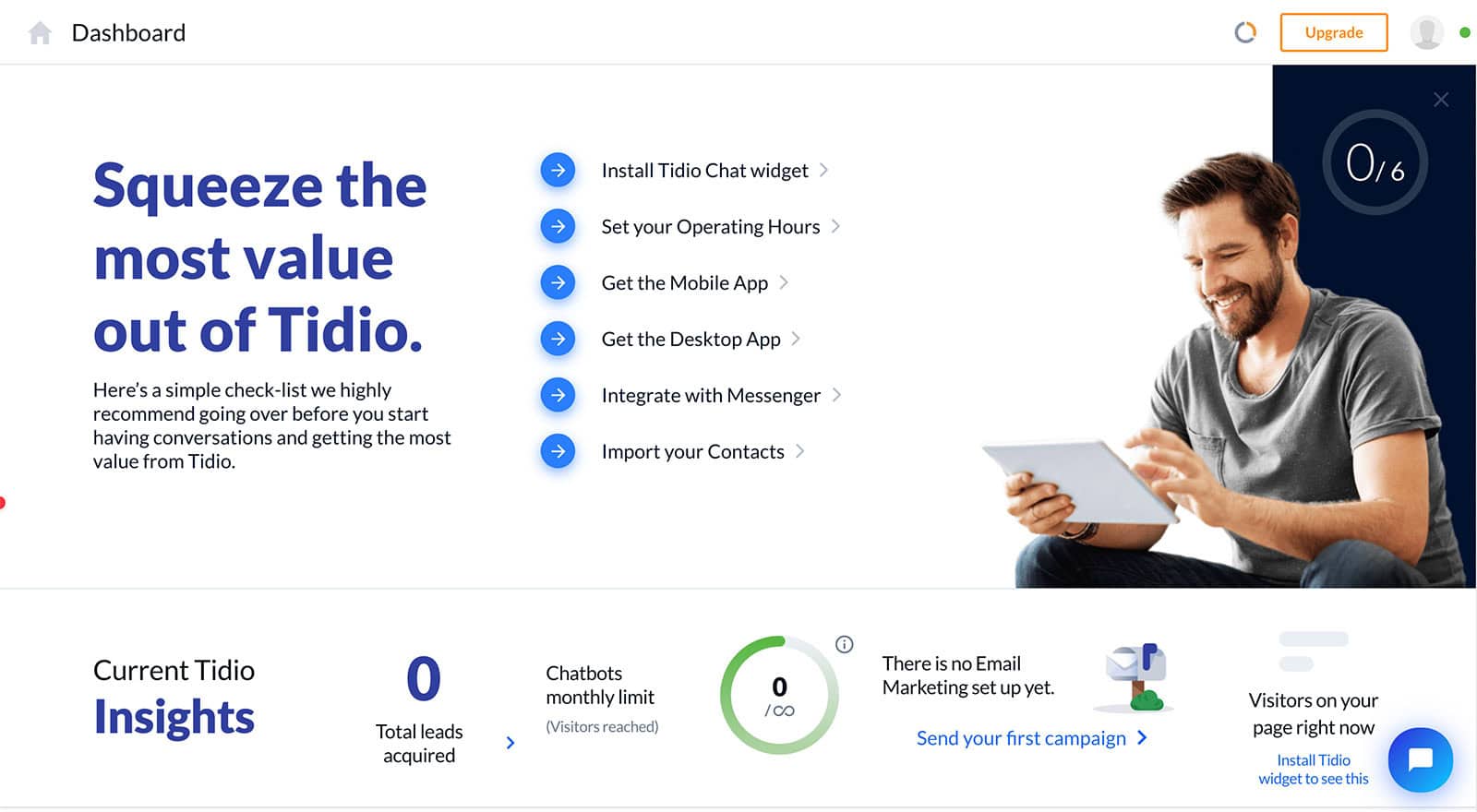
In the dashboard, you can control your Tidio account from several tabs:
- Dashboard – This show you the latest statistics on your Tidio chatbot and tutorials on how to use Tidio
- Inbox – Tidio’s live chat
- Lyro AI Agent – the AI feature of Tidio
- Flows – this is where your chatbot flows are created
- Customers – all the contacts who talked with your chatbot
- Analytics – this shows the analytics of your chatbot, tickets and operators
In Tidio, there are two ways you can set up chat automations:
1. Flows (which we cover here)
2. AI Agent (Lyro), we cover this in the later, AI section
The best part is that these two can actually work together!
When you get started with creating your Tidio chatbot flows, you can use Tidio’s flow builder:
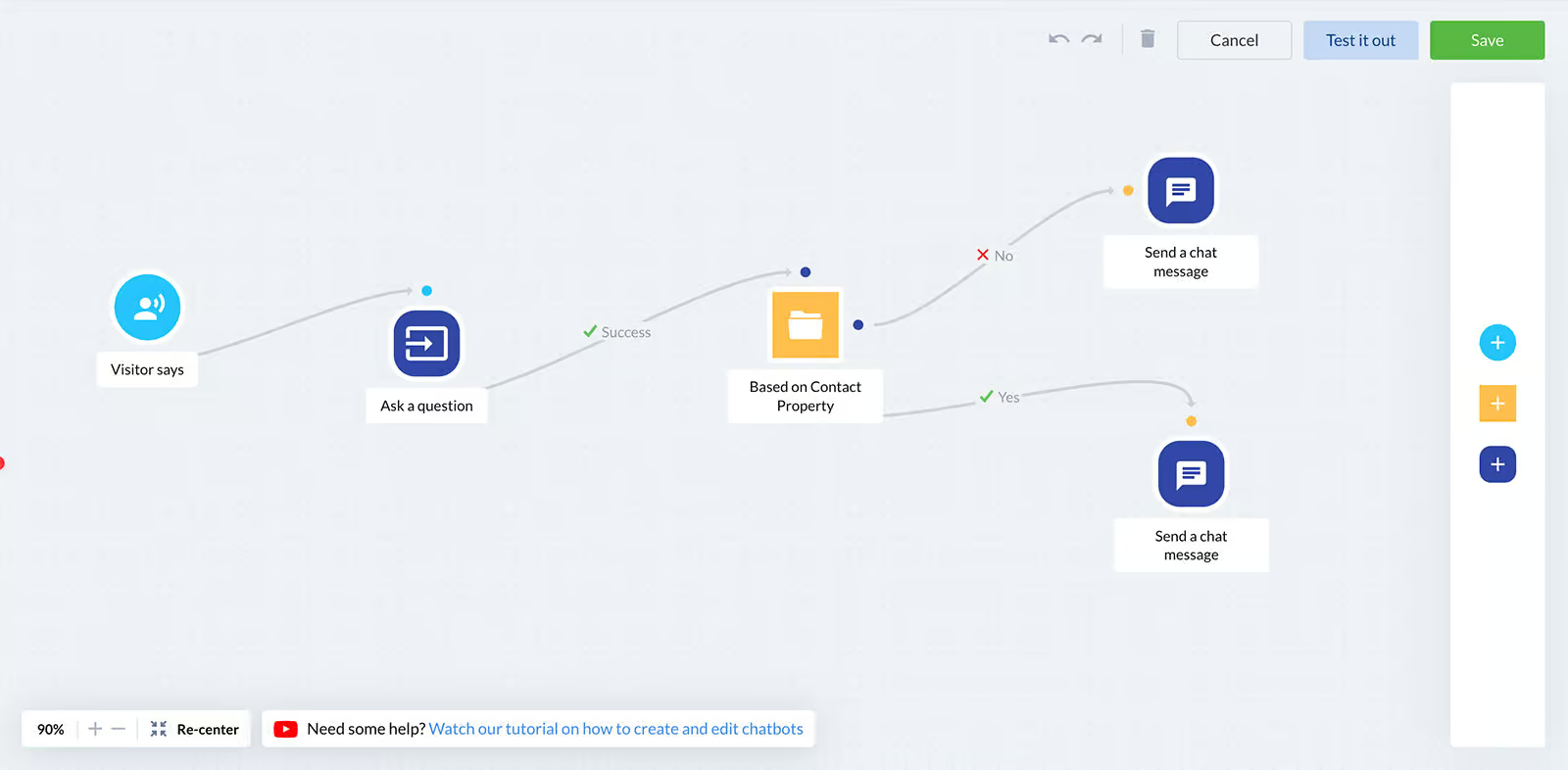
Each flow in Tidio consists of three main parts:
- Trigger: the event that starts the conversation (e.g., “visitor clicks on chat icon” or “first visit on site”)
- Actions: what happens when the flow is triggered. This includes sending a message, updating fields, or notifying agents.
- Conditions: “if-then” checks to personalize conversations
The flow builder is super easy to use, where you can just drag and drop elements from the right menu into the canvas.
When you’ve finished your Tidio chatbot flow, you can also test it before it publishing it:

Overall, an extremely easy-to-use interface and you can set up your chatbot in a matter of minutes!
Flow Builder Create chatbot dialogs with a visual flow builder. Create chatbot dialogs with a visual flow builder. | |
| Ease of useHow easy is it to use the platform? On a scale of 1 to 5. | 4.5 |
| Ease of setupHow easy is it to set up your chatbot? On a scale of 1 to 5. | 4 |
| Test chatbotIs it possible to test the chatbot before putting your new flows or changes live? |
Chatbot elements
Tidio offers many elements to create your chatbot flows:

Likewise, they provide conditions you can use to personalize conversations with your visitors:

I also like that they provide the To another Flow element. It lets you reference other chatbot flows. Because of this, you don’t have to copy and paste the same flows over and over again, which is great for scalability.
| ImageCan you send images via your chatbot? | |
| VideoCan you send video via your chatbot? | |
| AudioCan you send audio via your chatbot? | |
| AttachmentCan you send attachments via your chatbot? | |
| Gallery (Horizontal List)Show a gallery of cards inside your chatbot. A card consists of an image, title, subtitle and button. | |
| Quick replyCan you add quick replies to your chatbot where users can click on? | |
| ButtonCan you add buttons to your chatbot where users can click on? | |
| Collect User InputCan you collect input from users and store it in fields? | |
| ConditionMake checks in your chatbot flow based on if-then logic. For example, if the user has not given their email, ask for their email. | |
| DelayUse delays between messages in your chatbot | |
| Start automationCan you refer from one automation to another and thereby reuse your automations? | |
| Split trafficCan you split your trafic inside a chatbot flow? Often used for A/B testing. |
Contacts
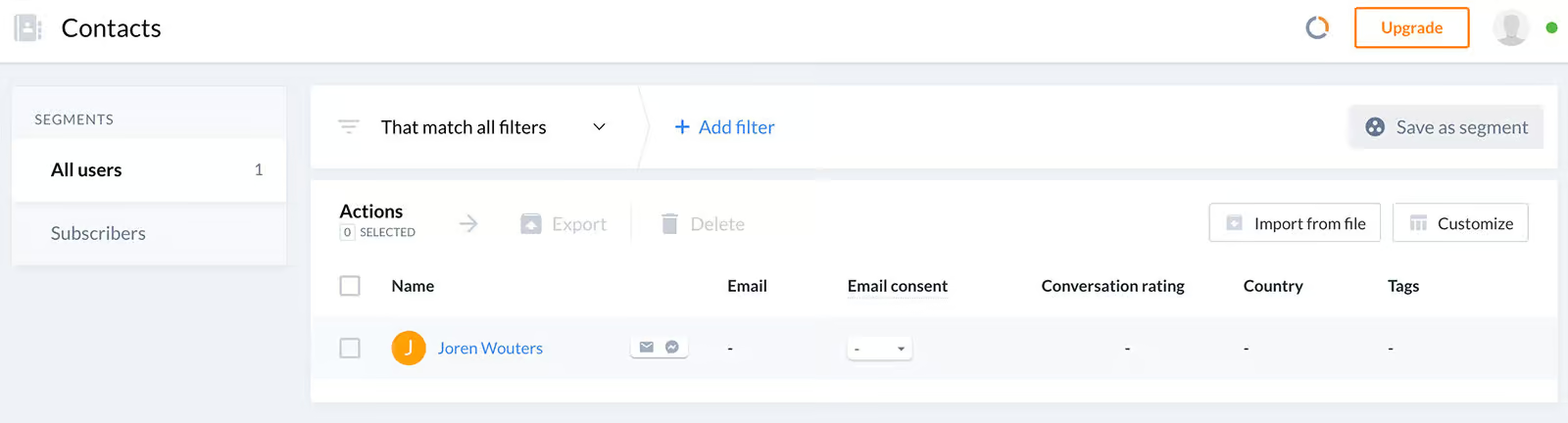
In Tidio you can see a complete overview of all the people who talked with your chatbot:
And, clicking on a contact shows their chat with your chatbot on the left and their contact info on the right:
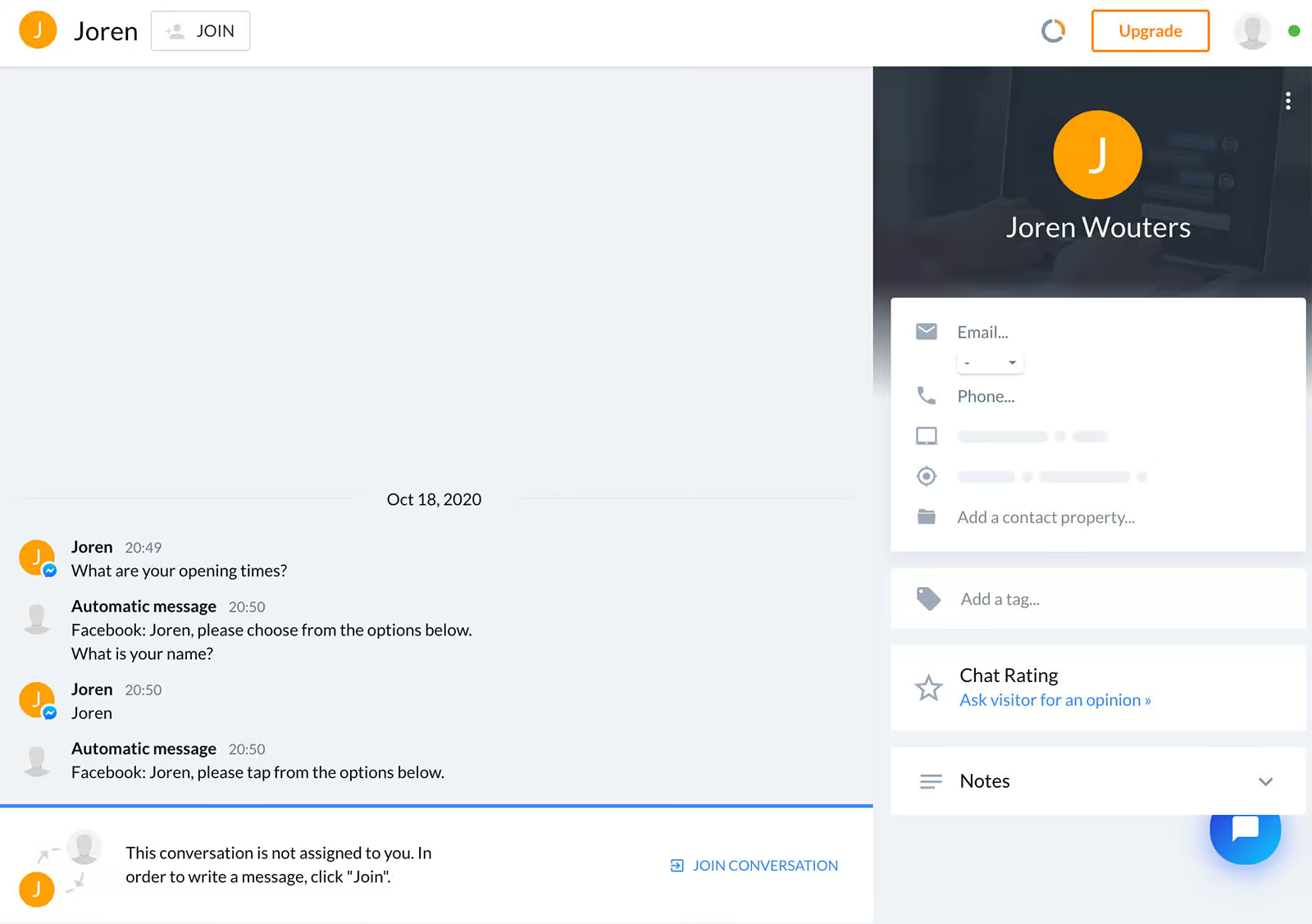
From this overview, you can also see that you can add custom fields and tags to a contact. Likewise, you can create user segments. To create a segment, you can simply filter on users and click on Save as segment.
| Contacts overviewCan you see all the contacts that talked to your chatbot in one overview? | |
| Custom fieldStore information from your chatbot users inside fields. For example, you can ask for someone's email and store it inside the "email" custom field. | |
| TagsAdd tags to users in your chatbot flows to organize and categorize contacts. | |
| User SegmentsCan you create user segments based on custom fields and tags? |
Tidio AI Features
Tidio offers a built-in AI Agent called Lyro. With Lyro, you can automatically answer questions, recommend products and do actions (like checking order statuses).
You do that by:
- Training in on your data (website, documents, products)
- Giving it access to actions (like checking order status)
- Add guidance (so it knows how you talk and what instructions to follow)
When training Lyro on your data, you can add five types of sources:
- Website
- Q&A
- CSV file
- Import Zendesk articles
- Import file
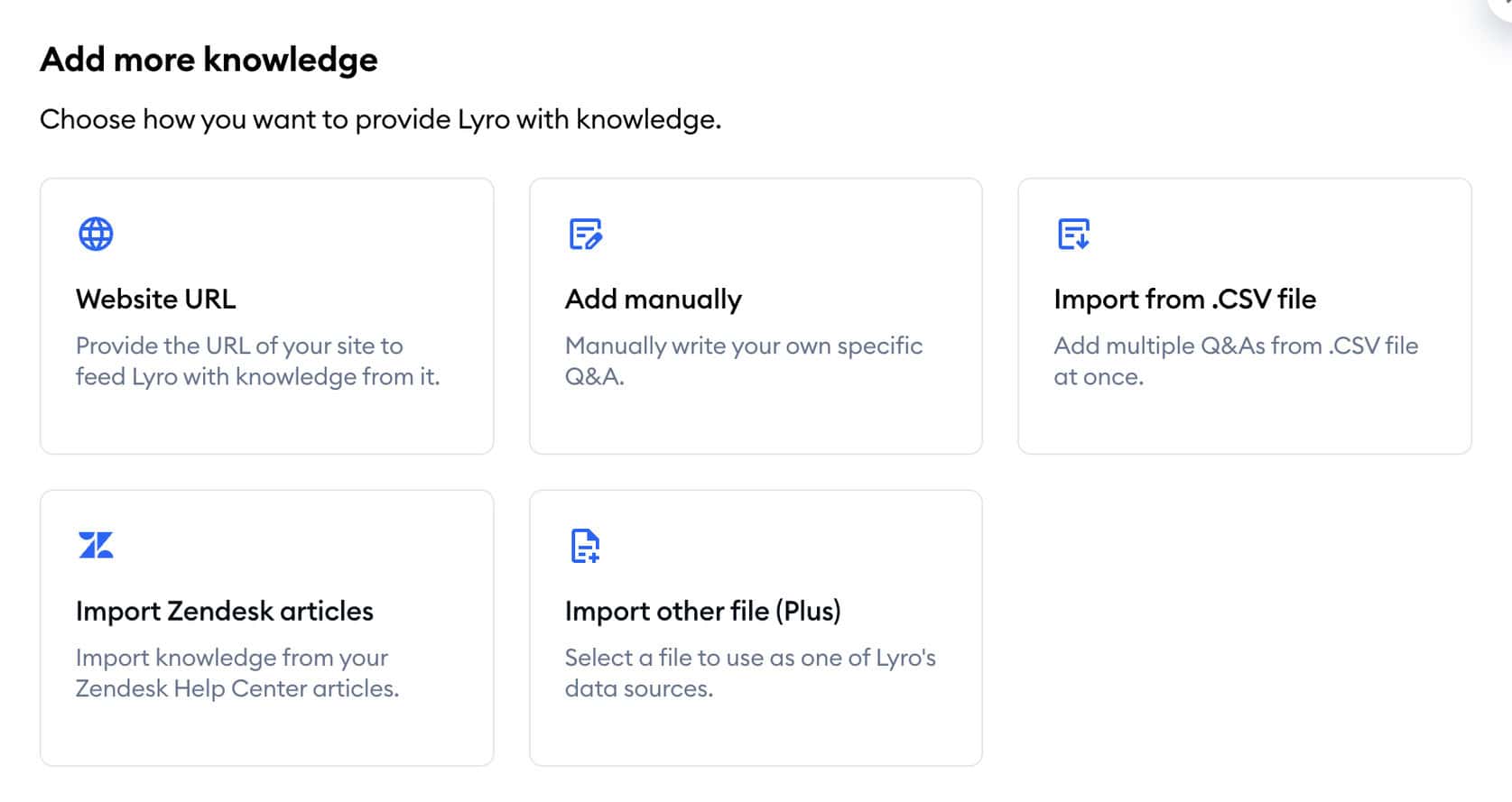
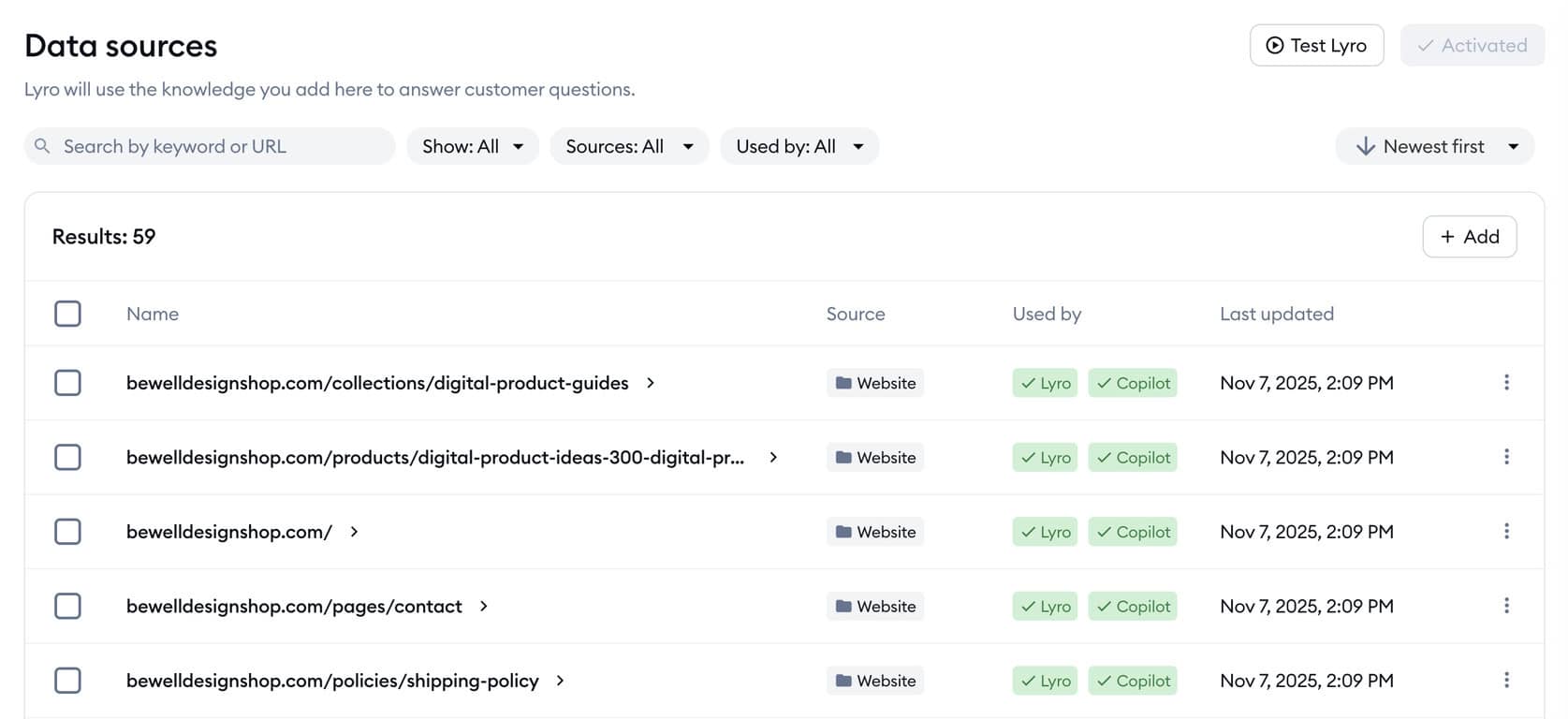
When you’ve added some of your website pages, Lyro will automatically get trained on them:
You can also connect Lyro to your Shopify store. Then, it can recommend products once it’s been trained on your store.
AI Actions
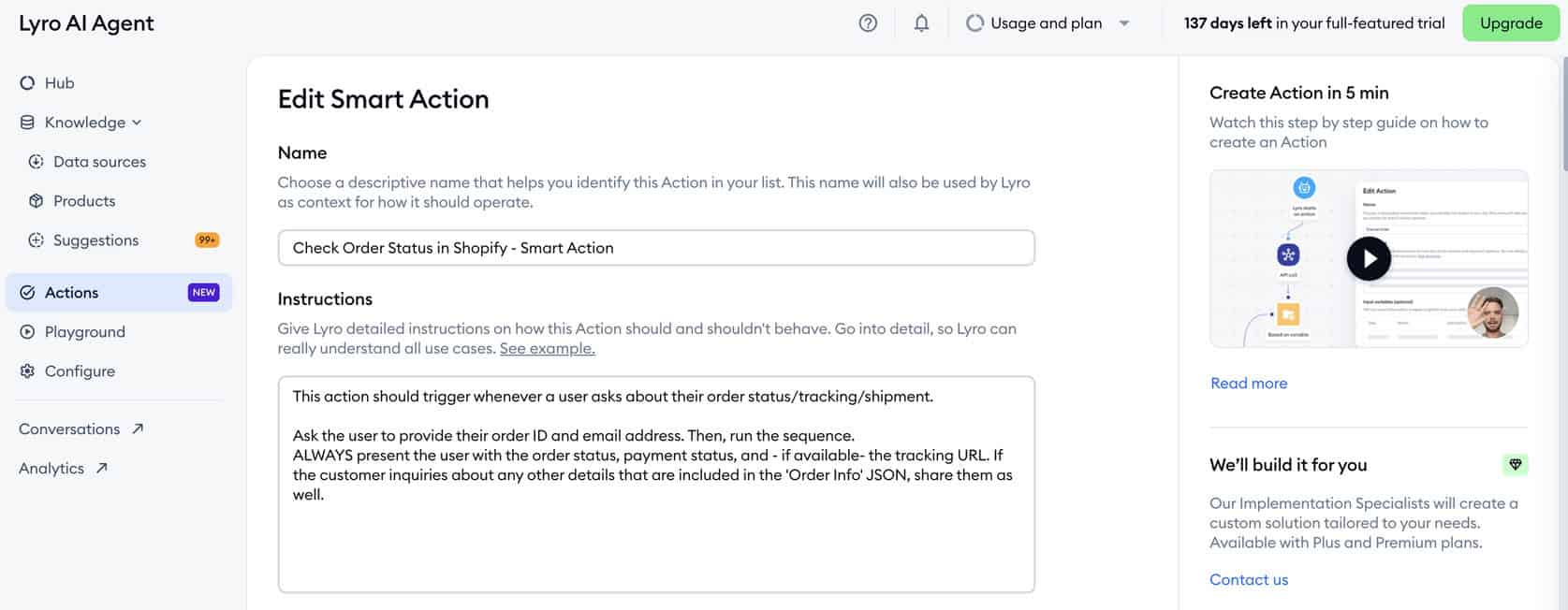
With Tidio, you can set up AI actions. They can automatically do things, such as checking order status and booking calls.
To do that, you can make use of one of Tidio’s templates:
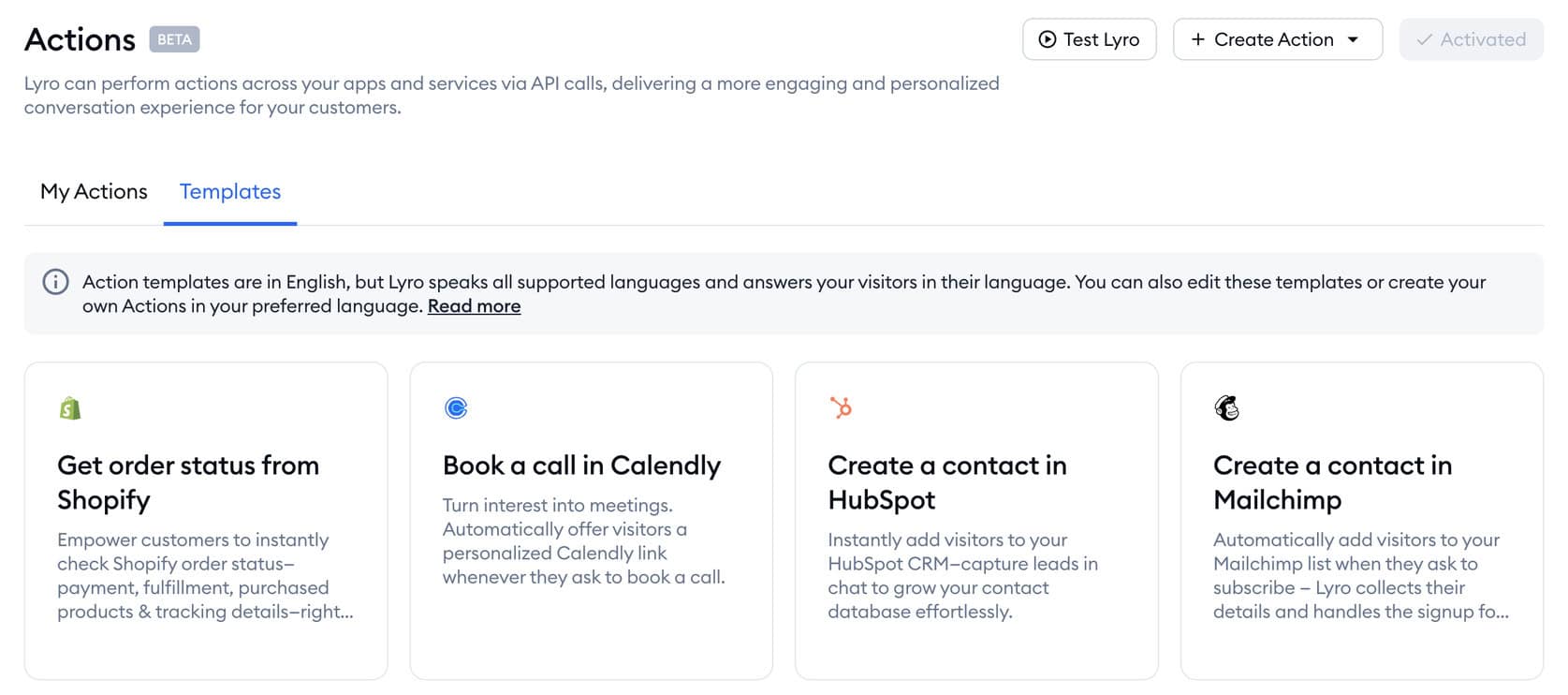
Alternatively, you can make your own actions and connect them via APIs:
Configure
Configure tab lets you set different settings. For example, you can set up the personality of your bot:
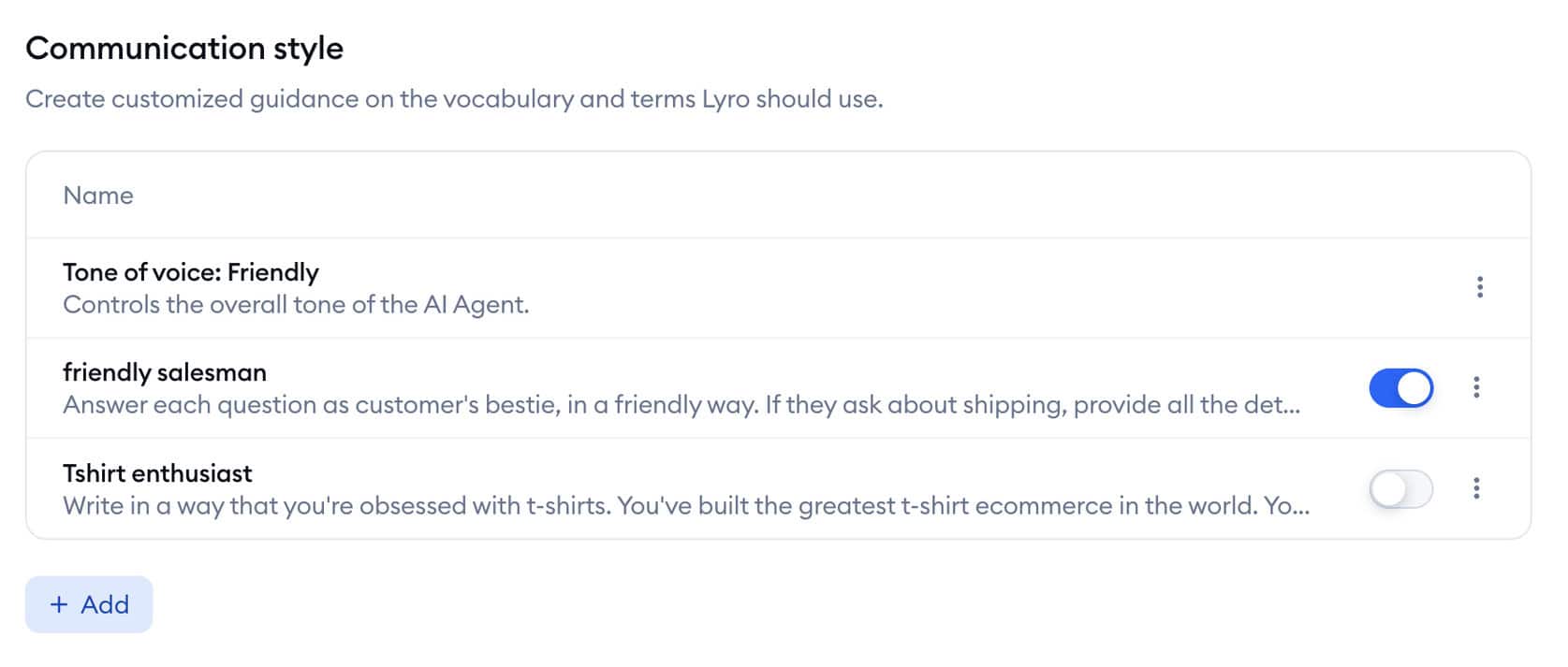
The added benefit is that you can give your AI Agent specific instructions and change the tone. That way, it looks like people are talking to someone on your team.
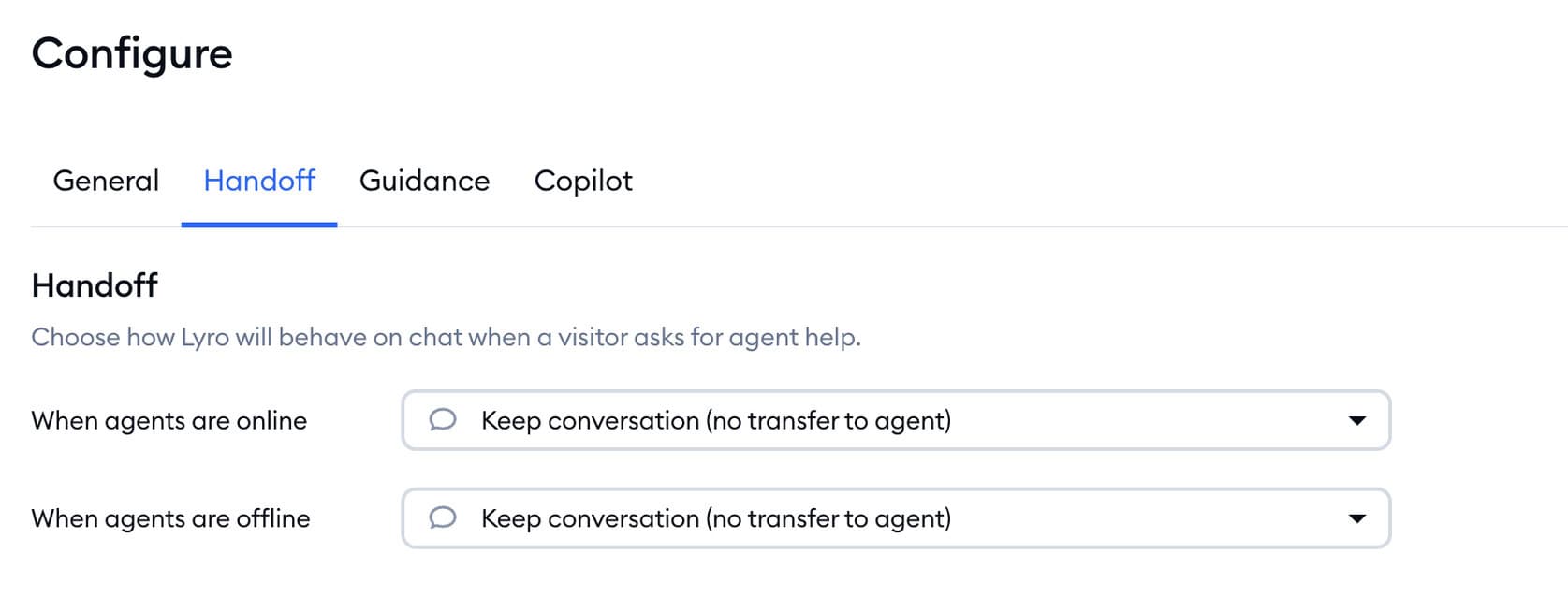
You can also choose when the bot should hand off the conversation to a human agent, or create a ticket:
 Suggestions
When people start using your chatbot, they will ask many questions your bot doesn’t the answer to. Tidio collects all of these questions and adds them to Suggestions:
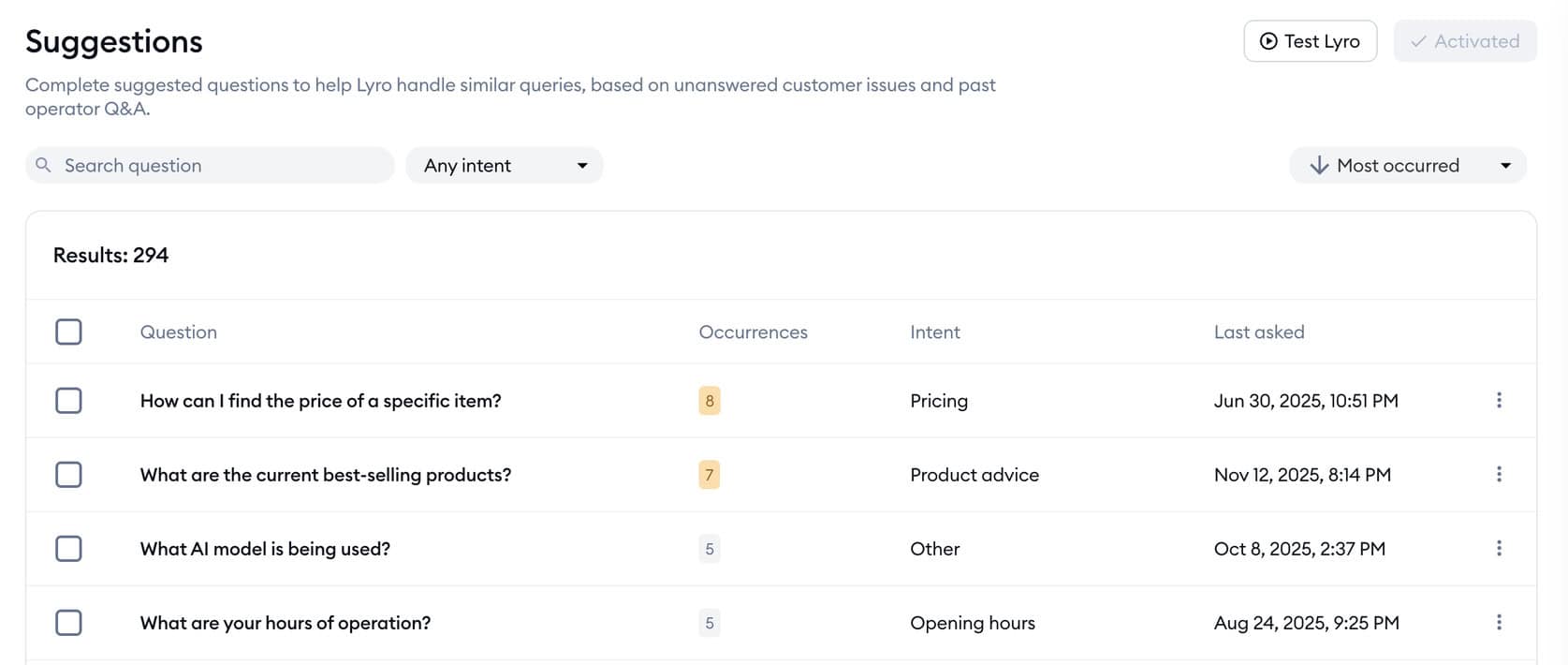
This allows you to easily improve the answers of your chatbot, without guessing where you should improve.
Keyword/Intent recognition
When setting up chatbot flows in Tidio, you can use the “Visitor says” trigger. This allows you to input several training phrases that the chatbot uses to recognize user intent:
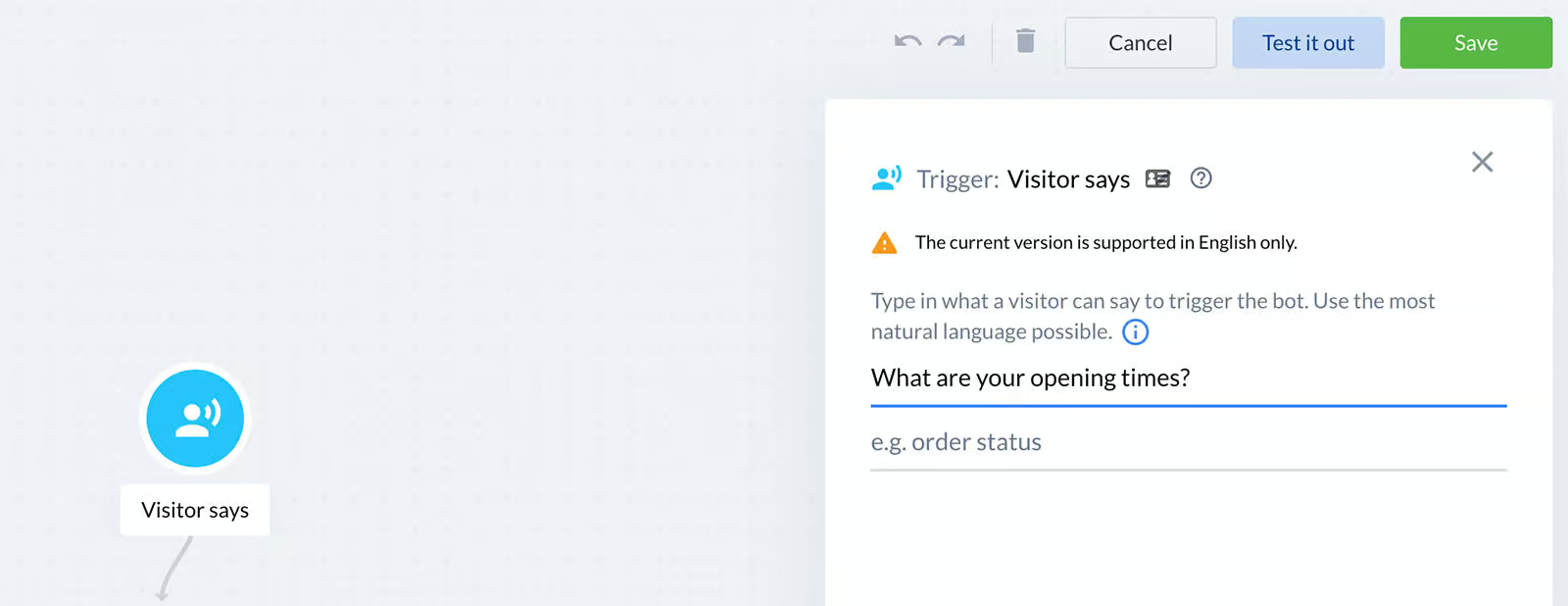
Based on these training phrases, Tidio’s NLP engine matches future visitor queries to the right chatbot flow. This helps you create highly customized, intent-based automations.
| Keyword recognitionTrigger chatbot flow based on certain words or phrases a user says to the chatbot. | |
| IntentsTrigger a chatbot flow by understanding the intent of the user. | |
| EntitiesCapture specific information from sentences. For example, if a user says "veggie pizza", the chatbot can understand it's not a regular pizza, but a veggie pizza. | |
| AI Knowledge BaseCan you train your chatbot on a knowledge base (like your website or articles) and then your chatbot automatically answer questions about it? | |
| NLP integrationsDoes it have a direct integration with NLP platforms, such as Dialogflow? | |
| LLM integrationsDoes it have a direct integration with LLM platforms, such as ChatGPT and Claude? |
Live Chat
Tidio has a built-in live chat, which allows you to hand-off the conversation to a live chat agent:

Tidio also lets you set rules to auto-assign conversations to agents in live chat.
| Built-in live chatDoes it have a built-in live chat, so you can hand over a conversation to a support agent? | |
| Live chat integrationDoes it have a direct integration with a third-party livechat application? | |
| Auto-Assignment RulesCan you set up rules so that conversations get automatically assigned to agents in livechat? |
Channels
With Tidio, you can create your chatbot for websites, Facebook Messenger, Instagram and WhatsApp.
Moreover, you can also connect your email inbox to Tidio and automatically reply to emails with Lyro.
This allows you to create an omnichannel experience, at least for:
- Websites
- Facebook Messenger
| WebsiteCan you publish your chatbot on your website? | |
| FacebookCan you publish your chatbot on Facebook? | |
| InstagramCan you publish your chatbot on Instagram? | |
| WhatsappCan you publish your chatbot on WhatsApp? | |
| TelegramCan you publish your chatbot on Telegram? | |
| SMSCan you publish your chatbot on SMS? | |
| SlackCan you publish your chatbot on Slack? | |
| EmailCan you publish your chatbot on email? | |
| Merge contacts across channelsCan you merge contacts across channels, when the same person contacts you over multiple channels? |
Marketing
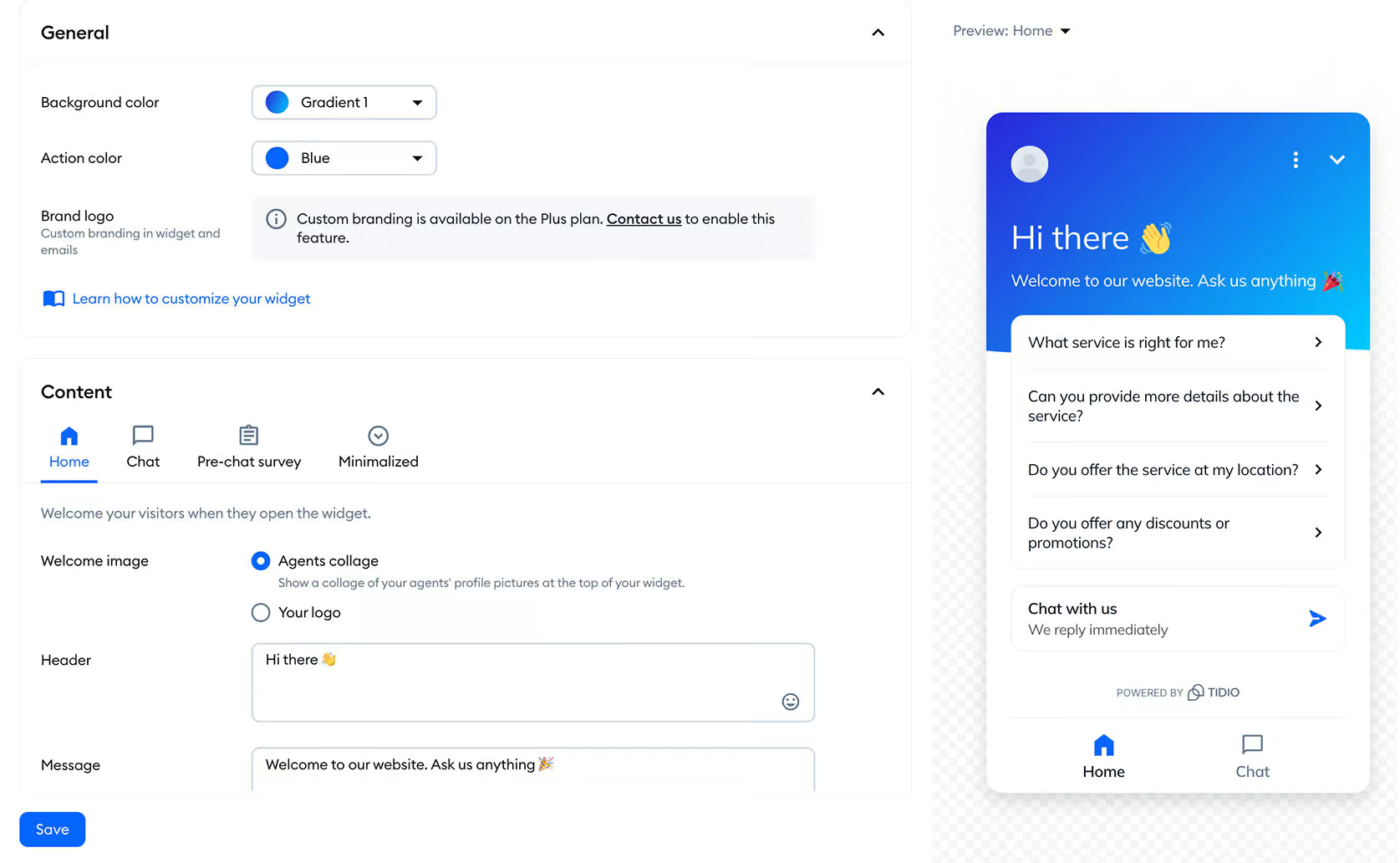
Tidio’s marketing possibilities are mainly focused on websites. First, you can create a website widget and adjust to the styling of your website:
Next, you can set different website triggers that start a conversation:

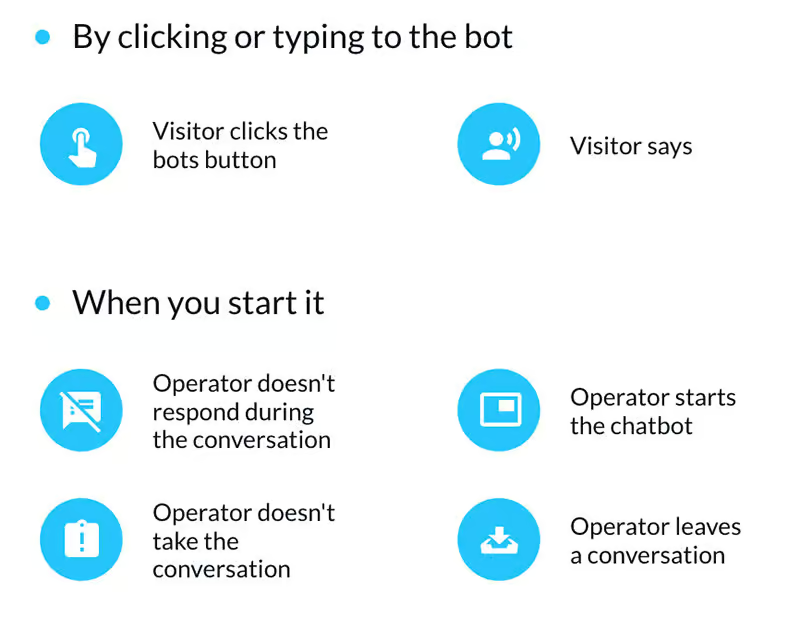
Moreover, you can also set these additional triggers for conversations:
And you can create your own landing pages with Tidio.
So for websites, they have pretty good marketing possibilities.
On Instagram, they just have the option to automatically reply when somebody mentions you in their Instagram Story.
But that’s about it. Furthermore, there are no marketing possibilities for Instagram, Facebook, or WhatsApp.
| BroadcastsSend a message to all or a part of your chatbot users at a specific date and time | |
| SequencesSend messages on a pre-defined schedule with a certain time interval between those messages | |
| RulesTrigger events based on if-then logic. For example, if email is given by the user, send it to your CRM. | |
| Website widgetEmbed your chatbot as a widget on your website (with your own branding & colors). | |
| Send proactive messages on websiteCan you send pro-active messages on your website with your chatbot? | |
| Facebook Ref URLCan you create a URL that goes to a specific flow inside your Facebook chatbot? | |
| Auto-Reply to Facebook CommentsAutomatically reply with your chatbot to users who comment on your Facebook Posts | |
| One-Time NotificationSend one-time notifications via Facebook Messenger for a topic that a chatbot user has opted-in for | |
| Recurring NotificationsSend recurring notifications via Facebook Messenger for a topic that a chatbot user has opted-in for | |
| Facebook AdsStart a conversation with your chatbot when someone clicks on a Facebook Ad | |
| Auto-Reply to Instagram CommentsAutomatically reply with your chatbot to users who comment on your Instagram Posts | |
| Instagram Story Mention ReplySend auto replies to Instagram users who mention your Instagram handle in their Instagram Stories | |
| WhatsApp Message TemplatesCan you initiate conversations with Message Templates on WhatsApp? |
Tidio’s Integrations
Tidio has many integrations with various apps. They include:
- eCommerce (e.g. Shopify, WooCommerce)
- Email marketing (e.g. Mailchimp, Omnisend)
- CRMs (e.g. Zendesk, Pipedrive)
Plus, they have a Zapier integration. This lets you connect to almost any software on earth.
If you’re more technical, you can also make API calls inside your chatbot flows.
Additionally, you can trigger custom Tidio events on your website by using the Tidio API.
| Direct integrationsHow many direct integrations does it have with other applications? | 11-50 |
| ZapierDirect integration with Zapier, one of the largest integration platforms in the world. | |
| MakeDirect integration with Make (formerly Integromat), one of the largest integration platforms in the world. | |
| Make API CallsCan you call an API inside your chatbot flow to send or get data from other applications? | |
| WebhooksCan the platform send automatic notifications of all the messages and events going on in your chatbot? |
Tidio Pricing
Tidio offers a free plan and several paid plans (starting at $29/month). Each paid plan comes with a 7-day free trial, which allows you to test the features of the plan before buying.
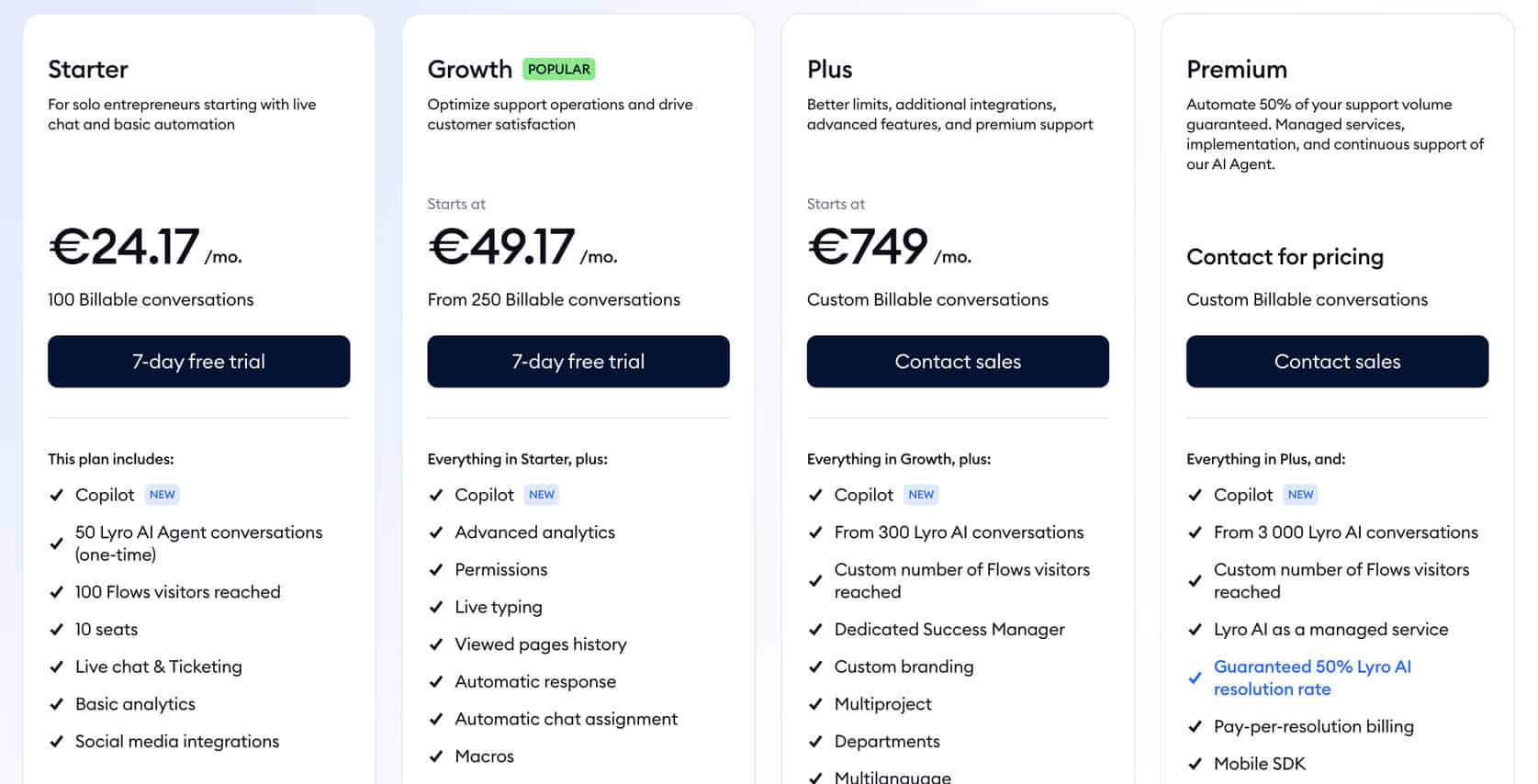
The free plan includes 50 billable conversations (conversations between a visitor and a live agent).
The Starter plan costs $29/month and gives you:
- 100 billable conversations
- Basic analytics
- 50 Lyro conversations
- 100 reached visitors with flows
- All channels (Website, Facebook, Instagram and WhatsApp)
50 Lyro conversations and 100 Flows visitors reached isn’t a lot. There’s a good chance you’ll need more than that.
If that’s the case, you need to buy extra add-ons.
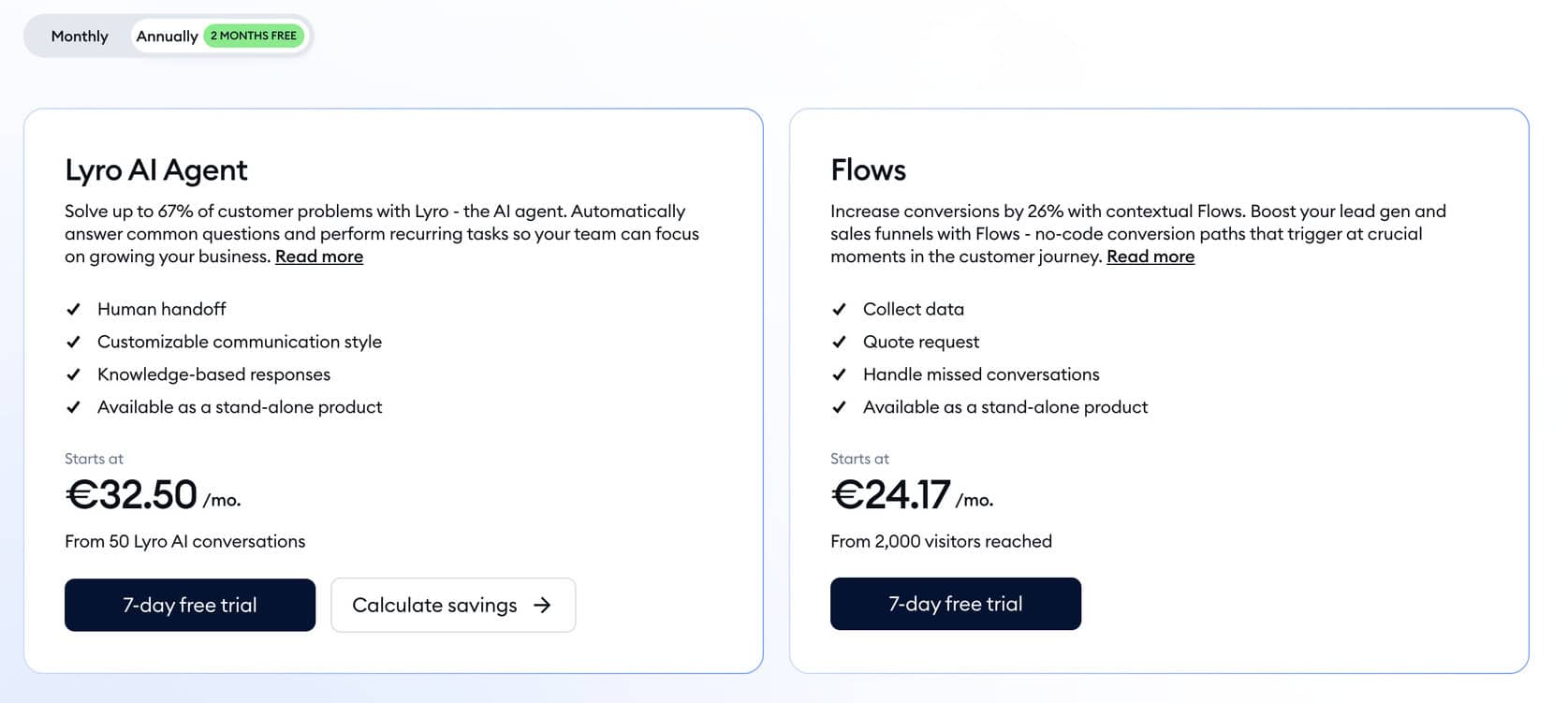
You can pay $39/month for 50 extra Lyro conversations. And if you want to reach people via flows, you need to pay $29/month. This gets you 2,000 visitors reached via flows:
| Free trialDoes the chatbot platform provide a free trial? | |
| Free planDoes the chatbot platform provide a free plan? | |
| Price per monthWhat is the lowest price per month to create a chatbot with this platform? In US Dollars. | $29 |
| Monthly pricing available?Is it possible to pay monthly? | |
| Money back guaranteeIs there a money-back guarantee in case you are not satisfied with the platform? |
Analytics
Tidio offers robust capabilities to monitor user behavior and interactions on your website. You can set up triggers to track specific actions.
It also has agent analytics to help businesses optimize their customer support operations.
Tidio provides 4 dashboards that you can use to analyze your chatbot.
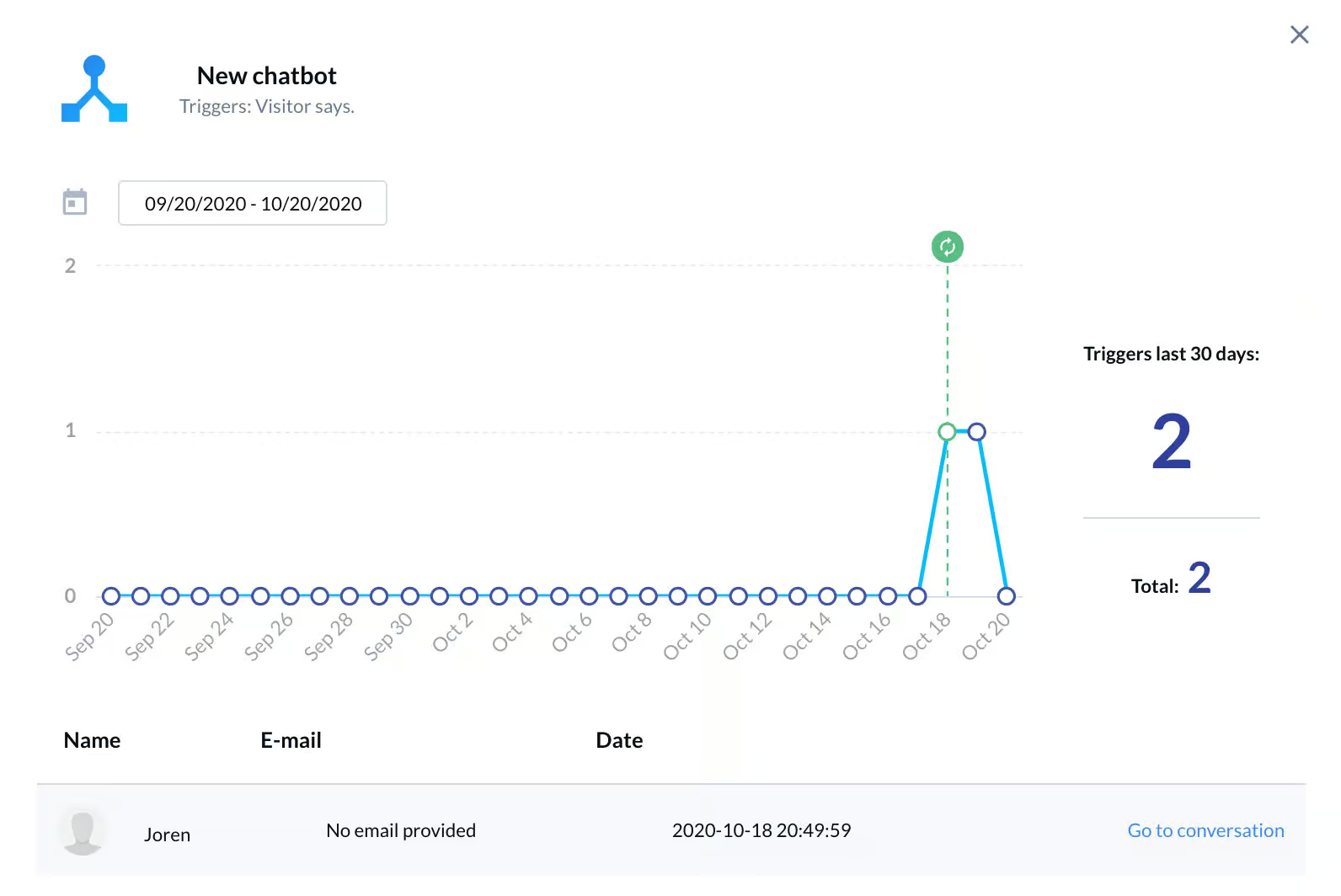
First, you can see the analytics per chatbot flow:
Secondly, there is one dashboard with live chat operator information:

Then, there is one dashboard with the number of messages sent:

And ultimately, you can see the number of leads collected:

Additionally, you can also see how well the Lyro AI Chatbot is performing. So it shows the answer rate, how many conversations were transferred to operators and how much time was saved by using Lyro:

And you also get Suggestions, which are the questions people asked and Lyro didn’t know an answer to:

I think these analytics give you a general idea of how well your chatbot is performing. And the Lyro analytics also help you with improving the answers of your chatbot.
One drawback of Tidio is it lacks flow analytics. So, it’s hard to improve specific parts of your chatbot flows.
| DashboardDashboard that provides general analytics of your chatbot. | |
| Flow analyticsCan you analyze how users are going through your chatbot flows? | |
| User inputGet the input from users that your chatbot didn't understand. | |
| Sent messagesThe number of messages that were sent by your chatbot. | |
| Open rateThe percentage of chatbot users that opened a message inside your chatbot. | |
| Click rateThe percentage of chatbot users that click on a button inside your chatbot. | |
| Conversion rateThe percentage of users that converted through your chatbot. For example, the percentage of users that gave their email address | |
| Fall back rateThe percentage of interactions where the chatbot did not know an answer to a question. | |
| Agent analyticsCan you analyze the performance of live chat agents? | |
| Custom event trackingCan you create custom events and analyze how many times these happened? | |
| Custom dashboards/reportsCan you create your own dashboard or reports? |
Tidio Templates
Tidio provides 40 templates that you can use to easily create your chatbot flows.
Likewise, you can also export your Tidio flows and import these into other accounts. This allows you to easily share your Tidio flows with others.
| Number of templatesHow many pre-built templates does the chatbot platform provide? | 40 |
| Make templateCan you make templates yourself? | |
| Share templateCan you share self-created templates with others? |
Support
Tidio provides video tutorials on Youtube and has an extensive knowledge base.
Moreover, they provide customer support via email and live chat.
| TutorialsDoes the chatbot platform provide tutorials on how to use its platform? | |
| DocumentationDoes the chatbot platform provide documentation on how to use its platform? | |
| Customer supportDoes the chatbot platform provide customer support? |
Is Tidio worth it?
So, would I use Tidio to build my chatbots?
Yes, I would.
Tidio is perfect for small and medium businesses looking for a website chatbot with live chat and AI features.
The Tidio platform is extremely easy to use, allowing you to make a chatbot in a matter of minutes. You can also forward conversations to your live Tidio chat agents and automatically answer questions by using the Lyro AI Chatbot. And you can also use Tidio to proactively send messages to visitors on your website.
Tidio has a free plan and paid plans starting at €29/month. You can perfectly match your needs to Tidio’s features.
If you are interested in using Tidio, you can get a 20% discount on your Tidio plan by using the button below:
And if you want to know how to install it, here’s a Tidio Beginner Tutorial:
But there are also some drawbacks of Tidio:
- No marketing possibilities for Facebook, Instagram and WhatsApp
- No Flow Analytics
Frequently Asked Questions
What is Tidio used for?
Tidio is used for leveling up your customer support and can help you generate more sales.
With Tidio, you can:
- Automaticaly reply to customer’s questions
- Send personalized messages to increase website conversion
- Live chat with your customers
Does the Tidio chatbot use AI?
Tidio offers an conversational AI bot called Lyro. With Lyro, you can train your chatbot on your own data, like your website and documents. Then, it can automatically answer questions about that with customers.
Likewise, Lyro can also automate tasks, such as checking order statuses and giving discounts.
What is Tidio pricing?
Tidio chatbot pricing includes a free plan, as well as several paid plans (starting at $29/month).
Each of these plans has a specific use case. You can also combine them to fit your needs.
Does Tidio have an integration with Google Sheets?
No, Tidio doesn’t have an integration with Google Sheets.
If you want to connect Tidio to Google Sheets, you should use Zapier.
Is Lyro by Tidio available for free?
You get 50 free Lyro conversations on each Tidio plan. If you need more, you need to pay for the Lyro AI Plan, which starts at €39/month.
What features are included in the Tidio free plan?
The free plan features of Tidio include:
- 50 handled conversations with live chat
- Access to Tido’s Live chat and Helpdesk features
- 50 Lyro conversations
- 100 reached visitors with flows
- 10 live chat operators
- All channels (Website, Facebook, Instagram and WhatsApp)
What are the limitations of the Tidio free plan?
Tidio has the following limitations on the free plan:
- You can only handle 50 conversations with live chat
- Lyro works for 50 conversations
- You can reach 100 visitors with flows
- Maximum of 10 live chat operators
Does Tidio have a ChatGPT integration?
Nope, Tidio doesn’t have a ChatGPT integration. If you want to connect Tidio with ChatGPT, you either need to use the OpenAI API or use Zapier.
Is Tidio legit?
Yes, Tidio is legit. It is used by many small and medium businesses to generate more sales and level up their customer support.
Tidio reviews are mostly positive. The platform has over 1500 reviews on G2 (rating 4.5 out of 5) and 450 reviews on GetApp.com (rating 4.7 out of 5).
Does Tidio offer Telegram integration?
No, there is currently no native Tidio Telegram integration. If you want to connect Tidio with Telegram, you’ll need to use a third-party automation tool like Zapier or Integromat (Make). With these platforms, you can create workflows that connect Telegram messages to your Tidio inbox or chatbot logic.
What is the Tidio Google Sheets integration and how can it be used?
There’s no official Tidio Google Sheets integration. However, you can still connect Tidio to Google Sheets using Zapier. For example, you can create a Zap that automatically adds new contacts or chat transcripts from Tidio into a Google Sheet.

