

Looking for an easy way to build an AI chatbot for your website, WhatsApp, or social media?
In this hands-on Heyy.io review, you’ll learn:
- How Heyy works
- What features you get
- How much it costs
- Whether it’s the right chatbot platform for your business
I tested Heyy.io myself to see how easy it is to set up, train AI employees, build automations, and manage conversations across different channels.
Here’s what I found!
Our Verdict
Our Verdict
Heyy.io is an easy-to-use AI chatbot platform that combines AI Employees, automations, live chat, and multichannel support in one tool.
It’s especially impressive for the price. Starting at $41 per month, you get access to features that are often spread across multiple platforms. That includes a Flow Builder, AI actions, a shared inbox, and support for channels 5 channels.
You can get started very quickly. The interface is clean, and building a basic chatbot takes very little time.
It’s great for small businesses, agencies, and teams that want to manage support and conversations across multiple channels with one tool.
Pros
- You can set up your chatbot quickly
- Easy-to-use Flow Builder
- Connects with website, WhatsApp, Instagram, Facebook & SMS
- Built-in AI Employees
- Built-in Live Chat
- Integrations with Zapier and Make
- You can connect to multiple Facebook/Instagram accounts
Cons
- You cannot test a flow before setting it live
- You need to create separate messages per channel
- No marketing possibilities for Facebook and Instagram


What is Heyy?
Heyy.io is an AI chatbot platform that helps businesses create chatbots for support, sales, and marketing.
You can train it on your website content, documents, text, and question-answer pairs. Once your chatbot is set up, it can answer customer questions automatically across different channels.
But Heyy offers more than just a basic AI chatbot builder. It also comes with:
- A flow builder for creating chatbot automations
- Built-in AI Employees that act as trained AI agents
- A live chat inbox for managing conversations manually when needed
That combination makes Heyy feel more like an all-in-one customer communication platform than a simple website chatbot tool.
It’s especially useful for businesses that want to combine AI chat, automation, and live chat with one platform.
How does Heyy work?
Heyy is very easy to get started with.
When you first log in, you land in the Inbox. This is the central place where you can view and manage all conversations from your connected channels:
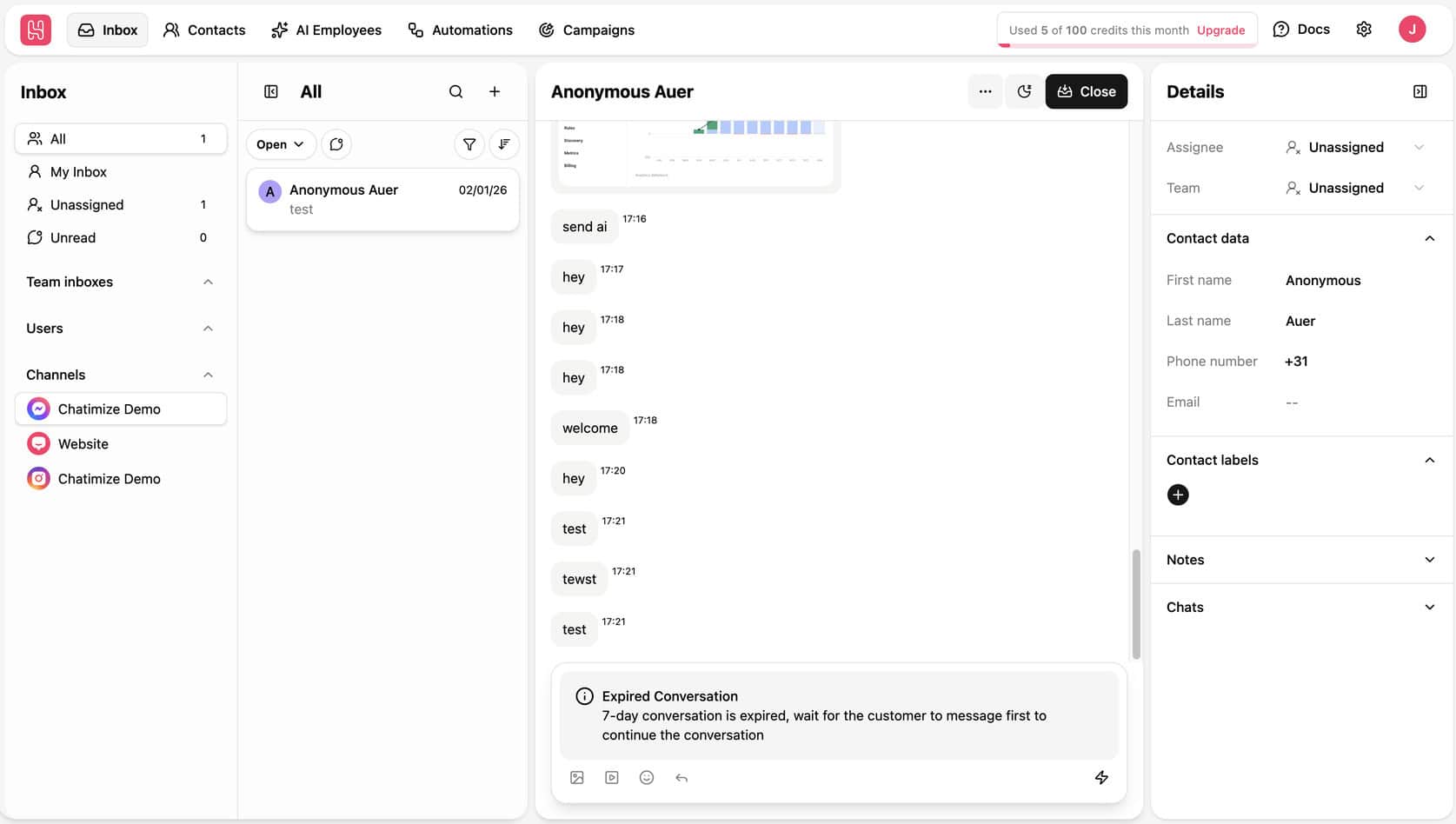
From here, you can see chats, reply manually, assign conversations, and view contact details. If you want to use Heyy as both an AI chatbot platform and a live chat tool, this is where everything comes together.
At the top of the dashboard, you also get access to the main parts of the platform:
- Inbox: Manage live conversations
- Contacts: View and organize your leads and customers
- AI Employees: Create and train AI agents
- Automations: Build chatbot flows
- Campaigns: Send one-time messages, similar to broadcasts
The platform feels well-organized, and it doesn’t take long to understand where everything is.
When you want to create a chatbot, Heyy gives you multiple automation templates to start with:
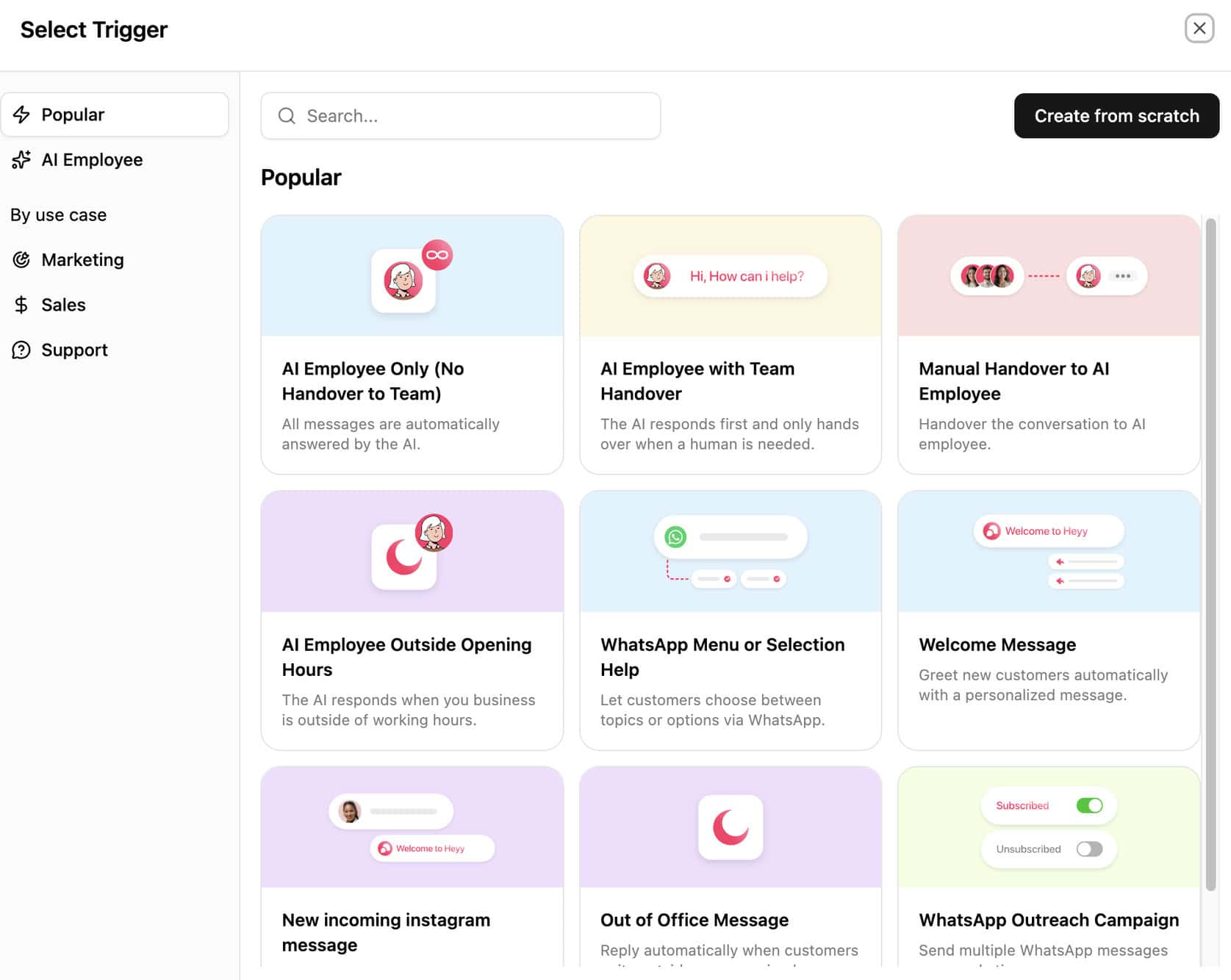
This makes setup much easier, especially for beginners. You can start with a template and customize it to your needs, instead of starting from scratch.
Once inside the Flow Builder, you can create automations with triggers, messages, AI steps, and logic:
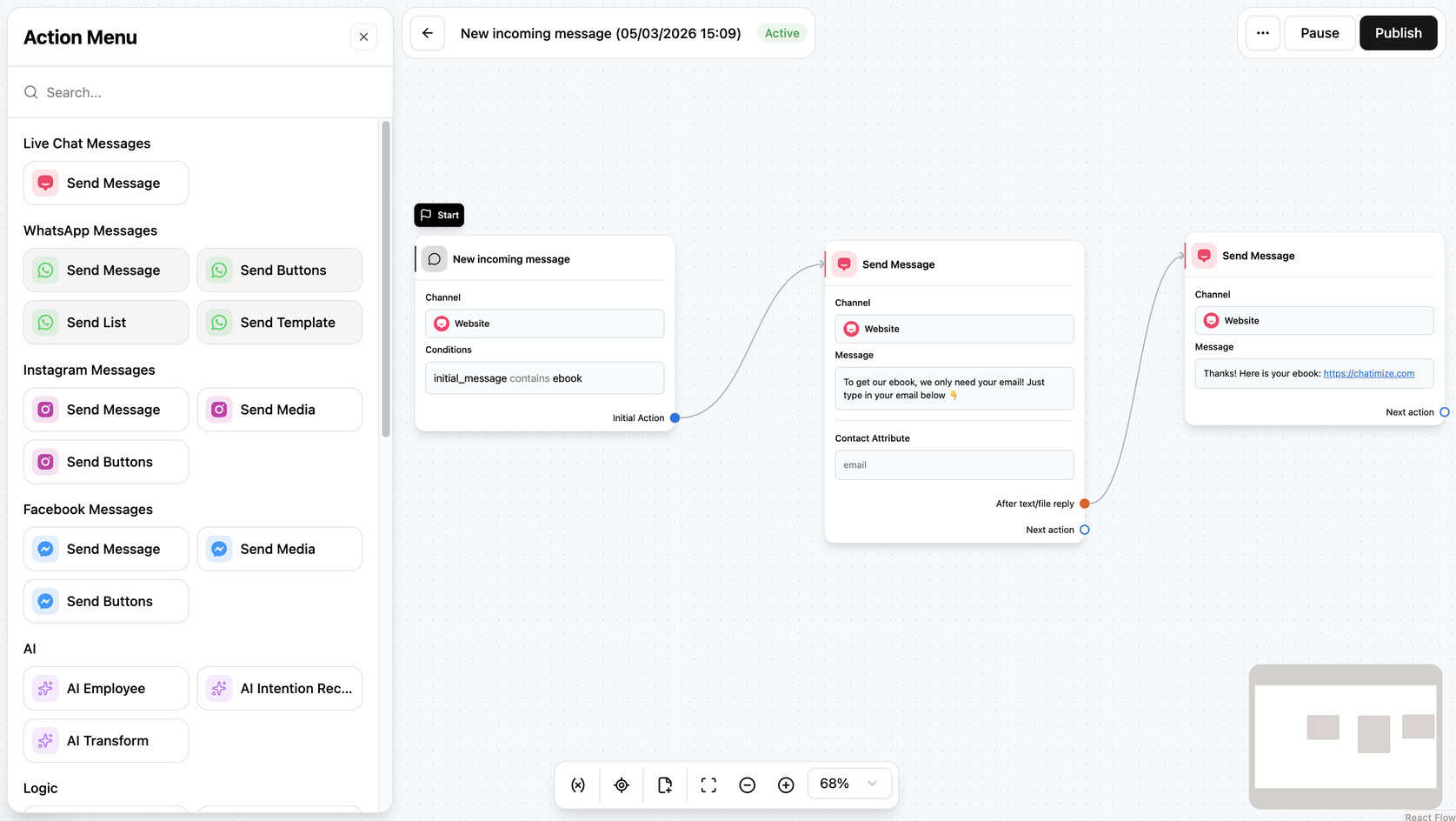
Each flow starts with a trigger. After that, you can add different steps depending on the channel and use case. For example, you can send a message, ask a question, or collect contact details.
The flow builder is one of Heyy’s best features. It’s easy to use, and it supports much more than simple chatbot replies.
You can also add logic like:
- Conditions
- Delays
- Variables
- Traffic splits
- Integrations
- AI actions
That gives you enough flexibility to build support flows, lead generation funnels, and sales automations without making the platform feel complicated.
Another big advantage is that you can use AI Employees inside your flows. So instead of only sending pre-written messages, you can let an AI respond dynamically when needed.
That means you can build a chatbot quite quickly. For most businesses, it’s realistic to get a basic chatbot live in around 10 minutes.
That said, the Flow Builder does have two important limitations:
- You can’t test a flow before setting it live. That’s frustrating, especially when you want to check if everything works correctly before publishing
- You need to create separate messages for each channel. So a message built for your website won’t automatically work for WhatsApp, Messenger, or Instagram. Ideally, you’d create one flow and reuse it across channels, but Heyy doesn’t support that
Flow Builder Create chatbot dialogs with a visual flow builder. Create chatbot dialogs with a visual flow builder. | |
| Ease of useHow easy is it to use the platform? On a scale of 1 to 5. | 4.5 |
| Ease of setupHow easy is it to set up your chatbot? On a scale of 1 to 5. | 4.5 |
| Test chatbotIs it possible to test the chatbot before putting your new flows or changes live? |
Heyy AI Employees
AI Employees is one of Heyy’s most interesting features.
These are AI agents that you can train for specific tasks, like:
- Customer support
- Lead qualification
- Answering sales questions
So instead of using one generic chatbot, you can create an AI Employee with its own role, instructions, and knowledge.
For example, you can choose the AI Employee’s role, select the AI model, and define exactly how it should behave:
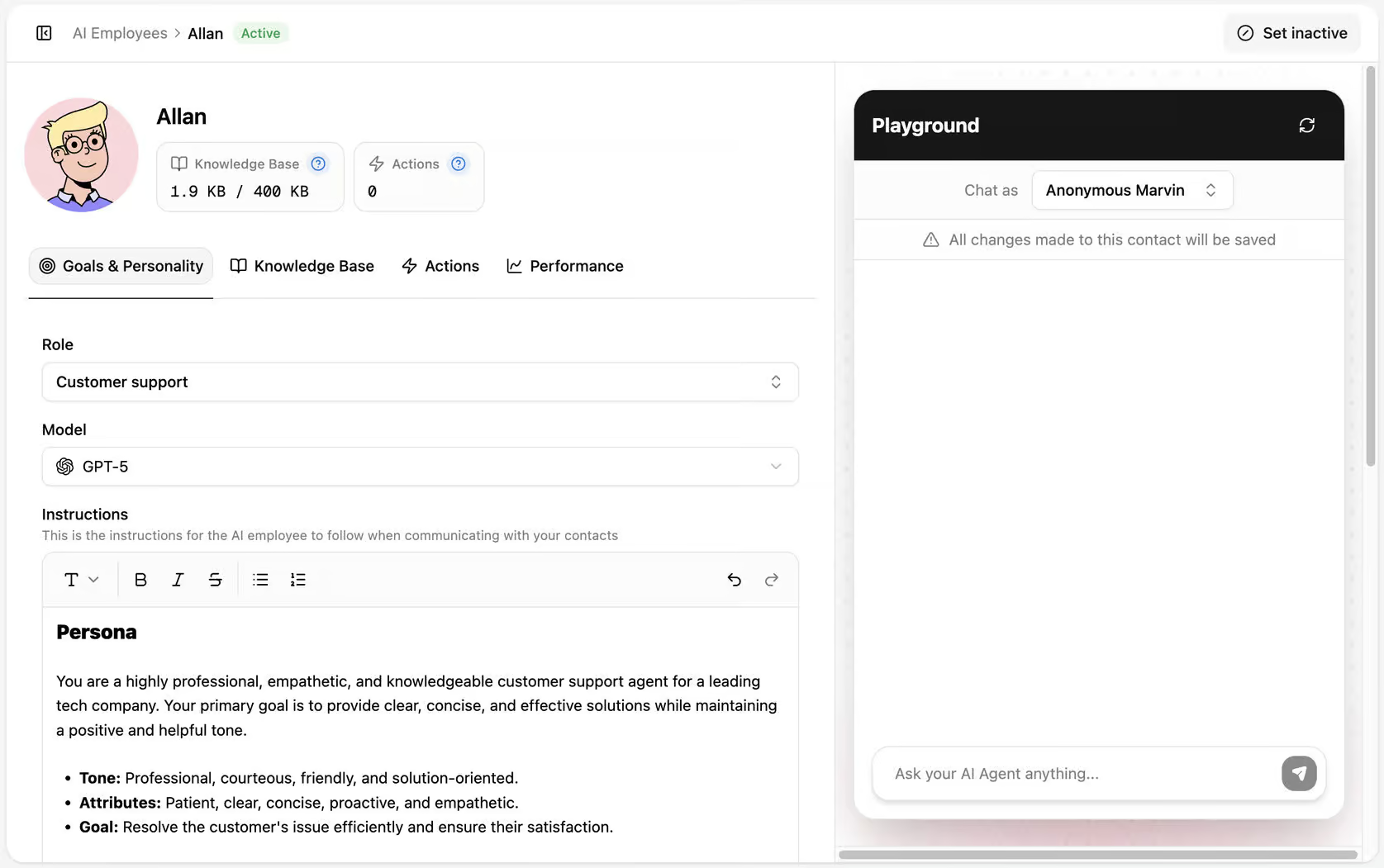
This gives you a lot of control over the chatbot’s tone and behavior. You can tell it how to respond, what kind of personality it should have, and what its main goal is in conversations.
Heyy also supports multiple AI models, including GPT and Gemini. That gives you flexibility depending on the kind of responses you want and the model you prefer to use.
Once your AI Employee has a role and instructions, you can train it on your own knowledge base:
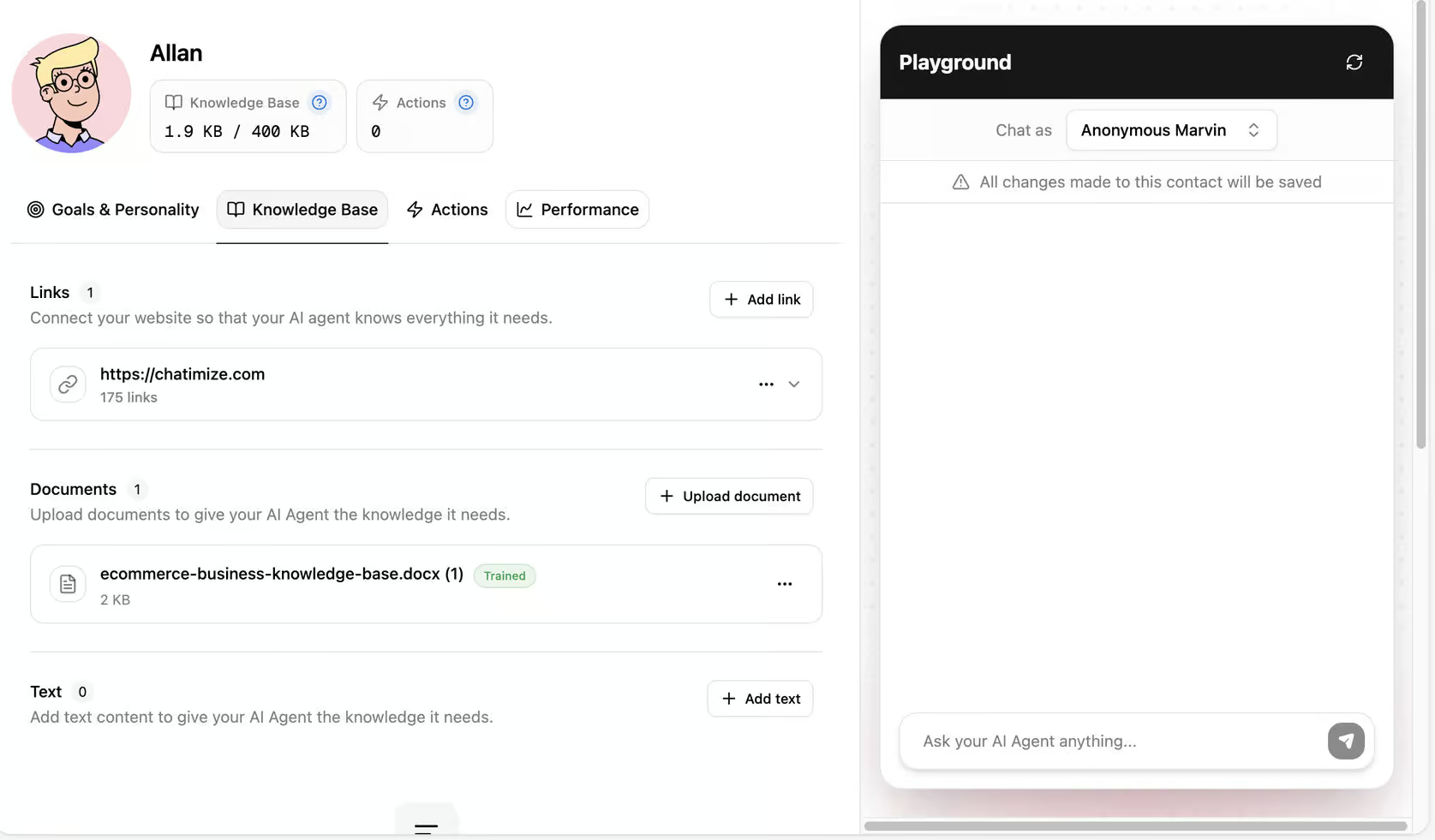
You can give it knowledge from:
- Links
- Documents
- Text
- Questions and answers
So it’s very easy to train the AI on your website content, internal documents, FAQs, or product information.
You can also test the AI Employee right away in the built-in playground. So after adding your instructions and knowledge, you can immediately ask questions and see how well it responds. I thought this was a very nice touch.
It lets you quickly check whether the AI understands your content and gives accurate answers before using it in a real chatbot.
Besides answering questions, AI Employees can also perform actions.
For example, they can:
- Read contact information
- Update contact information
- Trigger an automation
- Make a custom API call
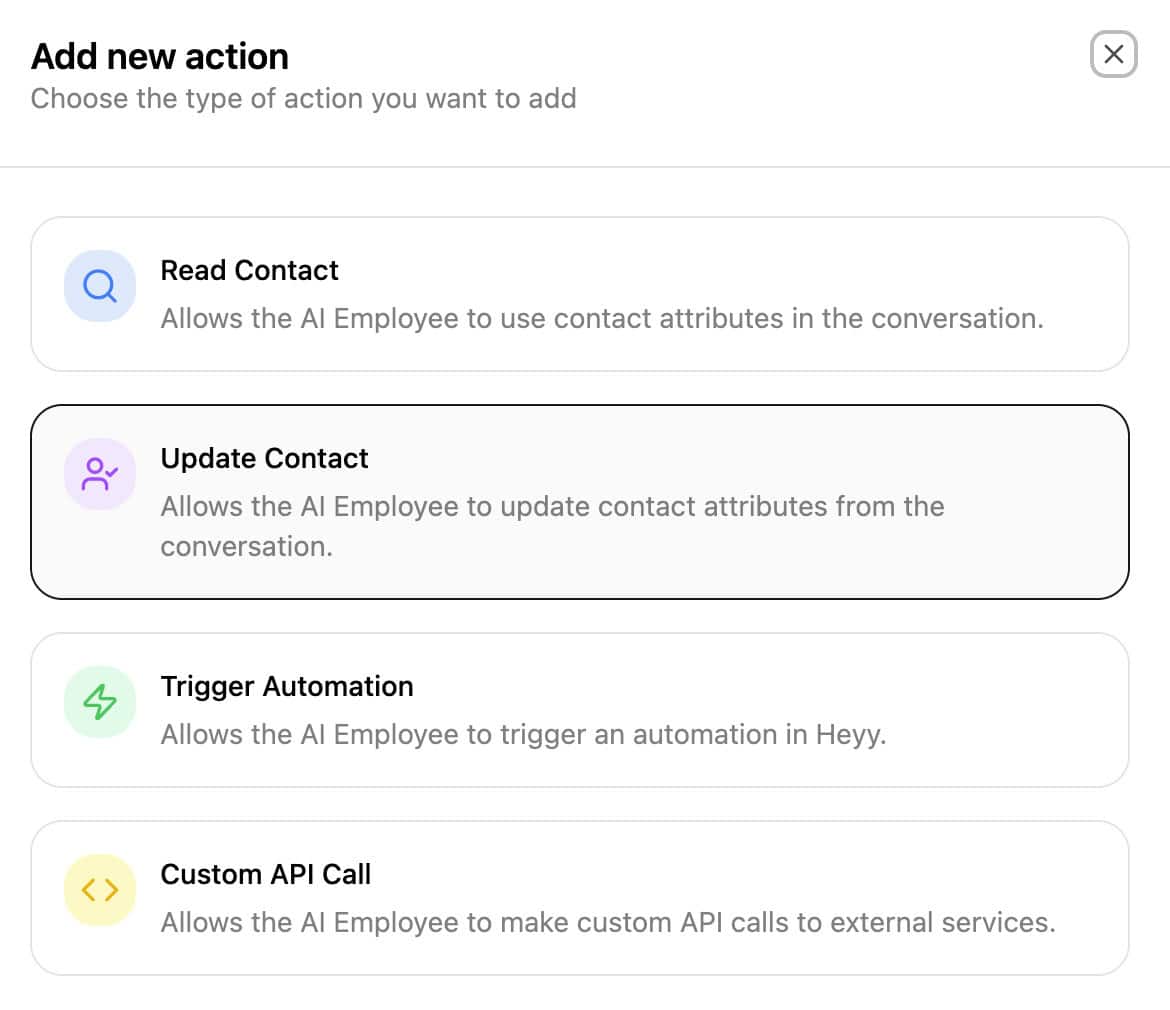 This means your chatbot can do more than just chat.
With the “Custom API Call”, you can connect Heyy to other systems. But the drawback is that it doesn’t come with built-in integrations for AI Actions.
Overall, AI Employees are very useful in real business scenarios, especially when you want to combine AI answers with automation.
| Keyword recognitionTrigger chatbot flow based on certain words or phrases a user says to the chatbot. | |
| IntentsTrigger a chatbot flow by understanding the intent of the user. | |
| EntitiesCapture specific information from sentences. For example, if a user says "veggie pizza", the chatbot can understand it's not a regular pizza, but a veggie pizza. | |
| AI Knowledge BaseCan you train your chatbot on a knowledge base (like your website or articles) and then your chatbot automatically answer questions about it? | |
| NLP integrationsDoes it have a direct integration with NLP platforms, such as Dialogflow? | |
| LLM integrationsDoes it have a direct integration with LLM platforms, such as ChatGPT and Claude? |
Heyy Pricing
Heyy has a free plan that gives you 100 credits per month. That’s enough to explore the platform, test its main features, and see whether it fits your use case.
Paid plans start at $41 per month, which gives you 2,000 credits per month:
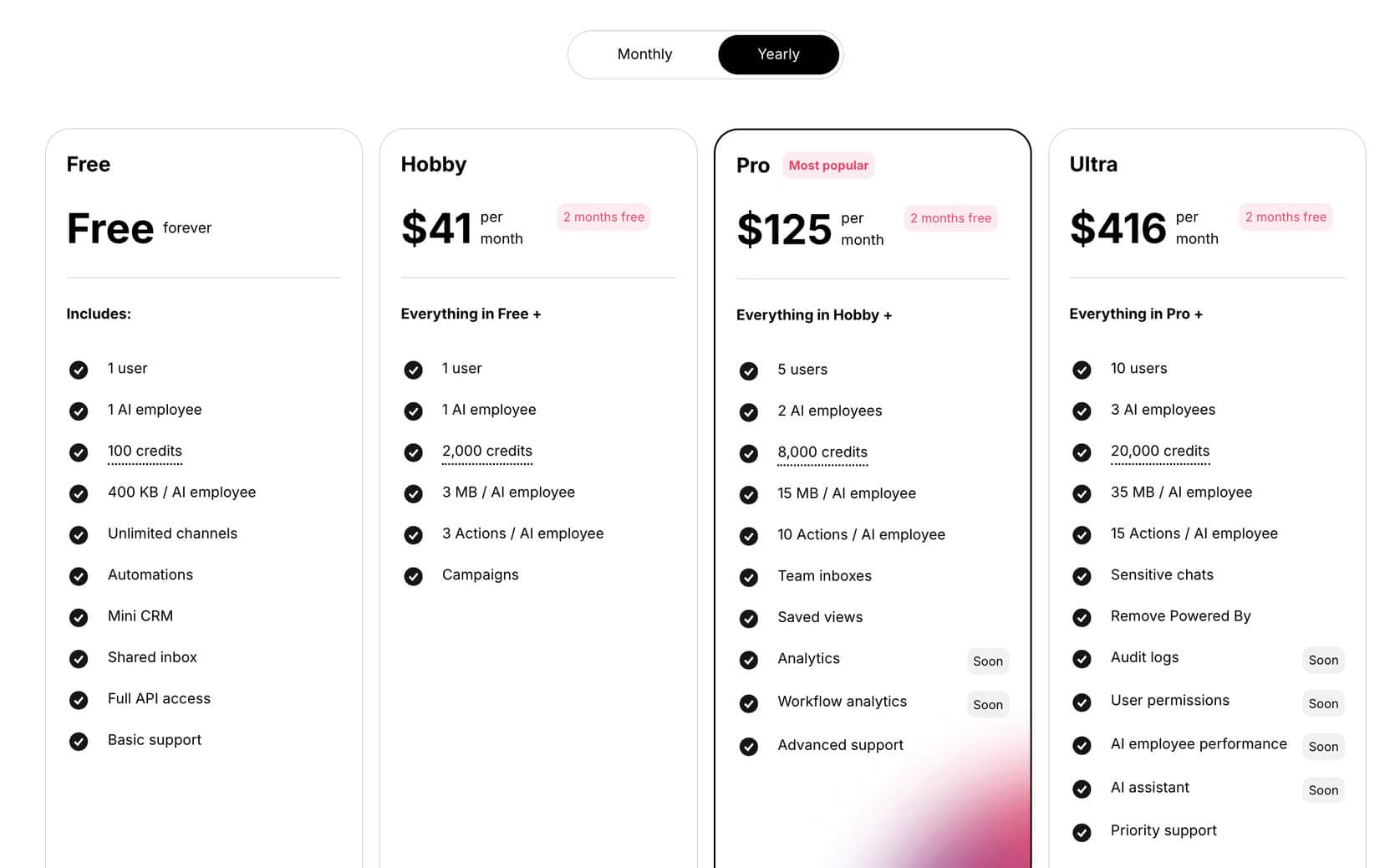
Even on the Hobby plan, you get access to features like:
- AI Employees
- AI actions
- Live chat
- Flow Builder
- Multichannel support
This makes Heyy great for businesses that want an all-in-one chatbot platform.
The free plan is useful for testing. But the paid plan is where Heyy becomes a serious option for small businesses that want to use AI chatbots for support, sales, or lead generation.
| Pricing in one sentence | Free plan; paid plans start at $49/month |
| Free trialDoes the chatbot platform provide a free trial? | |
| Free planDoes the chatbot platform provide a free plan? | |
| Price per monthWhat is the lowest price per month to create a chatbot with this platform? In US Dollars. | $41 |
| Monthly pricing available?Is it possible to pay monthly? | |
| Money back guaranteeIs there a money-back guarantee in case you are not satisfied with the platform? |
Heyy Channels
With Heyy, you can add your chatbot to:
- Website live chat
- Facebook Messenger
- SMS
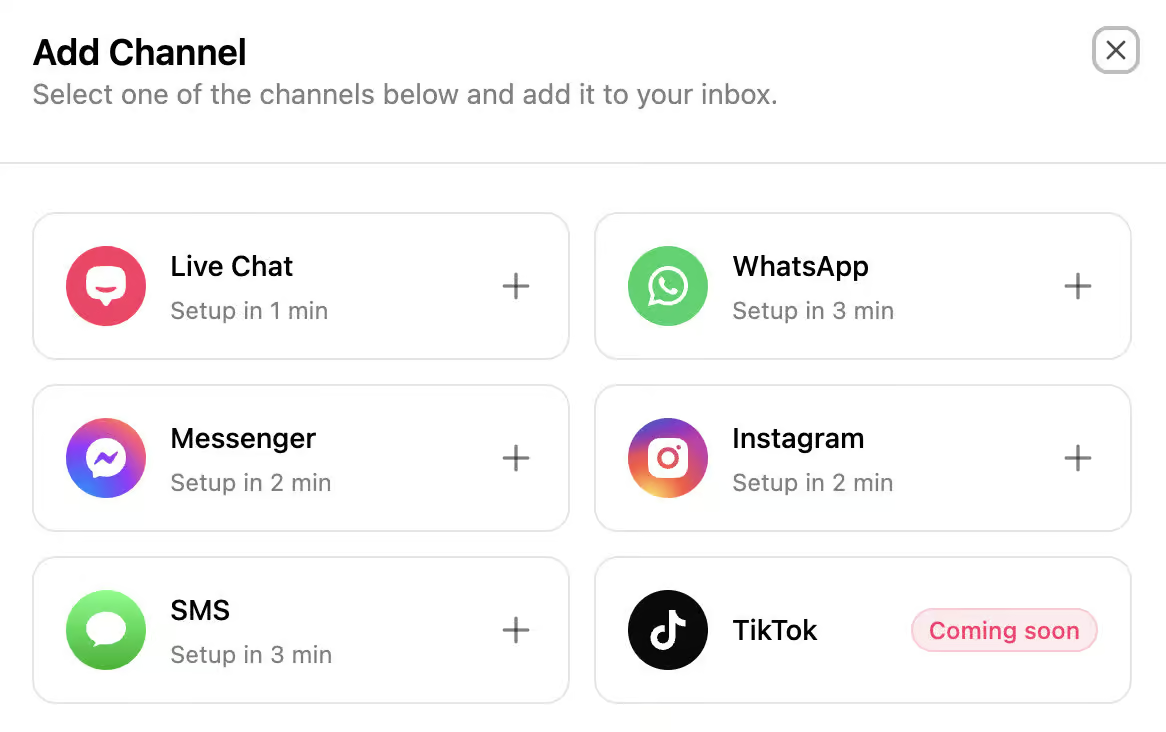
You can manage all of the channels from the same inbox, use the same AI Employees behind them, and build automations for different use cases.
Heyy also lets you connect multiple Facebook and Instagram accounts. That’s great for businesses and agencies if they manage more than one brand.
Website widget
The website widget is probably the easiest channel to set up.
You can customize the widget’s:
- Content
- Styling
- Security settings
- Visibility
- Installation
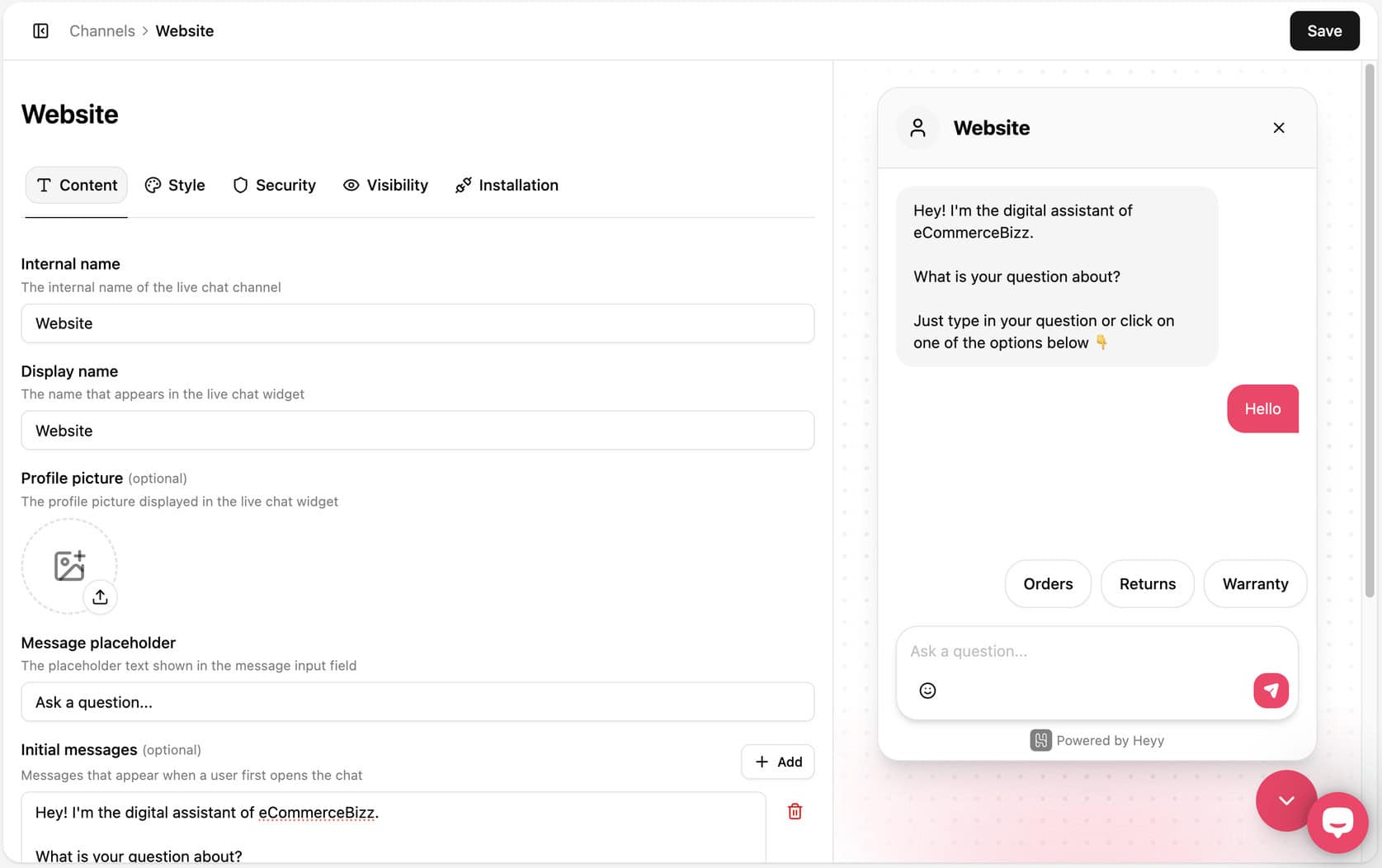
The setup is simple, and the preview on the right makes it easy to see how the widget will look on your site.
It’s easy to create a branded chat experience without needing a separate tool. You can adjust the welcome message, placeholder text, and quick reply options, then install the widget on your website.
WhatsApp Broadcasts
Heyy also includes useful WhatsApp features beyond regular chatbot conversations.
For example, you can send WhatsApp templates and WhatsApp broadcasts. That allows you to proactively start conversations with customers instead of only replying when they message first.
This is especially useful for sending:
- Follow-ups
- Reminders
- Promotions
- Re-engagement messages
So while Heyy is clearly built for support and automation, it also gives you some marketing functionality through WhatsApp.
However, there’s an important limitation here.
Heyy does not offer the same marketing possibilities for Facebook and Instagram. So if you want to run more advanced promotional campaigns on those channels, that could be a drawback.
Is Heyy worth it?
So, should you use Heyy to build your chatbot?
Yes, I think so! I think Heyy is worth it for businesses that want an easy way to build an AI chatbot across multiple channels.
Heyy combines several useful tools in one platform. You can:
- Create AI Employees
- Build automations with the Flow Builder
- Manage live conversations in the inbox
- Connect channels like website chat, WhatsApp, Instagram, Facebook Messenger, and SMS
It’s also very easy to get started with. The platform is beginner-friendly, the interface is clean, and you can build a basic chatbot quickly.
The pricing also feels fair for what you get. At $41 per month, you get access to AI chat, live chat, automations, and multichannel support in one place.
If you click on the button below, you’ll also get my discount code to get 1 month for free:
That said, Heyy isn’t perfect.
The biggest downside is that you can’t test a flow before setting it live. You also need to create separate messages for each channel. So, multichannel setup less efficient than it should be. And if you want advanced marketing features for Facebook or Instagram, Heyy will feel limited.
Still, those drawbacks don’t change the fact that Heyy is a very capable platform for the price.
If you want a chatbot tool that combines AI Employees, automation, live chat, and multichannel support in one easy-to-use platform, Heyy is definitely worth considering.
