


Think back to the last time you talked to a chatbot that didn’t understand you. You asked a question, and it asked you to rephrase it.
So you tried again in different words. It gave you the exact same reply. You rephrased one more time, and you were right back where you started.
That’s the doom loop:
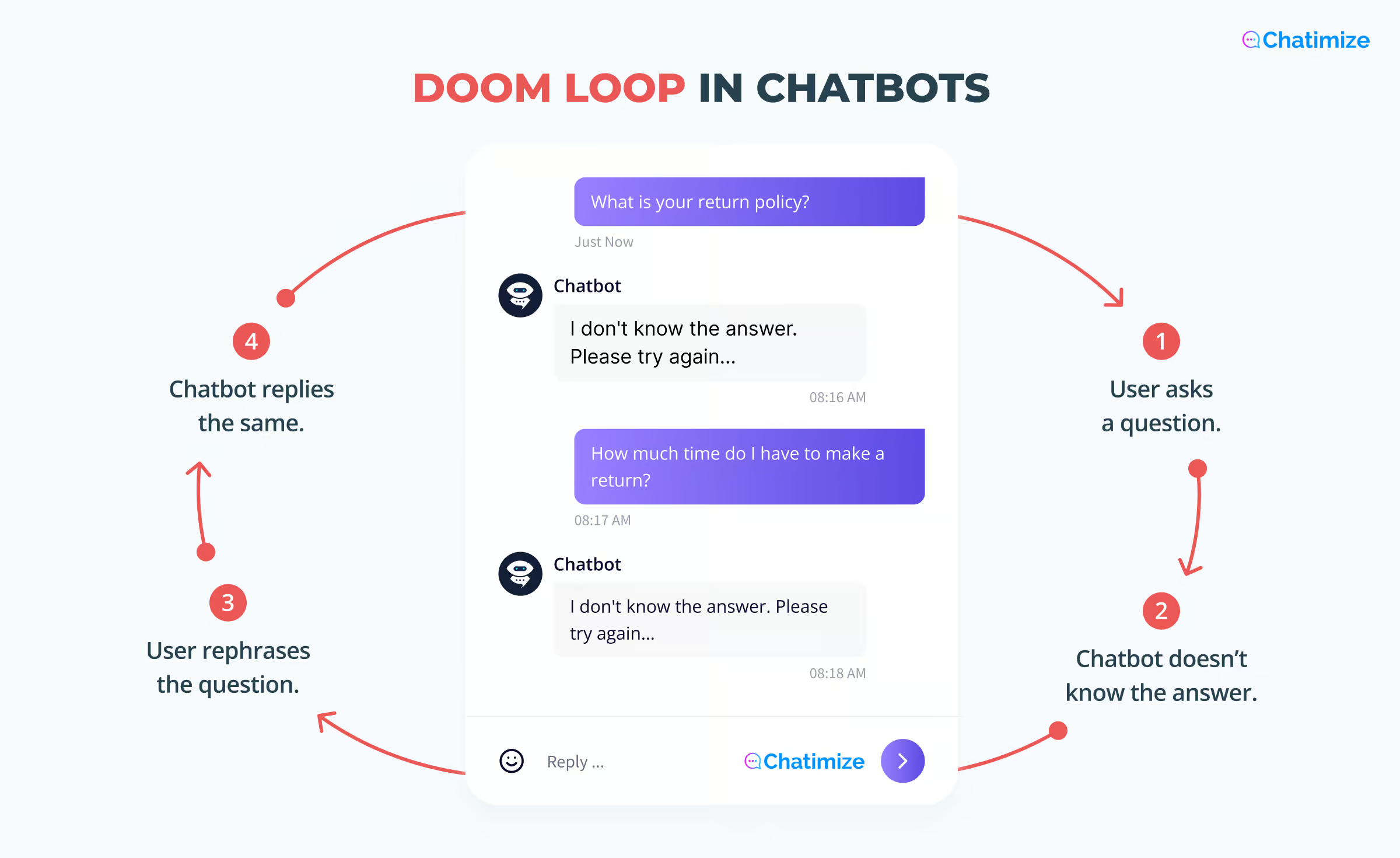
It’s what happens to real customers when a chatbot goes live without proper chatbot testing. And it’s only one of the things that can go wrong.
Over the past 7 years I’ve built and launched chatbots for hundreds of clients on WhatsApp, Instagram and websites. They often broke somewhere during testing, which is the point. Better it breaks for me than for a paying customer.
In this guide, I’ll show you what to test before you go live, why testing inside your chatbot platform isn’t enough, and a checklist you can copy and run through in under an hour.
Let’s get started!
What Is Chatbot Testing?
Chatbot testing is the process of checking that a chatbot behaves the way it’s supposed to before real customers rely on it. That means:
- Walking through its conversations yourself
- Trying to break the bot with questions you didn’t plan for
- Confirming it works on the actual channel your customers use
It’s the difference between “the bot works” and “the bot works for everyone who talks to it”.
Real testing means checking your chatbot where your customers will actually use it. So don’t only test inside your chatbot platform. Test on the channels you built it for, like WhatsApp, Instagram or your website.
Why Chatbot Testing Matters
Testing is easy to skip when you’re excited to launch. But you shouldn’t skip it. Here’s what it protects you from:
- It confirms the bot actually does its job: a chatbot can answer every question correctly and still book zero appointments
- It catches issues before your customers do: when you test in private, your chatbot mistakes stay private
- It saves you rework later: fixing a flow before launch is much faster than fixing it after hundreds of customers have hit the same dead end
- It protects customer trust: a broken chatbot experience is often worse than having no chatbot at all
In my experience, chatbots that fail in public are rarely badly built. They’re badly tested.
What to Test Before Launching a Chatbot
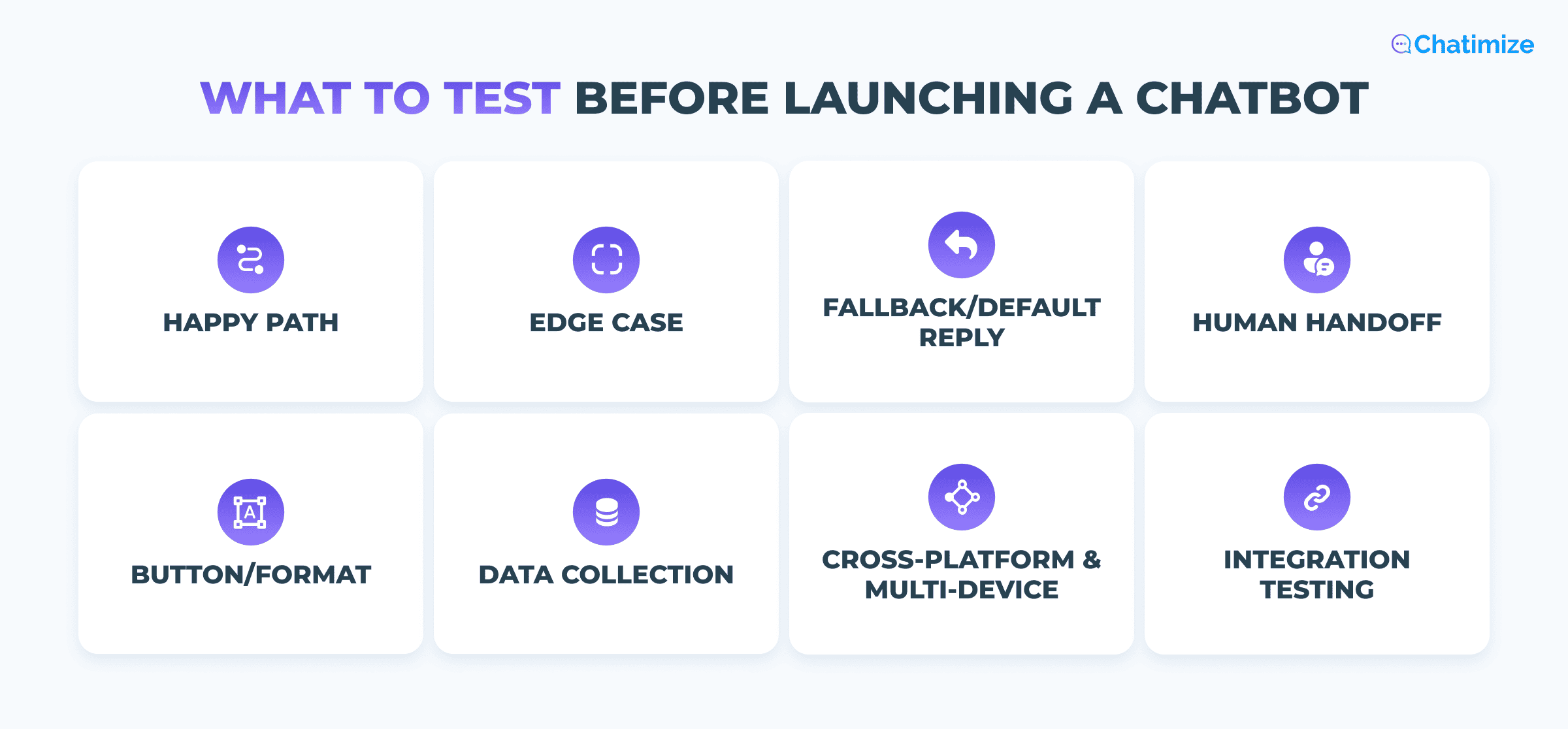
These eight checks are your chatbot testing framework. They work on any platform and with all types of chatbots.
- Happy path testing: walk through the exact conversation you designed, step by step, the way a customer would. Click every button and type every answer. Don’t skip ahead because you already know where the flow goes.
- Edge case testing: now try to break it. Ask questions you never trained the bot on. Use typos, slang and one-word replies. Pick testing scenarios that match your bot’s purpose, because a support bot and a booking bot break in different places.
- Fallback and default reply testing: send the bot something it can’t understand. Check that it replies with something helpful instead of silence. It should always offer a way forward, like a menu or a human.
- Human handoff testing: ask to speak to a person and confirm the conversation actually reaches one. Then check what your agent sees. A handoff that drops the conversation history forces the customer to explain everything twice.
- Button and format testing: confirm your buttons, lists, images and links show up the way you designed them. Formatting rules are different on WhatsApp, Instagram and Facebook. A message that looks perfect on one channel can still look bad on another.
- Data collection testing: if your bot collects an email address or an order number, check that the data lands where it’s supposed to. Then enter something invalid on purpose. The bot should catch the mistake instead of saving nonsense to your CRM.
- Cross-platform and multi-device testing: test on both mobile and desktop, because layouts display differently on each. If your bot runs on more than one channel, test every channel separately. Never assume one passed because another did.
- Integration testing: if your chatbot is connected to other tools, confirm those connections actually fire. Book a test appointment. Trigger the email. Check that the record shows up in your CRM.
None of this needs special software. You need a phone, a laptop and a willingness to break your own bot before a customer does.
How to Test on the Real Channel, Not Just the Platform Preview
Almost every chatbot builder has a preview window. It’s useful for checking your logic, and it’s where most people stop testing.
The problem is that a preview isn’t the channel. It’s the platform’s own simulation of the channel, and simulations aren’t perfect.
Character limits are usually the first issue. WhatsApp allows 20 characters on a button label and 24 on each row of a list menu. Your builder will happily let you type more.
What happens next depends on your platform. Some trim the text. Others send the message to WhatsApp, get it rejected, and show it as sent on your side anyway. Your customer receives nothing at all.
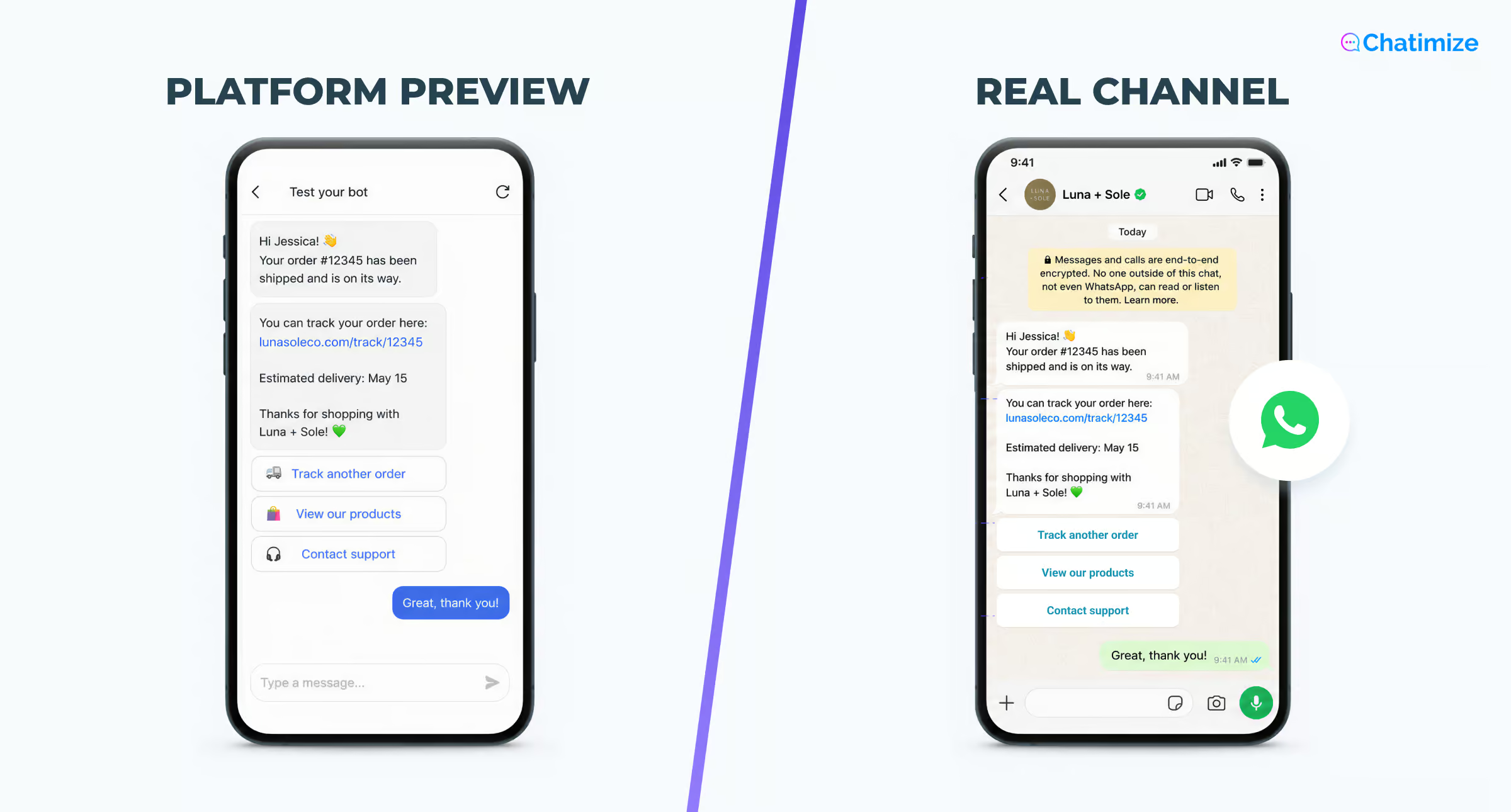
Showing buttons is the second. A neat row of quick replies in the preview can arrive as a numbered list of plain text on a live channel. The customer types “2” instead of tapping. It may still work, but it’s not the experience you designed.
Message timing is the third. Preview windows tend to fire every message instantly. Real channels add their own delivery delays, so a sequence that felt snappy in the builder can arrive in an awkward rhythm on a phone.
Message rules are next. WhatsApp is the clearest example. Outside the 24-hour customer service window, you can only send approved message templates. Your preview will happily let you send anything. The live channel won’t.
Here’s the practical difference. When you test a flow inside Manychat, you’re clicking buttons in a browser tab on your laptop. When you test that same flow by messaging your business account from your own phone, you see what the customer sees.
So test it that way. Message your Instagram or WhatsApp business account from a personal account on a real phone. Open your website chatbot on the live page in an incognito window, not in the widget editor.
Then run the whole happy path again from start to finish. Not a spot check on the first two messages.
This final pass takes about fifteen minutes. It catches the issues that no preview window will ever show you.
A Simple Pre-Launch Testing Checklist
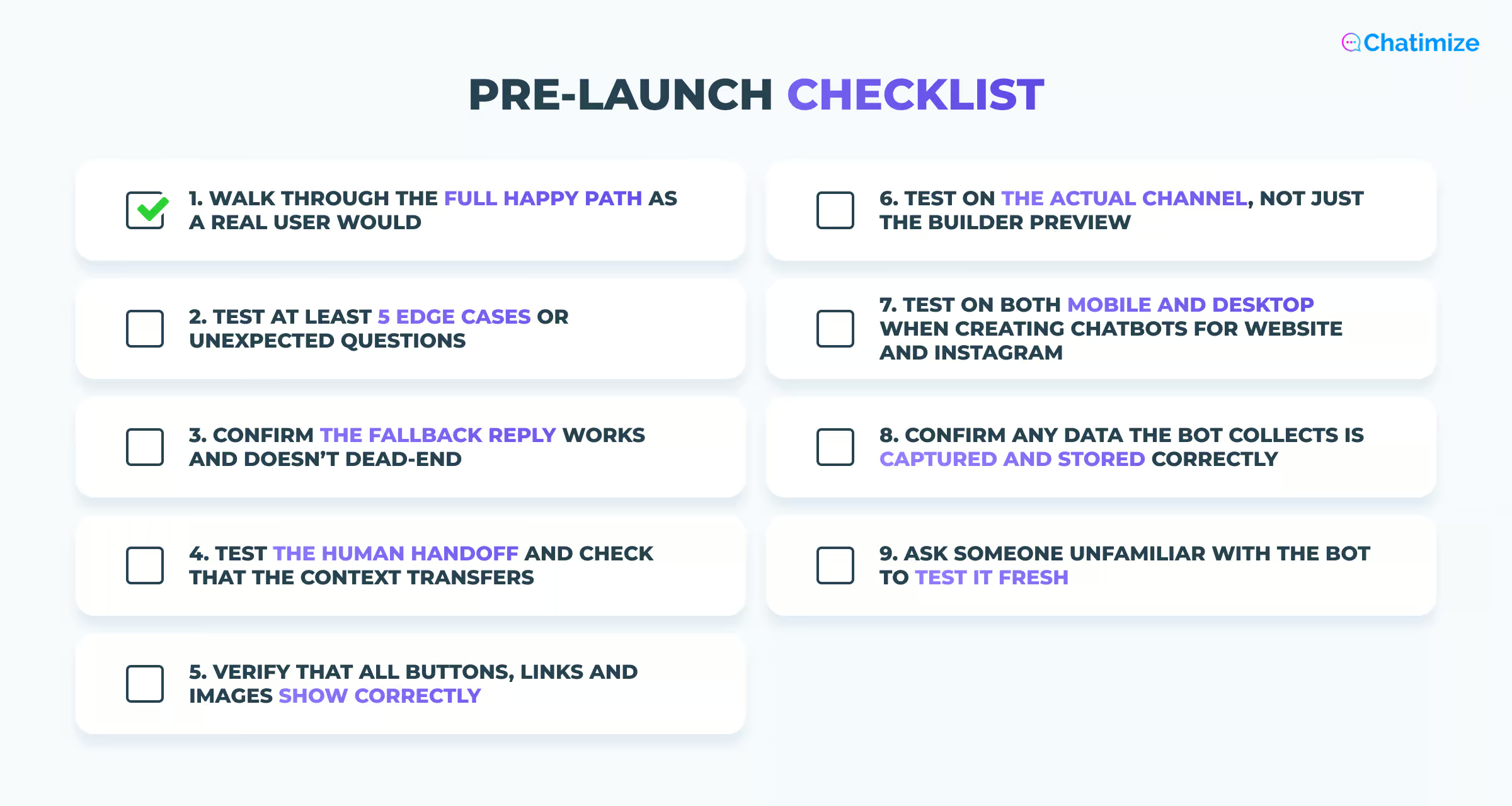
Here’s the chatbot testing checklist I work through before any bot goes live:
- Walk through the full happy path as a real user would
- Test at least 5 edge cases or unexpected questions
- Confirm the fallback reply works and doesn’t dead-end
- Test the human handoff and check that the context transfers
- Verify that all buttons, links and images show correctly
- Test on the actual channel, not just the builder preview
- Test on both mobile and desktop when creating chatbots for website and Instagram
- Confirm any data the bot collects is captured and stored correctly
- Ask someone unfamiliar with the bot to test it fresh
That last one is more important than you’d expect. You know your own bot too well to test it properly. You type the answers it expects, because you wrote them.
Someone else will do the thing you never thought to try, and that’s exactly what you want to happen before launch day.
Testing Doesn’t Stop After Launch
Your chatbot was tested against the business you had on launch day. That business keeps moving.
You add a product. You change your return policy. You run a promotion, and suddenly people are asking about a discount code the bot has never heard of. Every one of those turns a correct answer into a wrong one.
Your audience shifts too. One post takes off and suddenly you’re talking to strangers instead of regulars. They ask the basic questions your existing customers never needed to ask.
How people phrase things changes as well. New slang, new product names, new questions about whatever a competitor launched last week.
The platforms shift too:
- Meta updates how Instagram handles messages
- Your booking tool changes its API
- An integration that worked in March quietly stops working in June
Nobody sends you an email about it. So build in a habit of reading your conversations.
Once a week is enough for most businesses. You’re looking for questions the bot fumbled, flows people abandoned halfway, and moments where someone wanted a human.
Many platforms will do some of that work for you.
In Tidio, the Suggestions list collects every question that its AI Lyro couldn’t answer. So, you can write the missing answer and add it to its knowledge.
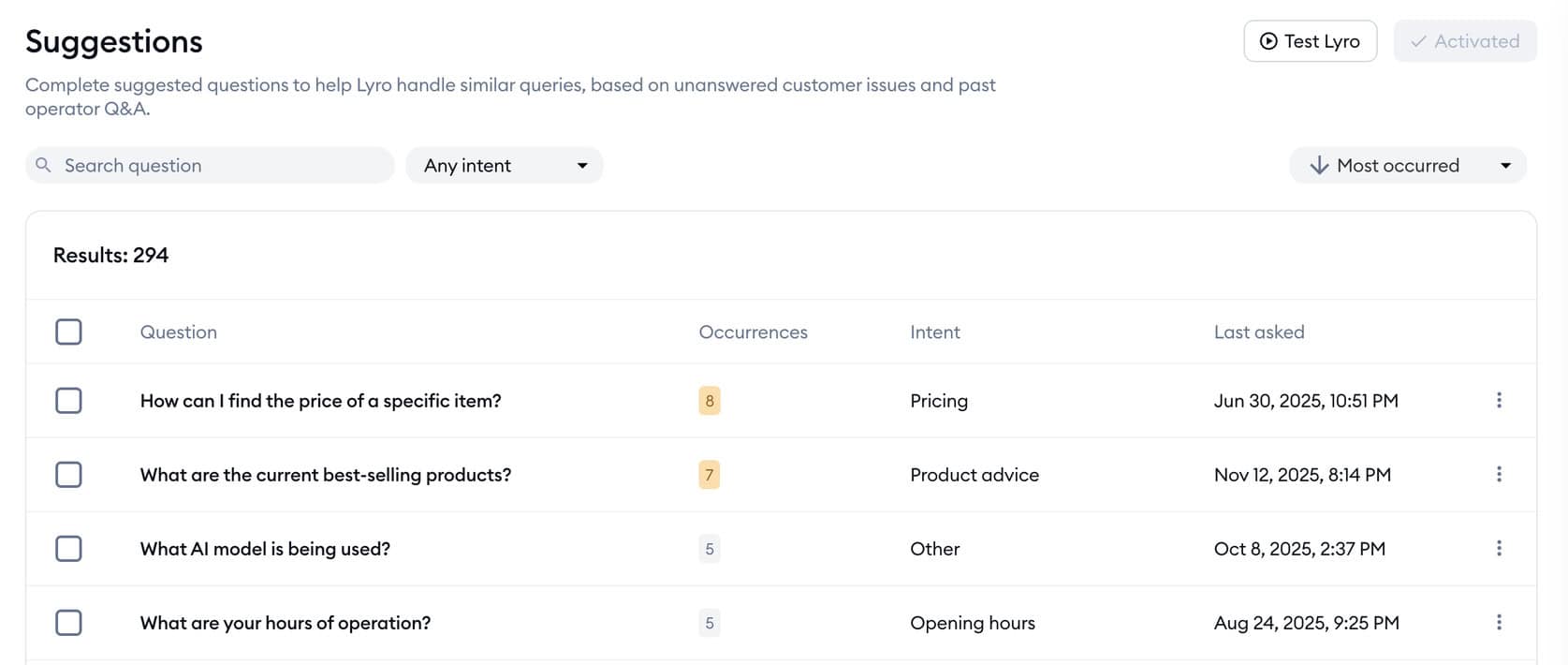
Chatbase has a Suggestions list too. It collects the questions your AI agent couldn’t answer well, so you can see exactly where its knowledge falls short. Click Improve answer, write the response it should have given, and Chatbase adds it to your Q&A sources automatically.
Then fix what you find and test the fix. That’s the whole loop, and that separates a chatbot that gets better every month from one that quietly gets worse.
Your Next Step
A testing checklist only helps if you have a chatbot to test. If you haven’t built yours yet, the next step is to pick a platform and get a first version live.
To learn how to build your own chatbot, check out my guide:
How to create a chatbot in less than 10 minutes
Frequently Asked Questions
How often should I re-test my chatbot after it’s live?
This depends on your situation, but as a rule of thumb, read your conversations once a week. That’s not a full test, it’s a scan for questions the bot handled badly.
Beyond that, re-test the specific flow every time you change something in it. Then run the full checklist again every few months, or whenever your platform or channel pushes a big update.
What’s the difference between testing a rule-based chatbot and an AI chatbot?
They fail in different ways, so you test for different things.
A rule-based chatbot only breaks when someone steps off the script. Your job is confirming that the paths you built hold up: every button, every branch, every exit. The failure you’re hunting for is a customer stuck somewhere with no way forward.
An AI chatbot rarely dead-ends, because it can respond to anything. That’s good, but it can also be a problem. It improvises, so you’re testing whether it stays accurate and on-brand while it does. Ask it things you never trained it on and watch what happens. A good AI bot says it doesn’t know and points to a human. A poorly tested one invents an answer that sounds right.
What’s the most common mistake businesses make when testing a chatbot?
Testing it the way they built it.
You click through your own flow, tapping the buttons in the order you designed, and everything works. Then a real customer types a full sentence instead of tapping, or asks about something on page two of your website, and the whole thing falls apart.
Should I test my chatbot with real customers or only internally?
Both. Do your own testing first, and get someone outside your business to try it too.
Then go live, but treat the first week as part of the test. Read every conversation, fix what breaks, and hold off on promoting the bot until you’ve seen it handle real customers without your help.
