


Meta just launched the Meta Business Agent, its own AI agent that replies to your customers on WhatsApp.
To check whether it’s worth it, I set one up on my own WhatsApp number. I gave it my business info, added frequently asked questions, set its tone and tested it in the sandbox.
Below I’ll share whether I recommend it for your business, what it costs and what it can do.
Our Verdict
Our Verdict
I wouldn’t use the Meta Business Agent for a business.
The basics work well. You can give it your business details, add the questions your customers ask most, and write skills that tell it what to do in a specific situation. The answers it gave me in the test were pretty good.
But everything that makes an AI agent genuinely useful sits behind Meta’s API. You can’t add files, train it on your website, or connect it to a tool like Shopify without writing code.
And that’s the problem. Bigger companies already run a chatbot platform, so the businesses most likely to start here are small ones. And small businesses don’t make API calls.
There’s one plan and you pay as you go: $2 per million tokens, which comes down to roughly 4 to 5 cents per message.
Pros
- Built into WhatsApp, so you don't need a third-party platform
- Train it on your business details and your most common questions
- Skills let you set its tone and tell it what to do in specific situations
- Pay as you go, so there's no monthly subscription to commit to
Cons
- Files, websites, connectors and tools all need Meta's API
- Hard to set up unless you can write code
- At 4 to 5 cents per message, it's expensive for what you get
- You can't hand the conversation over to a human


What is the Meta Business Agent?
The Meta Business Agent is an AI agent built by Meta that replies to your customers on WhatsApp for you.
You train it on your business details, the questions customers ask most, and a set of skills that tell it how to answer. After that it handles the conversations on your WhatsApp number by itself.
Because Meta built it, it runs inside WhatsApp itself, so you don’t need a third-party chatbot platform. You set the whole thing up in the WhatsApp Manager, inside the Business account you already have:
Meta Business Agent at a Glance
Here are the most interesting features I found in the Meta Business Agent while testing it:
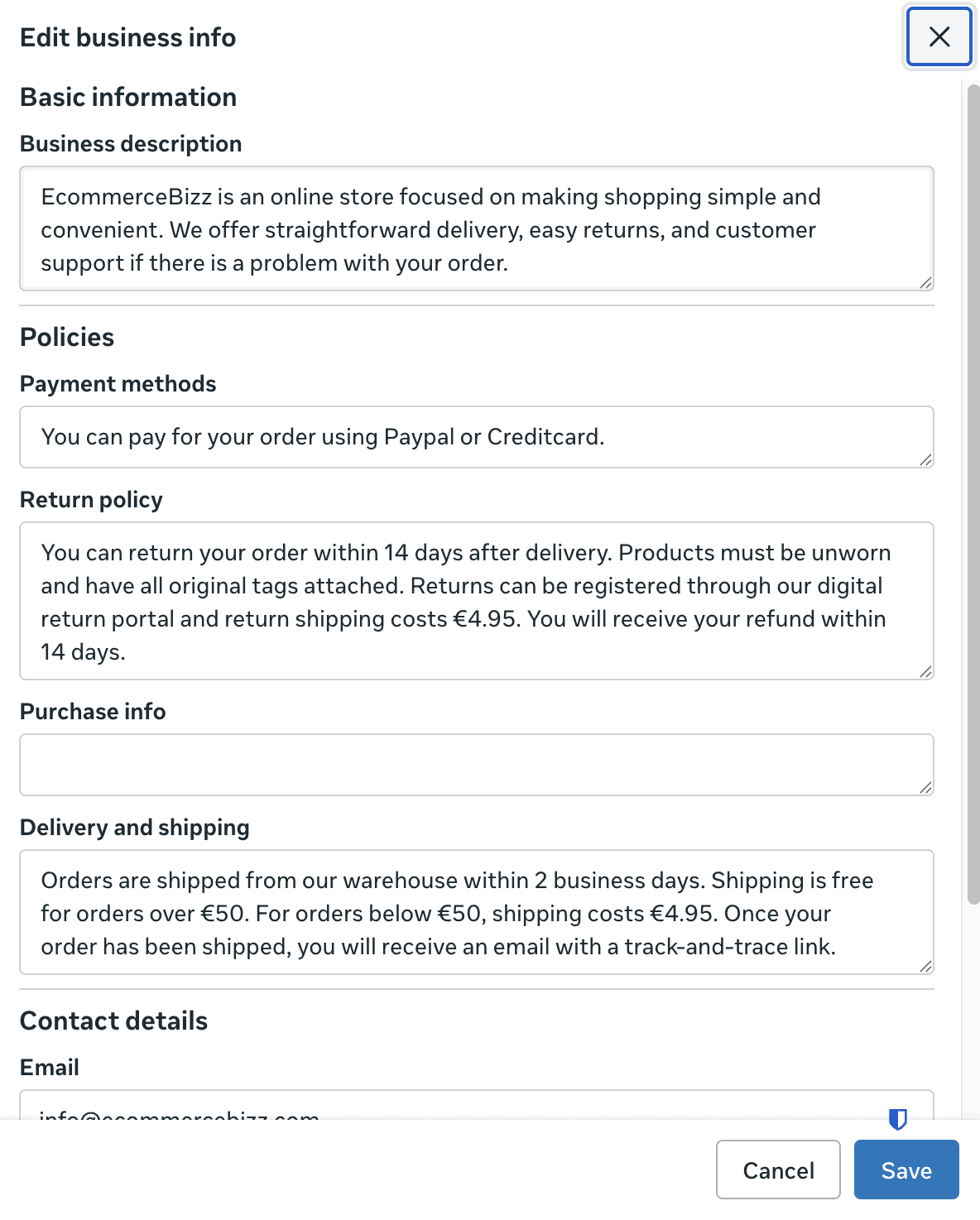
- You can train it on your business info, like your payment methods, return policy, delivery details and opening hours. This is the knowledge the agent answers from:
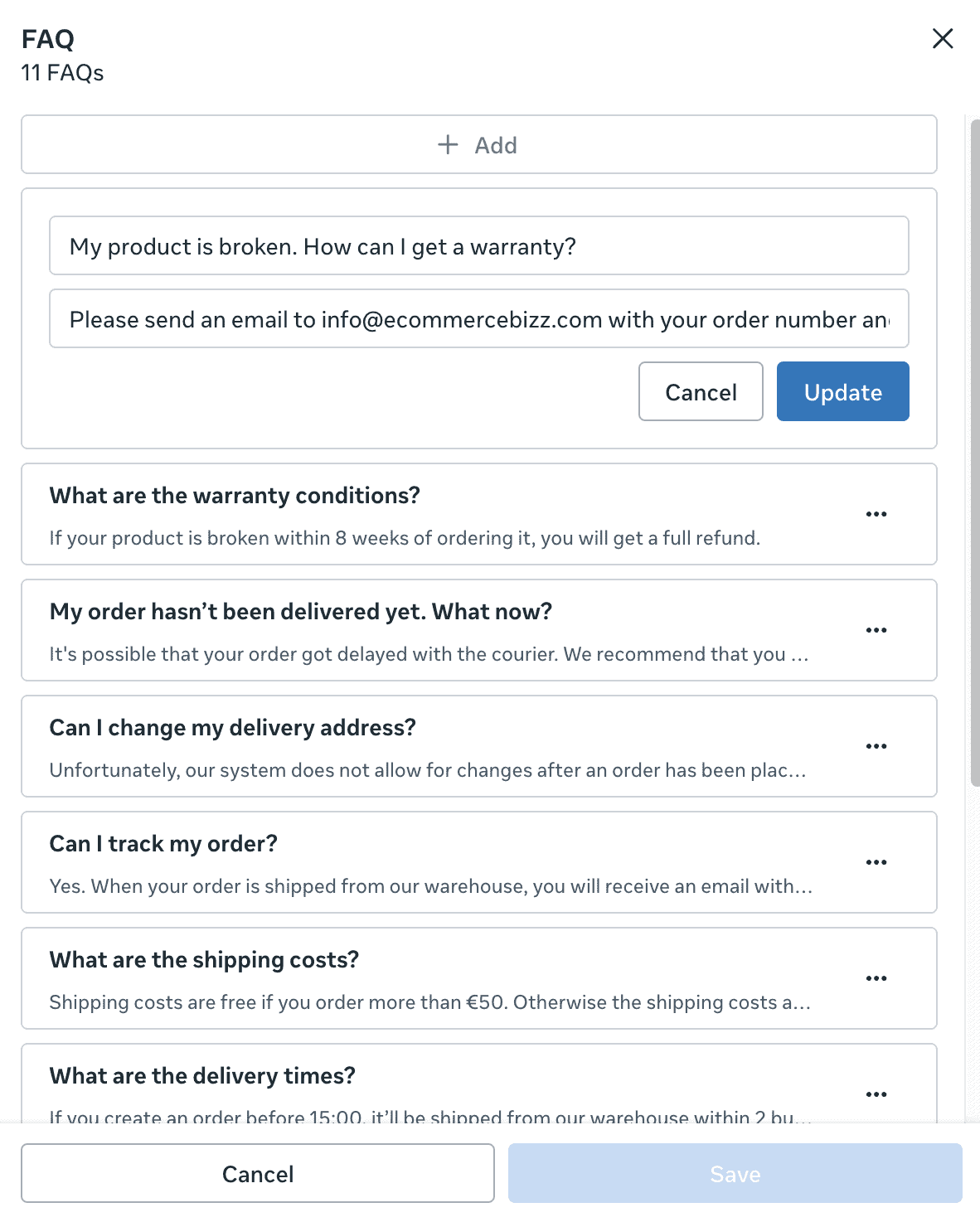
- Add the questions your customers ask most as frequently asked questions, each with the answer you want the agent to give:
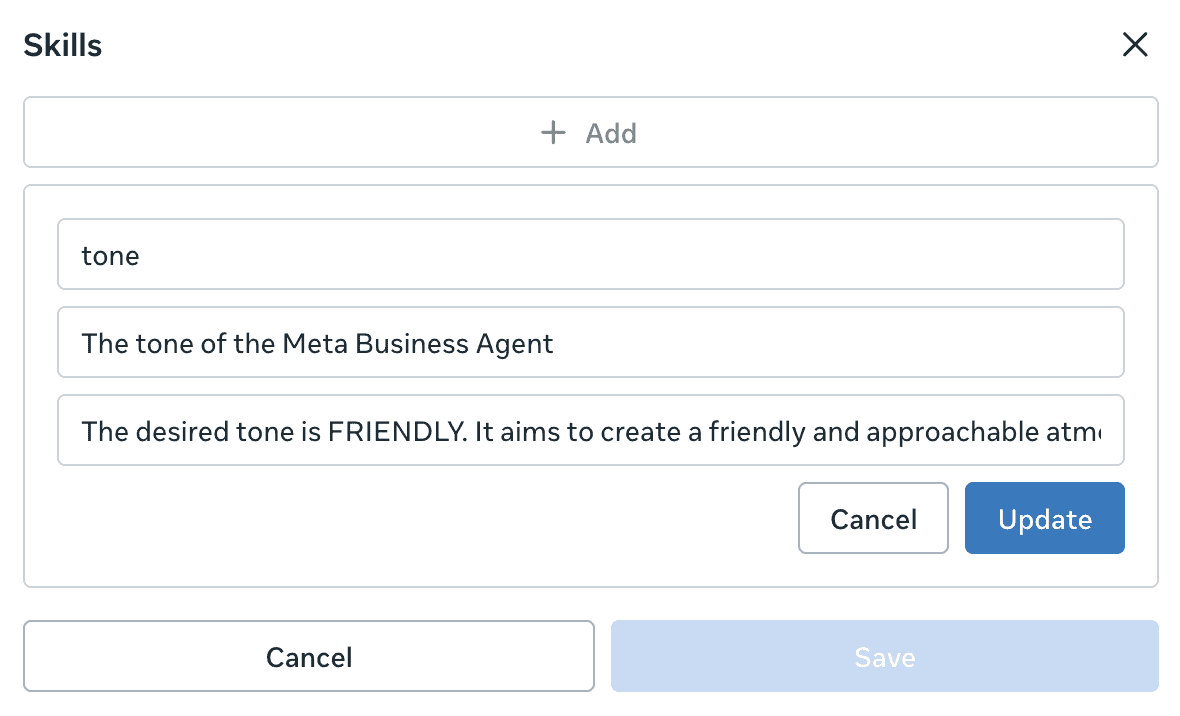
- Skills let you set the agent’s tone, or tell it what to do in a specific situation, like an order that hasn’t arrived:
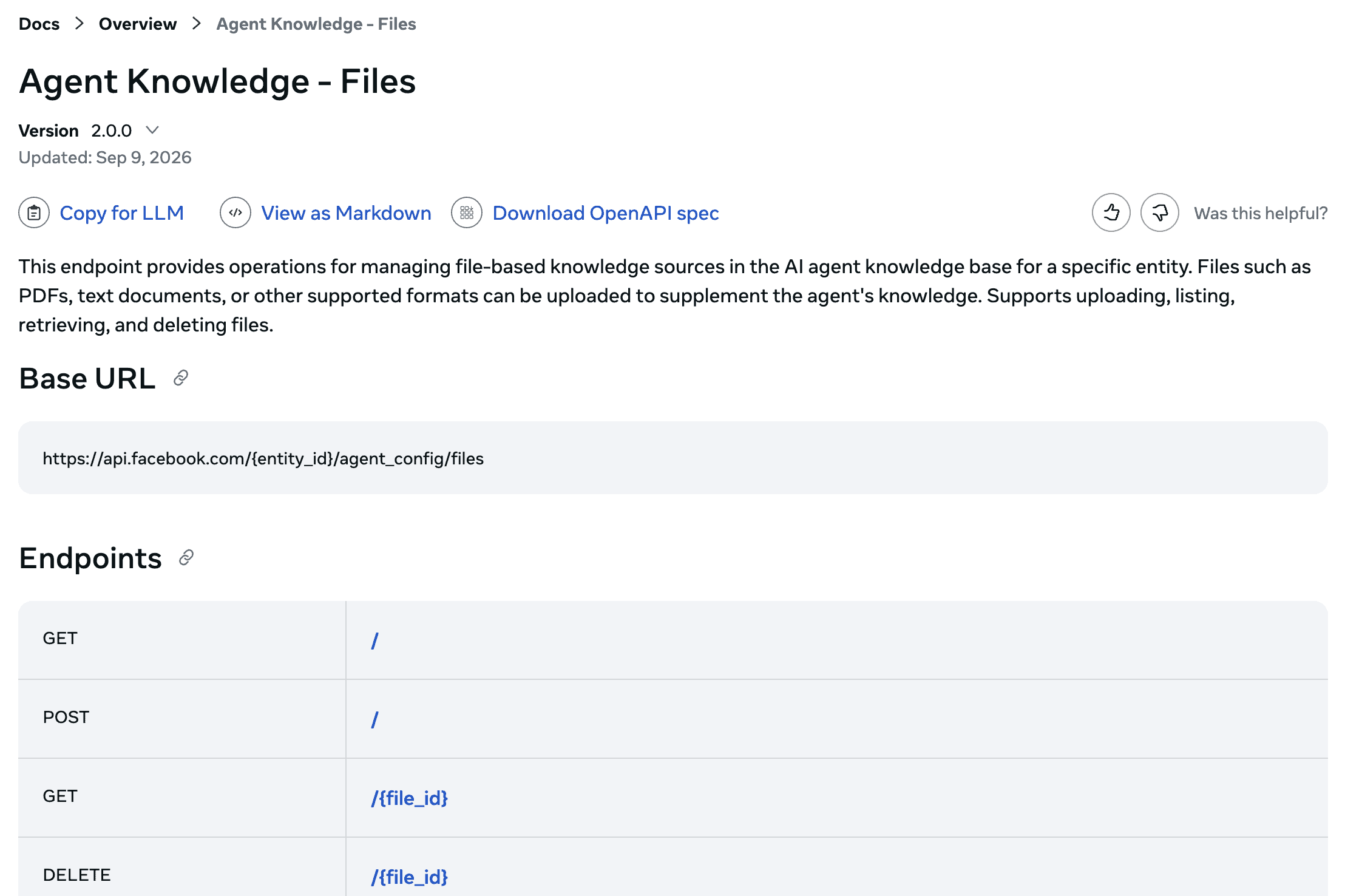
- You can also add files, websites, connectors and tools, the features that would make this agent genuinely powerful. But every one of them runs through Meta’s API:
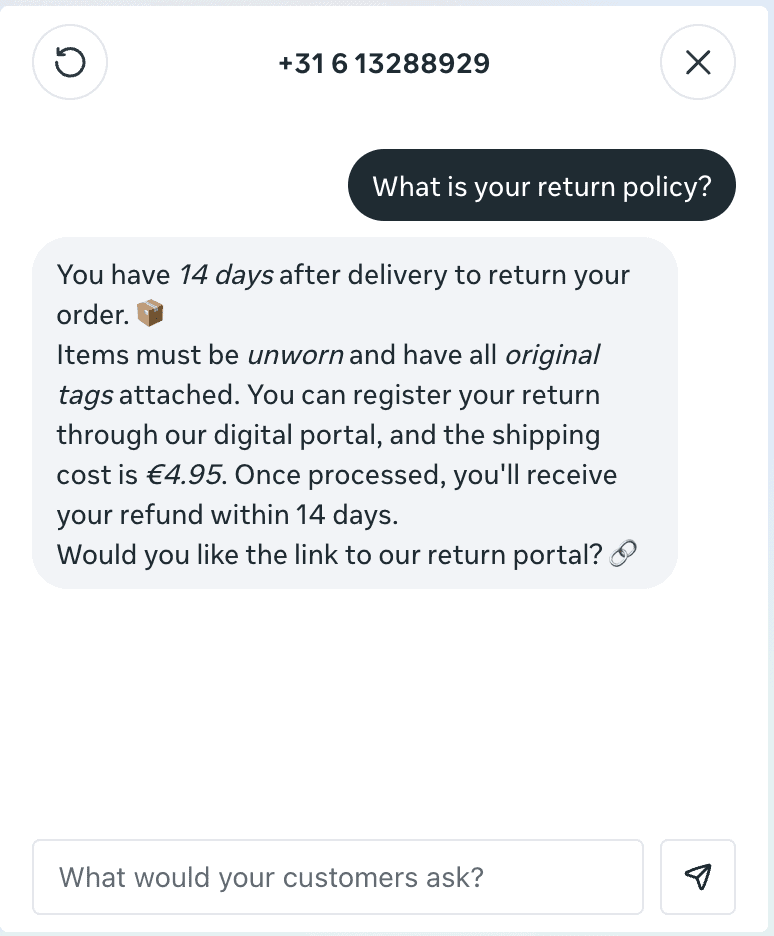
- Before it goes live, you can test the AI agent in a sandbox:
How Meta Business Agent Works
Setting up the Meta Business Agent looks easy, but you need technical knowledge if you want to connect it to other tools, train it on your website or train it on files. Let me explain.
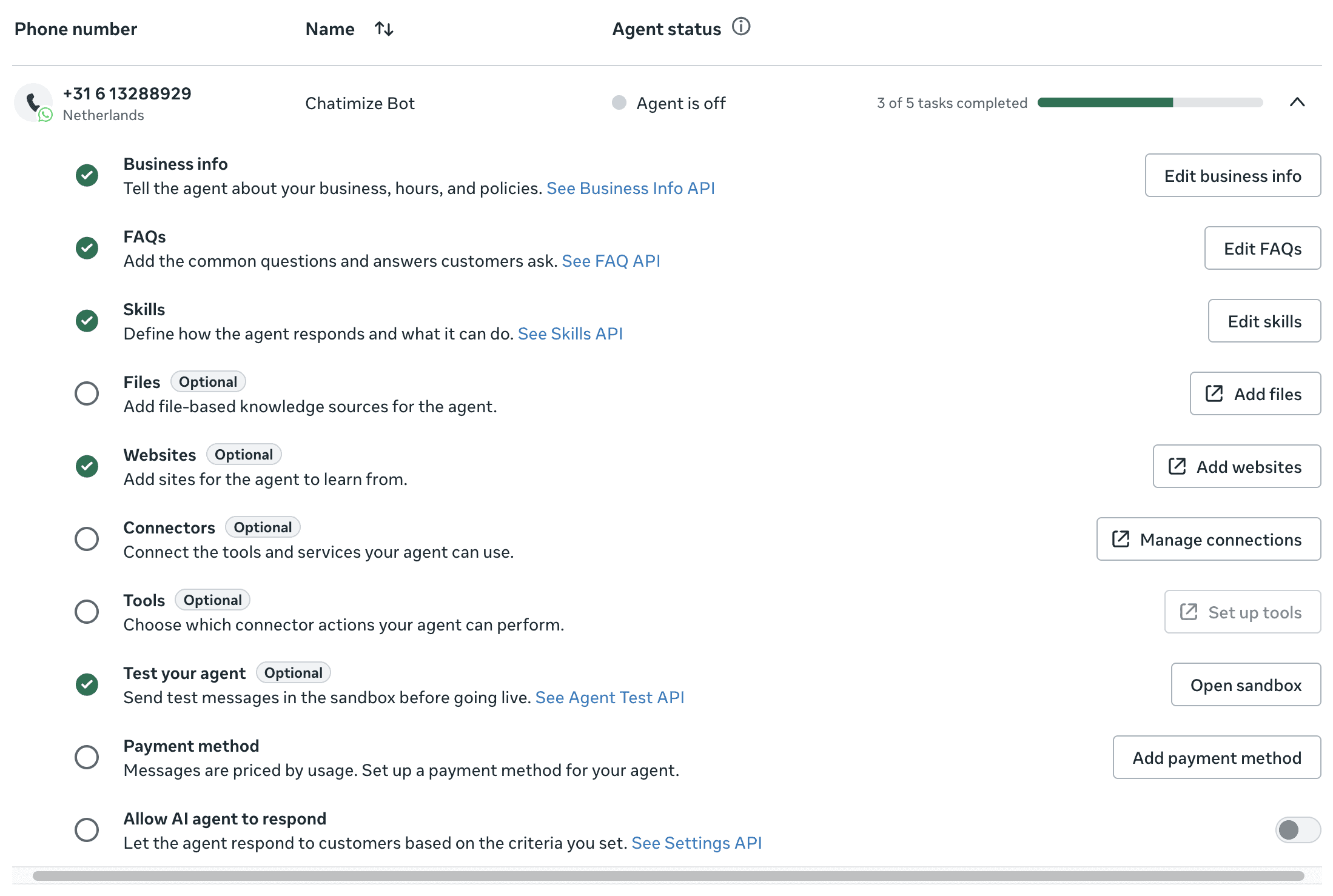
When you get started, you open the Meta Business Agent in WhatsApp Manager, pick your WhatsApp number, and get a checklist of ten things to work through:
You can add your business info, frequently asked questions and skills yourself, right in the interface. There’s no technical knowledge needed, just typing, and the Meta Business Agent trains on it automatically:
But you can’t do the other four yourself. Adding files or websites, using connectors, and connecting it to other tools all run through Meta’s developer documentation:
So if you want the agent to read your price list, learn from your website or check an order in Shopify, you need to make API calls. There’s no button that does it for you.
And that’s a real problem. The businesses most likely to use the Meta Business Agent are small ones, and most small businesses aren’t technical, so in practice they’ll never get to use these features.
That said, you can still test the agent in the sandbox before it goes live, so you can see how it responds. From my own testing, it responds pretty well. You just can’t train it properly:
I asked it about my return policy, and it answered clearly, in the tone I’d set. But when I asked for a return portal I’d never told it about, it offered to connect me with the team, and then nothing happened.
There’s no way to hand the conversation over to a human, or even get notified when the agent gets stuck.
Once you’re happy with it, you add a payment method and switch on “Allow AI agent to respond”. From then on, the agent answers customers on your WhatsApp number directly.
Flow Builder Create chatbot dialogs with a visual flow builder. Create chatbot dialogs with a visual flow builder. | |
| Ease of useHow easy is it to use the platform? On a scale of 1 to 5. | 3.5 |
| Ease of setupHow easy is it to set up your chatbot? On a scale of 1 to 5. | 2 |
| Test chatbotIs it possible to test the chatbot before putting your new flows or changes live? |
AI Features of Meta Business Agent
The Meta Business Agent gives you seven ways to train it, and only three of them work without a developer.
Those three are business info, frequently asked questions and skills. They’re what almost every business will actually use, so they’re what I’ll walk through here.
Business info
Business info is the foundation. It’s where you tell the agent what your business is, so it can answer questions about it.
You give it:
- A business description
- Your payment methods
- Your return policy
- Purchasing information
- Your delivery and shipping details
- Your own details: email address, opening hours and address
This screen is super important. Everything the agent says about your business comes from here, so a thin description gives you thin answers.
Frequently asked questions
Next you add the questions customers ask you over and over, each with the answer you want the agent to give back:
You add them one by one, typing a question and then an answer. With a long list, that can quickly get repetitive.
The answer itself is limited too. It’s one plain block of text. So you can’t give a short explanation followed by a list, which is exactly how you’d answer most customer questions properly.
Skills
Skills are where you tell the agent how to behave.
You can use skills in two ways:
- Set the tone
- Explain what to do in specific situations
For example, I wrote a skill telling the agent to stay friendly, keep answers short and use bullet points where they help:
| Keyword recognitionTrigger chatbot flow based on certain words or phrases a user says to the chatbot. | |
| IntentsTrigger a chatbot flow by understanding the intent of the user. | |
| EntitiesCapture specific information from sentences. For example, if a user says "veggie pizza", the chatbot can understand it's not a regular pizza, but a veggie pizza. | |
| AI Knowledge BaseCan you train your chatbot on a knowledge base (like your website or articles) and then your chatbot automatically answer questions about it? | |
| NLP integrationsDoes it have a direct integration with NLP platforms, such as Dialogflow? | |
| LLM integrationsDoes it have a direct integration with LLM platforms, such as ChatGPT and Claude? |
Pricing of Meta Business Agent
There’s one plan, and you pay as you go: $2 per million tokens. According to Meta’s own pricing page, one message uses roughly 20,000 to 25,000 tokens, which comes down to about 4 to 5 cents per message.
A simple exchange with a customer costs somewhere around 16 to 20 cents, and a more complicated one can reach 40 to 50 cents.
Paying as you go is great. There’s no monthly subscription to commit to, so if you only handle a handful of conversations a month, that’s all you pay for.
The price itself isn’t cheap. At 20 cents for a simple exchange, a hundred conversations a week works out around $80 a month. And that’s for an agent you can only train by typing into three screens.
It’s also a different model from the rest of WhatsApp. On a third-party platform you pay Meta for each message you send. And from 1 October 2026 that gets a lot more expensive, which I covered in the WhatsApp Business pricing changes. With the Meta Business Agent you pay for tokens instead.
| Free trialDoes the chatbot platform provide a free trial? | |
| Free planDoes the chatbot platform provide a free plan? | |
| Monthly pricing available?Is it possible to pay monthly? | |
| Money back guaranteeIs there a money-back guarantee in case you are not satisfied with the platform? |
Is Meta Business Agent worth it?
So, should you use the Meta Business Agent for your business? After testing it, my answer is no.
What’s there does work. Business info, questions and skills are quick to fill in. The answers it gave me were accurate and on tone, and pay-as-you-go pricing is convenient.
But two things stop me from recommending it:
- Files, websites, connectors and tools all need Meta’s API, so the most useful half of the platform is out of reach unless you write code
- You can’t hand the conversation over to a human, so any question the agent can’t answer simply goes unanswered
Then think about who that leaves. Medium and large businesses already run a chatbot platform connected to WhatsApp, so they won’t switch to this. That leaves small businesses, and small businesses don’t make API calls.
And at 4 to 5 cents per message, there are better platforms out there for the same money.
Chatbase is one of them. Like the Meta Business Agent, you can train it on your business info. But you can also train it on your website and files, and connect it to your other tools, all without a developer or any technical knowledge. And it costs around the same 4 to 5 cents per message.
So if you want something like the Meta Business Agent, but ten times easier to use, consider Chatbase:
This could change. The day Meta lets you add files, websites and connections without touching the API, the Meta Business Agent turns into a serious competitor for every chatbot platform out there. It just isn’t one yet.
