

When it comes to automating chats on Facebook, Instagram, WhatsApp, websites and more, Chatrace is one of the chatbot platforms that comes up as an option to pick.
And at first glance, the platform is packed with tons of incredible features and capabilities.
But is this the best chatbot platform you should use to create your chatbot?
Let’s find out in this comprehensive Chatrace review!
Our Verdict
Our Verdict
Chatrace has lots of great features that you want in a chatbot platform: easy-to-use flow builder, many chatbot elements, and overview of contacts. It also has a built-in AI Agents & AI Tools, decent analytics, and connects to multiple channels.
However, I try to avoid using Chatrace for my own clients because the company isn’t transparent. For example, I could not find any information on the people working at Chatrace.
I even asked the founder, but was told that he didn’t want to disclose any information. For me, that brings in too much risk for the stability of my own chatbot and I am therefore hesitant to use it.
My recommendation: test it out for yourself and see whether it is working for you, feature-wise it’s a very promising platform.


Pros
- Easy to use Flow Builder
- Collect User Input and Personalize conversations
- Publish chatbot on 9 channels
- Integrates with ChatGPT, Gemini, Claude
- Built-in AI Agents & AI Tools
- Built-in Live Chat
- Many marketing possibilities
Cons
- Company is not transparent
- Some features are hidden, high learning curve
- Minimal analyics
How to use Chatrace?
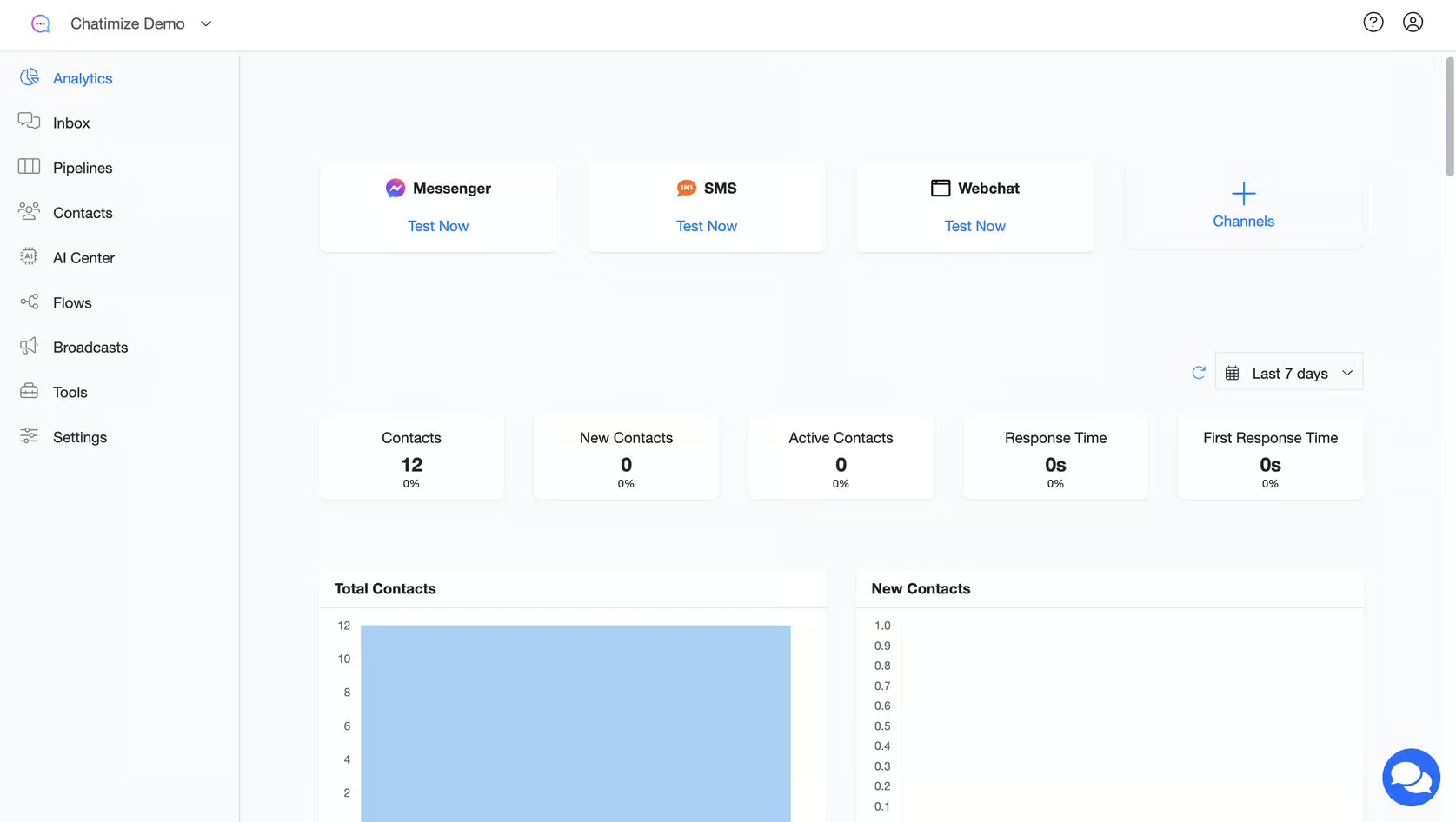
In Chatrace you have several tabs that help you manage your chat automations. These tabs include:
- Analytics – All the analytics for your automations.
- Inbox — Directly chat with your chatbot users
- Pipeline — Pipeline overview of your contacts
- Contacts – Overview of all the contacts who interacted with your chatbots
- AI Center — Where you create your AI Agents & AI Tools
- Flows — This is where your chatbot flows live
- Broadcasts – Send mass messages to your users.
- Tools – Access different tools in Chatrace, such as Rules, automatically replying to comments and more
- Settings – Control chatbot and account settings.
When creating chat automation, Chatrace uses a flow builder. Each automation you create in Chatrace can have one or more triggers and blocks.
A trigger is an action that starts the automation. It can be something like a user leaving a comment on your Facebook post.
The blocks are used to determine what happens once the automation starts. You can just click and drag these blocks to add them to the flow builder:

In Chatrace, you can add 9 blocks in the flow builder:
- Send Message – Sends an automated message to the user.
- Start Flow – Used to start the automaton flow.
- Action – Adds different actions and triggers to the automation flow.
- Conditions – Helps personalize conservation for a better experience.
- Send Email – Used for sending automated emails.
- Split Traffic – Helps implement A/B testing.
- Wait – Used to add a delay before sending a new message or reply.
- Landing page – Allows you to create a simple landing page
- Add notes – Used to add notes to blocks.
To simplify your flow building, click the Auto Organize Steps button. It will automatically organize all the steps in your chatbot flow:

Once you have created your chat automation, you can also test and preview it by creating a Draft link:

All in all, Chatrace has a pretty user-friendly interface where anyone can easily set up and test chatbot flows. But I did notice that many features are somewhat hidden in the interface and it can take some times before you fully understand how they all work together.
Ease of use How easy it is to build and change things once you're set up? On a scale of 1 to 5. How easy it is to build and change things once you're set up? On a scale of 1 to 5. | 4 |
| Setup difficultyHow much technical work it takes to get going. | Moderate |
| Average setup timeHow long until your first bot or AI agent is live. | 1 week |
| Set up with AIDescribe what you want in a chat, and an AI builds the bot or agent for you. | |
| Test before going liveYou can try the bot or agent yourself before customers see it. |
Want to compare Chatrace with 33 other chatbot platforms? Compare them here →
Chatbot elements
With Chatrace, it’s possible to use all the chatbot elements you need. And this is literally true: the platform ticks off any element that I have on my list.
I especially like the Conditions and Start Flow Feature. Use Conditions to personalize the conversations. This will improve the experience for your potential customers.
The Start Flow feature lets you build a scalable chatbot. You can link to other flows instead of copying the same flow over and over.
Contacts
When users chat with your bot, their info goes into the Contacts section of your Chatrace account.
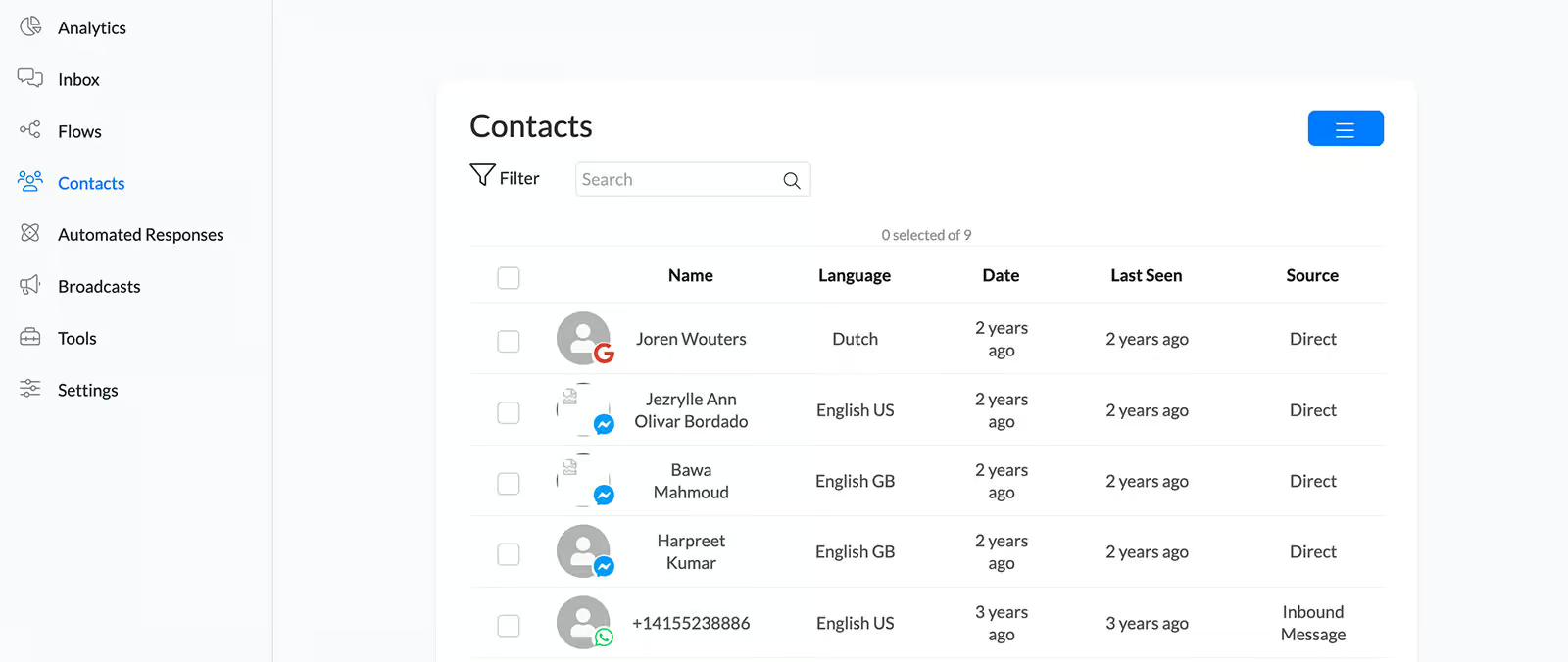
Clicking on any contact takes you to the Inbox. There, you can see the contact’s details and the full chat history:
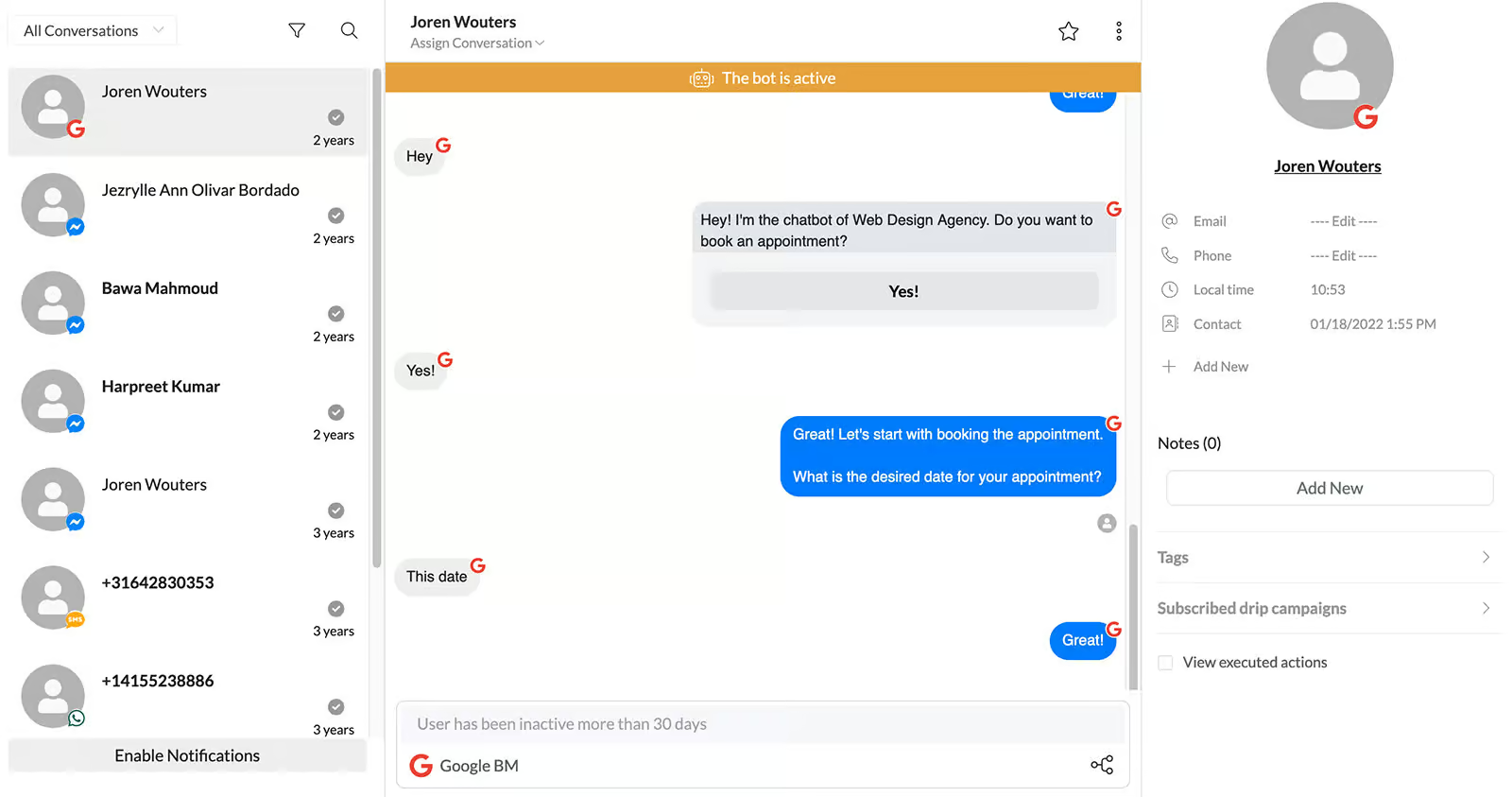
Within Chatrace, you can set up custom fields and tags, and assign these to your contacts. The chatbot can ask questions to users, and based on their replies, it will auto-assign the required custom fields or tags.
Additionally, you can also create pipelines in Chatrace, which is great for sales teams or if you want to use Chatrace as a CRM. Here, you can create stages and add contacts to a specific stage:
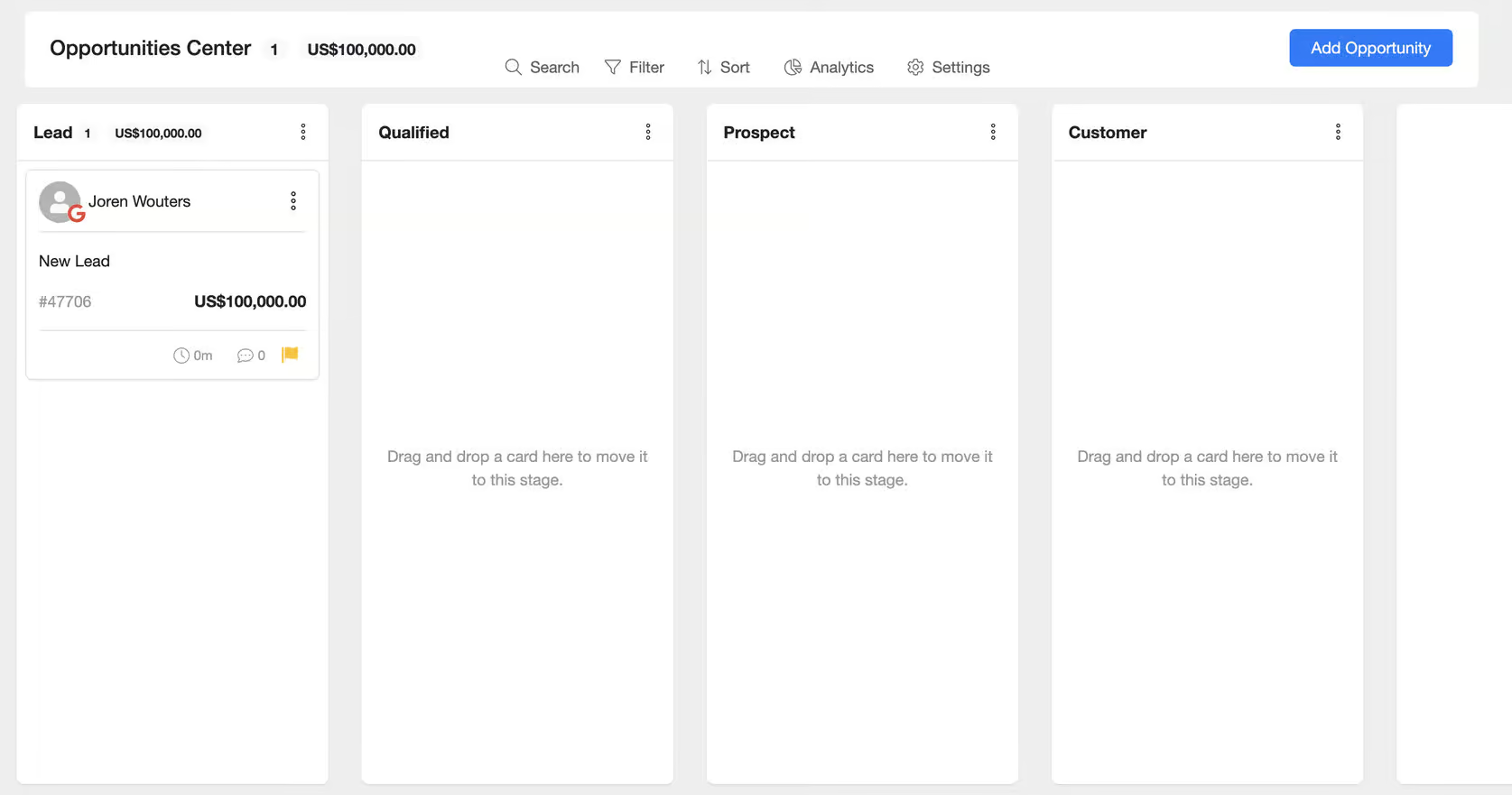
Moreover, it is possible to filter on contacts, but you cannot create segments of contacts.
Chatrace AI Features
Chatrace offers an AI Center that lets you create AI Agents and AI Tools.
When you create an AI Agent, you can give it a System message and give it access to AI Tools:
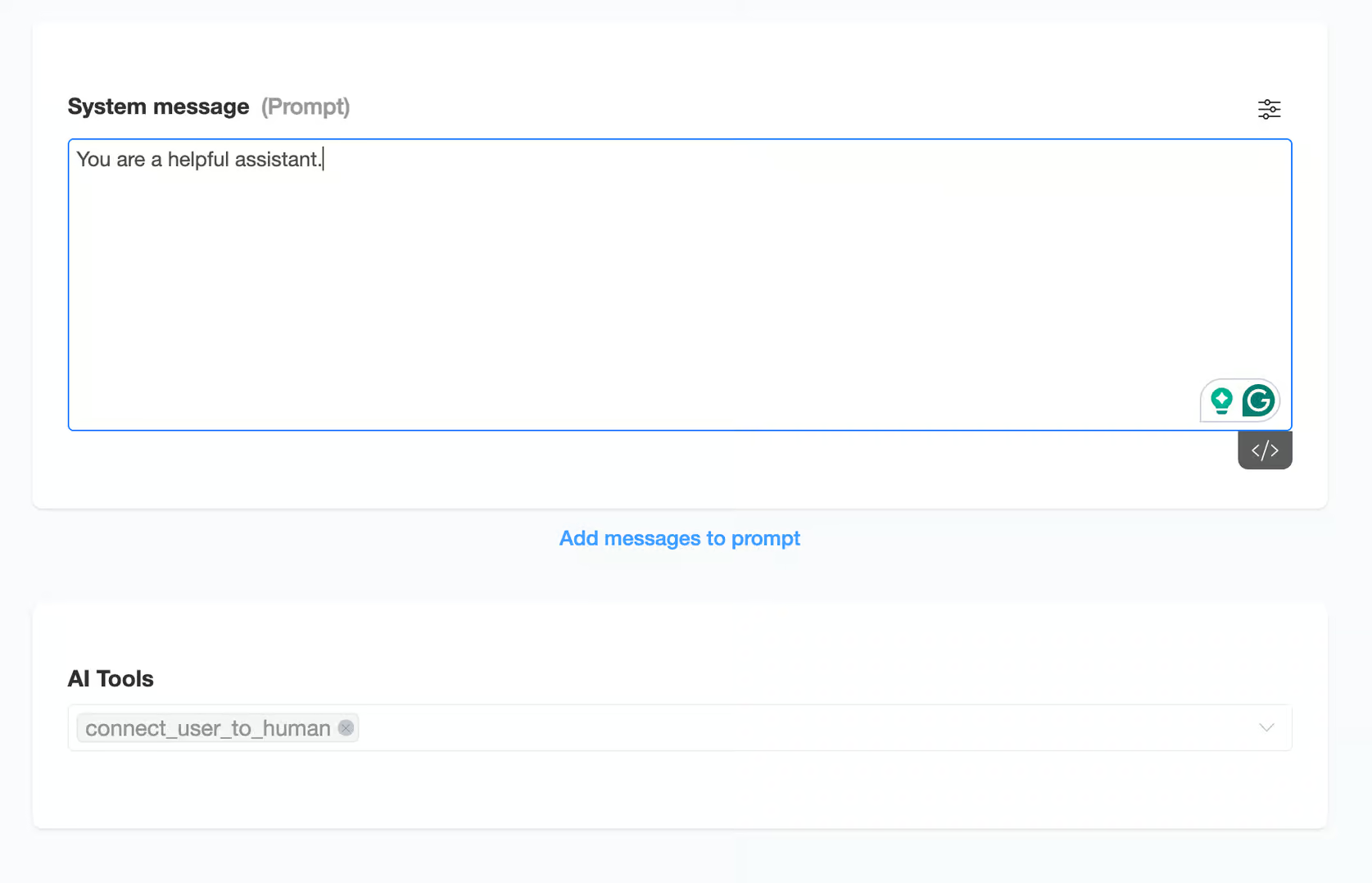
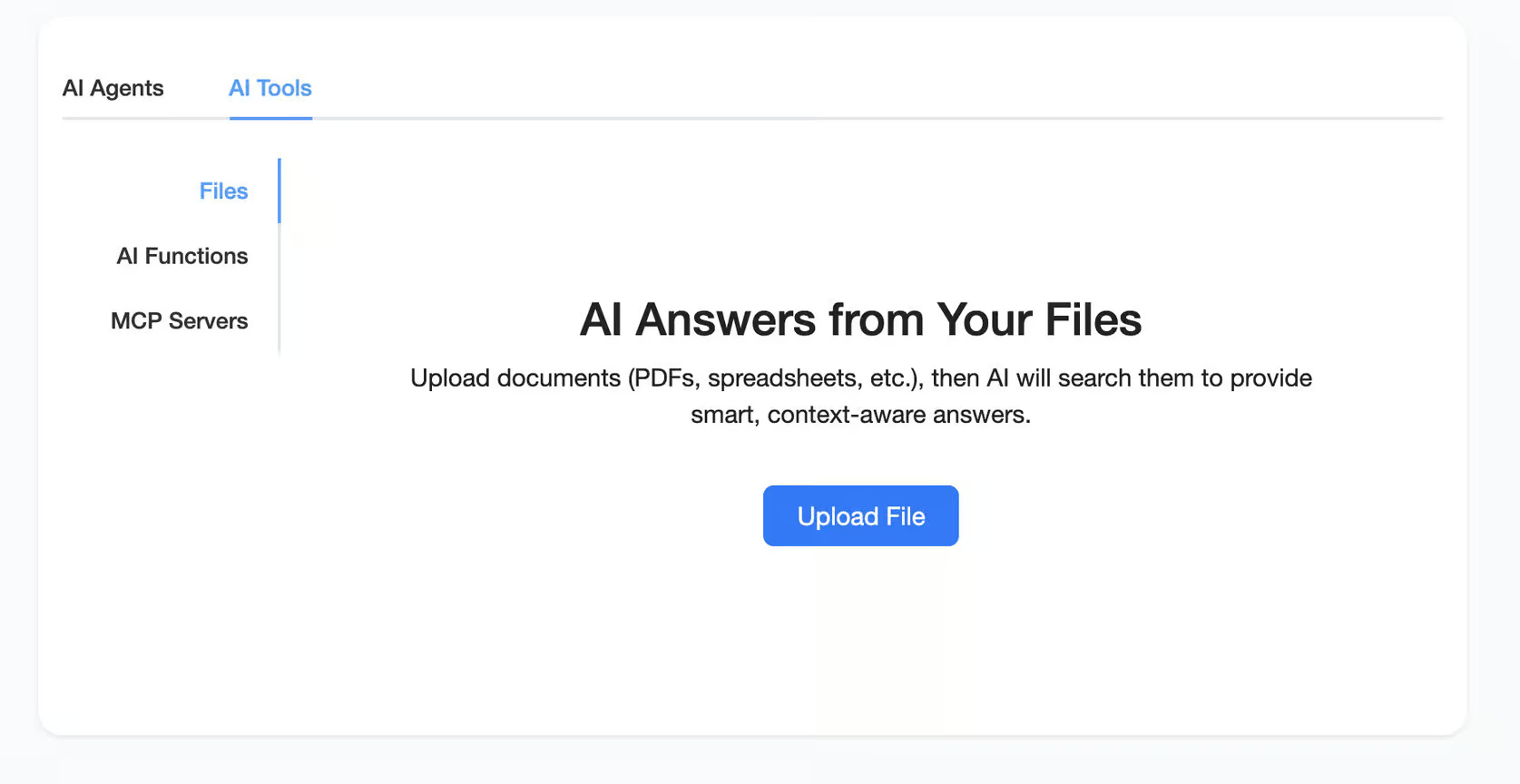
Chatrace offers three AI Tools:
- Files — You can train the AI Agent on files so it can automatically answer questions
- AI Functions — Collect data & trigger Chatrace flows
- MCP — MCP Server let your AI Agent do advanced tasks by connecting to external systems
If you want only want to reply to specific words, Chatrace also offers a simpler feature: Keywords.
With keywords, you can set up specific groups of keywords that your chatbot can automatically reply to. The bot response can be a text message or a flow. For most basic user inputs, this feature is more than enough to get your chatbot to respond appropriately:

But if you want further AI capabilities, Chatrace can be integrated with Dialogflow, ChatGPT, Google Gemini, and Claude. By doing so, the chatbot can be trained and configured to understand intent, and detect them in user messages. It helps the bot to provide accurate responses and become more interactive.
| Build an AI agentYou can build an AI agent that replies on its own. | |
| Train the AI on your contentThe AI learns from your website, documents or files. | |
| AI rulesTell the AI what it may and may not do, and which steps to follow. Also called guidance, guardrails or procedures. | |
| Let the AI perform actionsThe AI can do things in other tools, like book a meeting or update your CRM. | |
| Connect the AI to MCP serversThe AI agent can use any tool that has an MCP server, without a custom setup per tool. |
Live Chat
Chatrace has a built-in live chat, which allows you to transfer the conversation to a human agent at any time:
Chatrace also offers an iOS and Android app. It’s great if you want to manage your chatbot operations on the go.
| Hand over to a humanYour team can take over a conversation from the bot or AI, in an inbox inside the platform. | |
| AI copilotAI helps your team inside the inbox after a handover: it summarises the chat, tells you the customer's mood, and suggests replies. | |
| Auto-assignment rulesConversations go to the right teammate automatically. | |
| SLAsSet response-time targets and get alerted when a conversation is about to miss them. | |
| Connects to an external help deskHands conversations over to helpdesk platforms like Zendesk, Freshdesk, Intercom and similar. | |
| Contact profilesOne profile per person with their details and chat history. | |
| Custom fieldsAdd your own fields to a profile, like order number or budget. | |
| Merge contacts across channelsThe same person on WhatsApp and Instagram becomes one profile. |
Channels
Chatrace is an omnichannel chatbot platform that connects with:
- Websites
- SMS
- Telegram
- Viber
- Voice
For SMS, you need to connect your Twilio account. It will send and receive messages from users based on your chatbot flows.
Chatrace can also merge contacts across channels automatically. It does this based on a person’s phone number. If we have someone’s phone number on Instagram and they later message the chatbot on WhatsApp, Chatrace can identify them as the same person. It will then merge these two contacts into one.
| WebsiteCan you publish your chatbot on your website? | |
| WhatsAppCan you publish your chatbot on WhatsApp? | |
| FacebookCan you publish your chatbot on Facebook? | |
| InstagramCan you publish your chatbot on Instagram? | |
| TelegramCan you publish your chatbot on Telegram? | |
| SMSCan you publish your chatbot on SMS? | |
| EmailCan you publish your chatbot on email? | |
| SlackCan you publish your chatbot on Slack? | |
| VoiceAn AI agent can answer or make phone calls. | |
| WeChatCan you publish your chatbot on WeChat? | |
| ViberCan you publish your chatbot on Viber? |
Marketing
Chatrace provides a handful of marketing tools that can help you grow and expand your business.
You can add a widget to your website in the branding of your own website. You can also share links (Entry Points Links). These will guide your contacts to a specific flow in your website chatbot or another channel:

On Facebook, you can:
- Integrate Chatrace with Facebook Ads and target specific users
- Auto-reply to Facebook comments
- Use the Ref URL to get contacts to a specific chatbot flow
- Send one-time notifications
- Send Recurring Notifications
On Instagram, you can:
- Auto-reply to Instagram posts and comments
- Send automatic replies to users who mention your handle on stories
On WhatsApp, you can:
- Send WhatsApp message templates
With Chatrace, you can also send bulk messages to users with the Broadcasts feature. Select the channel and the group of users you want to broadcast to, and the chatbot will send the message to all selected users. This is perfect for promotions, special offers, discounts and more:

Messages can also be scheduled to be delivered at specific times. You can configure the message to be sent to all users simultaneously or at different hours based on their time zones.
Likewise, you can also add users to a sequence that will send them messages with a specific time interval in between.

| BroadcastsSend one message to many contacts at once. | |
| SequencesSend a series of messages over time. | |
| Proactive website messagesSend a visitor a message based on what they do, like 90 seconds on the pricing page. | |
| Comment to DM on FacebookSend a DM to someone who comments on your Facebook post. | |
| Click-to-message Facebook adsRun Facebook ads that open a chat with your bot. | |
| Facebook Ref URLA link that opens Messenger and starts a specific flow. | |
| Comment to DM on InstagramSend a DM to someone who comments on your Instagram post or reel. | |
| Follow to DM on InstagramSend a DM to someone who follows you on Instagram. | |
| Story mention reply on InstagramReply in DM when someone mentions you in their story. | |
| WhatsApp message templatesSend approved WhatsApp templates, for broadcasts or for follow-ups outside the 24-hour window. |
Integrations
Chatrace provides integrations with other powerful tools, such as:
- Zapier
- Make (formerly Integromat)
- OpenAI (ChatGPT)
- PayPal
- WooCommerce
- Mailchimp
- Microsoft Calendar
Moreover, you can also send API calls from Chatrace and Chatrace also provides its own API that you can trigger from other applications.
| Direct integrationsHow many built-in connections to other tools does it have? | 1-10 |
| ZapierDirect integration with Zapier, one of the largest integration platforms in the world. | |
| MakeDirect integration with Make (formerly Integromat), one of the largest integration platforms in the world. | |
| API CallsSend data to or get data from another tool's API, for example inside a flow. |
Chatrace Pricing
Chatrace has a Free plan with basic features and a Pro Plan starting at $14/month.
Free Plan
The free plan of Chatrace comes with:
- 100 contacts
- Limited features
- You can publish your chatbot on Facebook, Instagram, WhatsApp, Google, Telegram, Viber and SMS
This platform is great if you want to create a small chatbot or want to check if Chatrace is the right fit for your business.
Pro Plan
To access all the advanced features of Chatrace, you’ll need the Pro plan, which starts at $39/month:
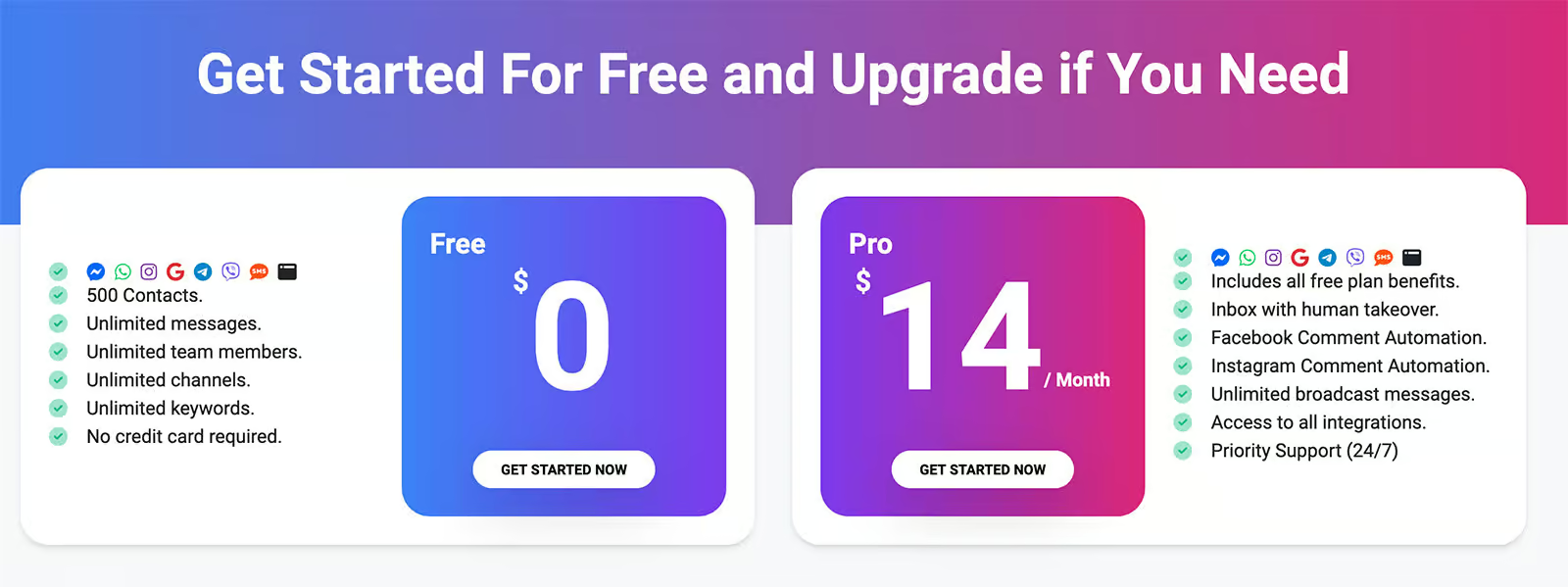
If you want to scale your chatbot to more than 3000 users, additional charges will apply based on the number of contacts.
With all Chatrace plans you get a 7-day free trial. And after that, there’s also a 30-day money-back guarantee. These risk-free offers are perfect for testing the chatbot in detail before deciding to invest money.
White Label Version
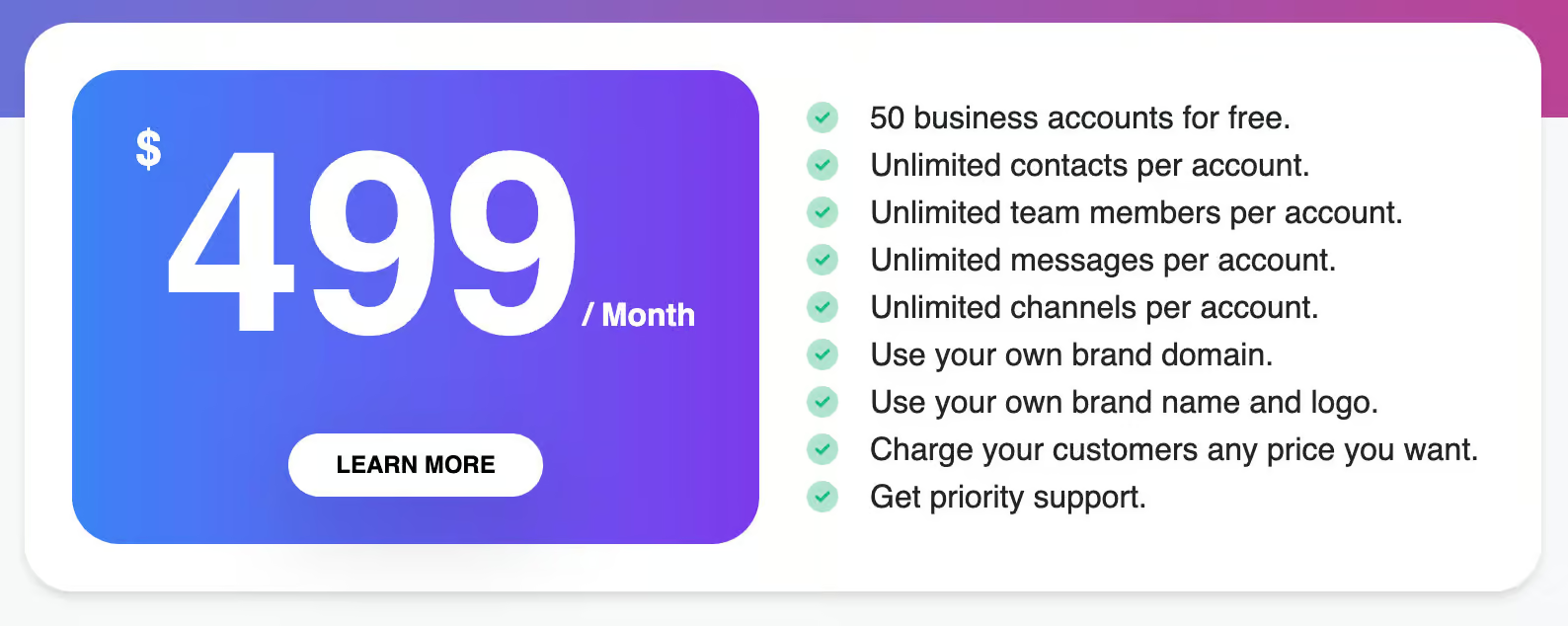
Chatrace also offers a white label version at $499/month.
This plan is mainly focused for large businesses that want to use the chatbot platform under their own brand name and logo:
| Starting priceThe lowest price you can start with per month, including seat minimums (in US dollars). | $39 per month |
| Free planDoes the chatbot platform provide a free plan? | |
| Free trialDoes the chatbot platform provide a free trial? |
Analytics
In Chatrace, your dashboard is your analytics page as well. This is where you can check and manage your chatbots across all channels and get a quick overview of all your contacts. Scrolling down, you’ll see graphs representing:
- Total contacts
- New contacts
- Messages received over specific periods

Moreover, you can analyze what your average response time was and how fast your support agents were responding to questions:

And how many questions were handled by the bot and how many by humans:

Further below, there are pie charts that display user segmentation data based on source, gender, and language:

The simple overview of the analytics page makes it easy to go through the data and gain insights into your chatbot’s performance and user activity. Moreover, you can also track inside the flow builder how many people got a message, opened or clicked on it.
While the analytics feature of Chatrace isn’t all too impressive, I do appreciate the simplicity and clean display of data and info.
| DashboardAn overview of conversations and contacts. | |
| Ask AI about your dataAsk questions about your analytics in a chat and get the answer from an AI. | |
| Flow analyticsSee how people move through each flow and where they drop off. | |
| AI Resolution rateHow many conversations the chatbot resolved on its own, and how often it had to fall back or hand over. | |
| Knowledge gapsShows questions the AI couldn't answer, so you know what to add to its knowledge. Also called suggestions. | |
| Conversion trackingTracks sales, bookings or sign-ups that come from conversations. | |
| Team performanceResponse times and workload per teammate. | |
| Custom reportsBuild your own reports or dashboards. |
Is Chatrace worth it?
So, should you use Chatrace to create your chatbots?
After this Chatrace review, I can say – it depends. Let me explain:
Chatrace has lots of great features that you want in a chatbot platform: easy-to-use flow builder, manye chatbot elements, and overview of contacts. It also has a built-in AI Agents & AI tools, decent analytics, and connects to multiple channels.
That being said, I am hesitant to use Chatrace for my own chatbot and my own clients. This is because the company is untransparent. For example, I could not find any information on the people working at Chatrace.
After asking the founder, I was told that he didn’t want to disclose any information about them (so I could not verify it). For me, that brings in too much risk for the stability of my own chatbot and I am therefore hesitant to use it.
My recommendation: test it out for yourself and see whether it is working for you, feature-wise it’s a very promising platform.
Frequently Asked Questions
What is Chatrace pricing?
Chatrace offers two main pricing plans: a Free plan and a Pro plan starting at $14/month.
The Free plan is ideal for small chatbots or businesses wanting to test the platform, with limited features and up to 100 contacts. The Pro plan, which allows access to advanced features, starts at $14/month and scales based on the number of contacts, with additional charges for larger user bases.
There’s also a white-label version available at $499/month for larger businesses.
Is Chatrace free?
Yes, Chatrace has a free plan. This plan gives you unlimited access to the platform for up to 100 contacts.
If you want it for more contacts, you need to go with their Pro plan (starts at $14/month).
Does Chatrace have an API?
Yes, Chatrace provides its own API. It enables users to connect with other applications or services seamlessly. Also, you can use Zapier, Make (formerly Integromat), and other integrations to expand your chatbot’s capabilities through API calls.
This feature is particularly useful for developers looking to create custom workflows and integrations beyond the native tools of Chatrace.
What is the difference between Chatrace and Silfer Bots?
Chatrace was formerly known as Silfer Bots. While the platform has undergone a rebranding, it has maintained its core functionalities and added new features to improve usability. If you were familiar with Silfer Bots, you’ll find that Chatrace offers similar capabilities with more polished integrations and an enhanced interface.
What are the best Chatrace alternatives?
Several alternatives to Chatrace are available if you’re looking for different features or pricing structures. Popular Chatrace alternatives include ManyChat, Botpress and Tidio. Each platform offers unique features that may suit different business needs.
