

Looking for an easy way to add AI chat, workflows, and live chat to your website and other channels? Then Crisp might be a good fit.
I tested Crisp myself to see how easy it is to set up its AI agent, train it on real data sources, build workflows, and manage conversations in the inbox.
Below, I’ll share what’s good, what’s not so good, and whether Crisp is the right fit for your business.
Our Verdict
Our Verdict
Crisp Chat is a strong all-in-one platform for teams that want AI chat, workflows, and helpdesk in one place.
It’s super easy to set up and use. And it gives you a lot: an AI agent you train on your own knowledge and connect to your other tools, a visual workflow builder, and an omnichannel inbox. Plus, you get a wide range of channels and integrations.
During testing, the platform also felt very flexible. You can go AI-first with Hugo, use workflows to structure conversations, or combine both.
It’s also affordable, especially for larger support teams. You can try it with a 14-day free trial, and paid plans start at $45/month.


Pros
- Very easy to set up and use
- Train an AI agent on your own knowledge
- Connect the AI to your other tools with actions and MCP servers
- Flexible setup with AI and workflows
- Omnichannel inbox for 11 channels, including Instagram, Facebook and WhatsApp
- Many integrations, including Shopify, Pipedrive, Salesforce, Mailchimp, Zapier and Make
- Strong value for larger support teams
Cons
- AI chatbot only available on the $45/month plan
- Limited marketing features for Facebook, Instagram, and WhatsApp
- The workflow builder needs the Essentials plan ($95/month)
What is Crisp Chat?
Crisp is an AI-powered customer support platform. It brings a unified inbox, automated workflows, and a mix of AI and human support together in one tool:
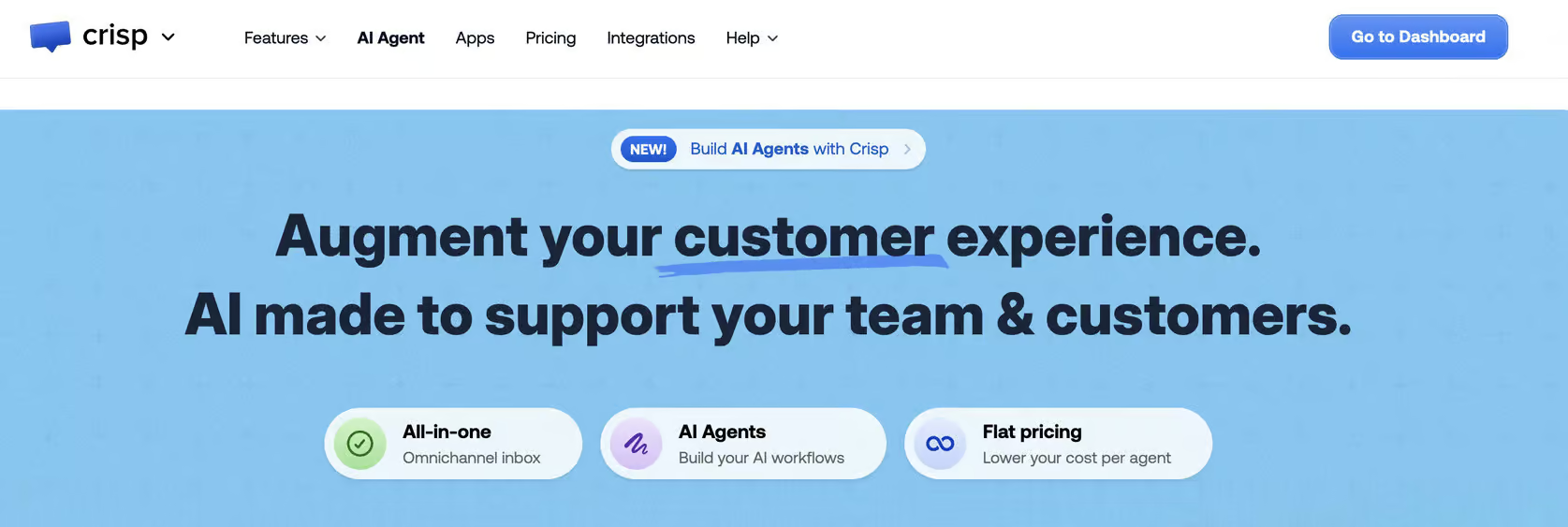
That makes it a great fit for businesses that want to use AI for customer support, but still want human agents to step in and manage conversations.
Crisp at a Glance
Here are the most interesting features that I found in Crisp while testing it:
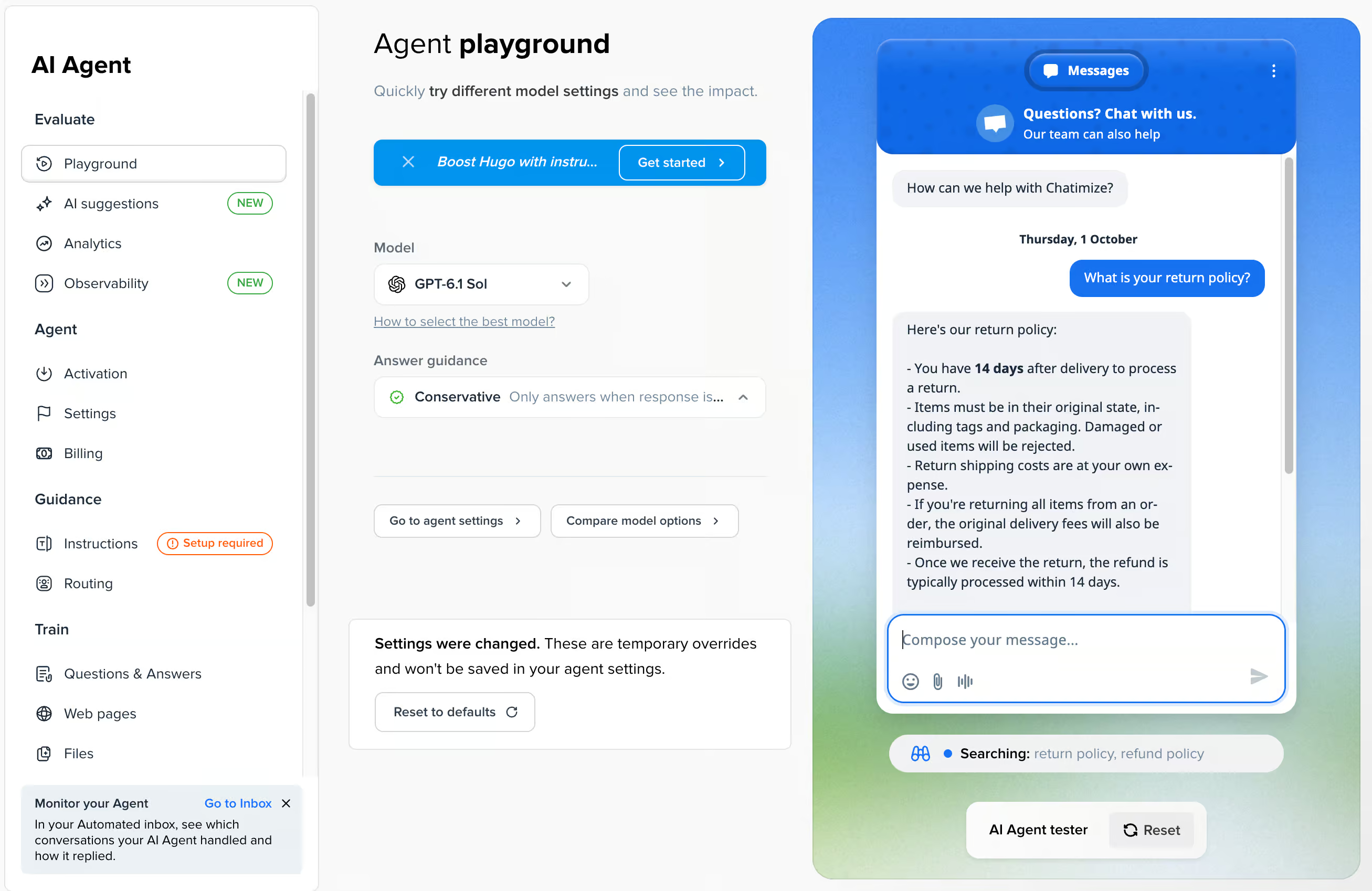
You can train its AI agent, Hugo, on your own knowledge, and it answers customer questions automatically. When I asked about the return policy, Hugo replied with the right details straight away:
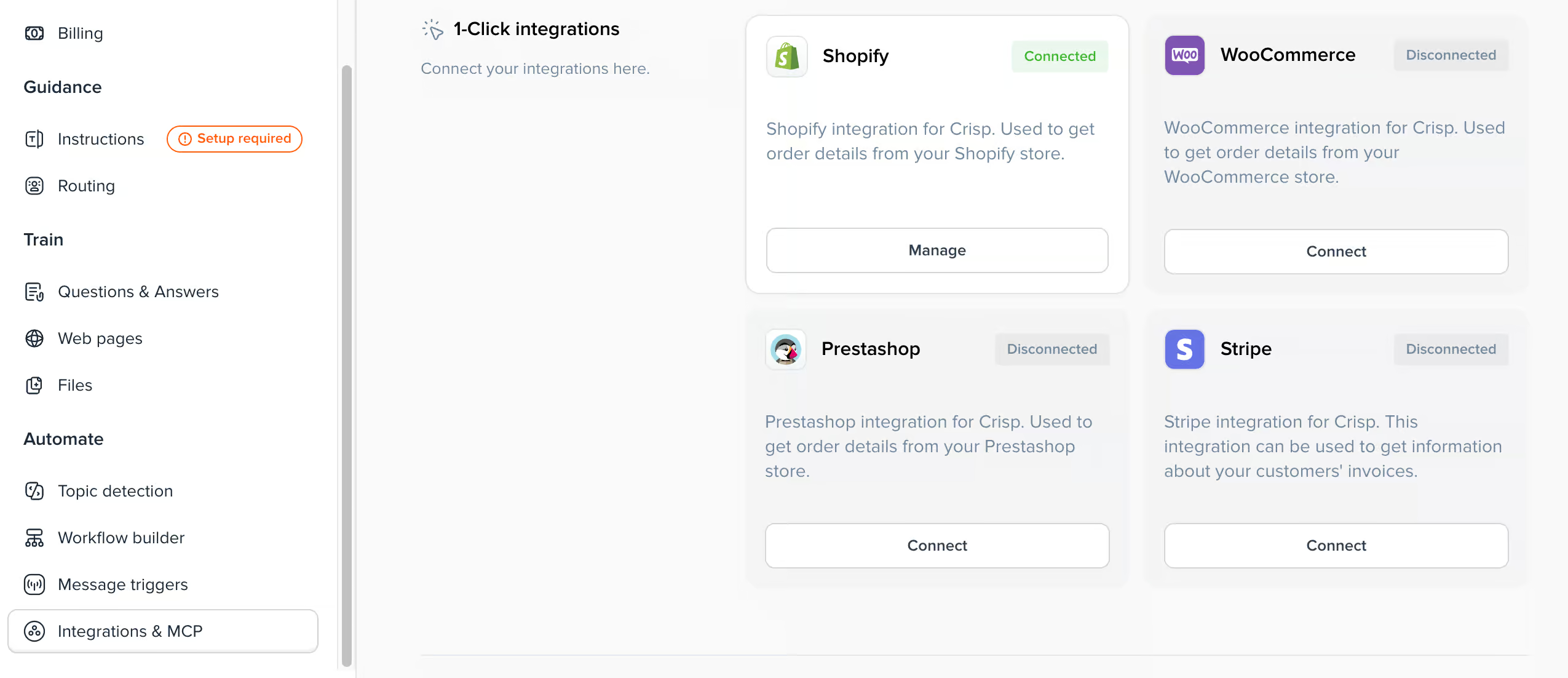
Hugo connects to your other tools with one-click integrations and MCP servers. With Shopify, for example, it can look up order details for your customers:
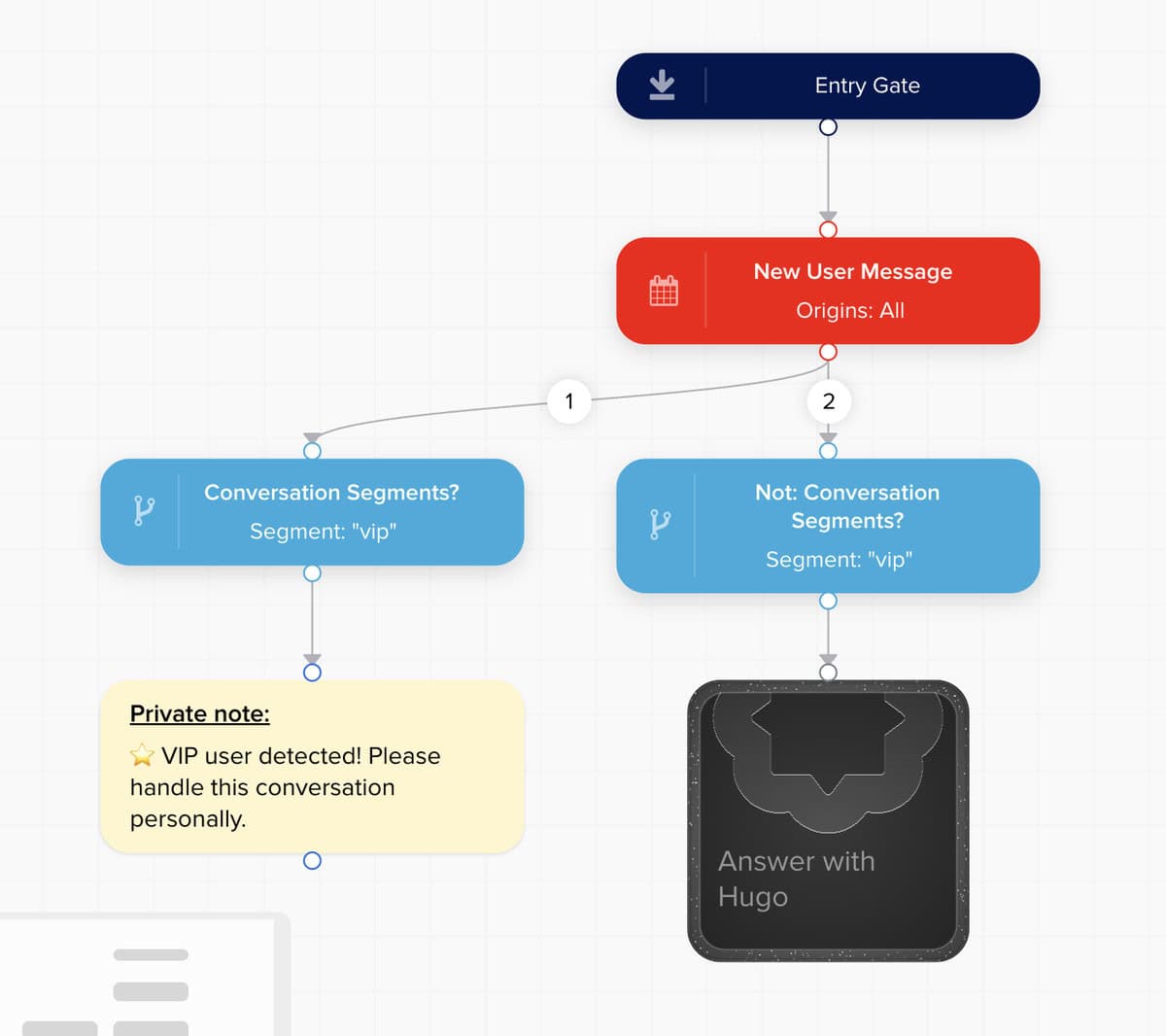
With the visual workflow builder, you can give conversations more structure. Use workflows inside your AI agent, or build a flow-based chatbot without AI:
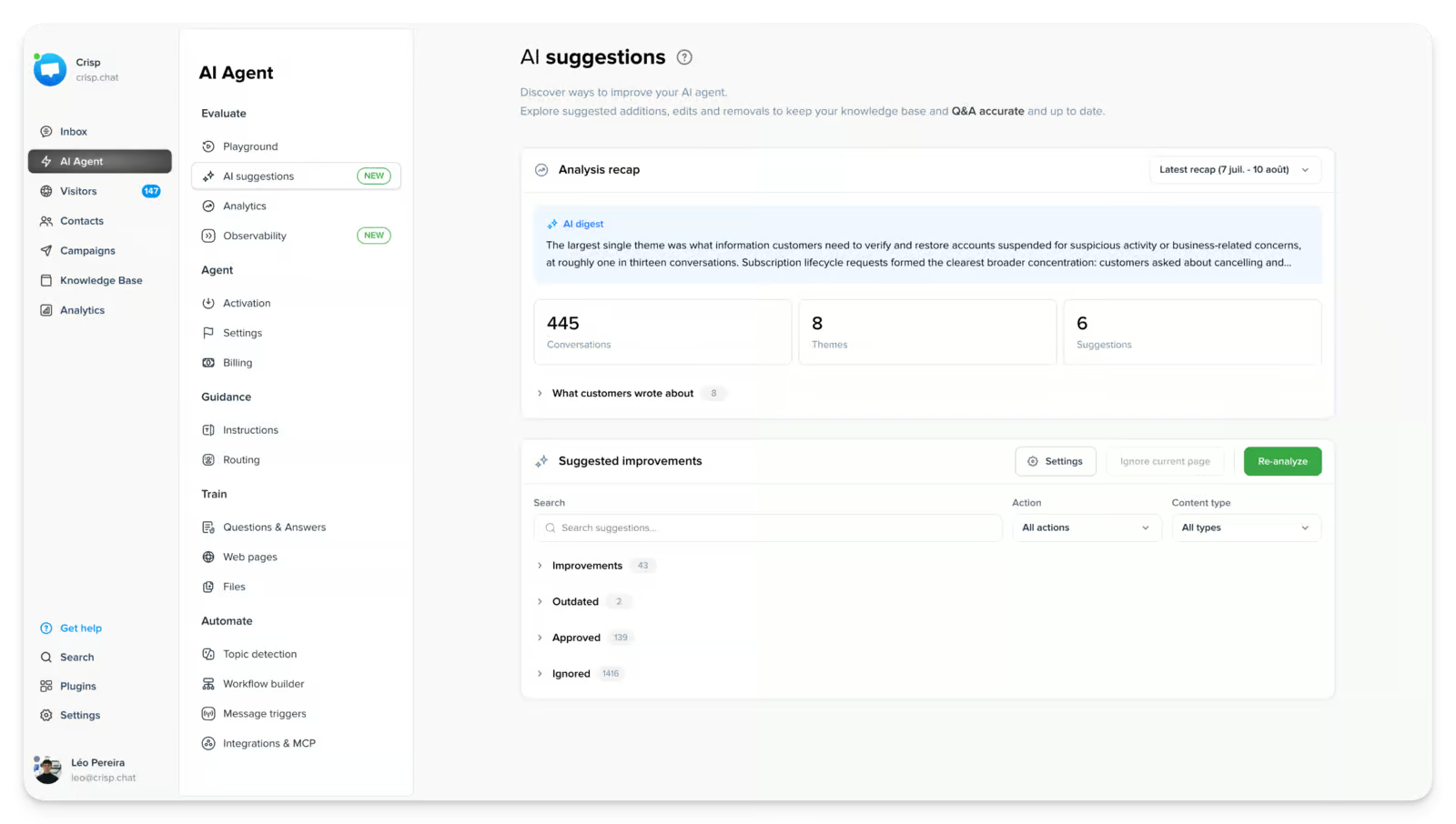
AI suggestions help you improve Hugo’s answers. Crisp looks at your customer conversations and suggests what to add, update or remove in your knowledge:
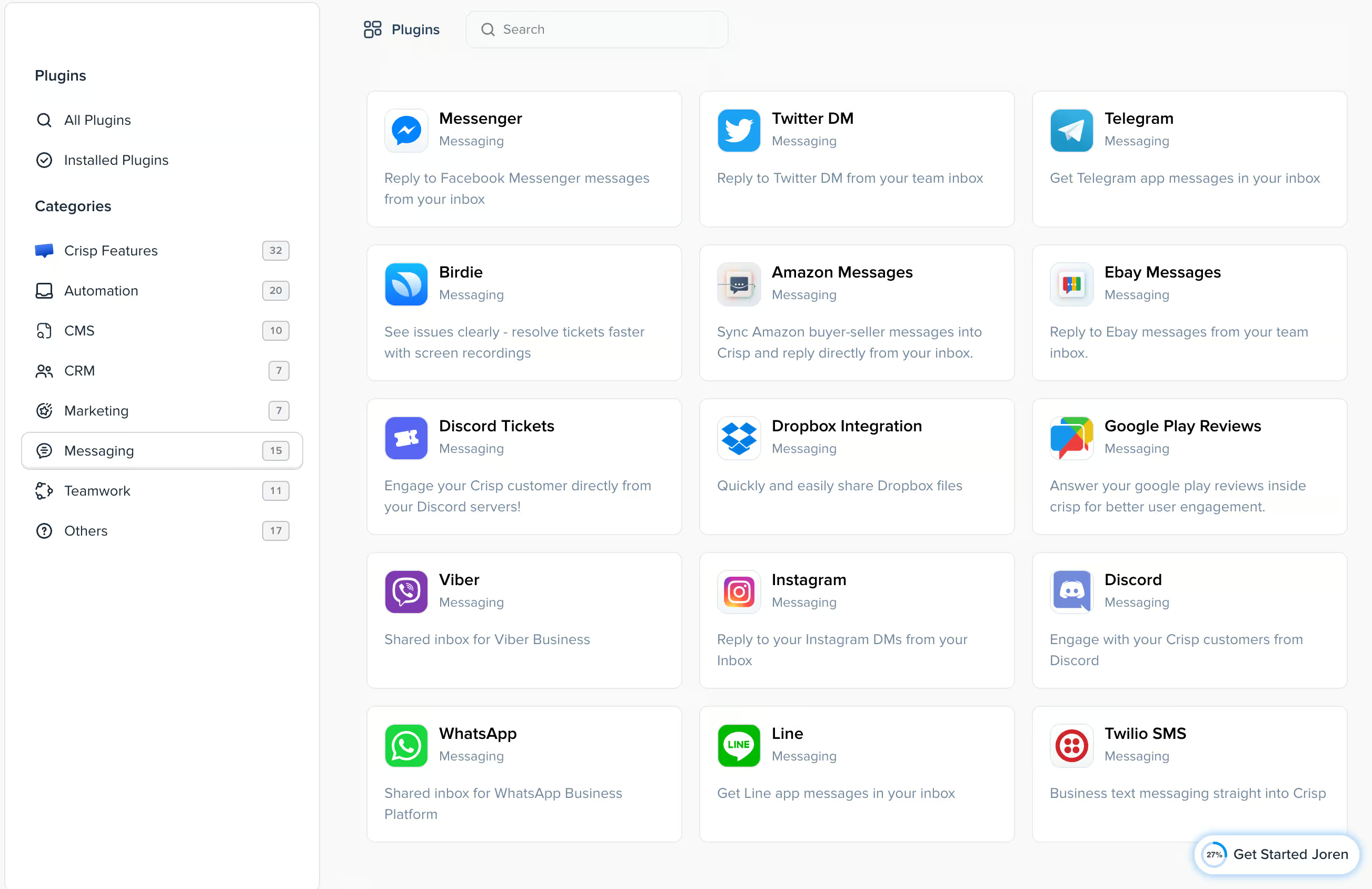
Original source: Crisp All your conversations land in one built-in inbox, and you can connect it to 11 channels, like WhatsApp, Instagram and Messenger:
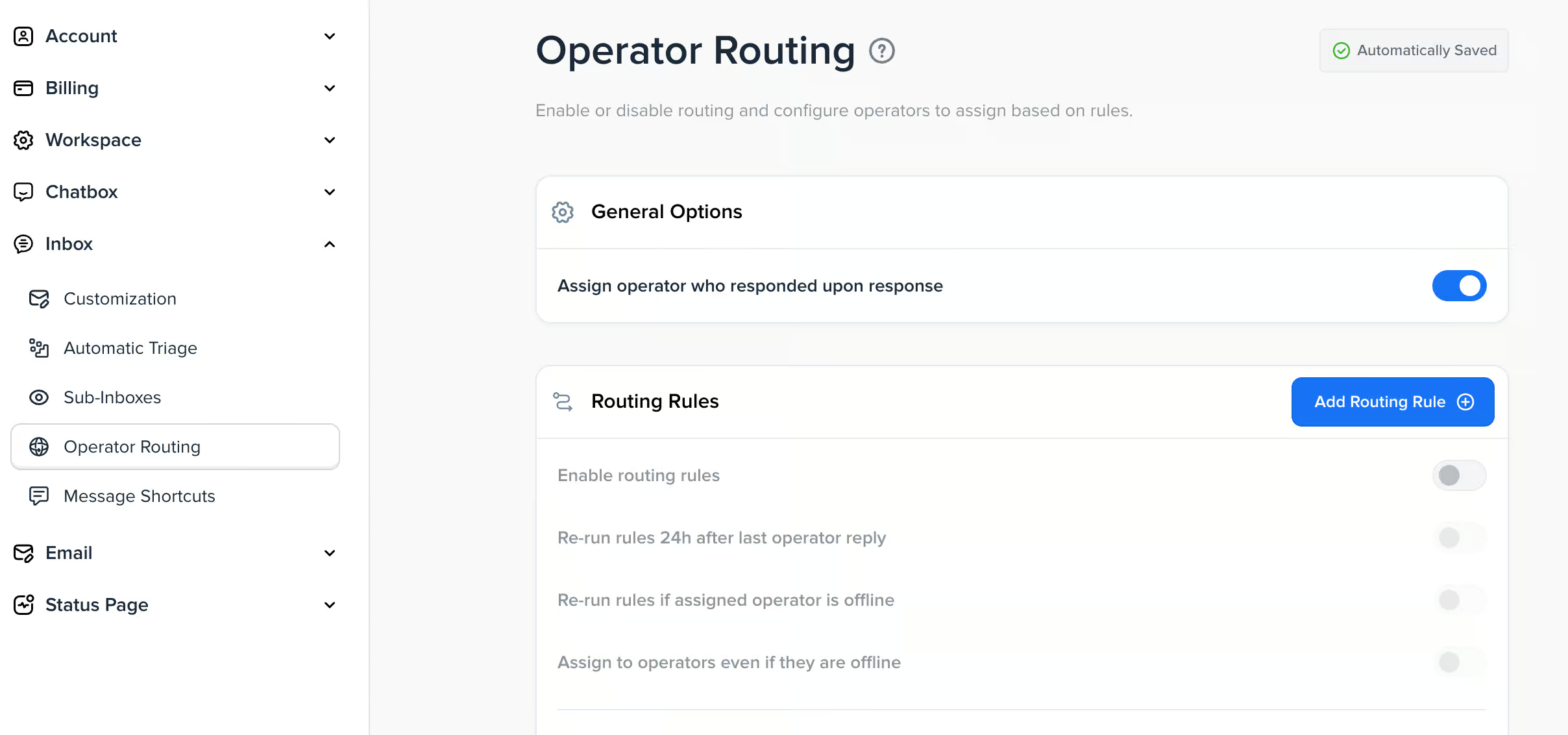
Routing rules send each conversation to the right person or team automatically:
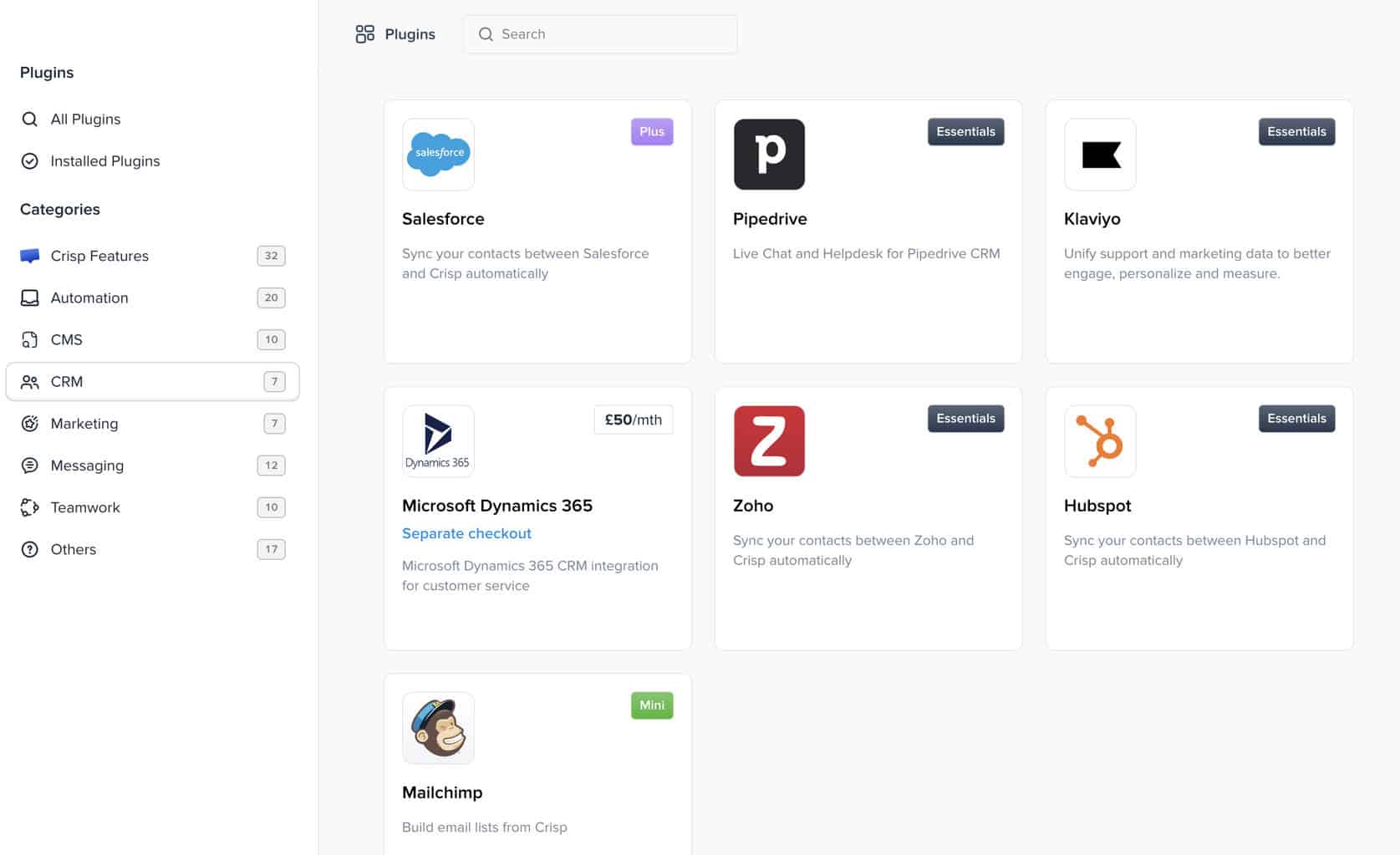
It also has many integrations with other tools, like Salesforce, HubSpot, Mailchimp, Zapier and Make:
How to get started with Crisp
It’s super easy to get started with Crisp.
One thing I liked during testing is that Crisp immediately guides you toward the setup style that fits your team best. Right at the start, you choose whether you want to go AI-first or human-first:
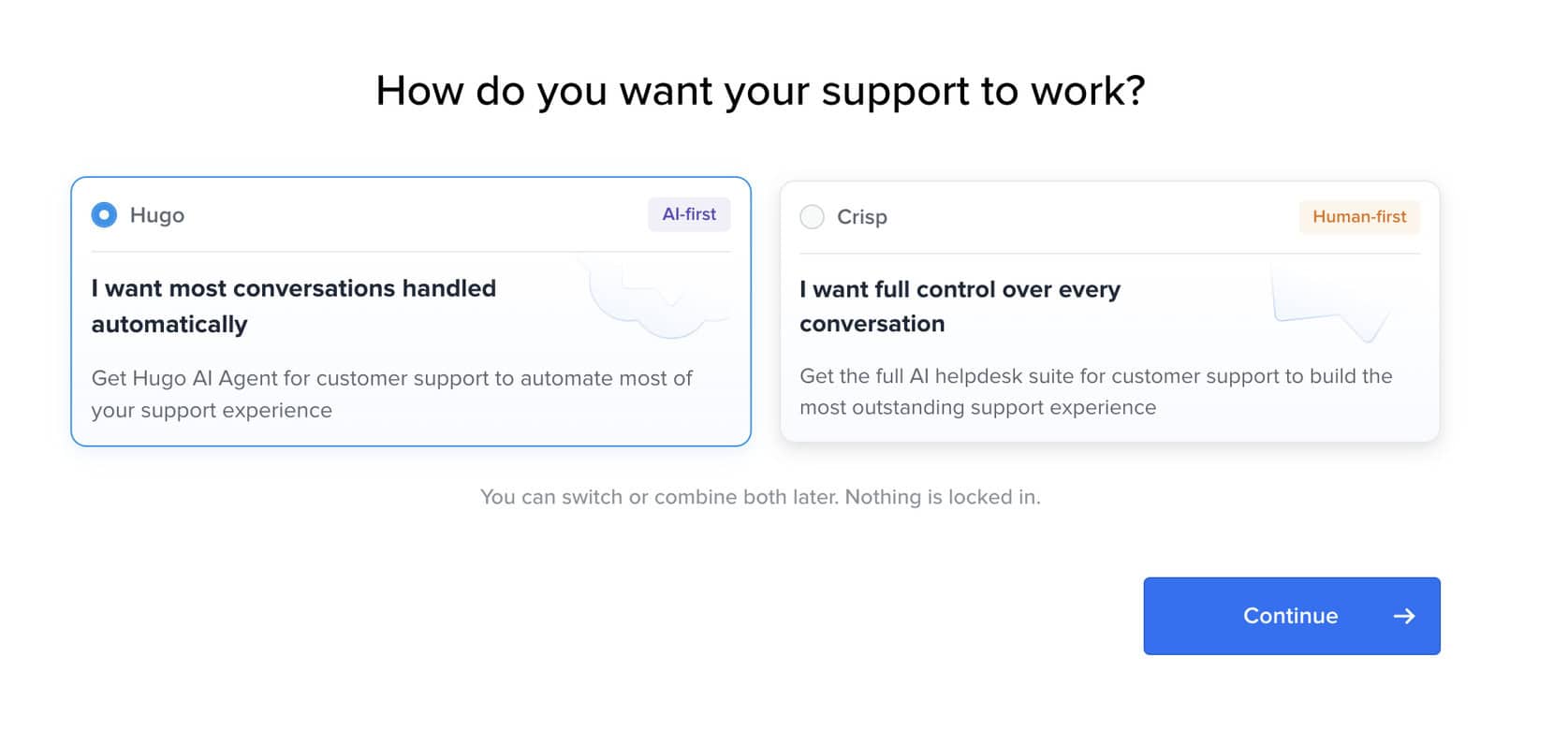
If you choose AI-first, Crisp focuses on letting Hugo, its AI agent, handle most conversations automatically. If you choose human-first, the platform is set up more around live agents, with AI added where useful.
That choice makes the onboarding very simple. And you’re not locked into one approach, which is great. Crisp lets you combine both later on.
After choosing AI first, you can set up Hugo and train it on your data. Crisp lets you train Hugo on knowledge from:
- Websites
- Files
- Questions and answers
- Helpdesk articles in Crisp
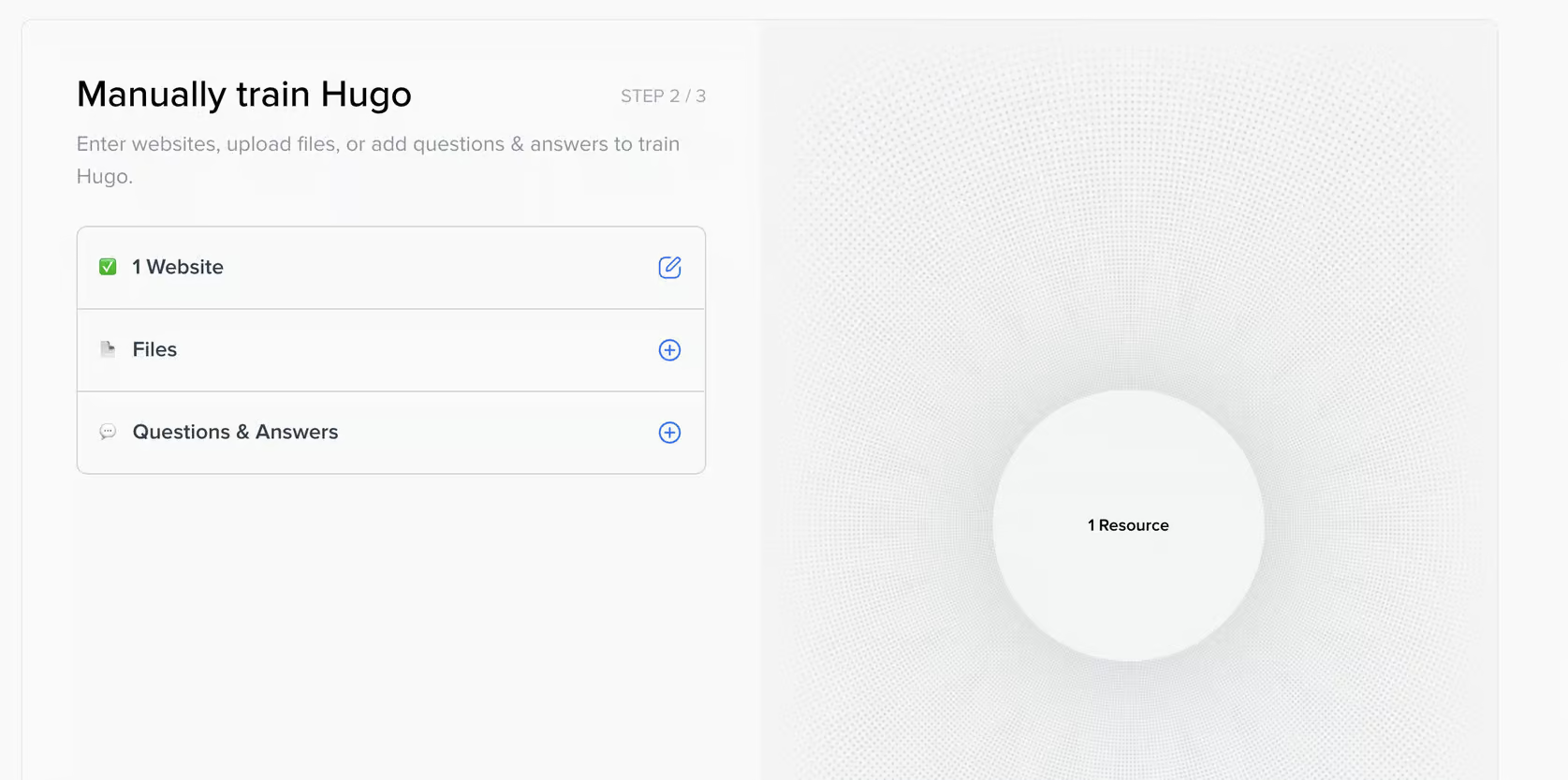
This is the foundation of the AI agent. During testing, I trained Hugo on all three types of sources, and the setup process was smooth.
Once you’ve added your knowledge, Crisp asks you to configure the agent itself.
You can give it a name, describe your business, and choose how cautious or assertive you want its answers to be:
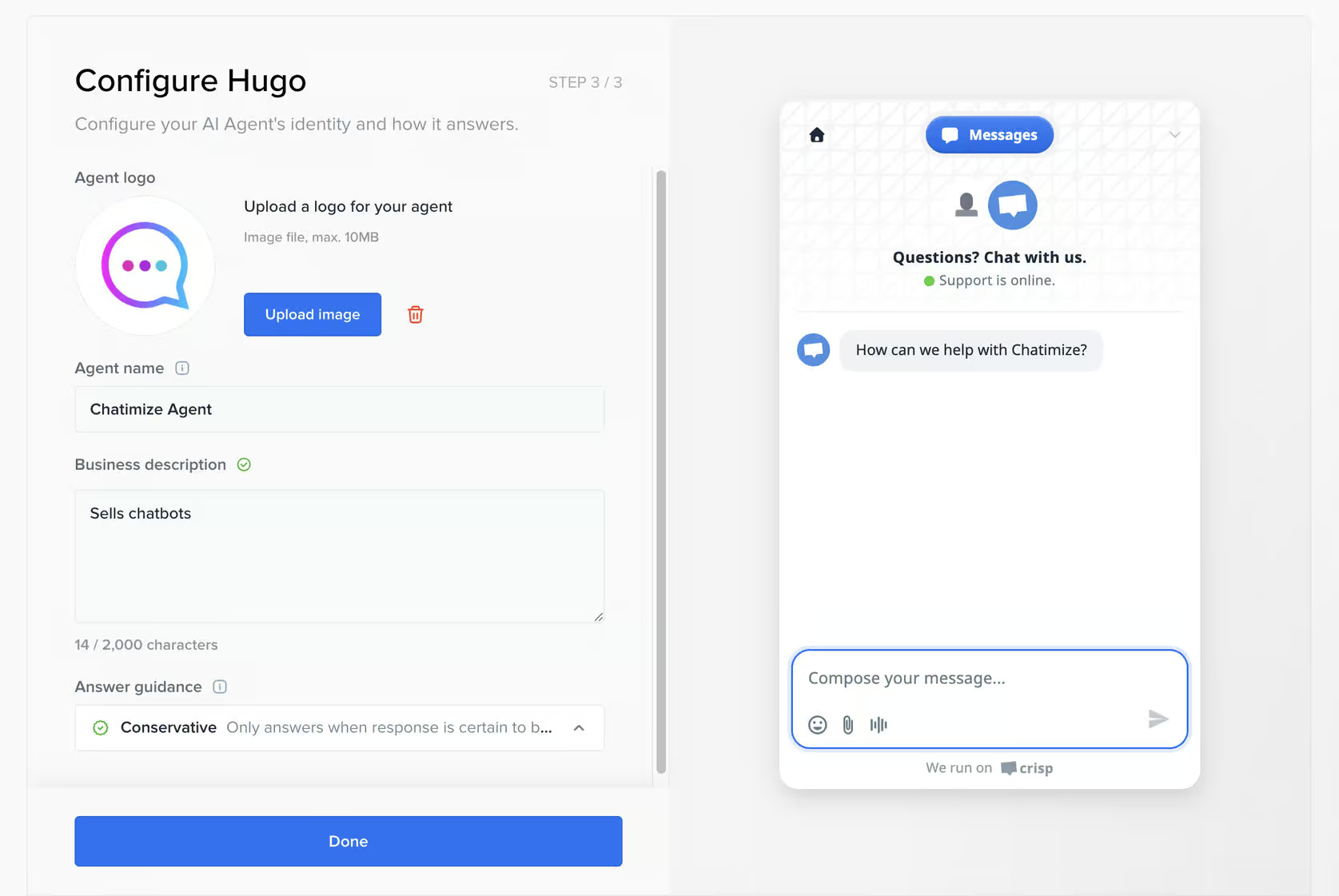
This helps influence how the chatbot responds and behaves.
After that, Crisp automatically creates the chatbot for you, and you can test it right away in the built-in playground:
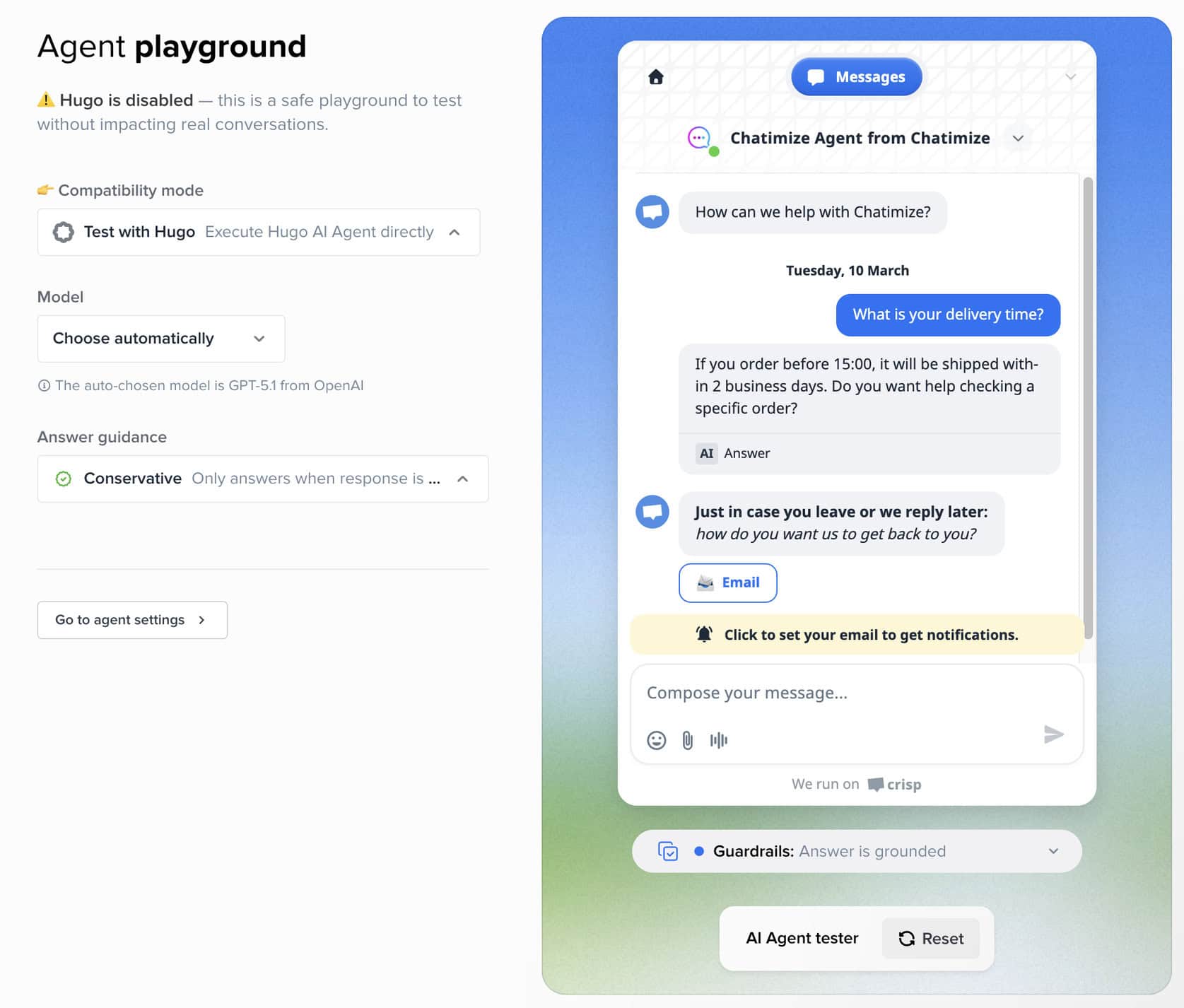
You don’t need to go through a complicated publishing process just to see how the chatbot performs. You can immediately ask questions, check the answers, and get a feel for how well Hugo understands your content.
You can also connect Hugo to your store right away. Crisp has one-click integrations for Shopify, WooCommerce, PrestaShop and Stripe. So Hugo can look up things like order details for your customers:
I connected Shopify this way, and it was super easy to set up.
Crisp also gives you a second way to build your chatbot, using workflows.
So instead of Hugo handling everything, you can build a visual flow that decides what should happen in different situations. For example, you can create flows that send VIP users to a human agent while everyone else is handled by Hugo:
Or you can use workflows for specific cases, like refund requests, lead qualification, or routing.
This is what makes Crisp so flexible. You’re not forced into one chatbot setup. Instead, you can:
- Let Hugo answer most conversations automatically
- Use workflows to structure conversations more tightly
- Combine both depending on your use case
All of that makes Crisp a great fit for teams with different support styles. Smaller teams can let the AI do most of the work, while larger support teams can create more controlled flows and handoffs.
Ease of use How easy it is to build and change things once you’re set up? On a scale of 1 to 5. How easy it is to build and change things once you’re set up? On a scale of 1 to 5. | 4.5 |
| Setup difficultyHow much technical work it takes to get going. | Easy |
| Average setup timeHow long until your first bot or AI agent is live. | 1 hour |
| Set up with AIDescribe what you want in a chat, and an AI builds the bot or agent for you. | |
| Test before going liveYou can try the bot or agent yourself before customers see it. |
Want to compare Crisp with 33 other chatbot platforms? Compare them here →
Crisp AI Features
Crisp’s AI features are built around Hugo, its AI agent. With this agent, you can train the AI on your knowledge, and then it can automatically answer customer questions.
You can set up Hugo with these seven features:
- Knowledge training
- Instructions
- Routing
- Workflows
- Connecting it to other tools
- Topic detection
- AI suggestions
Let’s take a closer look.
Knowledge training
The first step is training Hugo on your content.
You can train it on:
- Questions and answers
- Websites
- Files
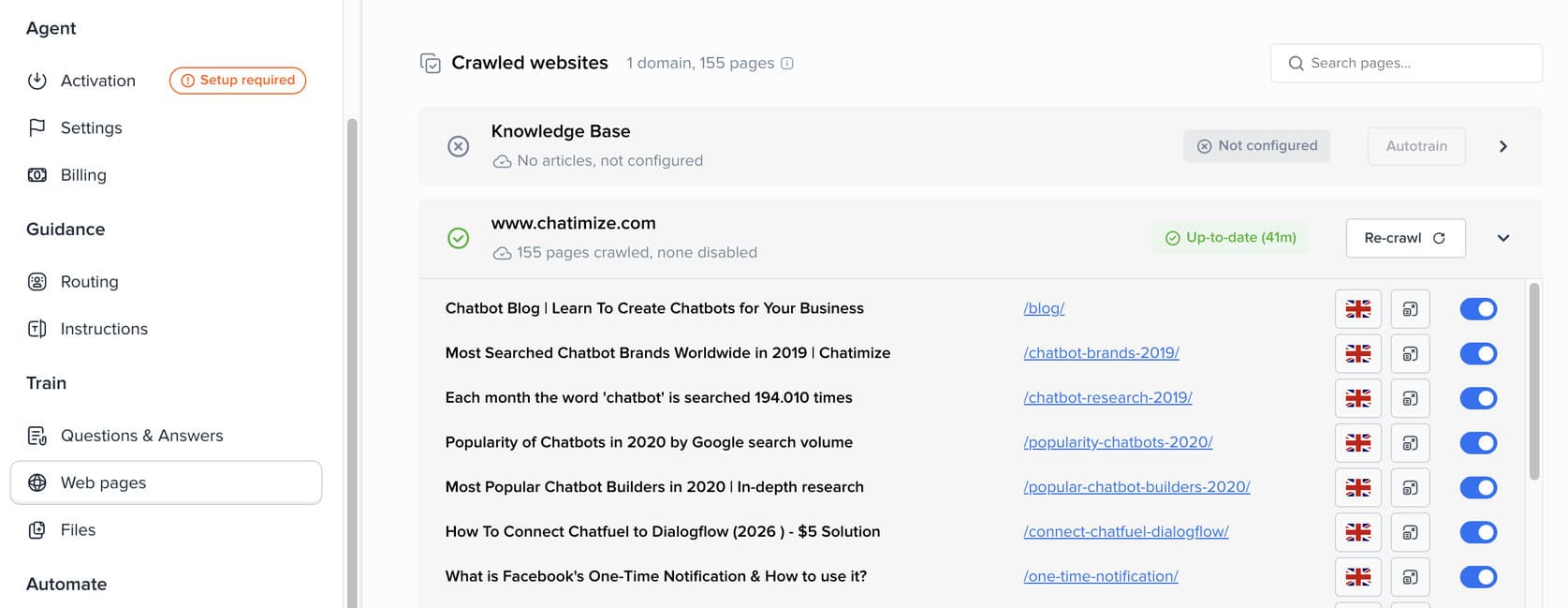
This gives Hugo the knowledge it needs to answer customer questions accurately. During testing, I used all three training options, and they worked well.
For most businesses, website training will probably be the main starting point. But the ability to also add files and Q&A pairs makes the knowledge base more flexible.
Add instructions and guidance
Once Hugo knows your content, you can guide how it should behave.
Crisp lets you create custom instructions for specific situations. For example, you can tell the AI to ask follow-up questions when someone wants to downgrade their plan, instead of just giving a generic response:
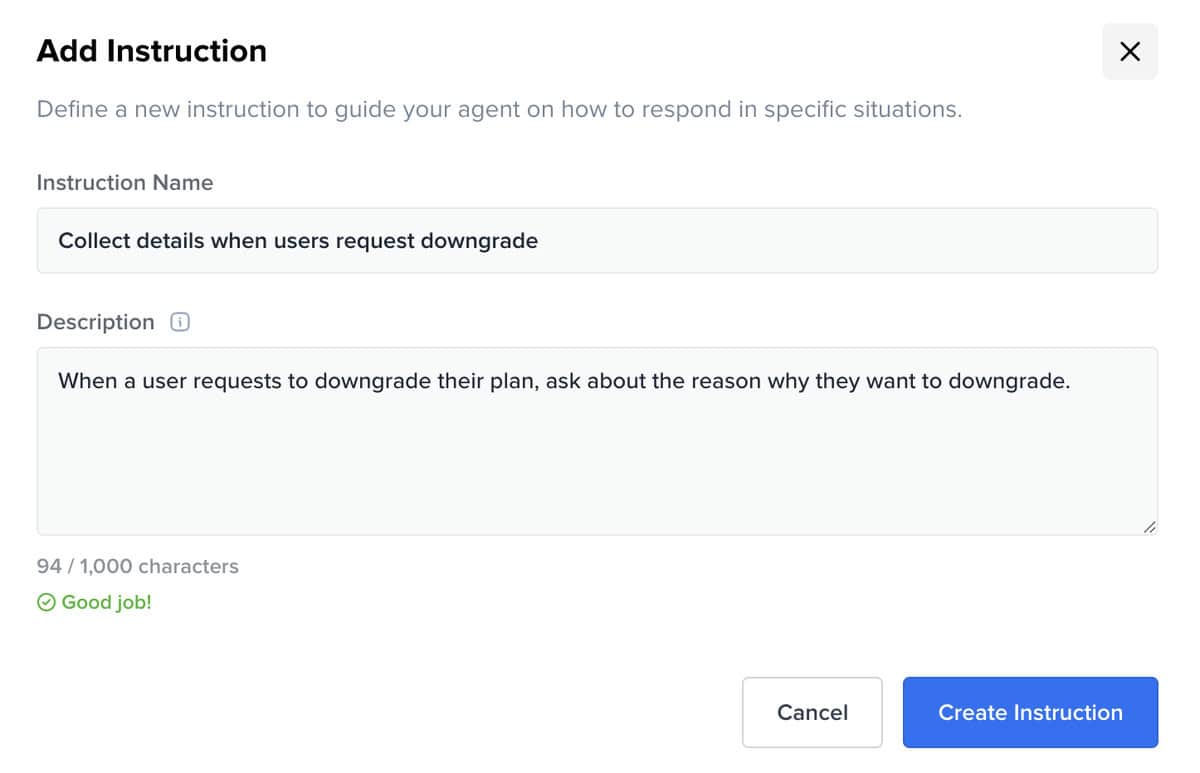
This is useful because it gives you more control over how the AI handles sensitive or high-value conversations. So Hugo isn’t just answering based on your knowledge base. It can also follow your preferred support logic.
Use routing rules for handover
Another useful feature is routing.
With routing rules, you can decide when a conversation should stay with Hugo and when it should be passed to a human agent or another destination.
For example, Crisp includes an escalation rule that routes the conversation when:
- Hugo can’t find an answer
- The user becomes frustrated
- The user asks for a human
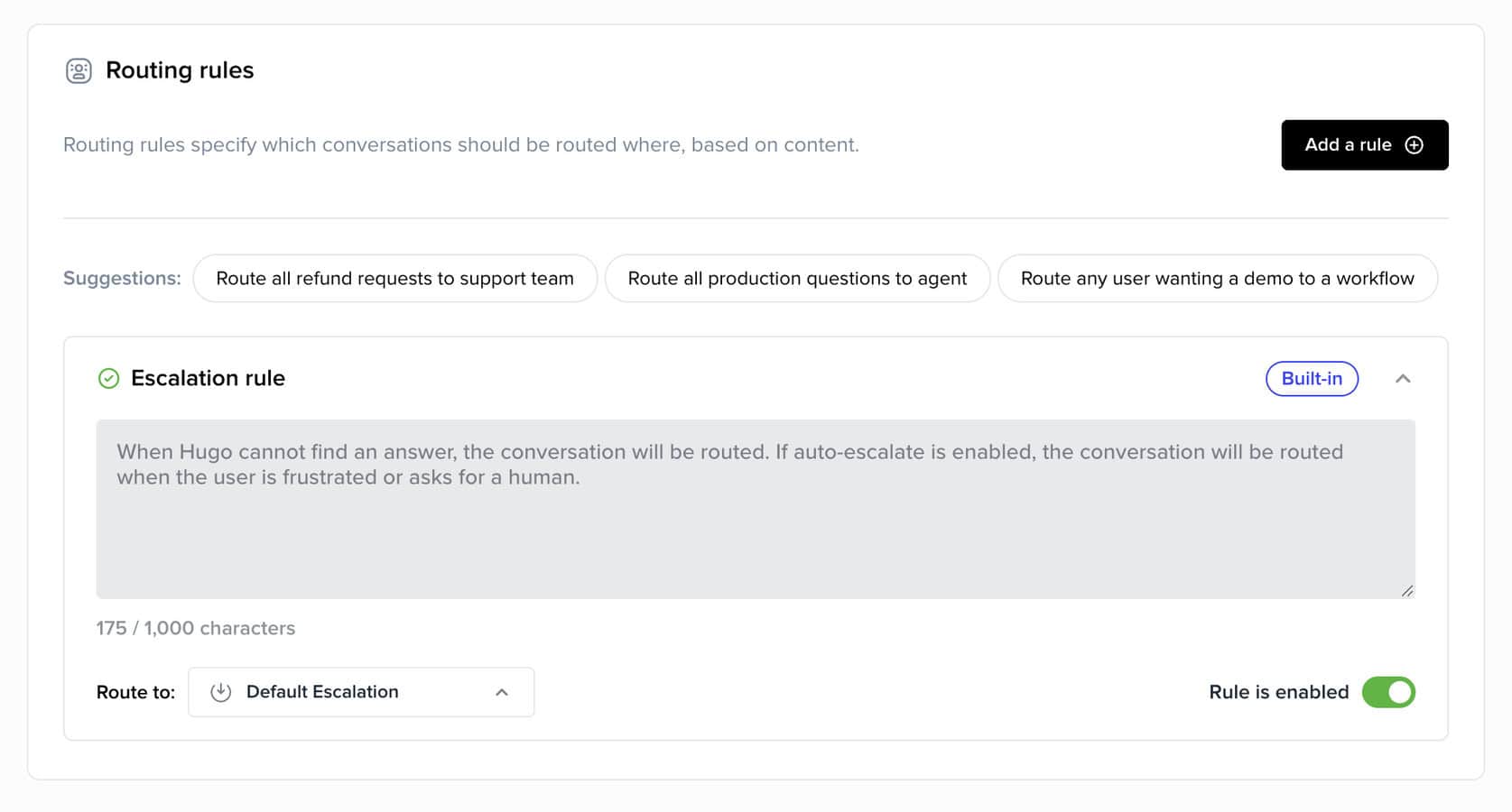
This is great for real support teams. You don’t have to choose between AI and human support. You can combine both and decide when each one should take over.
Combine AI with workflows
Crisp also lets you combine Hugo with workflows.
You can build a workflow that uses Hugo only at certain moments. But you can also start with Hugo and send users into a workflow when they match a specific use case, like a refund request.
For example, someone asking for a refund could be moved into a structured flow with buttons and follow-up steps. That’s often better than relying on free-form AI responses alone:
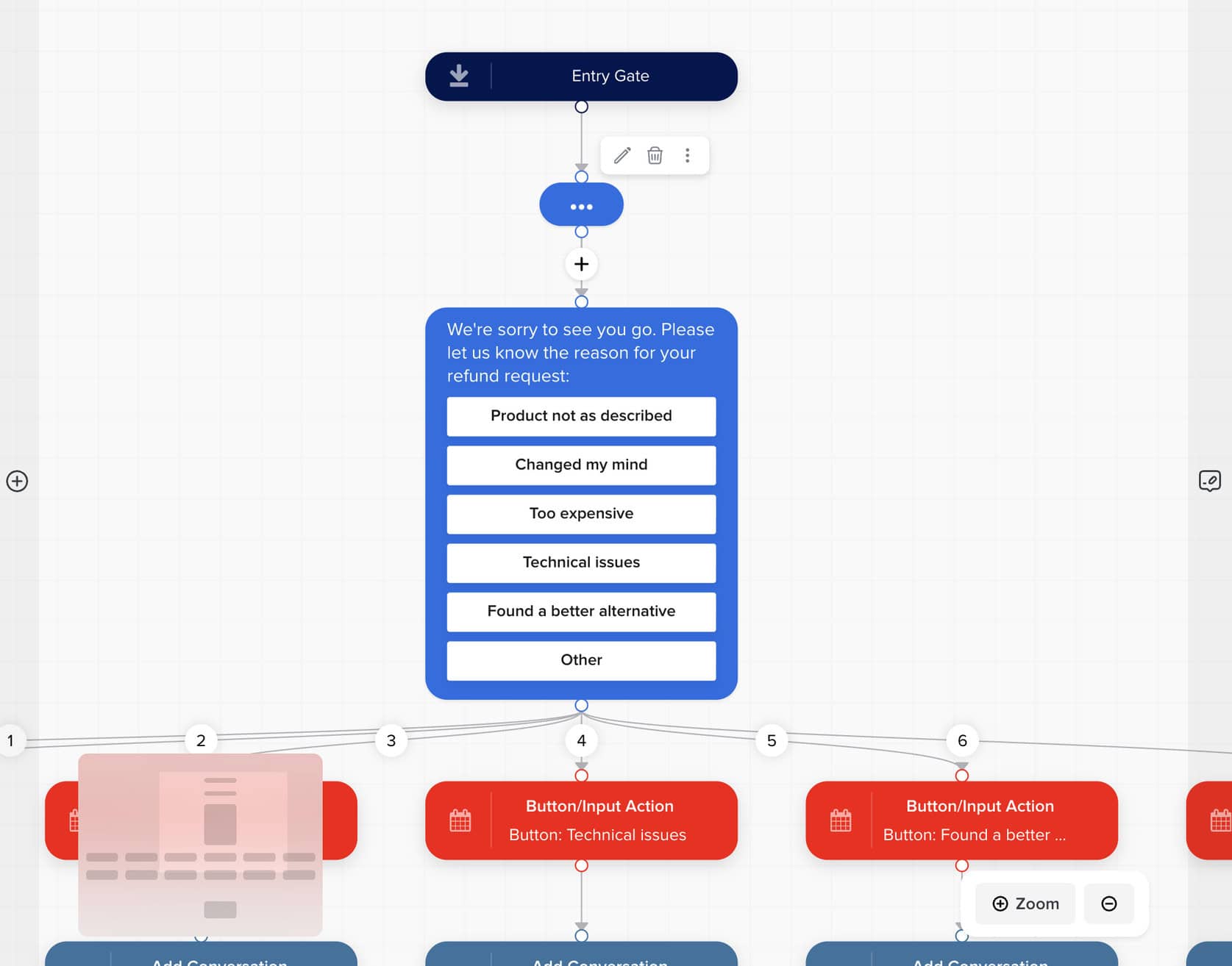
Crisp is very flexible here. You can go:
- AI first, with workflows when needed
- Workflow first, with AI inside the flow
That gives you more control over how automated or structured you want the customer experience to be.
Connect Hugo to your tools
Hugo becomes a lot more useful when it can work with your other tools.
The easiest way to do that is with one-click integrations. Crisp has four of them: Shopify, WooCommerce, PrestaShop and Stripe.
I set up the Shopify integration, and it was super easy. With it, Hugo can get a customer’s order details and update their shipping address:
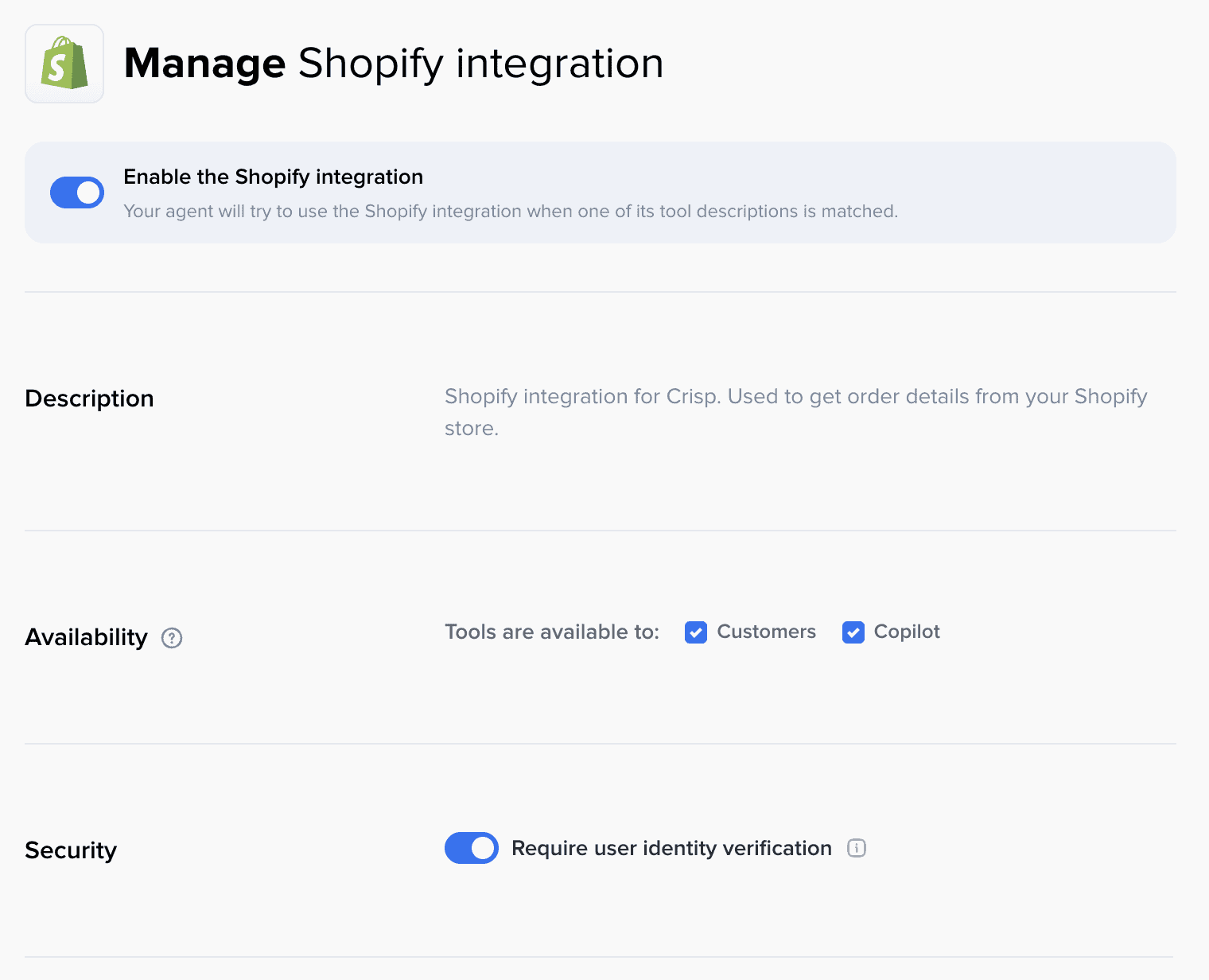
And you’re not limited to those four. You can also connect Hugo to MCP servers, which more and more tools offer to let AI agents work with them. So Hugo can work with pretty much any tool that has one.
That’s especially valuable for ecommerce and support teams that want the AI to handle real customer requests, not just answer questions.
Automatically detect conversation topics
Crisp also supports automatic topic detection.
This feature automatically tags conversations with the right topic, such as billing issues, technical support, or feature requests:
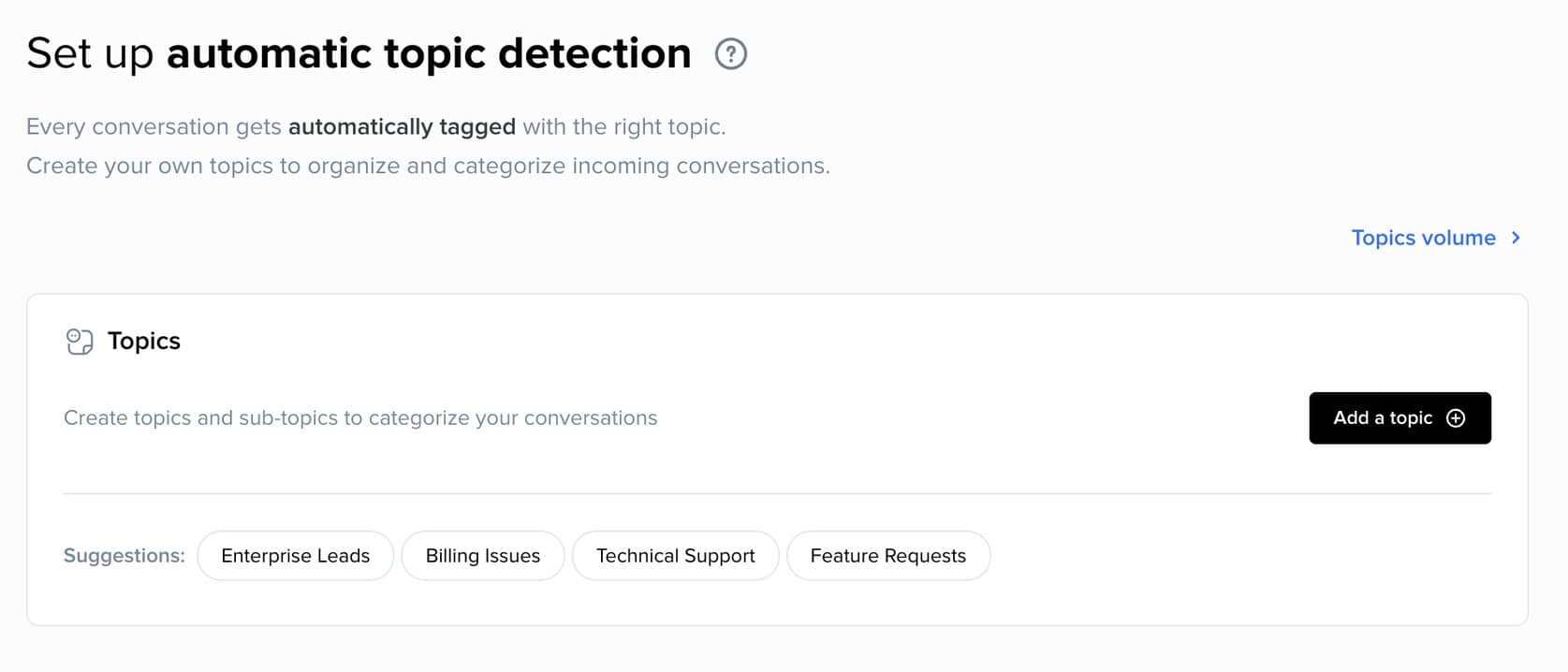
For smaller teams, this may not be necessary. But for larger support teams, it’s very useful.
It helps with:
- Organizing conversations
- Filtering chats by topic
- Improving reporting and analytics
- Helping agents understand the issue faster
So while topic detection isn’t the most important feature, it adds a lot of value for businesses that handle a high volume of support conversations.
Improve Hugo’s answers with AI suggestions
Crisp can also help you improve Hugo over time, with AI suggestions.
It analyzes your customer conversations and finds what customers keep asking about. Then it suggests what to add, update or remove in your knowledge base, and you accept or reject each suggestion:
This saves you from reading through every conversation yourself to find the gaps in Hugo’s knowledge. Just keep in mind that AI suggestions are only available on the Plus plan, at $295 per month. You can read more about how it works in Crisp’s guide to AI suggestions.
| Build an AI agentYou can build an AI agent that replies on its own. | |
| Train the AI on your contentThe AI learns from your website, documents or files. | |
| AI rulesTell the AI what it may and may not do, and which steps to follow. Also called guidance, guardrails or procedures. | |
| Let the AI perform actionsThe AI can do things in other tools, like book a meeting or update your CRM. | |
| Connect the AI to MCP serversThe AI agent can use any tool that has an MCP server, without a custom setup per tool. |
Crisp Chat Pricing
Crisp offers a 14-day free trial, and paid plans start at $45/month:
There’s also a Plus plan for $295/month, which mainly gives you more seats and more AI credits.
Each paid plan comes with AI credits, which Hugo uses every time it answers a customer.
So what does an AI credit actually get you? I asked the founder of Crisp, and the answer is that it depends.
Crisp calls AI models like OpenAI and Gemini directly. So the cost of a conversation depends on how long it is, how complex your chatbot is, and how many tools Hugo uses.
In practice, a conversation costs between $0.05 and $0.50. And you don’t have to guess, because Crisp shows you the average cost per conversation inside the platform.
You can also set a cap on how much you spend on AI credits. Once you reach it, Hugo switches off and conversations go straight to your live chat team, so your AI costs never go past the limit you set.
| Starting priceThe lowest price you can start with per month, including seat minimums (in US dollars). | $45 per month + $0.25 per AI conversation |
| Free planDoes the chatbot platform provide a free plan? | |
| Free trialDoes the chatbot platform provide a free trial? |
Crisp Chat Inbox
Crisp also comes with a built-in live chat inbox. This is where your team can manage conversations across different channels in one place:
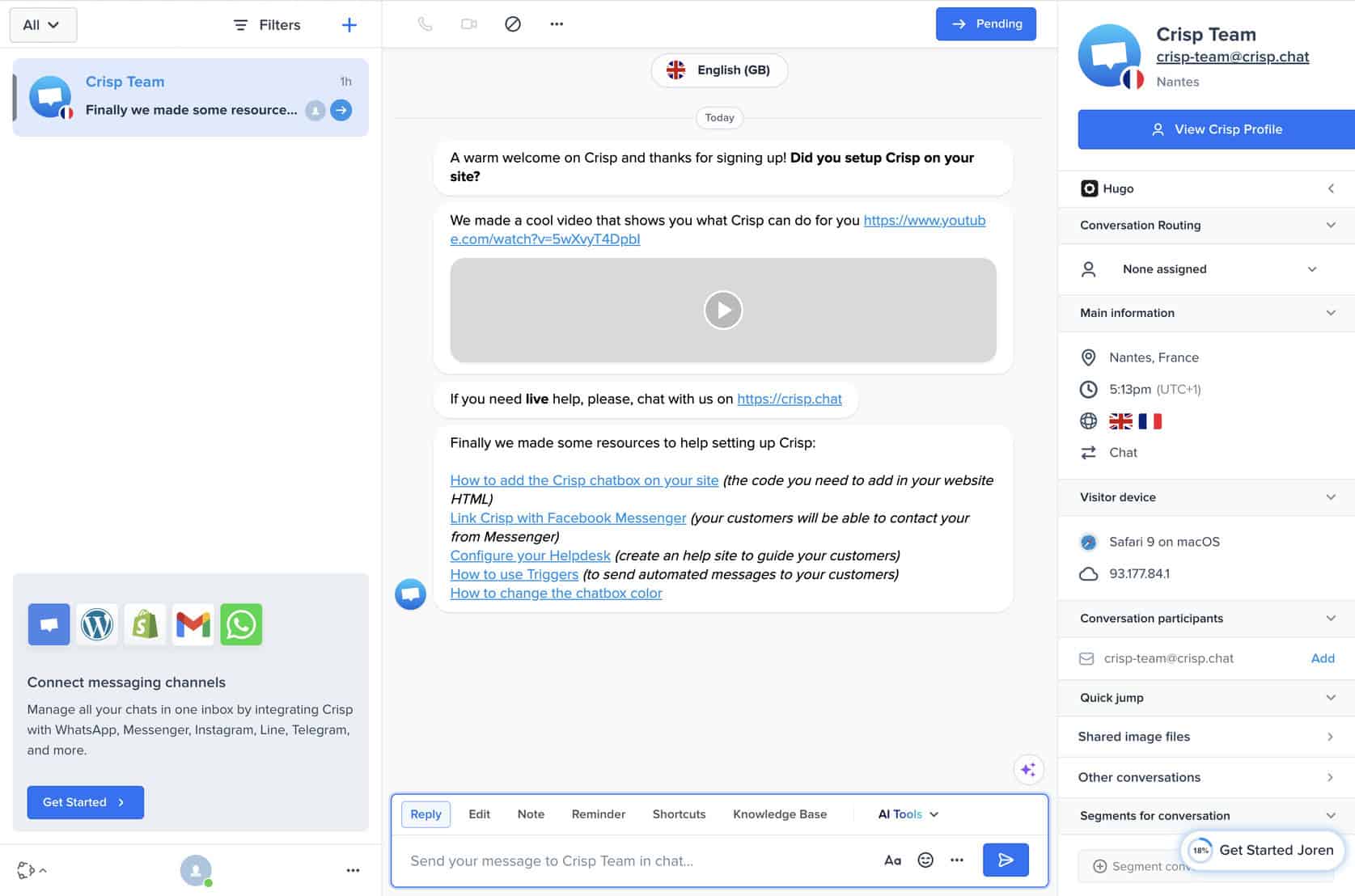
On the left, you see your conversation list. In the middle, you get the full chat history. And on the right, Crisp shows extra details about the contact, routing, and conversation data.
It’s a clean setup, and it gives support teams everything they need to handle chats efficiently.
With operator routing, Crisp automatically sends each conversation to the right operator or department, based on rules you set:
On top of that, you can split your inbox into sub-inboxes, for example one per team. That keeps things organized as your team grows, because everyone only sees the conversations that matter to them.
Overall, the inbox is straightforward, easy to use, and fits well with the rest of the platform.
| Hand over to a humanYour team can take over a conversation from the bot or AI, in an inbox inside the platform. | |
| AI copilotAI helps your team inside the inbox after a handover: it summarises the chat, tells you the customer’s mood, and suggests replies. | |
| Auto-assignment rulesConversations go to the right teammate automatically. | |
| SLAsSet response-time targets and get alerted when a conversation is about to miss them. | |
| Connects to an external help deskHands conversations over to helpdesk platforms like Zendesk, Freshdesk, Intercom and similar. | |
| Contact profilesOne profile per person with their details and chat history. | |
| Custom fieldsAdd your own fields to a profile, like order number or budget. | |
| Merge contacts across channelsThe same person on WhatsApp and Instagram becomes one profile. |
Crisp.chat Channels & Integrations
Crisp supports 11 channels, including:
- Website
- Facebook Messenger
- Telegram
- SMS
- Viber
This multichannel setup is great for support teams that don’t want to switch between different tools.
Of all these channels, the website channel stands out, for two reasons.
First, you can fully customize how your chat widget looks, from the colors and layout to the welcome message. That’s something businesses ask for a lot:
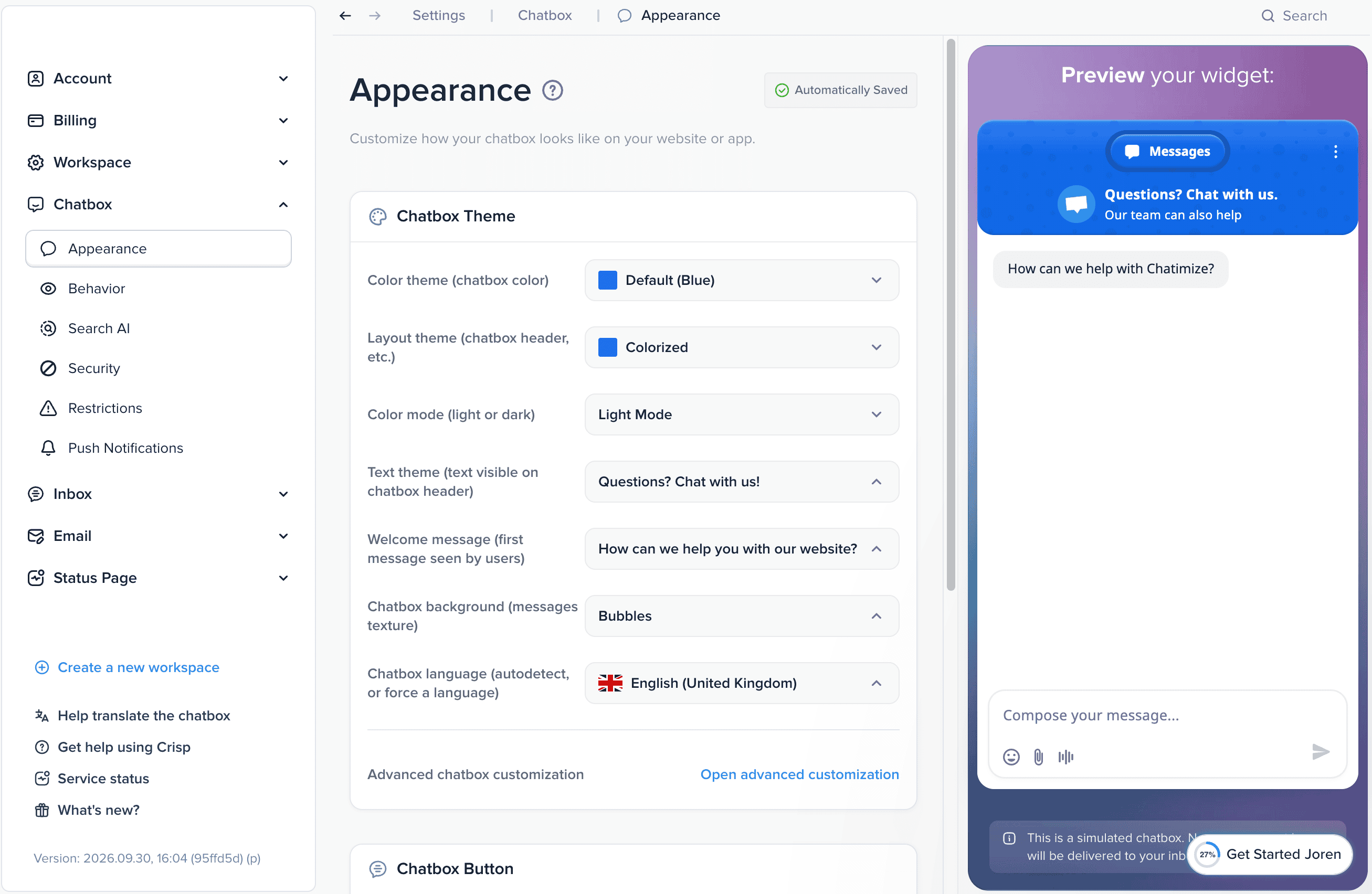
Second, and more interesting, you can send proactive messages based on what visitors do on your website. Crisp calls these message triggers, and they’re surprisingly advanced.
For example, you can open the chatbox and show a message when someone is about to leave your website, or only on specific pages:
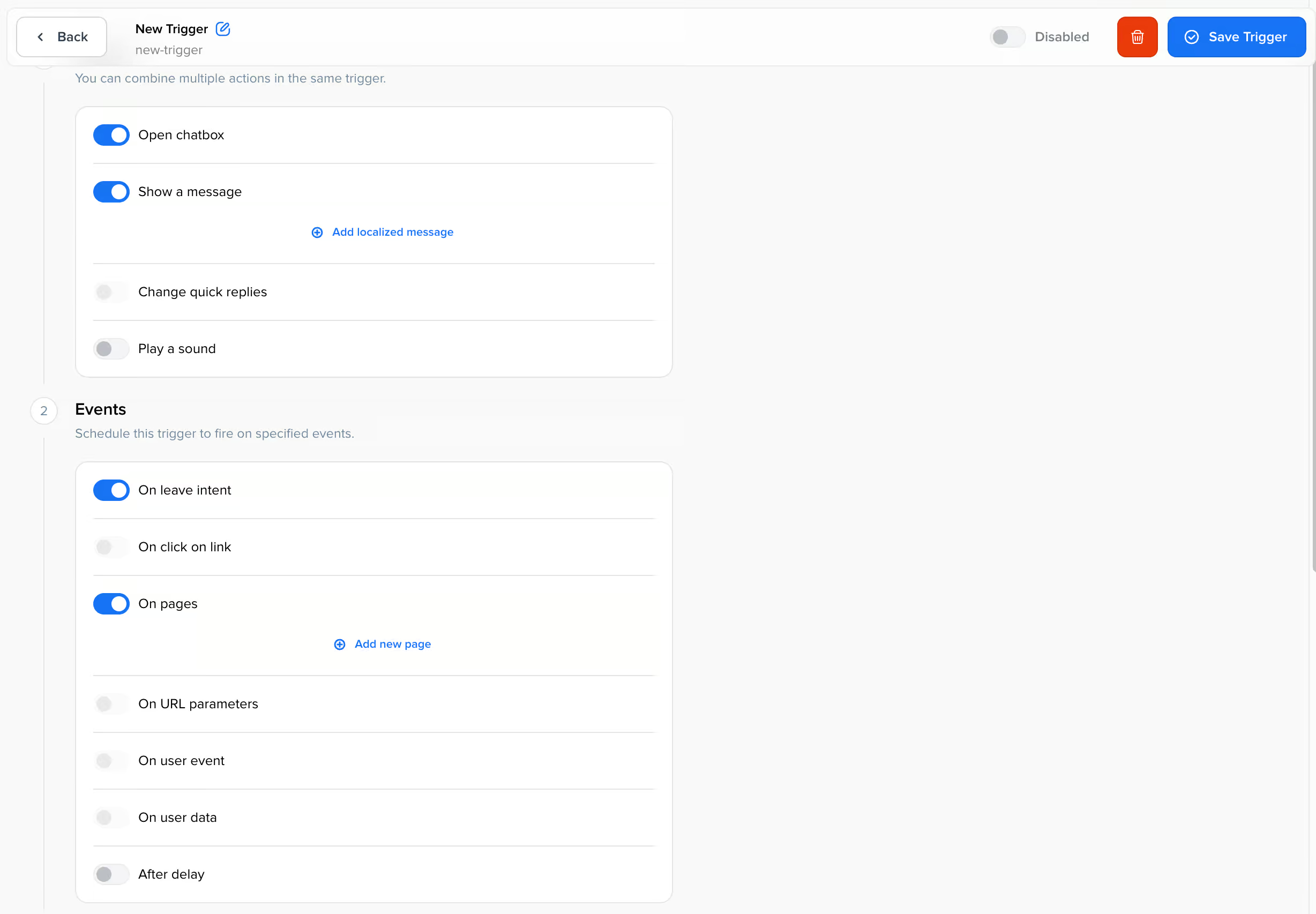
That lets you reach out at the right moment, to help visitors with a problem or to turn them into leads and sales.
On top of that, Crisp also offers a solid range of integrations. For example, it integrates with:
- CRM tools like Salesforce and HubSpot
- Email marketing tools like Mailchimp
- Other business tools like Pipedrive and Klaviyo
It also connects with automation platforms like Zapier, Make, and n8n. This gives you more flexibility to connect Crisp with the rest of your stack.
And besides these general integrations, Hugo connects to your tools through one-click integrations and MCP servers, as I covered in the AI features above.
Is Crisp Chat worth it?
So, should you use Crisp to build your chatbot?
Yes, Crisp is worth it if you want an omnichannel chatbot platform with built-in live chat.
During testing, I was impressed by how flexible Crisp is. You can go AI-first with Hugo, use workflows to structure conversations, or combine both depending on how you want your support to work.
That makes it a strong option for businesses that want more than just a basic AI chatbot.
Crisp also gives you a lot in one platform. You get:
- An AI agent
- Workflow builder
- Omnichannel inbox
- Routing rules
- A wide range of channels and integrations
For support teams, that all-in-one setup is a big plus.
The pricing is also very fair. At $95 per month for 10 seats, the Essentials plan offers a lot of value, especially for larger customer support teams.
To get started with Crisp , click the button below:
That said, Crisp isn’t perfect.
The main drawback is that AI usage is tied to credits. You already get Hugo on the $45 per month plan, but your costs go up if you rely heavily on AI.
Crisp also has limited marketing features for channels like Facebook, Instagram, and WhatsApp. So if your main goal is chatbot marketing rather than support, there are better options.
But if you want an easy-to-use platform for AI-powered customer support across 11 channels, you should consider Crisp Chat.

Hi, do you know how to process a trigger in Crisp for sending OTP after opening a conversation?
Hey Donna! What do you mean by OTP?