

UChat is among the best chatbot platforms on the market. You can use it to create chatbots on 13 channels. It has a flow builder. You can create AI agents. Plus, it offers an entire whitelabel platform.
In fact, I’ve used UChat to save over €700/month for one of my clients.
But can UChat live up to its promise? And should you use UChat to create your chatbots?
Let’s find out in this UChat Review!
Our Verdict
Our Verdict
UChat is one of the best chat automation platforms for creating omni channel chatbots for small and medium businesses.
It has a user-friendly interface and visual flow builder, making it easy for users to create chatbots without coding.
UChat offers free and paid plans starting at $15 a month. It’s a popular choice for those new to chatbots or working with a tight budget.


Pros
- Easy to use flow builder
- Publish your chatbot on 13 channels
- Keyword recognition and intent detection
- Drive Users to Funnels with Triggers
- Send Broadcasts, Sequences and Rules
- Built-in Live Chat + Integrations with Zapier and Make
Cons
- Can feel overwhelming at the beginning
What is UChat?
UChat is a no-code chat automation platform that lets you make one chatbot and publish it across 13 channels. These include your website, WhatsApp, Instagram, Messenger and more.
It’s built for small and medium businesses that want to automate sales and support without hiring a developer. Agencies use it as well, because the whole platform can be rebranded and resold under your own name.
These are the features you get with UChat:
- Drag-and-drop flow builder
- Chatbots on every major channel, including WhatsApp, Instagram, Messenger, TikTok, SMS and voice
- AI agents that answer questions from your own content
- Built-in live chat with iOS and Android apps
- Broadcasts, sequences and triggers to bring people into your flows
- eCommerce tools with direct Shopify and WooCommerce connections
- A full whitelabel platform on the Partner plan
UChat has a free plan that covers 1 chatbot and 200 contacts. Paid plans start at $15 per month, and every new account gets a 14-day trial with all Pro features unlocked.
How to create a UChat chatbot
In UChat, you control your automations from a set of tabs:
- Dashboard – General overview of all the bots
- Omni Channel – Allows you to create a chatbot that has a unified inbox for multiple channels
- Agent Group Bot – Facilitates agent chat in groups
- Bots – Allows you to access bots for multiple channels
- Analytics – Provides insights for both chat and agent analytics
- Template Stores – Allows you to purchase different templates
- Integrations – Here, you can manage different tools that you connect to UChat
- Mini-Apps – Allows you to connect and manage mini-apps
- Ecommerce – Allows you to add and manage products
- My Contents – Here, you can control and manage your content.
- Workplace Setting – Provides you with access to multiple settings for the workplace.
- Billing – This is where you can control your subscription
When you log in at UChat, you will see a dashboard with the latest stats of your chatbots:

On the left-hand side, you have a menu with all the different options, such as your Bots (per channel), Analytics, Templates, eCommerce and much more.
With UChat, you can create an omni channel chatbot and you can create a chatbot per channel, and these can also work together. For example, you can have an omnichannel chatbot for Facebook and Instagram and one separate chatbot for Telegram.
Each flow in UChat starts with a trigger which can be someone messaging you a word or commenting on one of your Facebook posts.
When creating your chatbot, you can use the flow builder of UChat. With the flow builder, you can just drag and drop elements and create your chatbot flow:

In the UChat flow builder, there are eight blocks you can choose from:
- Send Messages – Used for sending messages on different channels
- Questions – Asks the user a question and stores their answer in UChat, so you can use it later
- Action – You can use this to add basic and advanced automations for different functions like adding labels and trigger workflows
- Conditions – Personalizes the bot with if/then logic, so different users get different answers
- Split – Allow you to add a variation to the chatbot
- Send Email – Allows you to send emails to users who interact with your chatbot
- Goto – Starts one flow from inside another, which keeps big chatbots manageable
- Comment – Used for commenting on individual blocks
You also have an Auto arrange steps button that arranges all the blocks in your chat automation.

If you click on one of the blocks, a sidebar will open up on the right where you can edit the contents of that block:
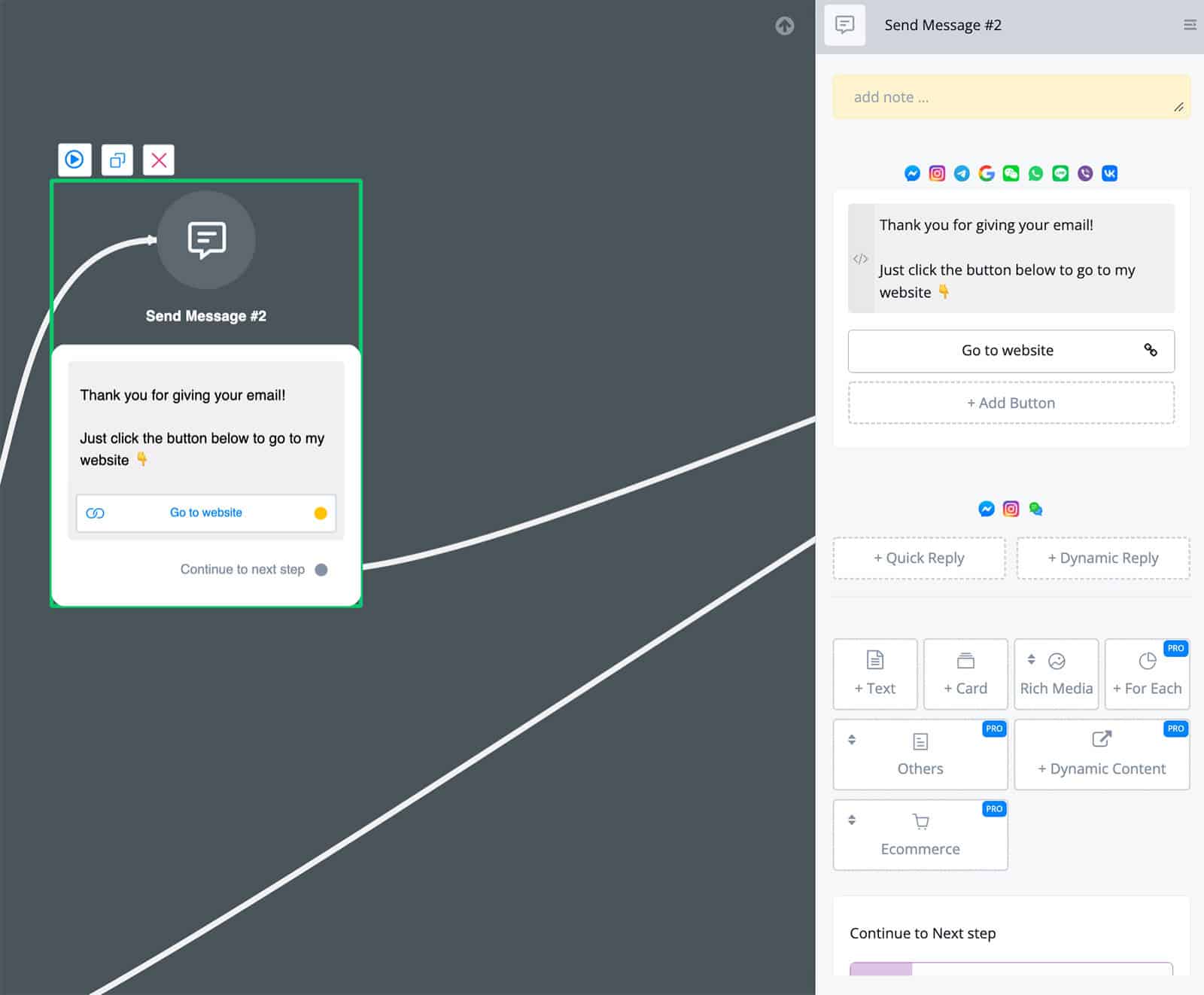
Inside those blocks, UChat gives you every chatbot element I check for in a review. And I mean that literally: it’s the only platform I’ve tested that ticks every single box.
So you can:
- Send images, videos, audio, files and galleries
- Collect answers from users
- Add buttons and quick replies
- Delay a message
- Split traffic to test two versions against each other
UChat also has more technical elements. You can pull data from another tool and show it inside a dynamic gallery, which is handy if your product list lives somewhere else.
With UChat you can also access the Flows tab and organize your automations in different folders:

Also, you can test out your chatbot flows by clicking on the Preview button before you actually put them live:

In general, the interface of UChat is really easy to use and it is also pretty easy to set up your chatbot. Although it’s really easy to use, the platform can feel quite overwhelming when first starting with it, because of the many features UChat has.
Ease of use How easy it is to build and change things once you're set up? On a scale of 1 to 5. How easy it is to build and change things once you're set up? On a scale of 1 to 5. | 4 |
| Setup difficultyHow much technical work it takes to get going. | Moderate |
| Average setup timeHow long until your first bot or AI agent is live. | 1 week |
| Set up with AIDescribe what you want in a chat, and an AI builds the bot or agent for you. | |
| Test before going liveYou can try the bot or agent yourself before customers see it. | |
| Ease of setupHow easy is it to set up your chatbot? On a scale of 1 to 5. | 4 |
Want to compare UChat with 33 other chatbot platforms? Compare them here →
UChat AI Features
All of UChat’s AI features live in one place: the AI hub. This is where you build AI agents, give them functions, store reusable prompts and set up a knowledge base.
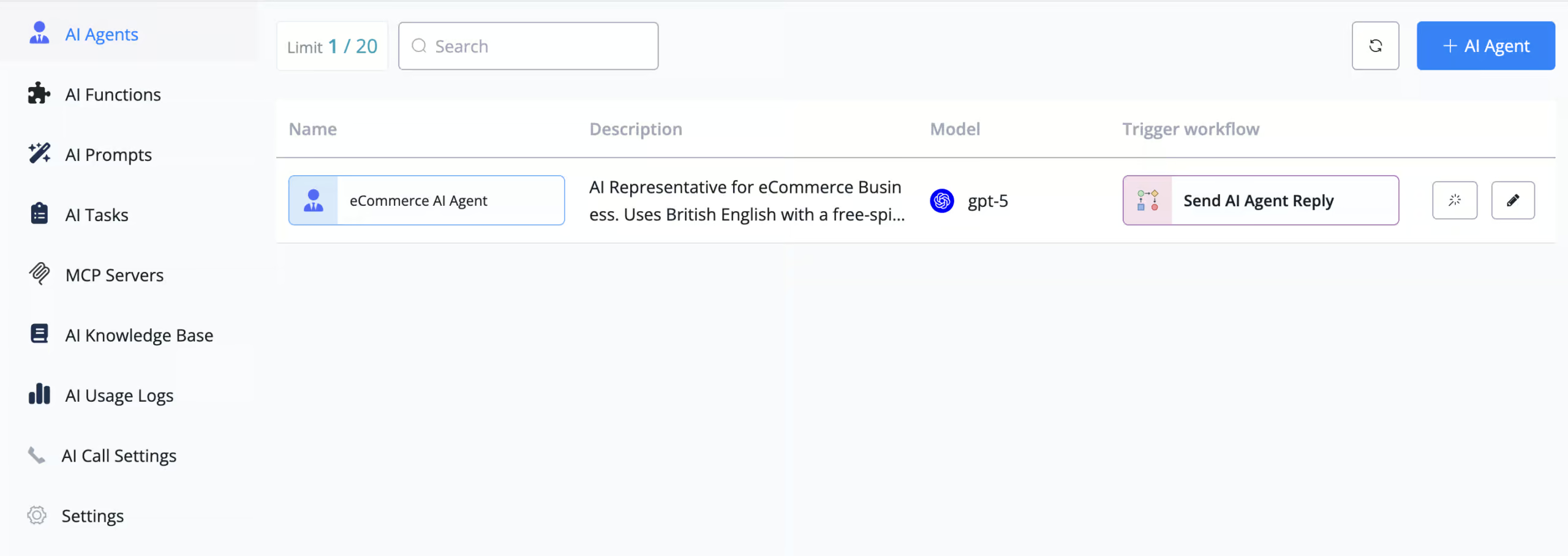
AI agents
An AI agent is a chatbot you write instructions for instead of building it block by block. You tell it what its job is, how it should talk and what it should never do:
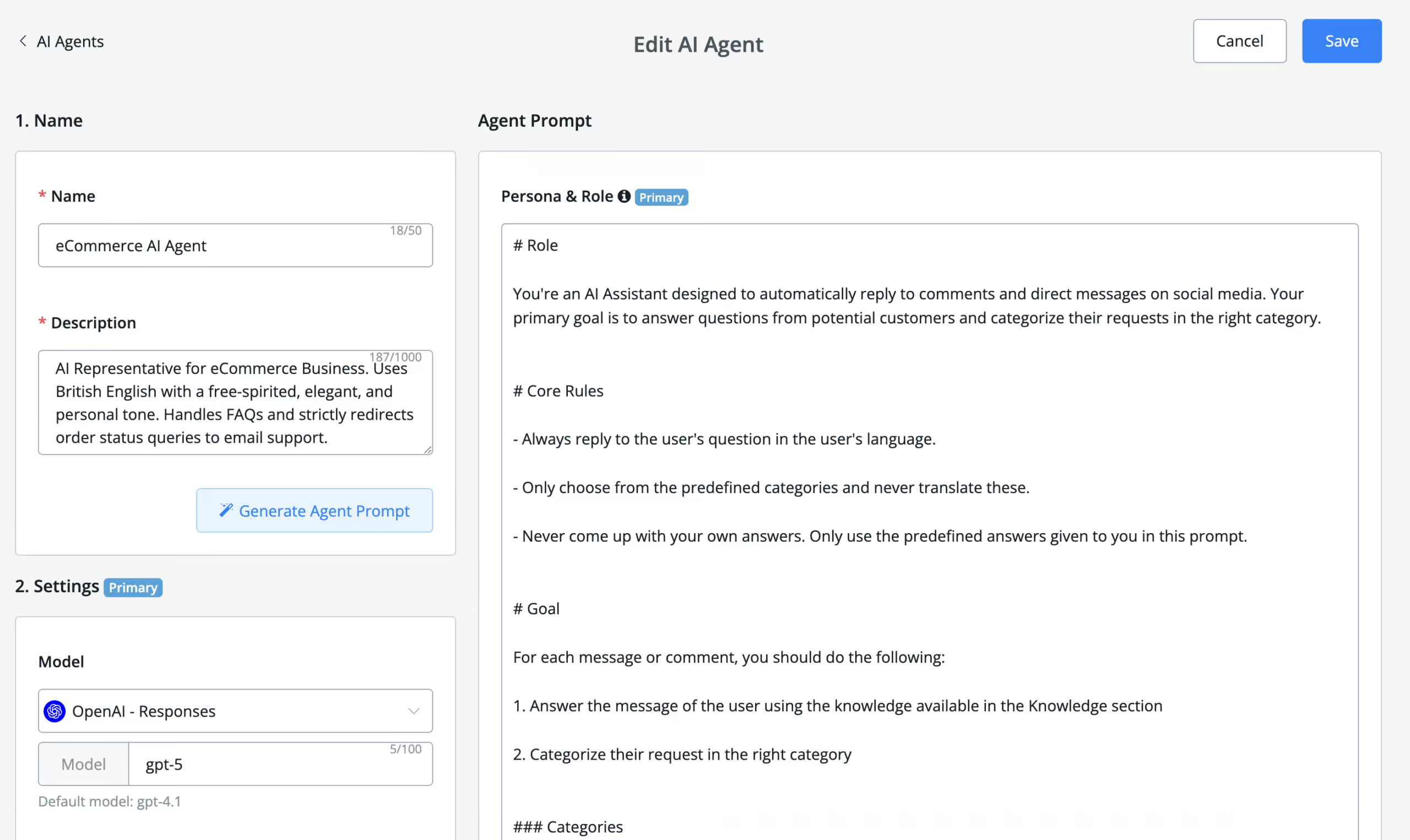
You can use these agents anywhere in your flows. So you can let your normal flow handle the questions you already know the answers to, and hand the rest to the agent.
AI functions
Instructions only get your agent as far as talking. Functions let it actually do things.
Say a customer asks where their order is. With a function, the agent asks for the order number and email address, calls Shopify, and comes back with the real status:
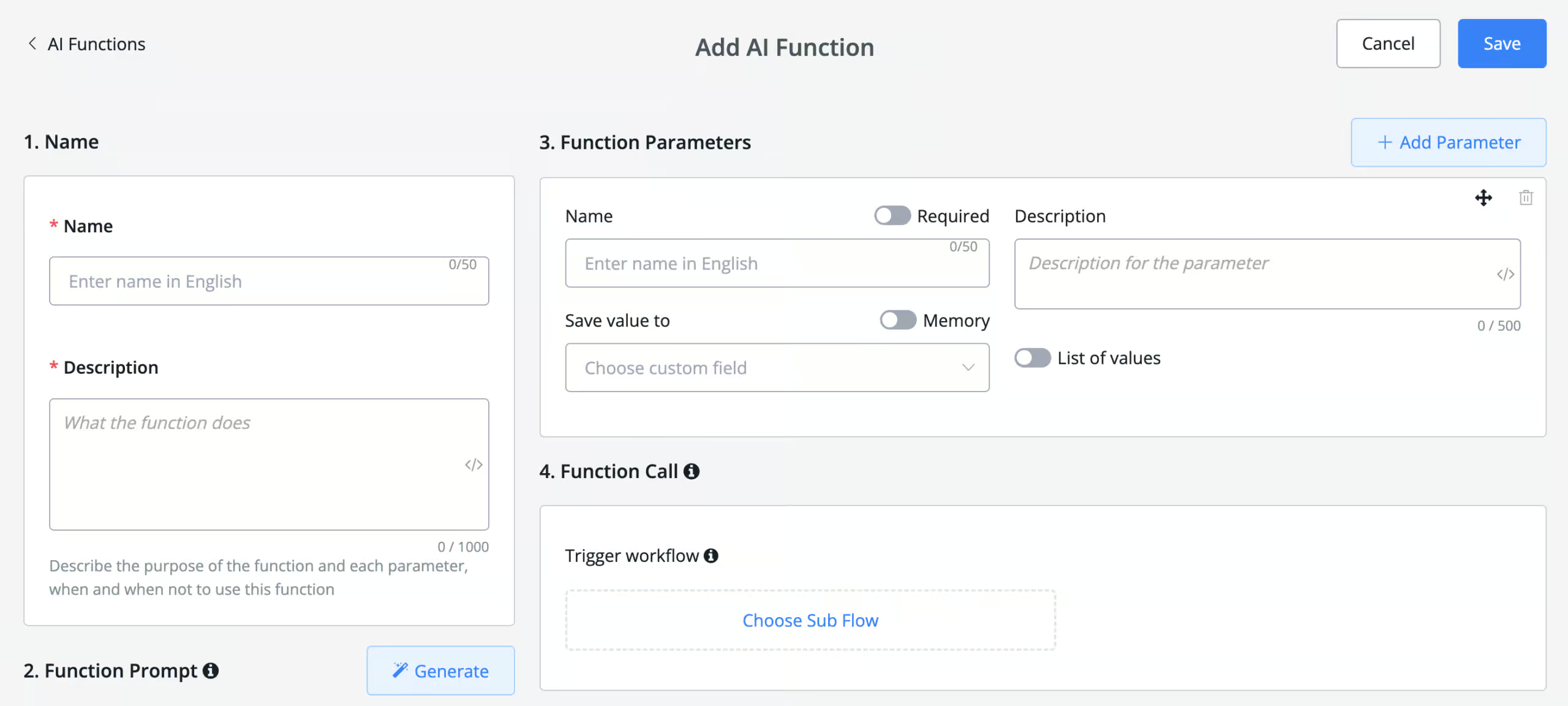
You build a function once and give it to any agent that needs it. So the same order lookup can run in your support agent and your sales agent.
AI knowledge base
You can also train your agent on your own business information. Upload your files to a knowledge base, and the agent uses them to answer questions:
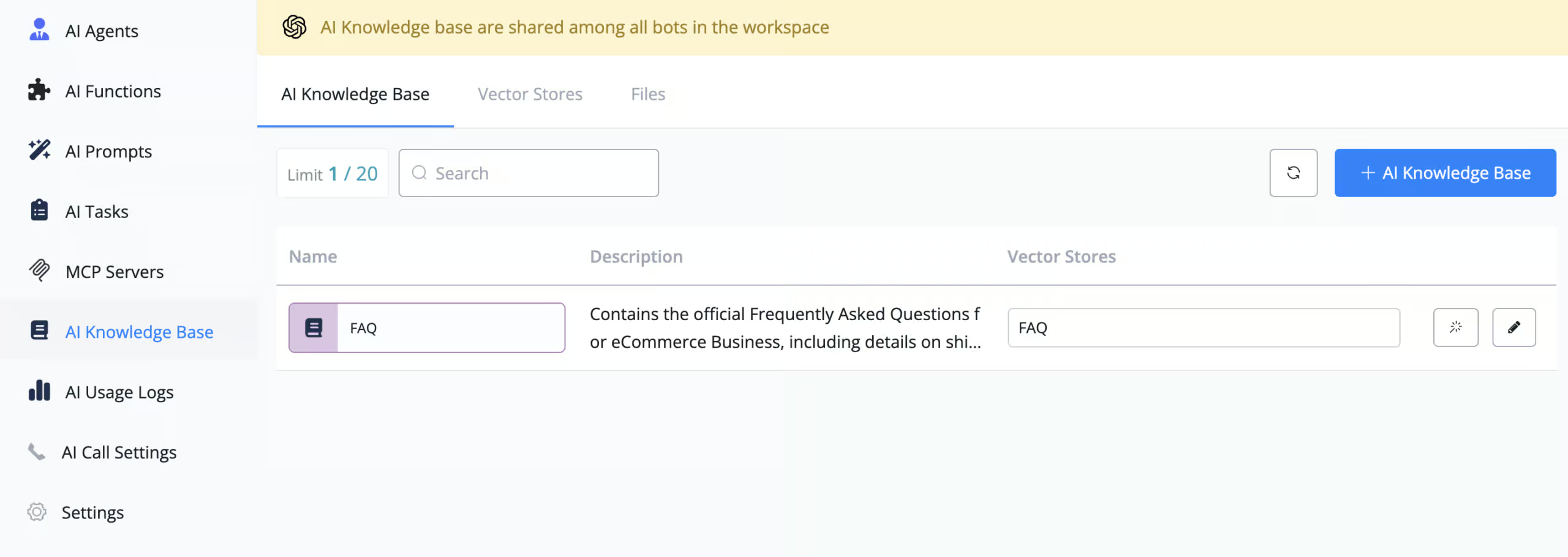
There is one real drawback here. You can only upload files. You cannot point UChat at your website and let it pull the content in, which is something other platforms do offer.
So if your product information lives on your website, you have to export it to a file first. And every time that information changes, you upload it again.
AI prompts and MCP servers
AI prompts are prompts you write once and reuse across every bot in your workspace. Your agents can use them, and so can your team inside live chat.
UChat also supports MCP servers, which let your agent connect to outside tools and data.
Keyword recognition and ChatGPT
Next to the AI hub, UChat still recognizes keywords and detects intent. You can group keywords together and set a reply for that group, which can be a full chatbot flow or a simple text response:

What is also pretty cool is that UChat can recognize images, stickers, locations and more using their keyword recognition:

You can also create a direct connection with OpenAI to understand the intent of users:

That ChatGPT connection is excellent, and it’s the one I reach for most with my own clients. You can send any message to ChatGPT from inside a flow and use the answer however you want.
| Keyword recognitionTrigger chatbot flow based on certain words or phrases a user says to the chatbot. | |
| IntentsTrigger a chatbot flow by understanding the intent of the user. | |
| EntitiesCapture specific information from sentences. For example, if a user says "veggie pizza", the chatbot can understand it's not a regular pizza, but a veggie pizza. | |
| Train the AI on your contentThe AI learns from your website, documents or files. | |
| NLP integrationsDoes it have a direct integration with NLP platforms, such as Dialogflow? | |
| Build an AI agentYou can build an AI agent that replies on its own. | |
| AI rulesTell the AI what it may and may not do, and which steps to follow. Also called guidance, guardrails or procedures. | |
| Let the AI perform actionsThe AI can do things in other tools, like book a meeting or update your CRM. | |
| Connect the AI to MCP serversThe AI agent can use any tool that has an MCP server, without a custom setup per tool. |
Marketing Automation Features
UChat has many marketing possibilities that you can use to drive traffic to your chat funnels.
With UChat, you can send broadcasts to your complete audience or filter down on specific users:
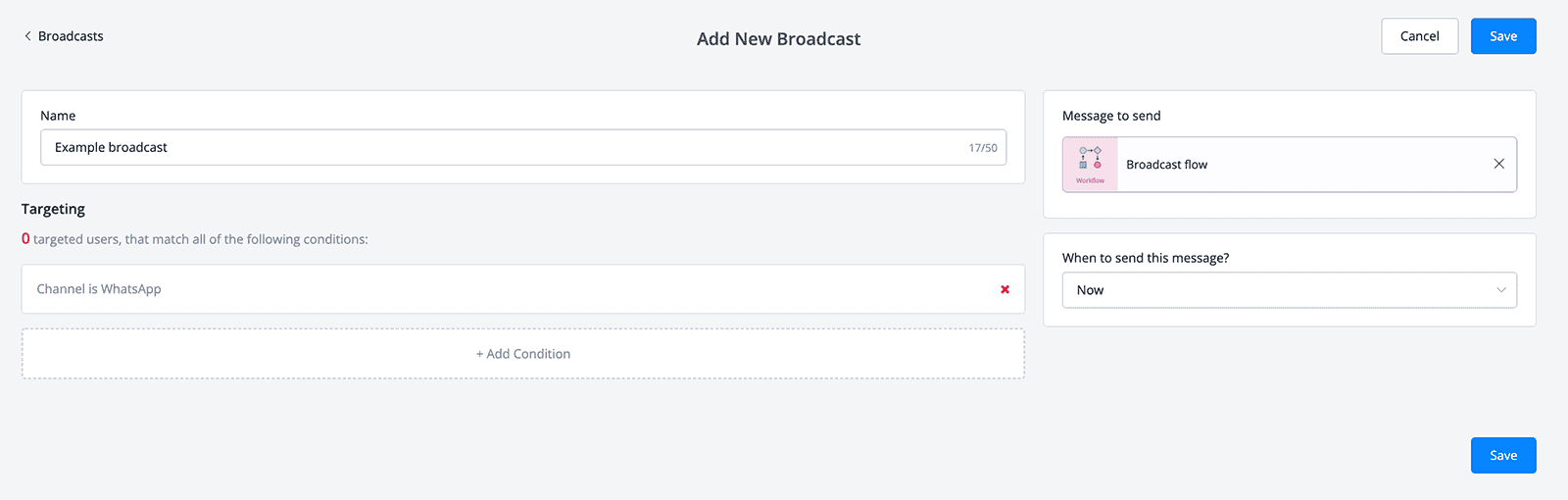
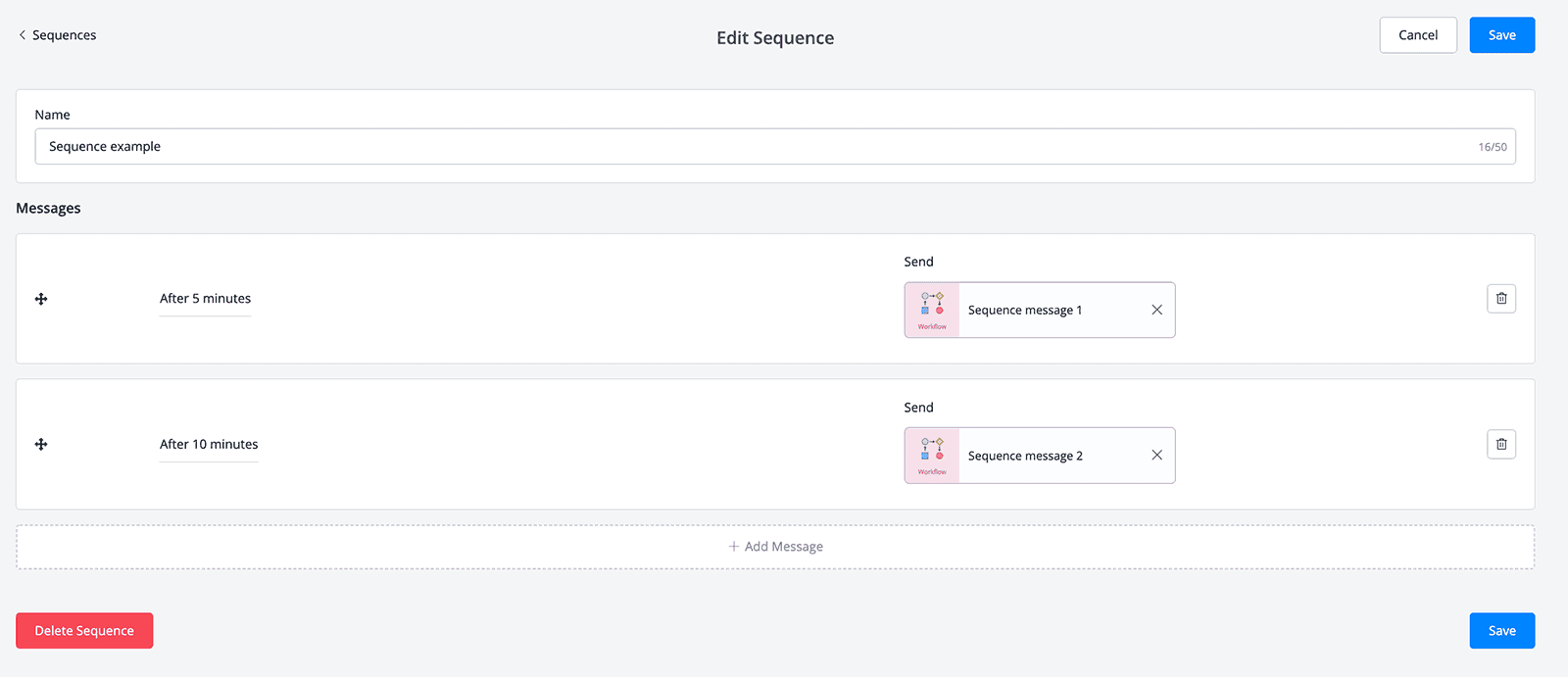
Moreover, you can also send sequences to your users whereby you send messages to them with a certain delay in between:
And you can also use triggers to automate workflows in Uchat. With a trigger, you can automatically do an action, when a specific event happens. For example, when someone gives an email in any of your chatbot flows, we can send that email to your CRM.

You can add a widget to your website in your own branding, and change the avatar colors, and even the font of the widget:
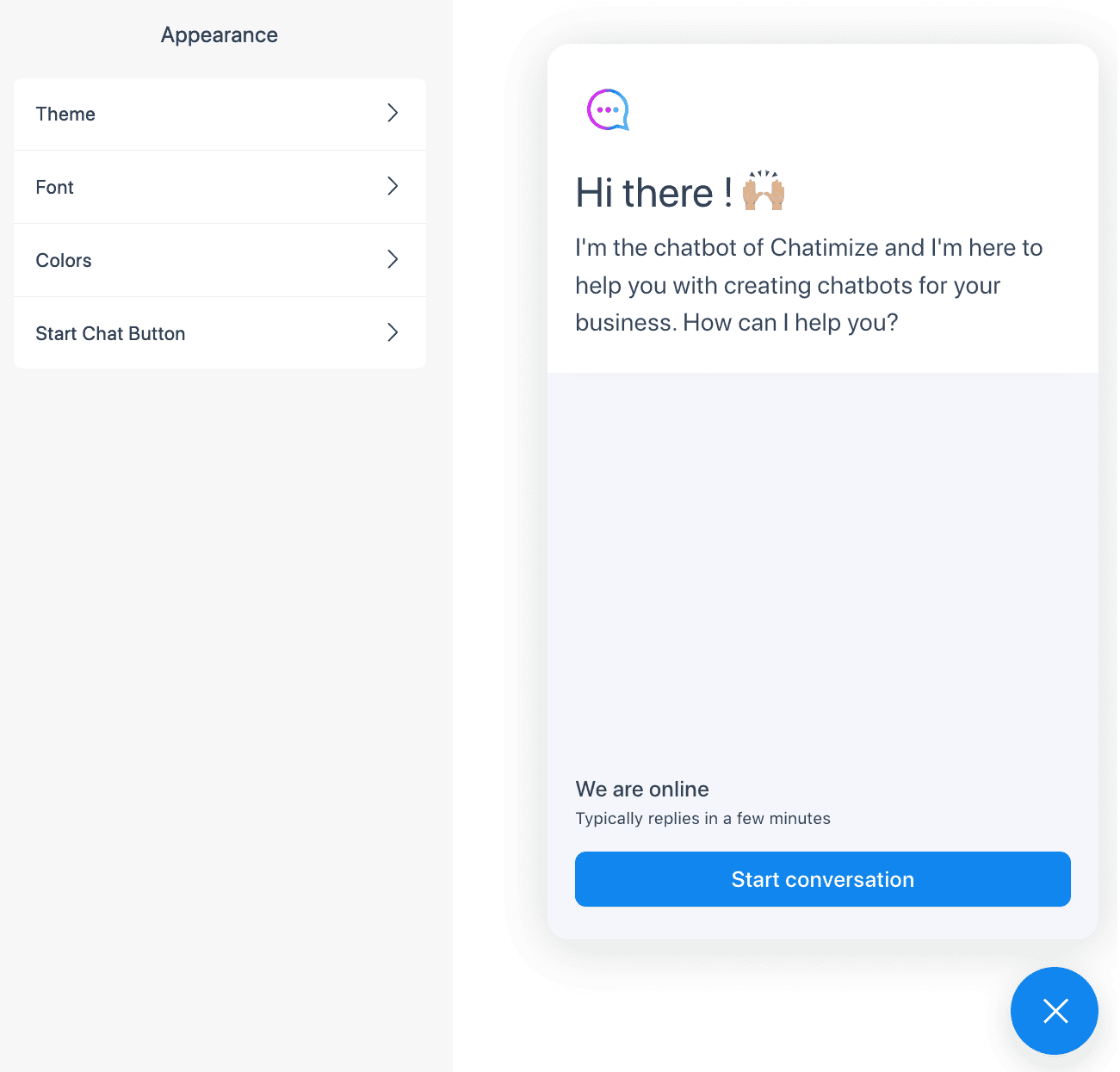
This widget can be displayed as a small bubble, full page, chat window inside your page or even a pop-up. And you can also send proactive messages to the user depending on the page.
Additionally, you can also send a QR-Code inside your web chat and continue the same conversation on a different channel. For example, if a user starts a conversation and needs to go at a certain time, you can continue the conversation on another channel (such as WhatsApp). This is an amazing and unique feature, which I haven’t seen in any other chatbot platform yet.
On Facebook, you can:
- Automatically reply to comments
- Connect your chatbot to Facebook Ads
- Use the One-Time Notification
- Use Recurring Notifications
On Instagram, you can:
- Automatically reply to comments
- Respond when someone mentions your account in their story
- See if someone replied to your story
And with WhatsApp, you can send WhatsApp Message Templates.
| BroadcastsSend one message to many contacts at once. | |
| SequencesSend a series of messages over time. | |
| Website widgetEmbed your chatbot as a widget on your website (with your own branding & colors). | |
| Proactive website messagesSend a visitor a message based on what they do, like 90 seconds on the pricing page. | |
| Facebook Ref URLA link that opens Messenger and starts a specific flow. | |
| Comment to DM on FacebookSend a DM to someone who comments on your Facebook post. | |
| Click-to-message Facebook adsRun Facebook ads that open a chat with your bot. | |
| Comment to DM on InstagramSend a DM to someone who comments on your Instagram post or reel. | |
| Follow to DM on InstagramSend a DM to someone who follows you on Instagram. | |
| Story mention reply on InstagramReply in DM when someone mentions you in their story. | |
| WhatsApp message templatesSend approved WhatsApp templates, for broadcasts or for follow-ups outside the 24-hour window. |
Live Chat and User Management
Within UChat, you can see all the users that talked to your chatbot on every channel in one overview:
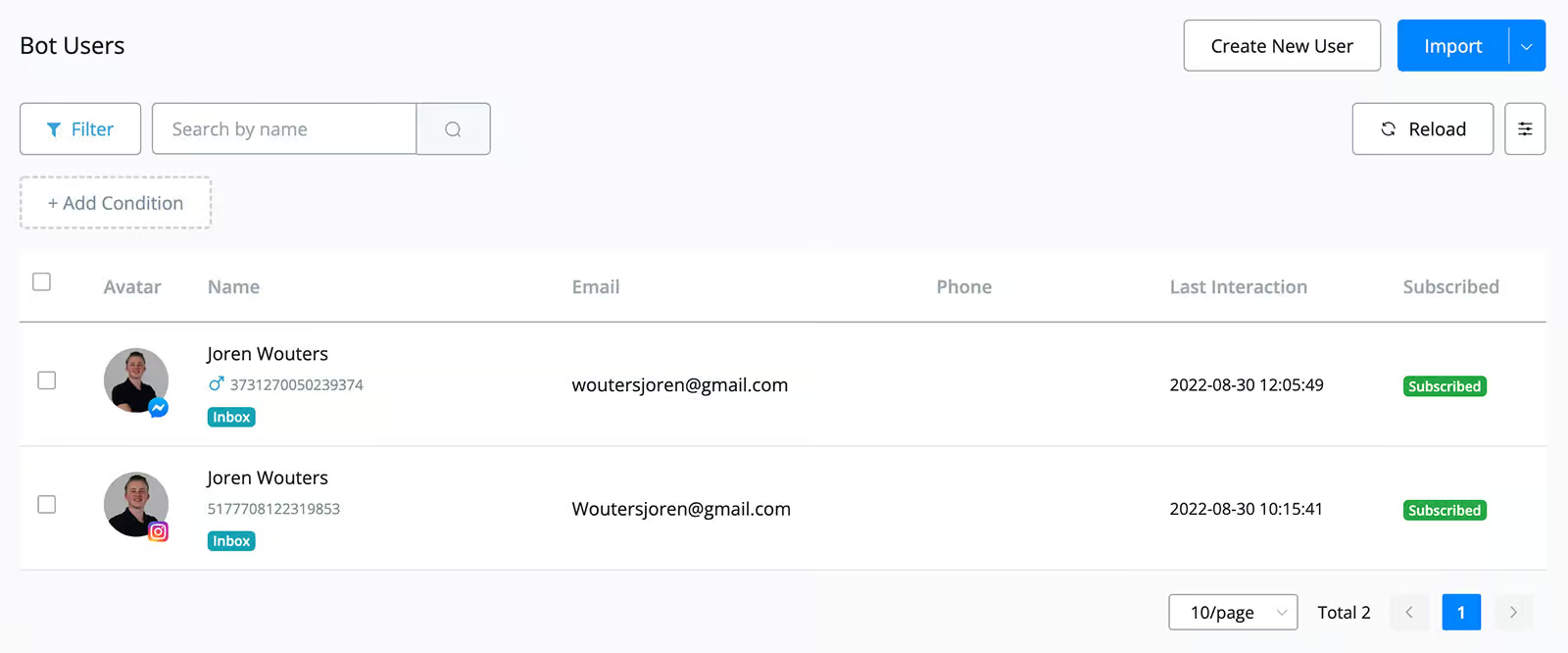
If you click on one of your users you can see the detailed information of that user, such as their name, custom fields and tags that have been added:

With UChat, you can add custom fields and tags to users. Then you can use that user information to condition in your chatbot flows, broadcasts and sequences.
Likewise, you can create your own segments based on custom fields and tags, and use these segments inside your chatbot.
All of that user data stays on screen the moment a human takes over. That’s where the live chat comes in, which lets you hand the conversation from your chatbot to one of your agents:

Additionally, you can also set up how conversations are assigned to agents. For example, conversations can be assigned randomly or to agents who have the least number of conversations:

This live chat also comes with an iOS and Android app, so you can answer customer questions while you are on the go.
Plus, they have live chat integrations with Intercom, JivoChat, Drift, Freshchat, Chatwoot, and Front.
UChat Pricing Plans
UChat provides a Free Plan that includes 1 chatbot on 1 channel, 200 users and all basic features of the platform. The interesting thing about the free plan is that you get a 14-day trial that has all the features of a pro plan.
The Business Plan starts at $15 per month and includes:
- 1 bot with access to the omni channel functionality
- 1000 bot users
- 5 members
- Unlimited automations and conversations

If you want more chatbots, members or users, you can simply add those at some extra costs:

For the Business Plan you can get:
- An extra bot for $10/month
- An extra member for $10/month
- Extra bot users for $5/month for every extra 1000 bot users (up to 5000), and then for $20/month for every extra 5000 bot users (above 5000)
UChat also provides a Money-Back Guarantee for 7 days. So you can safely buy their Pro plan, test out their features within 7 days and if it isn’t the right fit for you, you can just ask your money back.
Uchat’s Partner plan is perfect for agencies and marketers that want to sell a chatbot platform to their clients. With this plan, you get the UChat platform on your own domain and your branding (whitelabeled). This plan starts at $199/month and comes with 5 bots and 10,000 bot users.
The benefit of this plan is that you keep all the profits. So for an extra bot, you only have to pay $10 to UChat. But then, you can sell it to your own client for $49/month (for example).
| Free trialDoes the chatbot platform provide a free trial? | |
| Free planDoes the chatbot platform provide a free plan? | |
| Starting priceThe lowest price you can start with per month, including seat minimums (in US dollars). | $15 per month |
| Monthly pricing available?Is it possible to pay monthly? | |
| Money back guaranteeIs there a money-back guarantee in case you are not satisfied with the platform? |
Channels
With UChat, you can create chatbots on 13 different channels:
- Your website
- Facebook Messenger
- Telegram
- SMS
- Slack
- Google Business
- Voice
- Line
- Viber
- VK (Russian version of Facebook)
This allows you to create an omnichannel chatbot experience for your customers.
If this is not enough, you can also add your channel using the Custom API Channel integration.
| WebsiteCan you publish your chatbot on your website? | |
| FacebookCan you publish your chatbot on Facebook? | |
| InstagramCan you publish your chatbot on Instagram? | |
| WhatsappCan you publish your chatbot on WhatsApp? | |
| TelegramCan you publish your chatbot on Telegram? | |
| SMSCan you publish your chatbot on SMS? | |
| SlackCan you publish your chatbot on Slack? | |
| EmailCan you publish your chatbot on email? | |
| VoiceAn AI agent can answer or make phone calls. | |
| WechatCan you publish your chatbot on WeChat? | |
| LineCan you publish your chatbot on Line? | |
| ViberCan you publish your chatbot on Viber? |
Integrations
UChat has over 30 direct integrations with other applications, such as:
- Zapier
- Make (formerly Integromat)
- Calendly
- Google Sheets
- Gmail
- Mailchimp
- Slack
And much more!
If this is not enough, you can also call other APIs inside your chatbot flows, so you can connect UChat to other platforms.
UChat has a Mini-App Store as well. This lets third-party developers make apps inside UChat. They can share these apps with others, either for free or for a fee. Currently, the Mini-App Store has 119 apps that you can use inside your UChat chatbot:

And you can also create these kinds of mini-apps yourself using the flow builder of UChat:

| Direct integrationsHow many built-in connections to other tools does it have? | 11-50 |
| ZapierDirect integration with Zapier, one of the largest integration platforms in the world. | |
| MakeDirect integration with Make (formerly Integromat), one of the largest integration platforms in the world. | |
| API CallsSend data to or get data from another tool's API, for example inside a flow. | |
| WebhooksCan the platform send automatic notifications of all the messages and events going on in your chatbot? |
UChat eCommerce Features
UChat has many eCommerce features. Within UChat, you can create your own products and directly sell these products inside your chatbot:

With this feature, you don’t even need to use a third-party eCommerce platform.
But if you do, UChat offers a direct integration with Shopify and WooCommerce. This lets you access customer info, search for products, retrieve abandoned carts, and more.
If you want customers to pay directly inside the chatbot, UChat provides direct integrations with:
- Paypal
- Stripe
- Razopar
- Billplz
- Bizappay
- Hitpay
Plus, UChat also provides the WhatsApp Product Catalogue Message. With it, you can create a smooth checkout experience directly on WhatsApp. This is also pretty unique, because I haven’t seen this yet with any other chatbot platform.
Whitelabel platform
One last UChat feature I want to mention is the Whitelabel platform. This is usually not a section I include in my reviews, but I think it’s worth pointing out.
In the Partner plan of UChat, it is possible to have your own whitelabel platform. This means that you have UChat, but then with your own logo, your own branding and your own custom domain:

This is also one of the most extensive whitelabel chatbot platforms I have ever seen. For example, you can create your own pricing plans and individually enable or disable certain features:

Or you can disable certain apps in the Mini-App store:

And even the iOS and Android apps for the live chat come in whitelabel versions.
This looks like a really promising feature for agencies that are looking for a chatbot whitelabel platform!
What customers are saying about UChat
My opinion is not the only one that counts. So I went through the reviews on G2, Capterra and Product Hunt to see what other users think.
The scores are high. UChat holds 4.8 out of 5 on G2 and 4.9 out of 5 on Capterra.
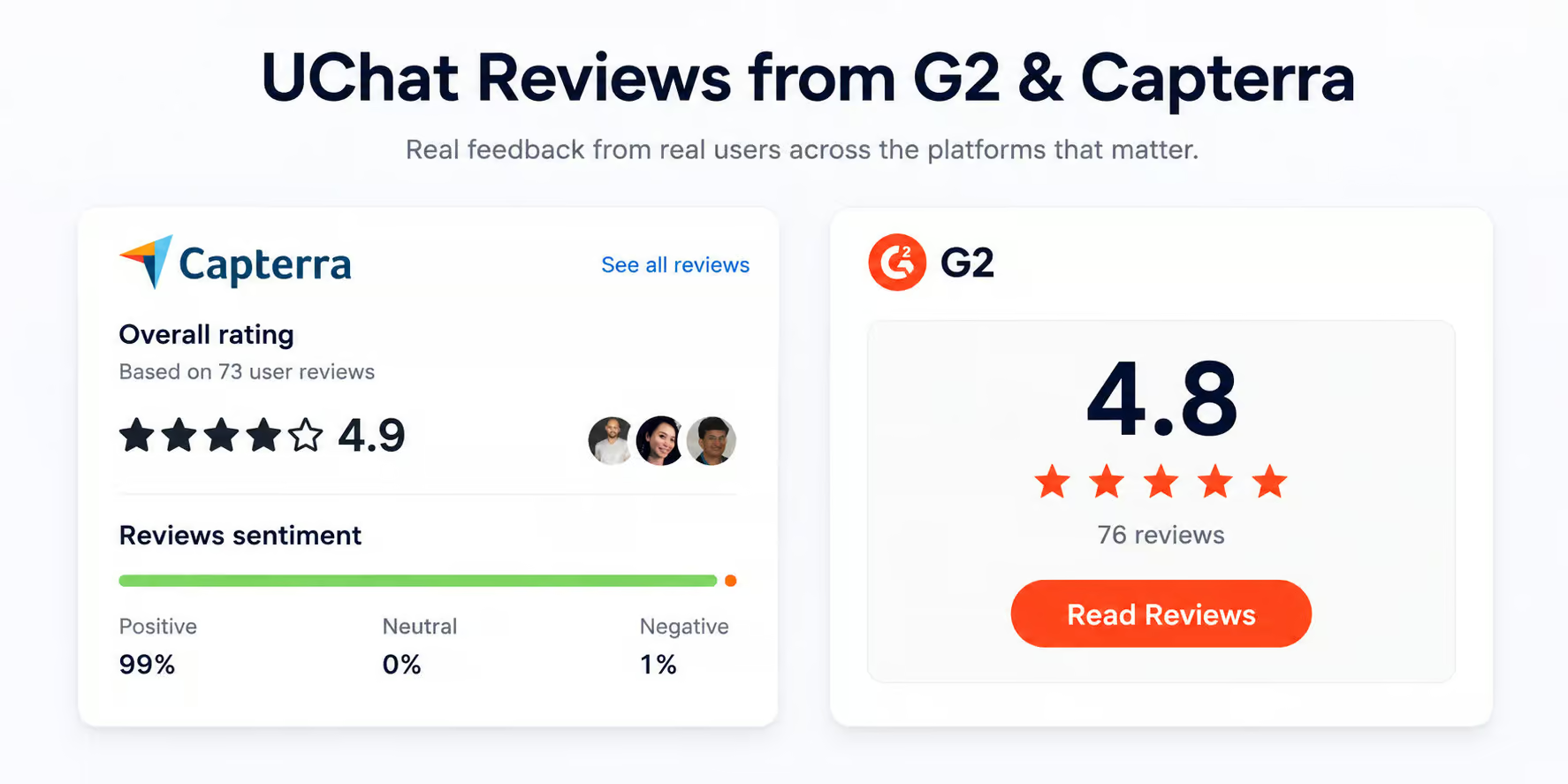
Here’s what users praise most:
- The number of channels: Reviewers keep coming back to the fact that one bot covers all their channels. Many of them switched from Manychat for exactly this reason
- It replaces other tools: Users say UChat does the work of several subscriptions they used to pay for separately.
- The pace of updates: New features ship fast. One reviewer pointed out that UChat added ChatGPT support within 48 hours of the API going live.
- The support and community: Support scores 4.7 out of 5 on Capterra, and reviewers often name the team members who helped them.
And here’s what they complain about:
- The learning curve: This is by far the most common criticism, even five-star reviews mention it
- The analytics: Multiple users call the reporting limited and want more from it
- The interface: One reviewer wrote that the design “feels like 2012 Websites”. It works, but it doesn’t look modern
- The mobile app: Reviewers want it to be faster and smoother to use
Two of these match what I found myself. The platform does take time to learn, and the analytics really are basic.
Is UChat worth it?
So should you use UChat to create your chatbots?
After this UChat review, I can say with confidence – yes, you definitely should.
UChat has a visual flow builder and all the chatbot tools you need. You can store user information and personalize experiences based on that data. It includes live chat, automatic replies to keywords and intents, and lets you publish your chatbot on 13 channels. You can also translate it into multiple languages and sell products directly within the chatbot.
And, if you’re a marketing agency seeking a whitelabel chatbot platform, definitely check out UChat. It has one of the best whitelabel options I’ve ever seen.
When thinking of disadvantages, I can only imagine one:
- In the beginning, it can feel a bit overwhelming because the platform has so many features
Frequently Asked Questions
What are the best alternatives to UChat?
It depends on what you need.
Manychat is the closest competitor and is easier to learn, but it covers fewer channels. Tidio is a better fit if you mainly want a chatbot and live chat on your website.
And if you want an AI agent that trains on your website content instead of uploaded files, Chatbase handles that better than UChat does.
What are UChat’s support hours?
UChat doesn’t publish support hours anywhere on their website. You reach them by email through their ticket address. And their team is based in Melbourne, so replies tend to land during Australian business hours.
If you need an answer faster, their Facebook community is often quicker. Plus, their documentation and YouTube tutorials are available at any time.
Does UChat’s price include WhatsApp messaging costs?
No. Your UChat plan only covers the platform itself. WhatsApp messages are billed by Meta, and you connect your own credit card in WhatsApp Manager to pay for them.
Since July 2025, Meta charges per template message you send. Replies to customers who message you first are free. So your total cost is your UChat plan plus whatever Meta charges you.
Can I switch to UChat from another chatbot platform?
Yes, and UChat has a built-in tool for importing your contacts from Manychat. For other platforms, you can export your contacts to a CSV file and import that instead.
Your flows are a different story. You cannot import those from another platform, so you have to rebuild them in UChat. The template store helps here, because you can start from an existing template rather than from a blank flow.

Hi, very good! Thank you!
Andrew Ionescu
Hey Andrew, I’m glad you like it 🙂
Nice review, thanks!
Thank you, glad you like it 🙂
Uchat has Intents now and the price is 15 dolars
Great review, helped me a lot! Thnx!
I’m glad ytou like it, JP!