

Xenioo describes itself as “The Best Omnichannel Chatbot Platform”, but is this true?
In this Xenioo Review, I cover the Xenioo features, pros and cons. And I will also share its pricing and most important: When you should use it.
Let’s get started!
Our Verdict
Our Verdict
Xenioo is great for small and medium businesses looking to create omnichannel chatbots.
By using the platform, you can create a chatbot using the flow builder and publish it on 10+ channels. Likewise, Xenioo offers many chatbot elements, has built-in AI features, and a direct integration with ChatGPT.
While I think Xenioo is great for SMEs, it seems that the platform is more focused on enterprise companies. A drawback is that the pricing is untransparent, so I have no idea how much it costs.


Pros
- Flow Builder
- Many chatbot elements
- Custom Fields & Tags to Store Contact Info
- Publish chatbot on 14 channels
- Built-in AI: Intents, Entities
- Built-in Live Chat
- Good analytics
Cons
- Takes some time before you understand the interface
- Untransparent pricing
How to use Xenioo
When building your chatbot flows, Xenioo uses a Visual Flow Builder:

On the left-hand side, you have all the individual chatbot elements and on the right-hand side you got the settings of each element.
Moreover, you can click on “Preview Your Bot” to test your chatbot:
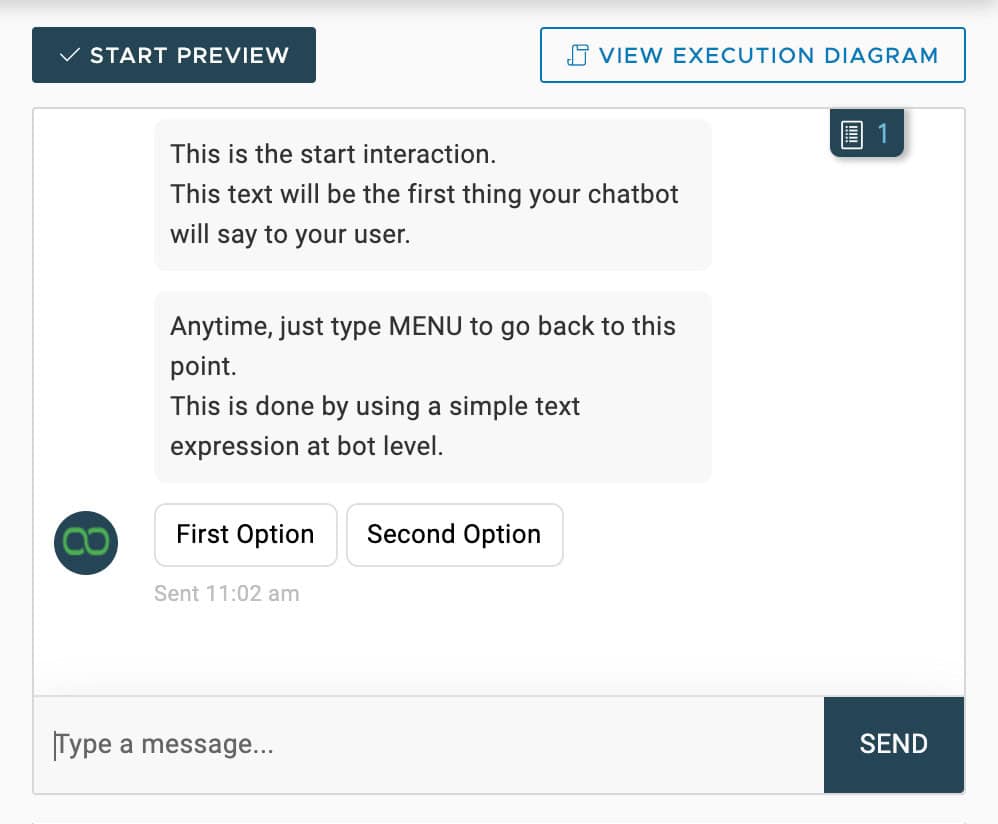
But that’s not all. Xenioo also has an Execution Diagram. And this is an awesome feature that I haven’t seen before in any other chatbot builder. Using the Execution Diagram, you can analyze what decisions Xenioo made and why a user is somewhere inside your flow:

Using the execution diagram, you can test your chatbot flow really fast and solve problems with your chatbot even faster.
In general, the interface is easy to use and it is also easy to set up your chatbot.
But I must say that it takes some time before you fully understand the interface, especially if you have never built a chatbot before.
Because of the many options that are available within Xenioo you sometimes lose the overview.
Want to compare Xenioo with 33 other chatbot platforms? Compare them here →Ease of use  How easy it is to build and change things once you're set up? On a scale of 1 to 5.
3.5 Setup difficulty How much technical work it takes to get going.Complex Average setup time How long until your first bot or AI agent is live.1 month Set up with AI Describe what you want in a chat, and an AI builds the bot or agent for you.Test before going live You can try the bot or agent yourself before customers see it.
Chatbot elements
Xenioo has many chatbot elements. It has over 50 elements you can use to build your chatbot flows.
Also, the chatbot elements are pretty advanced.
Take for example the Button element. One of the annoying things users do when they need to click on a button is replying with text (instead of clicking on the button). And most chatbot platforms can’t handle that.
But Xenioo handles this out of the box. In Trigger Text Expression, you can set your own expression. This will manage text replies when users need to use the button.

Next to standard elements, such as the button, they have also elements that make your chatbot GDPR compliant:

Contacts
In Xenioo, you can see all the conversations with your chatbot in the “Conversations” tab:
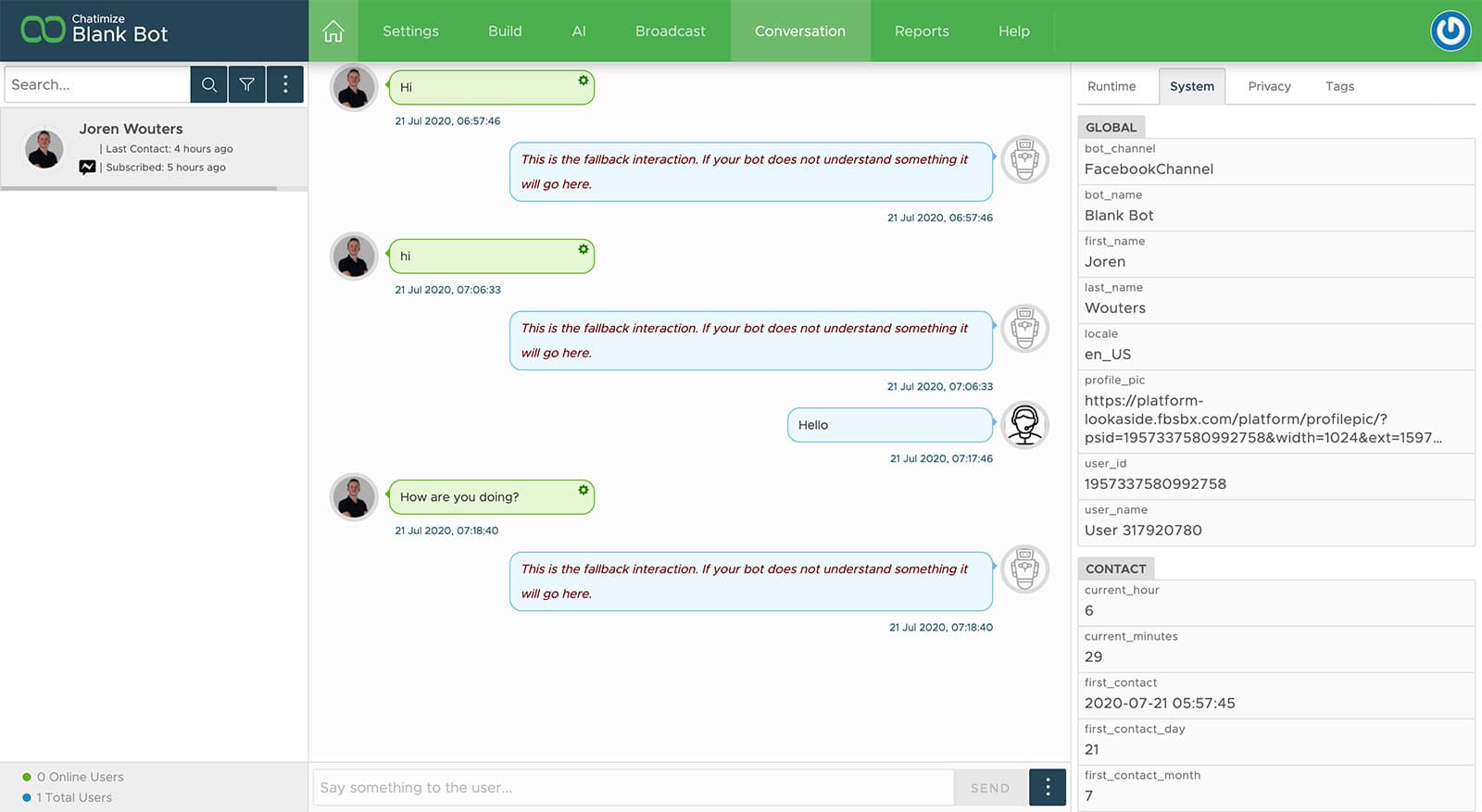
On the left-hand side, you see an overview of all the conversations. In the middle, you see the content of the conversation and on the right-hand side, you see information of the contacts.
With Xenioo, you can assign custom fields and tags to users. And based on those custom fields and tags, you can determine user segments (called “Audiences” in Xenioo).
Xenioo AI Features
Xenioo has built-in AI for Intents and Entities.
You can train your Xenioo chatbot to understand the intent of the user and use entities:

Then, when you’ve determined the intents and entities, you can train test and train it:

And if that’s not enough, you can also connect your chatbot with DialogFlow or IBM Watson Assistant and use their AI models in your chatbot.
Likewise, Xenioo offers a direct connection with OpenAI. So you can also connect your chatbot with ChatGTP.
| Build an AI agentYou can build an AI agent that replies on its own. | |
| Train the AI on your contentThe AI learns from your website, documents or files. | |
| AI rulesTell the AI what it may and may not do, and which steps to follow. Also called guidance, guardrails or procedures. | |
| Let the AI perform actionsThe AI can do things in other tools, like book a meeting or update your CRM. | |
| Connect the AI to MCP serversThe AI agent can use any tool that has an MCP server, without a custom setup per tool. |
Live Chat
Xenioo has a built-in live chat, which allows you to hand over the conversation to a live chat agent:
Unfortunately, you cannot set up auto-assignment rules, which can be useful for larger customer support teams.
| Hand over to a humanYour team can take over a conversation from the bot or AI, in an inbox inside the platform. | |
| AI copilotAI helps your team inside the inbox after a handover: it summarises the chat, tells you the customer's mood, and suggests replies. | |
| Auto-assignment rulesConversations go to the right teammate automatically. | |
| SLAsSet response-time targets and get alerted when a conversation is about to miss them. | |
| Connects to an external help deskHands conversations over to helpdesk platforms like Zendesk, Freshdesk, Intercom and similar. | |
| Contact profilesOne profile per person with their details and chat history. | |
| Custom fieldsAdd your own fields to a profile, like order number or budget. | |
| Merge contacts across channelsThe same person on WhatsApp and Instagram becomes one profile. |
Channels
With Xenioo, you can put your chatbot on 14 channels:
- Your website
- Facebook Messenger
- SMS
- RCS (texting for Android Phones)
- Google Business Messages
- Telegram
- Discord
- Slack
- Microsoft Teams
- Amazon Alexa
- Google Assistant
- Phone Voice

Besides that, you can also send automatic emails to users of your chatbot.
So, if you want to create an omnichannel experience for your users, Xenioo is a great fit.
| WebsiteCan you publish your chatbot on your website? | |
| WhatsAppCan you publish your chatbot on WhatsApp? | |
| FacebookCan you publish your chatbot on Facebook? | |
| InstagramCan you publish your chatbot on Instagram? | |
| TelegramCan you publish your chatbot on Telegram? | |
| SMSCan you publish your chatbot on SMS? | |
| EmailCan you publish your chatbot on email? | |
| SlackCan you publish your chatbot on Slack? | |
| VoiceAn AI agent can answer or make phone calls. | |
| WeChatCan you publish your chatbot on WeChat? |
Marketing
With Xenioo, you can send broadcasts to your complete audience or a part of it:

With Xenioo, you can put a widget on your website and customize it to the branding of your website:

You can also:
- Create landing pages
- Connect your chatbot to Facebook ads
- Use the One-Time Notification
- Automatically reply to Facebook comments
- Create custom URLs for your chatbot
Studies show that 90% of consumers want consistent interactions. This holds true no matter how they contact a business. Companies that can deliver this seamless experience retain up to 91% more customers. Xenioo’s omnichannel chatbot solutions help businesses easily meet expectations.
| BroadcastsSend one message to many contacts at once. | |
| SequencesSend a series of messages over time. | |
| Proactive website messagesSend a visitor a message based on what they do, like 90 seconds on the pricing page. | |
| Comment to DM on FacebookSend a DM to someone who comments on your Facebook post. | |
| Click-to-message Facebook adsRun Facebook ads that open a chat with your bot. | |
| Facebook Ref URLA link that opens Messenger and starts a specific flow. | |
| Comment to DM on InstagramSend a DM to someone who comments on your Instagram post or reel. | |
| Follow to DM on InstagramSend a DM to someone who follows you on Instagram. | |
| Story mention reply on InstagramReply in DM when someone mentions you in their story. | |
| WhatsApp message templatesSend approved WhatsApp templates, for broadcasts or for follow-ups outside the 24-hour window. |
Integrations
Xenioo has direct integrations with Mailchimp, ActiveCampaign, Google Firebase, Sendgrid, and WordPress search.
Besides that, they also have a Zapier integration which allows you to connect with almost every software on earth.
And if you want to get more technical, you can also connect your chatbot with other applications by using API calls in your chatbot flows.
| Direct integrationsHow many built-in connections to other tools does it have? | 1-10 |
| ZapierDirect integration with Zapier, one of the largest integration platforms in the world. | |
| MakeDirect integration with Make (formerly Integromat), one of the largest integration platforms in the world. | |
| API CallsSend data to or get data from another tool's API, for example inside a flow. |
Xenioo Pricing
The pricing of Xenioo is completely untransparent. On its website, Xenioo presents 3 plans: Growth, Professional & Custom:

But each of these plans doesn’t come with a price, so I don’t know how much it costs. And most often when companies don’t present the price, it’s rather a high price than a low price.
That said, you can still use a free trial on each plan. It lets you test if the platform works for you, without paying.
| Starting priceThe lowest price you can start with per month, including seat minimums (in US dollars). | — |
| Free planDoes the chatbot platform provide a free plan? | |
| Free trialDoes the chatbot platform provide a free trial? |
Analytics
Xenioo provides a dashboard that shows the number of messages, the number of users and user retention:

Moreover, you can analyze the analytics of your chatbot flow right inside the Flow Builder:

In addition, you can analyze the user input that the chatbot didn’t understand in the Parse Logs, so you can easily improve the answers of your chatbots.
Overall, pretty good analytics!
| DashboardAn overview of conversations and contacts. | |
| Ask AI about your dataAsk questions about your analytics in a chat and get the answer from an AI. | |
| Flow analyticsSee how people move through each flow and where they drop off. | |
| AI Resolution rateHow many conversations the chatbot resolved on its own, and how often it had to fall back or hand over. | |
| Knowledge gapsShows questions the AI couldn't answer, so you know what to add to its knowledge. Also called suggestions. | |
| Conversion trackingTracks sales, bookings or sign-ups that come from conversations. | |
| Team performanceResponse times and workload per teammate. | |
| Custom reportsBuild your own reports or dashboards. |
Templates
Xenioo provides 16 templates that you can use to build your chatbot, including free and premium templates.
Unfortunately, you cannot make templates yourself and share them with others.
Support
Some features are a bit “hidden” in the interface. They have detailed documentation that explains each feature.
Furthermore, they have Youtube tutorials in which they explain how to use their platform.
Also, you have online and email support.
| Support qualityHow fast and helpful support was when we tested it. 5: a human replies in live chat within an hour, plus good docs. 4: a human replies the same day. 3: email only, reply within 1–2 days. 2: slow, or only an AI bot. 1: no reply. | 2 |
Is Xenioo Worth It?
So, should you consider Xenioo to build your chatbots?
Yes, you definitely should.
Xenioo is great for small and medium businesses looking to create omnichannel chatbots.
By using the platform, you can create a chatbot using the flow builder and publish it on 10+ channels. Likewise, Xenioo offers many chatbot elements, has built-in AI features, and a direct integration with ChatGPT.
While I think Xenioo is great for SMEs, it seems that the platform is more focused on enterprise companies. A drawback is that the pricing is untransparent, so I have no idea how much it costs.
When thinking of drawbacks, there are two:
- It takes some time before you understand the interface
- Untransparent pricing

Hello –
Regarding your review of Xenioo – what is the issue you refer to at the end of your review “Not compliant with the latest Facebook policies”? Will Facebook prohibit publishing a Xenioo bot via Messenger?
Great question! I will elaborate on this.
No, Facebook will not prohibit you to use a Xenioo bot via Messenger. But, this year Facebook introduced new policies (https://chatimize.com/facebook-messenger-policy/) and because of that you can only send messages to your users within 24 hours or you need to pay for it / use the One-Time Notification (https://chatimize.com/one-time-notification/).
The One-Time Notification is a great way to reengage users outside the 24-hour window. Unfortunately, Xenioo doesn’t have this feature built-in their platform. Therefore, I said they don’t comply with the latest Facebook policies.
Is this clear?
Just an additional note on this: Xenioo supports One-Time Notifications and One-Time Follow-ups since December fully adhering to standard Facebook protocols!
Thank you, I will add this to my review!