


By Joren Wouters • Updated on
With an Instagram automation, you can automatically reply to DMs and comments without doing it manually.
Here’s what it can do:
- It can automatically send a DM to anyone who comments on your posts. This is a smart way to start a conversation with people who are already interested in what you share.
- It can answer common questions about your business. And it does so fast and automatically.
- It can promote your products, share links, or send special offers 24/7, even while you sleep.
In short, Instagram automated messages help you save time, grow your audience, and turn more strangers into customers. And it does it all on autopilot.
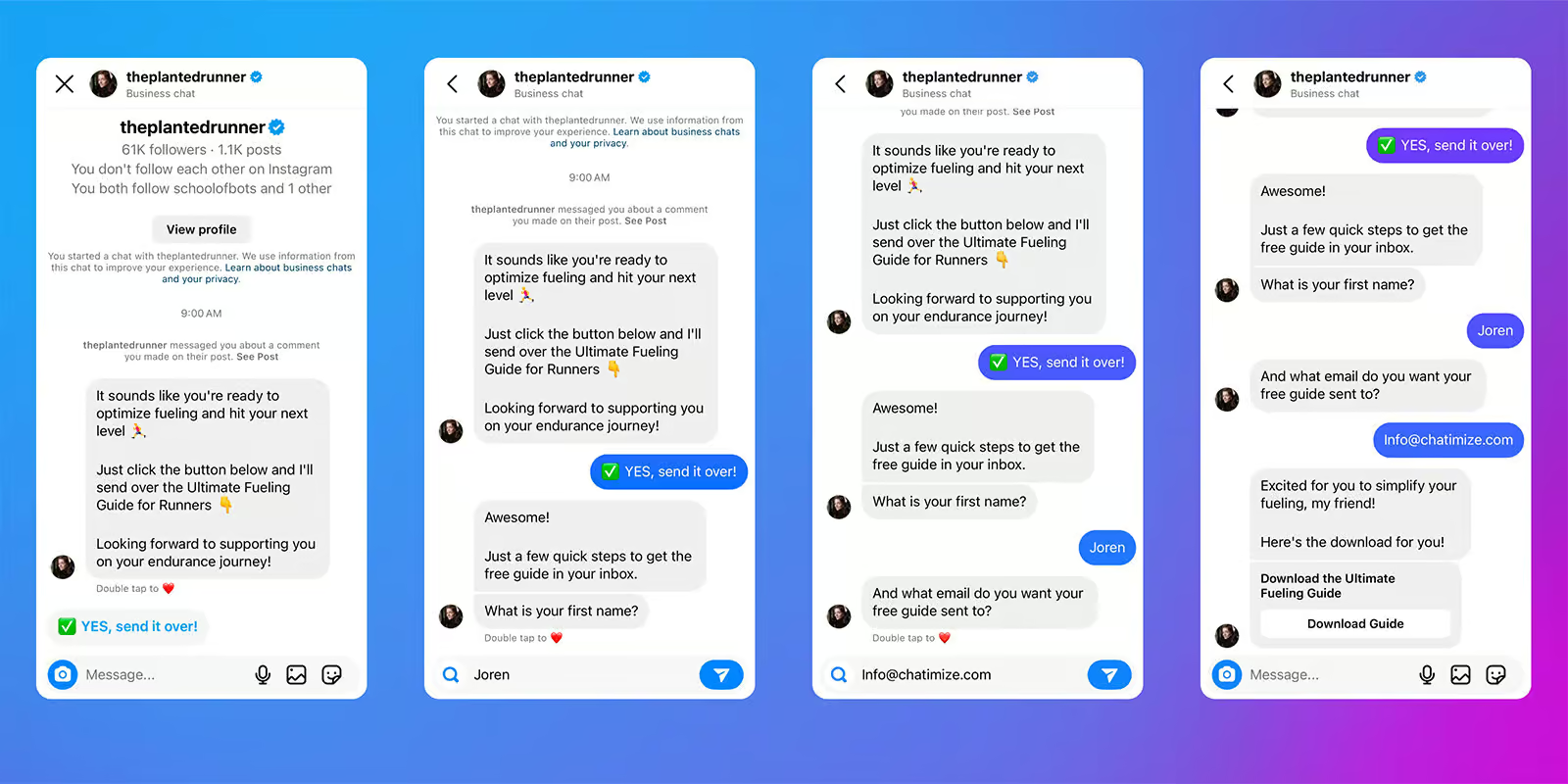
Here’s how we set up for one of our clients:
Step 1: Set up a Manychat account (it’s free) and link it to your Instagram
To start building your Instagram DM automation, you’ll first need a Manychat account.
Manychat is one of the best Instagram DM Automation tools in the world. It’s the platform I recommend and personally use with all my clients.
Why Manychat? Because it checks all the boxes:
- Good for beginners: You don’t need any tech skills. Just drag, drop, and go.
- Officially approved by Meta: There’s no risk to your account.
- Budget-friendly: Paid plans start are only $15+/month, and they also offer a free plan.
You can set up your free account and get my 100% discount code by clicking on this button:
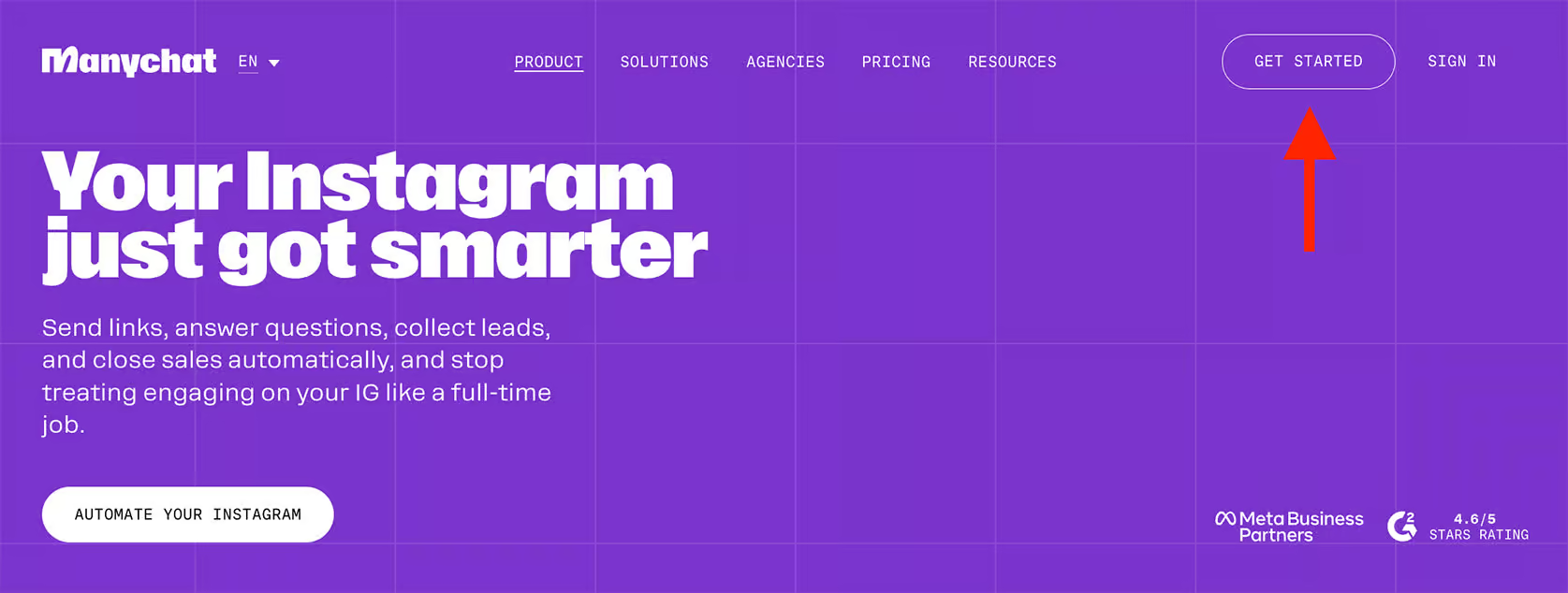
Once you’re on the Manychat site, hit Get Started Free:
Choose Instagram as your channel, and sign in with your Instagram profile:

Note: Instagram DM automation only works with Business or Creator accounts, not personal accounts. To switch, go to:
Settings → Account Type and Tools → Account Type → Switch to Professional Account
This takes 2 minutes and is free.
The next step is you connect your account properly. If you need help, I’ve got a full tutorial that’ll make sure you do it right in two easy steps:

Step 2: Add two triggers to start the DM Conversation
Now it’s time to tell your automation when to start. In this example, we’ll build a simple DM automation that collects emails in exchange for a free investing guide.
Let’s say you’re offering a Free Investing Guide. The automation will trigger when someone sends you a message or comments on your content using a specific keyword like “GUIDE.”
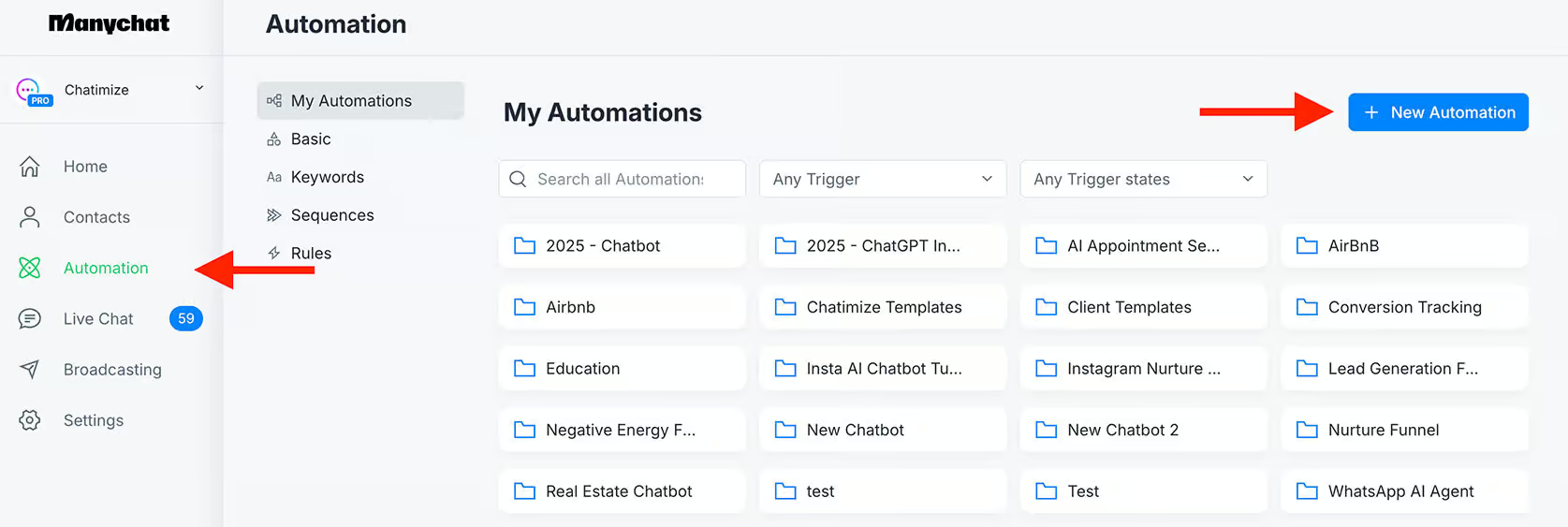
To do this, head into Manychat, go to Automation, and click New Automation:
All automated flows start with a trigger. That’s what kicks everything off. In our case, we want the flow to start when someone:
- Comments on a post or reel
- Sends you a DM with a keyword
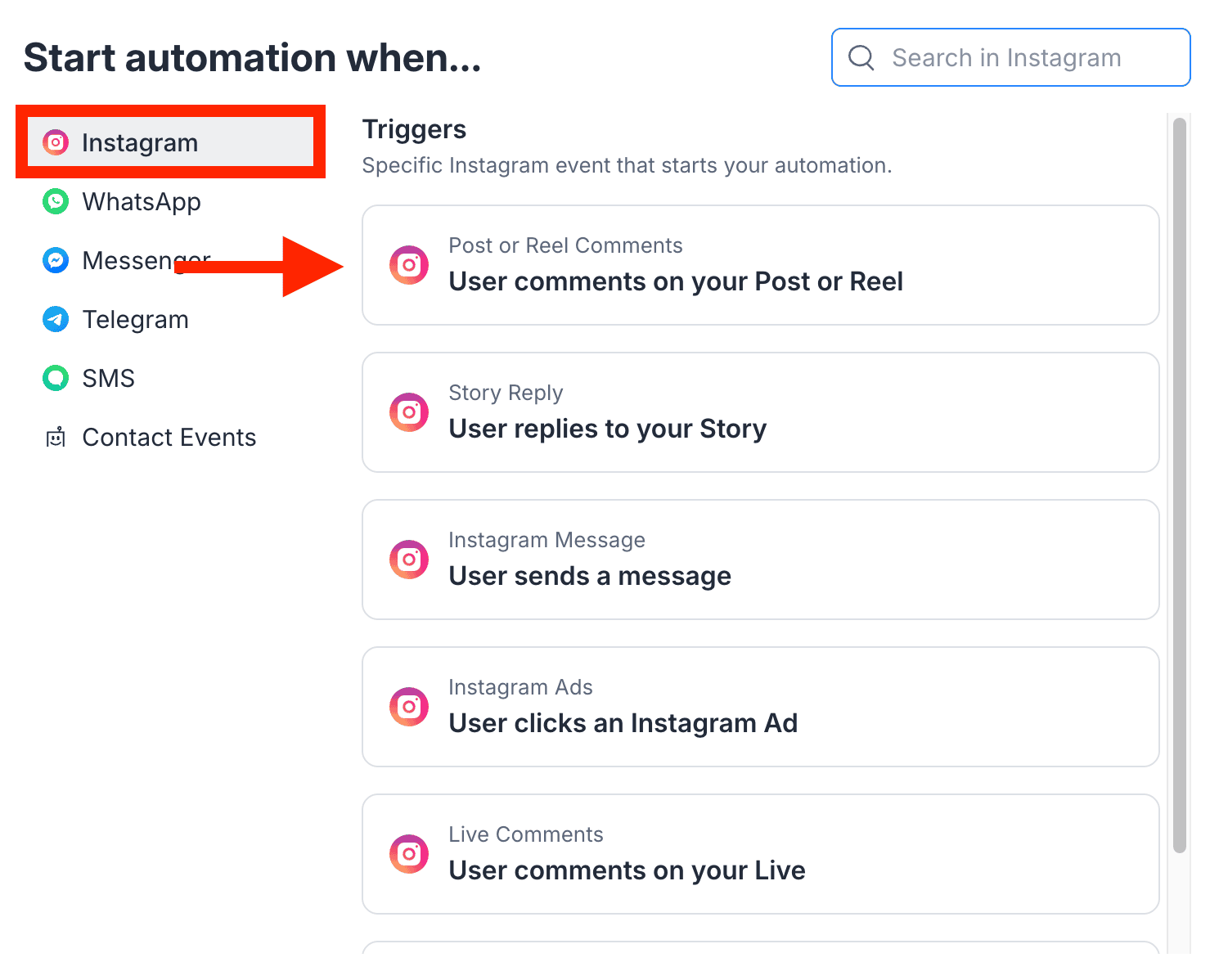
First, we’ll make a comment trigger. Click on Add trigger:

Then choose Instagram and User Comments on Post or Reel:
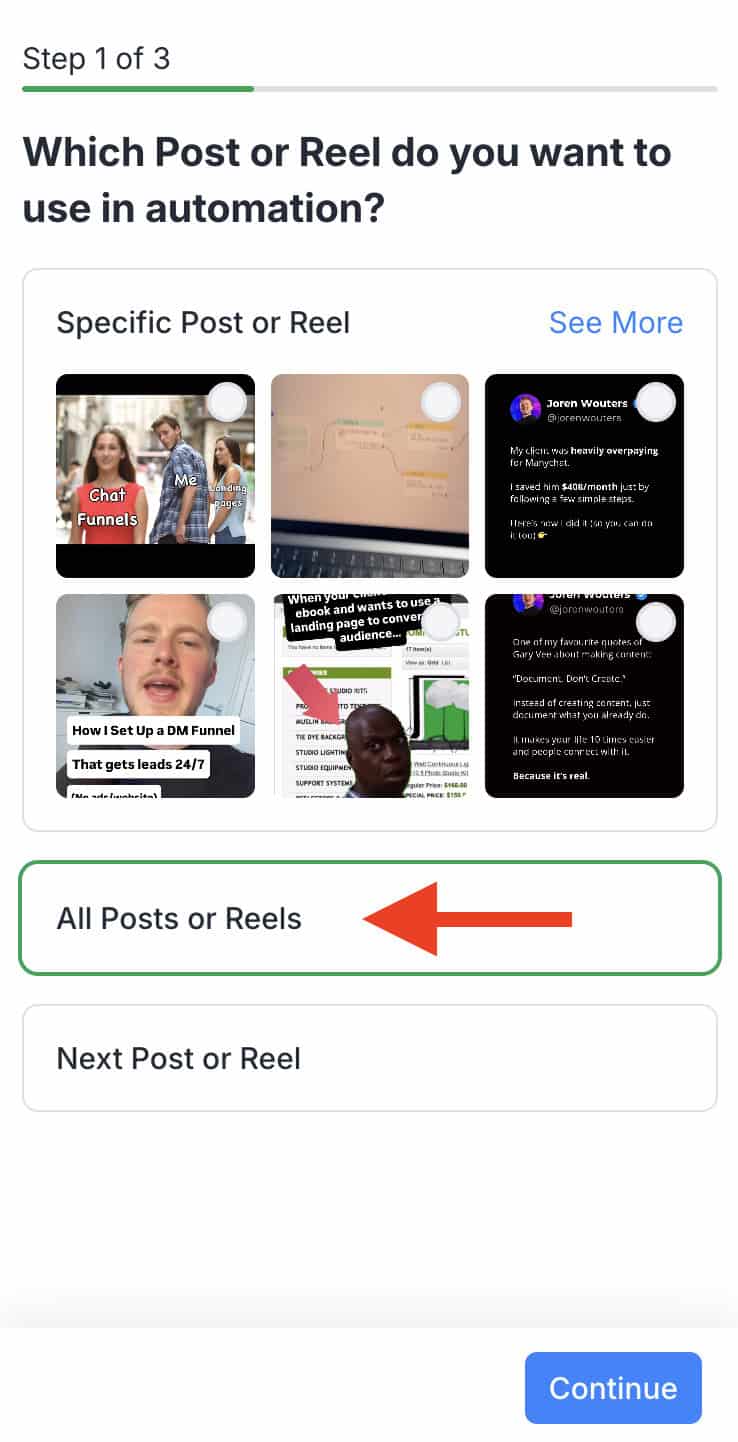
Next, you’ll choose which posts this automation should apply to. You can trigger it for:
- One specific reel/post
- All reels/posts
- Only the next reel/post
I usually recommend using “All posts and reels”. That way, you only have to set it up once and it works for all posts.
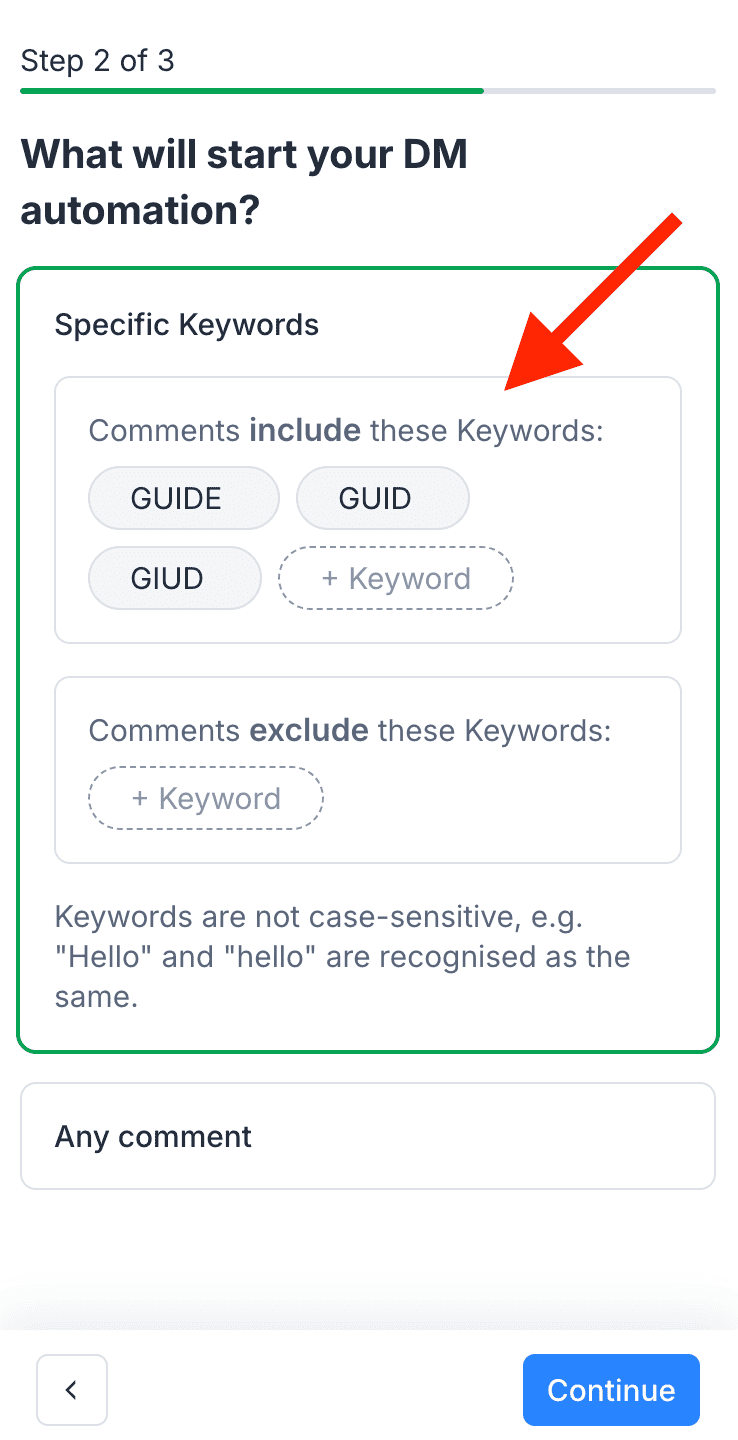
Then, add the trigger keywords. In your post caption, you might say:
Comment “GUIDE” below to get my free investing guide!
The automation will trigger any time someone comments with “GUIDE” on your posts.
Inside Manychat, add GUIDE as a keyword, and include a few common typos just to be safe:
Now set up your Public Reply. This is the comment that appears under their original comment. It’s a great chance to get them excited and send them to their DMs.
So we will add three variations here and click on Create:

Manychat will randomly rotate between these replies so your comments don’t look copy-pasted or spammy.
That takes care of our comment trigger. Next, we’ll handle users who message you directly instead of commenting.
Let’s say you post a Story that says:
DM me “GUIDE” to get your Free Investing Guide!
Go back to Add Trigger, pick Instagram → User Sends a Message:

Choose message begins with, enter “GUIDE” and add a few close variations or misspellings just in case:

Now, whether someone comments or sends a DM with the GUIDE keyword, your automation will start.
Pro Tip: Don’t want to build this from scratch? Download my free template here.
Whatever you do, make sure you follow Instagram DM rules, especially on messaging frequency and trigger content.
Using a Meta-approved platform (like Manychat) will keep your automation compliant. But aggressive keyword triggers or high-volume DM campaigns can still get restricted if they’re spammy.
Step 3: Build Your Instagram DM Automation Funnel
Now that your triggers are in place, it’s time to design the actual flow. These are automated messages in the DMs people will receive once they comment or DM you.
Because Instagram behaves different on mobile and desktop, we’ll split this automation in two parts:
- First message after comment or DM
- Follow-up automation to collect data and send your freebie
First message after comment
Inside Manychat, the first message should welcome the user and confirm that they want the free resource. Here’s a sample you can tweak:
Looks like you’re ready to make your first investment and earn some passive income!
Get instant access to my FREE Investing Guide and learn the exact steps to grow your money the right way—without the guesswork.
Just click the button below or reply with “WEALTH” to get your free guide now 👇

Make sure this message is marked as Send as Private Reply. Otherwise, it won’t go through.
The next step is to add a quick reply. This is a button that people can tap on in their messages. When they do, it triggers the next part of your automation.
So, include a quick reply with something like this:
✅ YES, send it over!

Pro Tip: On desktop, quick replies don’t show up (Instagram limitation). That’s why we also instruct users to type the word “WEALTH”.
Then, if people are on mobile, they can click on the quick reply. If they are on Desktop, they can type in the word.
Create the Follow-up automation to collect data
So, let’s make another automation, and then we’ll link the previous automation with this new one.
Now go back to Automation -> New Automation:
Choose Instagram, and User sends a message:
Write WEALTH, as well as some common typos, and pick Message begins with:

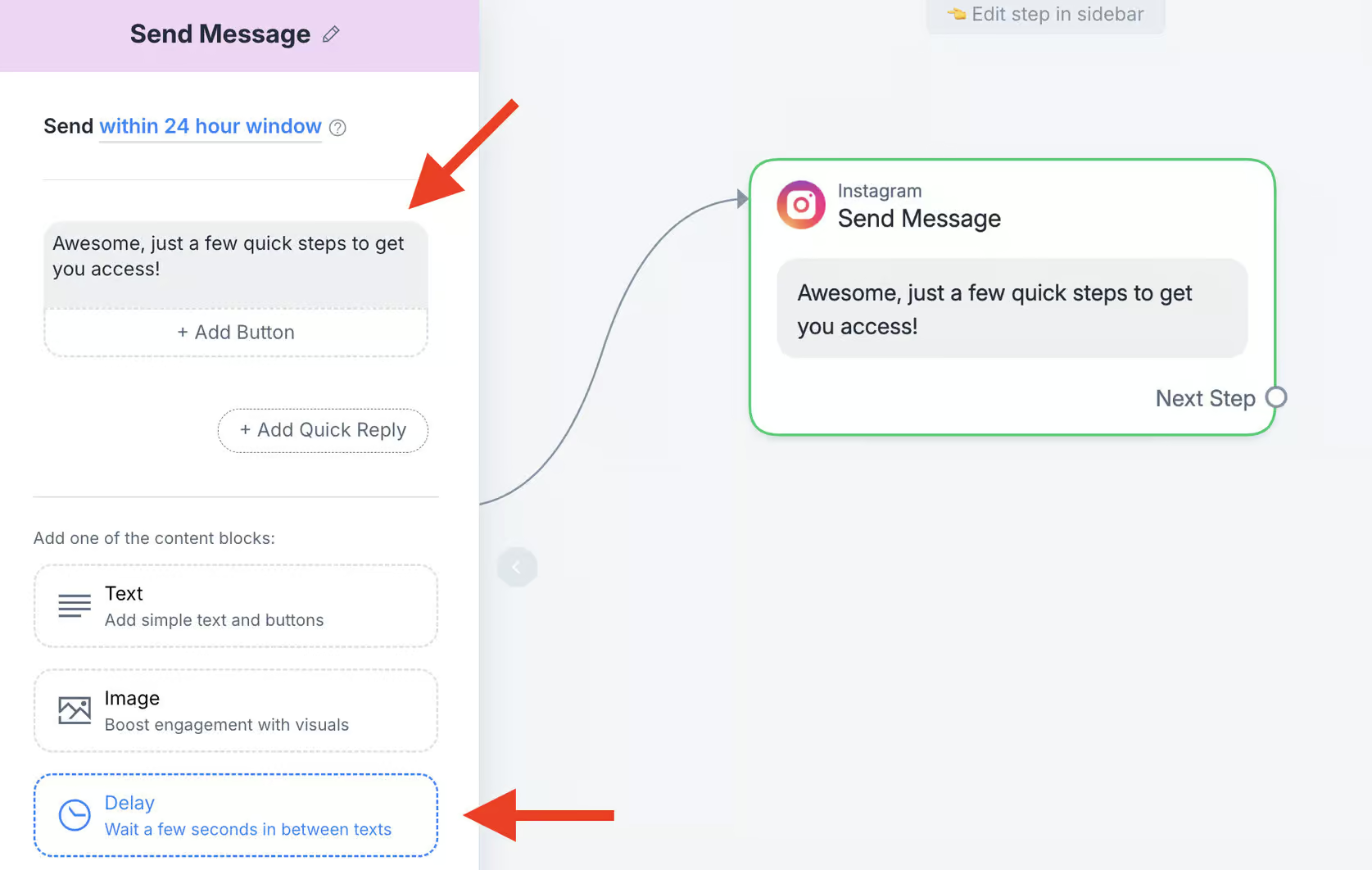
We want to make them excited. So, add a message that says something like “Awesome, just a few quick steps to get you access!”. Then, add 3 seconds of delay to make it seem more natural and human:
Next, you’ll build the actual sequence that collects their name and email. This can all be done within Instagram DMs.
Click on Data Collection:

Set it to collect the user’s first name. Choose Reply Type: First Name and change the expiration time to 23 hours (this gives users more time to answer):
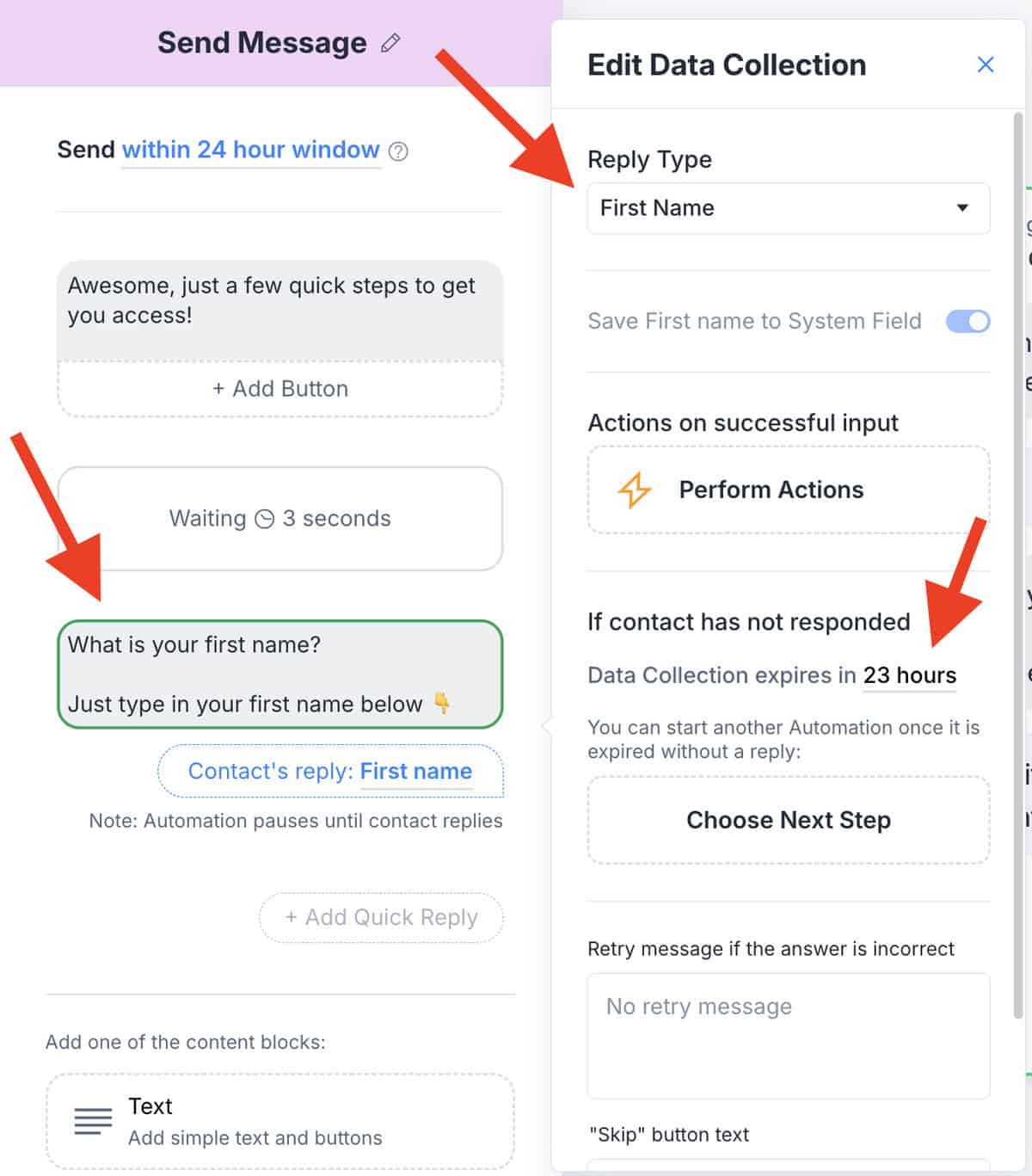
Go down and and remove the “Skip” button text. This means that users can’t skip the step:

Let’s link this to another message:
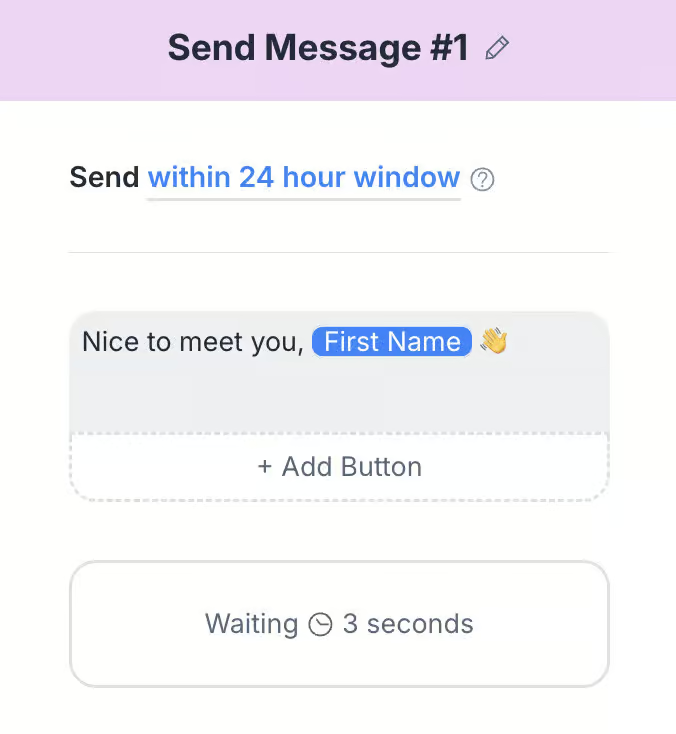
Once they reply, send a new message using their name to keep it friendly and engaging:
Then ask for their email.
Click Data Collection again, this time set to Reply Type: Email. This tells Manychat to check if the email format is valid:
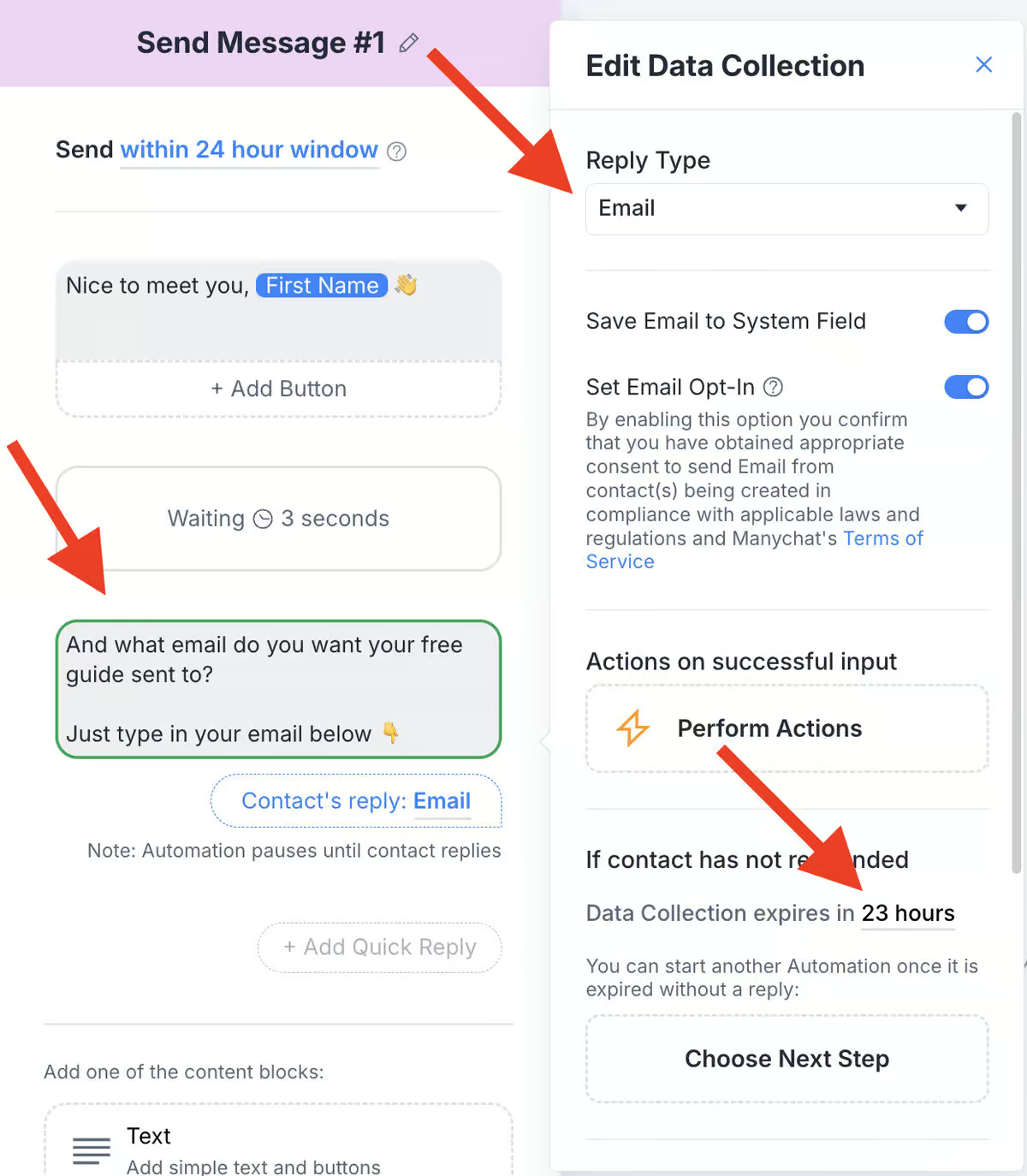
Scroll down and delete the “Skip” text again so they must fill it in.
If someone enters an invalid email, Manychat will automatically ask them again:

Once you’ve collected both name and email, it’s time to send your guide!
You’re all set, {{first_name}}!
Can’t wait for you to get started with investing!
Just click the button below to get instant access 👇
Then add a button labeled something like “Access Free Guide” and link it to your resource. I will use Chatimize.com just for the sake of this example:

At this point, this is what the automation should look like:

Finally, link this second automation back to your original one using the Manychat block “Start Automation”. This connects the whole experience from trigger to delivery:

When everything looks good, hit “Set Live” in the top right corner. And you’re done!


Great guide! The step-by-step setup with Manychat is incredibly clear and actionable, especially the tips about platform differences (desktop vs. mobile) and the email validation feature.
I have a practical question about expanding beyond the initial guide. After the lead receives their resource, what’s an effective follow-up sequence you’ve seen work well? For example, an automation that checks in a few days later to ask a specific question about the guide or offers related content, to start nurturing them without being spammy?
Hey Simon, great question! What I typically do after giving a freebie is send more free value over the course of 1-3 days. This will build the relationship and “warm up” the lead. Then once trust has been built, that’s when I present a paid offer and convince them to buy. In fact, you can get this funnel when you sign up for my Skool community: https://www.skool.com/manychatmasterclass. So if you are interested in that, highly recommend checking it out!