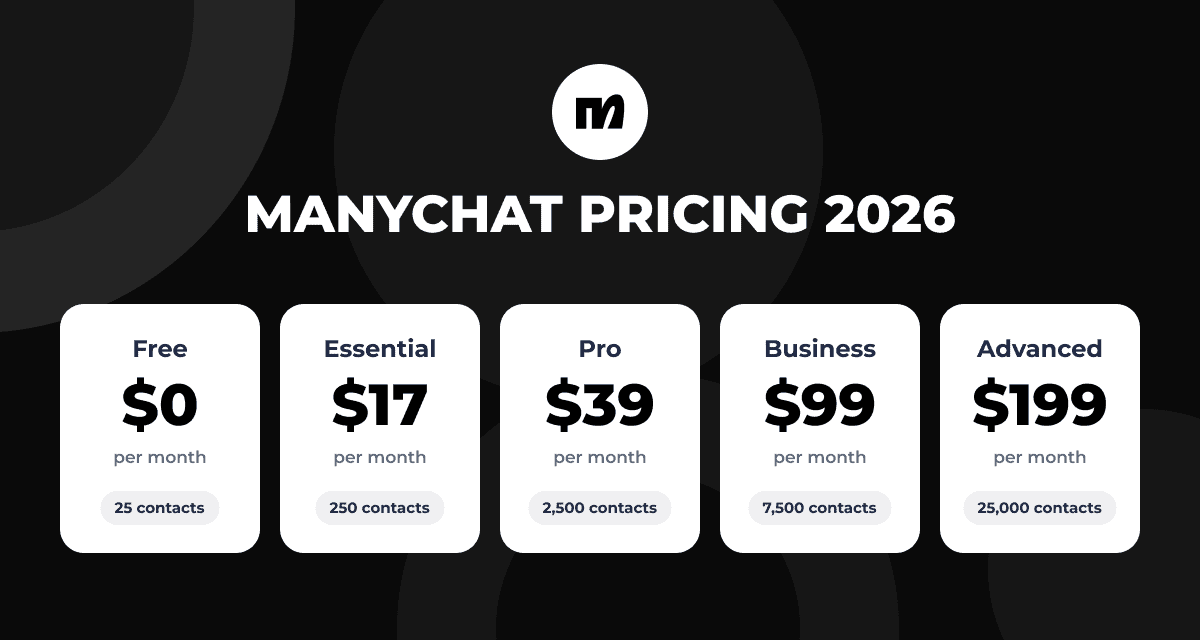
Manychat pricing starts with a free plan, then $17 to $199/month ($14 to $139/month if you pay annually), based on your active contacts.
But extra contacts, WhatsApp messages and seats can add a lot to that bill.
I’m an official Manychat Educator, and I’ll show you what you’ll really pay and how to pay less.
Disclaimer: Chatimize earns a commission if you sign up through my links, at no extra cost to you.
Manychat Pricing Plans at a Glance
Manychat has five plans. Yes, Manychat is free to start: the Free plan costs $0 and includes 25 active contacts.
This is what every plan costs and includes:
| Plan | Monthly | Yearly (per month) | Active contacts | Extra contact (monthly / yearly) | Users | Manychat AI |
|---|---|---|---|---|---|---|
| Free | $0 | – | 25 | – | 1 | No |
| Essential | $17 | $14 | 250 | $0.10 / $0.082 | 2 | No |
| Pro | $39 | $29 | 2,500 | $0.05 / $0.038 | 3 | Included |
| Business | $99 | $69 | 7,500 | $0.025 / $0.018 | 5 | Included |
| Advanced | $199 | $139 | 25,000 | $0.004 / $0.0028 | 10 | Included |
If you pay yearly, you save 18% on Essential, 25% on Pro and 30% on Business and Advanced.
These plans are for Manychat accounts created since March 2, 2026. If your account is older, you may still be on the old Pro plan. That plan is priced by your total number of contacts. You stay on it until Manychat moves your country to the new plans.
How Manychat Billing Works
Manychat charges you by active contacts. An active contact is a person you exchange a message with in a billing month, through an automation, AI, a broadcast or the Inbox.
One person counts once a month, no matter how many messages you send them. And contacts you don’t talk to that month don’t count. That includes contacts you import, until you message them.
If you go over your plan’s limit, your automations keep running. You just pay a small fee for each extra contact. On a yearly plan, that fee is still billed every month.
But there’s a way out. Upgrade within the same billing cycle, and Manychat drops the overage you’ve built up. Those contacts then count toward your new plan.
Which Manychat Plan Should You Pick?
This is the short version:
| If you want… | Pick | Why |
|---|---|---|
| To try Manychat for free | Free | $0 for 25 active contacts, and you don’t need a credit card |
| To collect leads on a small budget, and you don’t use an email platform yet | Essential | $17/month ($14/month if you pay annually) for 250 active contacts, with no Manychat branding. Leads go to Google Sheets |
| To collect leads and add them to your email platform or CRM | Pro | $39/month ($29/month if you pay annually), and it connects to Kit, Mailchimp, Klaviyo, HubSpot, Zapier and Make. Essential only connects to Google Sheets |
| To use Manychat AI or WhatsApp | Pro | $39/month ($29/month if you pay annually), and it’s the cheapest plan that has them |
| A shared Inbox for your team, and $99/month ($69/month if you pay annually) fits your budget | Business | It’s the cheapest plan with a team Inbox that assigns chats, and it includes 5 users |
| More than about 11,500 active contacts a month | Advanced | It’s the most expensive plan at $199/month ($139/month if you pay annually), but at that size it costs less than Business plus extra contacts |
Free plan
Best for: testing Manychat before you pay for it.
What’s included: 25 active contacts, 2 channels, 1 user and up to 4 live triggers. A trigger is what starts an automation, like a comment or a keyword in a DM. You don’t need a credit card.
What’s missing: Manychat AI, broadcasts and integrations. Your messages also show Manychat branding.
Essential plan
Best for: new creators who want to collect leads but don’t use an email marketing platform yet.
What’s included: 250 active contacts, 2 channels, 2 users and unlimited automations. You can save leads to Google Sheets, and there’s no Manychat branding.
What’s missing: WhatsApp, SMS and email, Manychat AI and broadcasts. Google Sheets is also the only integration, so there’s no Zapier, Make or API.
Pro plan
Best for: serious creators and small businesses that have committed to their business.
What’s included: the Manychat Pro price is $39/month ($29/month if you pay annually) for 2,500 active contacts, 3 users and 3 channels. Those channels can include WhatsApp, SMS and email, with up to 10,000 emails a month.
You also get Manychat AI, broadcasts, Zapier, Make and the API. Broadcasts go out on Messenger, WhatsApp, SMS, email and Telegram, but not on Instagram or TikTok. And you can connect tools like HubSpot, Klaviyo, Mailchimp, Kit, Stripe and PayPal.
Pro is cheaper than Essential from about 470 active contacts. Past that point, Essential’s extra contacts cost more than the jump to Pro.
What’s missing: you can only connect 3 channels, chats aren’t assigned to your team automatically, and there’s no priority support.
Business plan
Best for: growing audiences and teams. From about 3,700 active contacts, Business is cheaper than Pro plus overage.
What’s included: everything in Pro, plus 7,500 active contacts, 5 users and unlimited channels. You can send up to 30,000 emails a month, and you get a multi-user Inbox that assigns chats to your team, plus priority support.
What’s missing: nothing a creator needs. You pay for more contacts and more team features, not new automation tools.
Advanced plan
Best for: big accounts. From about 11,500 active contacts, Advanced is cheaper than Business plus overage.
What’s included: everything in Business, plus 25,000 active contacts, 10 users and up to 100,000 emails a month. Extra contacts are also the cheapest here, at $0.004 each ($0.0028 if you pay annually).
What’s missing: no new features over Business. You only pay for the room to grow.
You need Pro if:
- You want to use Manychat AI
- You want to use WhatsApp, SMS or email
- You want to send broadcasts
- You want to connect Zapier, Make or the API
- You have more than about 470 active contacts a month
What You’ll Actually Pay
Your bill depends on how many active contacts you have. This is the cheapest plan at each size, with extra contacts included:
| Active contacts | Cheapest plan | Monthly total |
|---|---|---|
| 250 | Essential | $17 ($14 if you pay annually) |
| 1,000 | Pro | $39 ($29 if you pay annually) |
| 3,000 | Pro | $64 ($48 if you pay annually) |
| 5,000 | Business | $99 ($69 if you pay annually) |
| 10,000 | Business | $161.50 ($114 if you pay annually) |
| 25,000 | Advanced | $199 ($139 if you pay annually) |
These totals assume monthly billing, no extra seats and US prices before tax.
To make it concrete, here are three examples:
An Instagram creator with 1,000 active contacts: Pro costs $39/month ($29/month if you pay annually). On Essential, the same month would cost $92 ($75.50 if you pay annually), because you pay for 750 extra contacts.
A Reel goes viral and you hit 6,000 active contacts on Pro: that month costs $39 plus 3,500 extra contacts at $0.05, so $214. If you pay annually, it’s $29 plus $0.038 per extra contact, so $162. If you upgrade to Business in the same month, you pay $99 ($69 if you pay annually) and the overage is dropped.
A store on Pro sends a WhatsApp broadcast to 2,000 contacts in the UK: Manychat charges $0.073 per UK marketing message, so the broadcast costs $146. That makes $185 for the month ($175 if you pay annually), as long as you stay under 2,500 active contacts. I used the UK here because Meta has paused marketing messages to US numbers.
Extra Costs on Top of Your Plan
The plan price isn’t always the whole bill. These costs come on top:
- WhatsApp: you pay for every message template Manychat delivers, and since October 1, 2026, for most replies too. The price depends on the message type and your contact’s country.
- SMS: texts go through your own Twilio account, so Twilio bills you for them, not Manychat.
- Email: once you go over your plan’s email limit, each email costs $0.003.
- Extra Inbox seats: $25/month per seat on Pro, Business and Advanced, up to 3, 5 or 10 seats in total.
- More accounts: one subscription covers one Manychat account, so agencies pay for each client account.
WhatsApp is the cost most people miss. Manychat takes it from your Manychat Wallet, a balance you top up next to your subscription. This is what it charges per message in three markets:
| Market | Marketing | Utility | Service (replies) |
|---|---|---|---|
| North America | $0.0287 | $0.0039 | $0.0034 |
| United Kingdom | $0.0730 | $0.0253 | $0.0220 |
| Germany | $0.1569 | $0.0632 | $0.0550 |
Marketing messages are promotions, like a broadcast about a sale. Utility messages are updates people asked for, like an order confirmation. And service messages are your replies after a customer messages you first.
Every WhatsApp number gets 1,000 free service messages a month. And when someone reaches you through a Click-to-WhatsApp ad, every message in the next 72 hours is free. I explain both in my post on WhatsApp’s new pricing.
To work out your own WhatsApp costs, you can use Manychat’s WhatsApp pricing calculator.
Is Manychat AI Included?
Yes, on Pro, Business and Advanced. Manychat AI is included there at no extra cost, so there’s no add-on to buy. Free and Essential don’t include it.
Manychat AI does four main things:
- The AI Step takes over a chat to reach a goal, like collecting someone’s details.
- Intention Recognition starts an automation based on what someone means, not only the exact keyword.
- The Text Improver rewrites your messages.
- The Flow Builder assistant builds an automation for you after a few questions.
On Instagram, it can also answer questions in your DMs and reply to comments for you. I tested Manychat’s AI features in my Manychat review.
How to Pay Less for Manychat
There are five ways to lower your Manychat bill:
- Use my partner code: as an official Manychat Educator, I can give you your first month of Pro for free with my Manychat promo code.
- Start with the free trial: Essential and Pro come with 14 days for free, and you can get a refund within 30 days of buying a plan.
- Pay yearly: you save 18% to 30%, and Pro drops from $39 to $29/month.
- Upgrade instead of paying overage: if you go over your limit, upgrading in the same billing cycle wipes out the overage.
- Don’t move to Business too early: Pro plus overage stays cheaper until about 3,700 active contacts.
Is Manychat Worth the Price?
Yes, if you use Instagram or Facebook to get leads and sales. Comment-to-DM automations, DM funnels and broadcasts are where Manychat pays for itself. And Manychat Pro gives you all of them for $39/month ($29/month if you pay annually).
But it gets expensive when you have a big audience that only interacts once. Everyone who comments on a viral Reel counts as an active contact that month, even if you never hear from them again.
If price is what’s holding you back, UChat is a cheaper way in. It’s a chatbot builder for Instagram, WhatsApp and more, and it costs $15/month, with a free plan for up to 200 contacts. I compare it with other options in my list of Manychat alternatives.
Frequently Asked Questions
Does Manychat have a free trial?
Yes. Essential and Pro both come with a 14-day free trial. If you want more time, my partner code gives you your first month of Pro for free.
Can I cancel Manychat anytime, and can I get a refund?
Yes, you can cancel at any time, but only on the website, not in the app. If it’s been less than 30 days since you bought your plan, you can ask Manychat’s support team for a refund.
Can I switch from yearly to monthly billing?
Not until your yearly term ends. The other way around is fine, though: you can switch from monthly to yearly at any time, and what’s left of your monthly plan goes toward the yearly payment.
Does one Manychat subscription cover several Instagram accounts?
No. Each Manychat account connects one Instagram account and is billed on its own. So if you run two Instagram accounts, you need two subscriptions.