


If a customer lands on your website with a simple question, they don’t want to wait hours for an answer. They want it immediately.
That’s exactly where FAQ chatbots come in.
An FAQ chatbot answers common questions automatically. This can include things like pricing, shipping, login issues, or business hours. Customers get quick answers. Your team gets fewer repetitive questions.
But FAQ chatbots are not a perfect solution for every situation.
They work very well for simple, repeated questions. And not so well for complex or sensitive issues.
In this guide, I’ll show you:
- What an FAQ chatbot is
- How FAQ chatbots work in practice
- Real-life FAQ chatbot examples
- The benefits and limitations
- When to use one, and when not to
Let’s get started!
What Is an FAQ Chatbot?
An FAQ chatbot is software that automatically answers common customer questions. Instead of a human support agent replying to every message, the chatbot handles simple questions instantly.
That can include questions like:
- What are your opening hours?
- How much does it cost?
- Where is my order?
- How do I reset my password?
- What is your return policy?
Put simply, it’s a digital assistant that helps customers find answers faster.
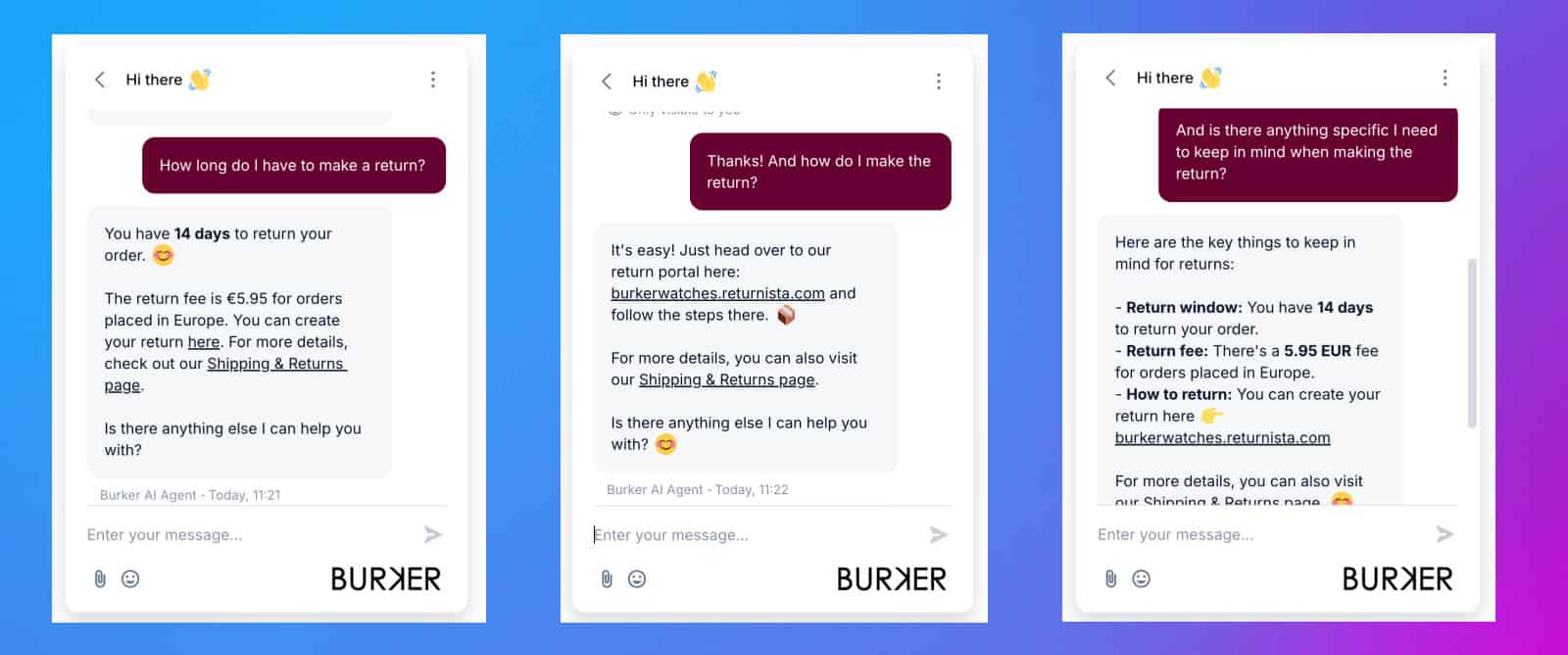
Here’s an example of a chatbot that guides customers through questions about returns and refunds:
FAQ chatbots are usually added to places where customers already ask questions, such as:
- Websites
- Help centers
- Chat widgets
- Facebook Messenger
- Other messaging apps
From the customer’s perspective, it feels like a normal chat conversation.
From the business side, it reduces repetitive support tickets. In fact, research shows that chatbots can cut your costs by 30%. Plus, it helps your team respond faster to the questions that actually need human help.
How FAQ Chatbots Work
At their core, FAQ chatbots do one simple thing – they respond instantly when a customer asks a question.
What happens between the question and the reply depends on how the chatbot is set up. But in most cases, the flow is very straightforward.
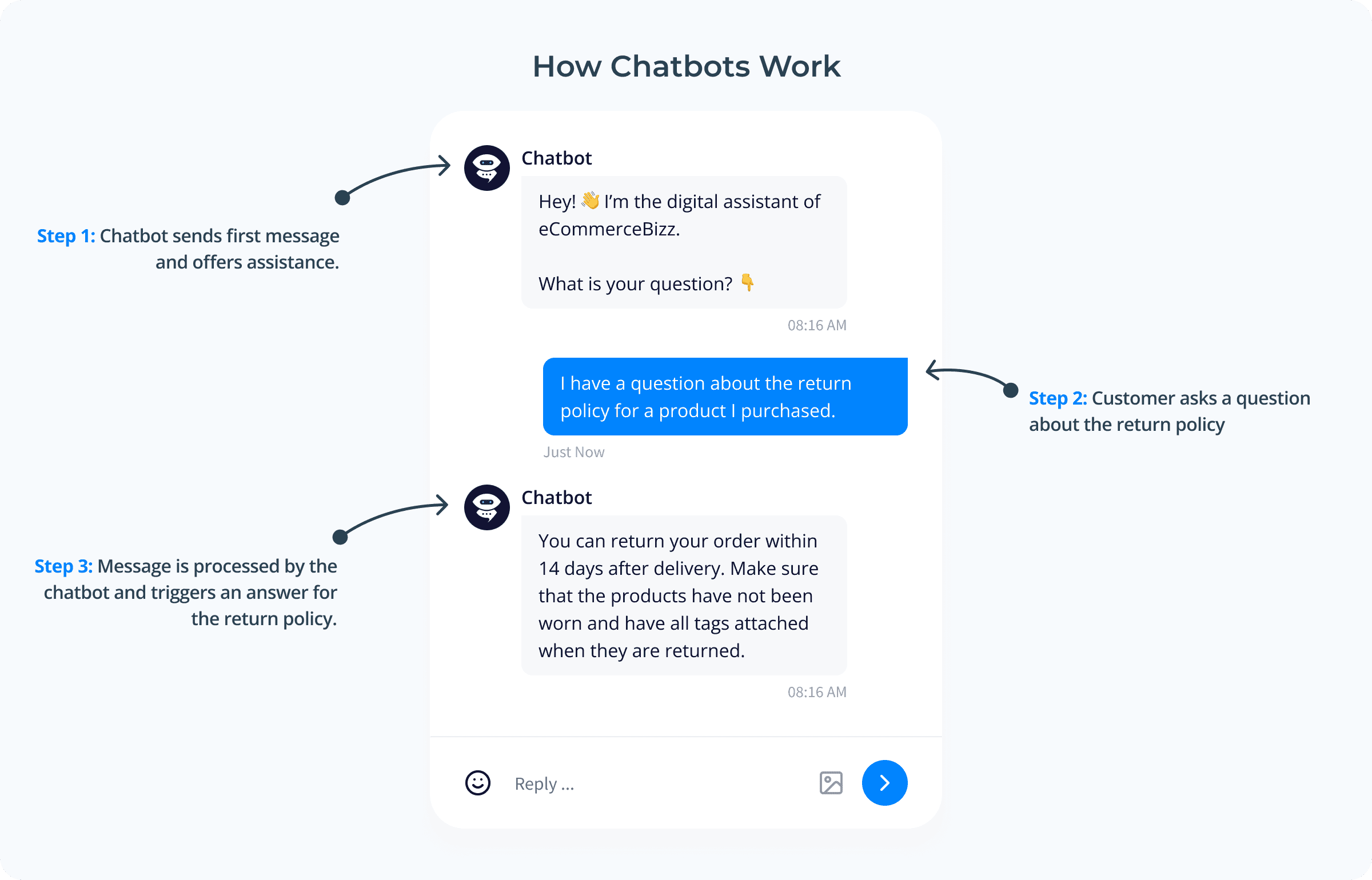
How chatbots work usually follows this process:
- A user asks a question or clicks a suggested option
- The chatbot matches the question to an answer
- The chatbot replies instantly
- If needed, the chatbot escalates to a human
Let’s make that more concrete.
Imagine someone asks a question about a return policy. The chatbot then looks up the knowledge that it has, and gives the answer.
If the question is simple, the chatbot handles everything on its own.
But if the request is unclear or more complex, the chatbot can pass the conversation to a human agent. For example, if the order is delayed or there’s a complaint.
FAQ chatbots aren’t meant to handle everything. They take care of the repetitive, predictable questions first. And they leave the more complex situations to your support team.
That’s what makes them practical.
Real-Life FAQ Chatbot Examples
Let’s look at how FAQ chatbots work in real situations.
Below are common examples across different types of businesses. Each one shows what the user asks, how the chatbot responds, and what happens next.
Pricing and Plan Questions
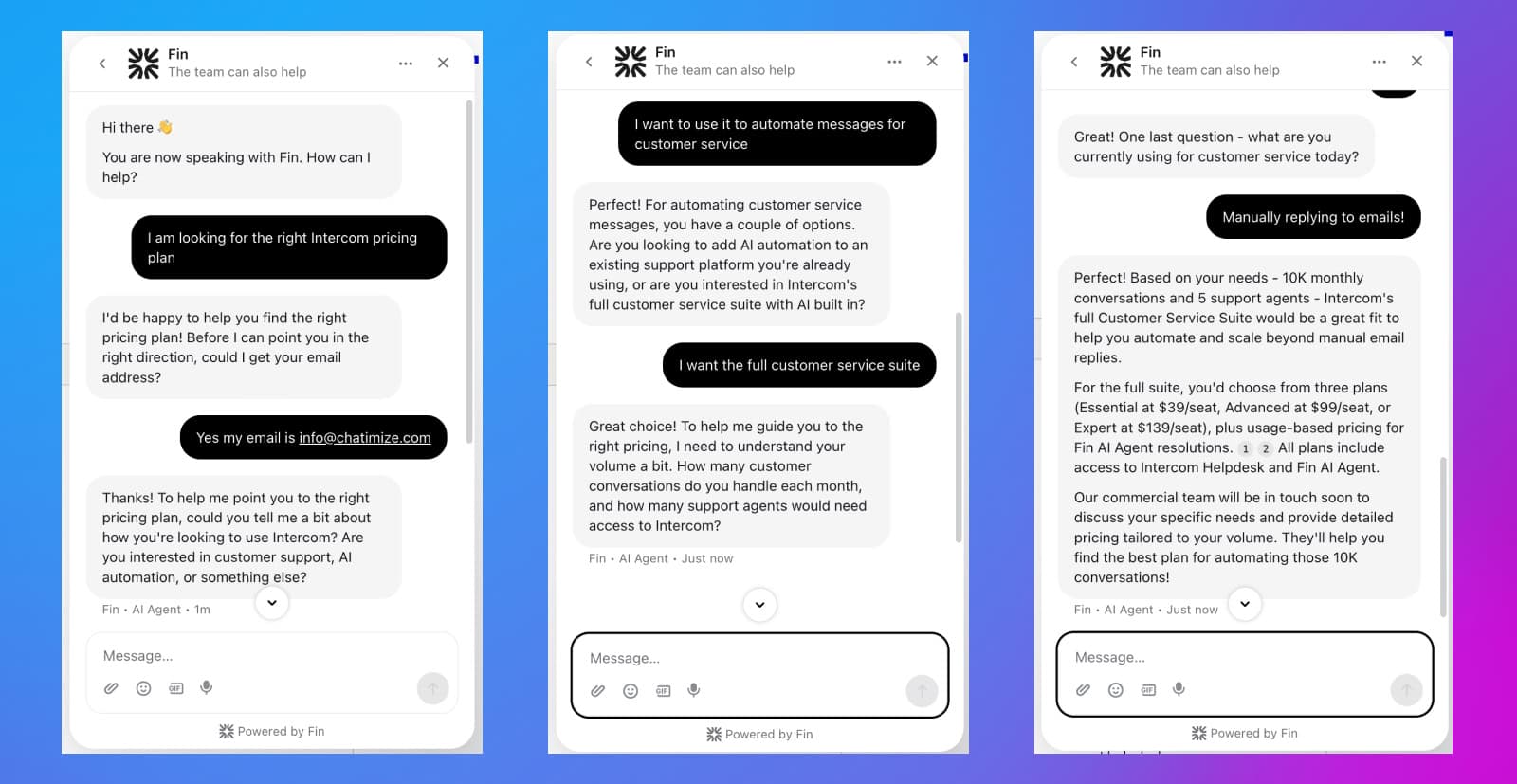
Intercom is one of the best chatbot platforms, especially for enterprise. If you visit the Intercom pricing page, the chatbot immediately starts a guided conversation.
User asks:
“I’m looking for the right Intercom pricing plan”
Chatbot replies:
Instead of giving a generic answer, the chatbot asks a few follow-up questions. For example:
- What you want to use Intercom for
- Whether you need automation or full support features
- How many conversations and agents you have
Based on those answers, it recommends the most suitable plan and explains the pricing options:
What happens next:
The user is guided to the right plan without needing to compare everything manually. The chatbot informs the user that their commercial team will contact them soon.
Shipping and Delivery Questions
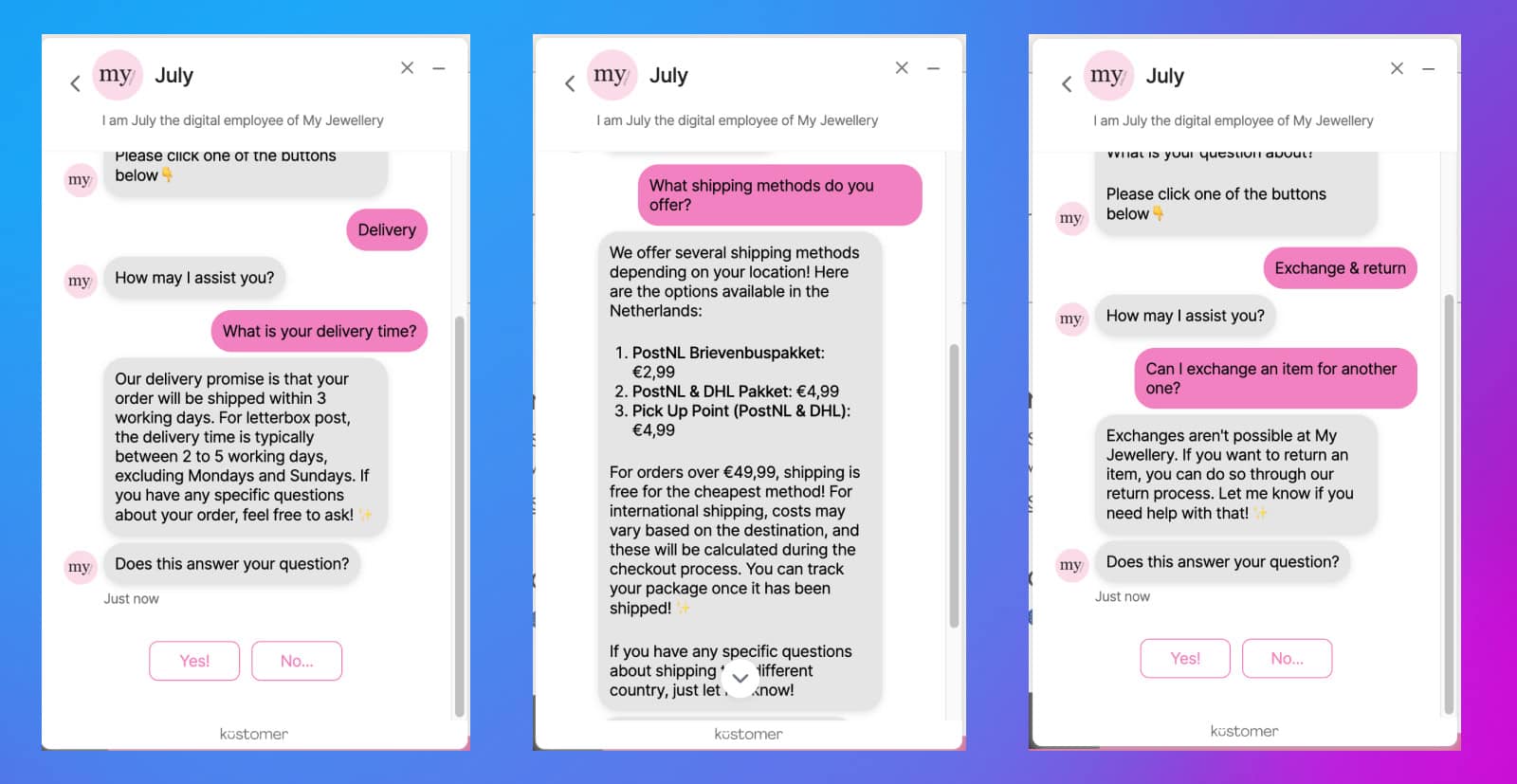
My Jewellery is an eCommerce brand that sells jewelry and accessories online. They use a chatbot to handle common shipping and delivery questions.
User asks:
“What is your delivery time?” and “What shipping methods do you offer?”.
Chatbot replies:
The chatbot provides a clear, structured answer. For example:
- Estimated delivery time (e.g. 2–5 working days)
- Available shipping methods
- Shipping costs and conditions (like free shipping thresholds)
At the end, it also asks if the answer solved the question.
What happens next:
The user gets real-time information without contacting human support.
Return and Refund Policies
Burker is an eCommerce brand that sells watches online. They use a chatbot to guide customers through return and refund questions.
User asks:
“How long do I have to make a return?” and “How do I return my order?”.
Chatbot replies:
The chatbot gives a clear, structured answer. For example:
- Return window (e.g. 14 days)
- Return fee (if applicable)
- A direct link to the return portal
- A short explanation of the steps
What happens next:
The customer can complete the return without needing help from a support agent.
Account or Policy Help (NCM Insurance)
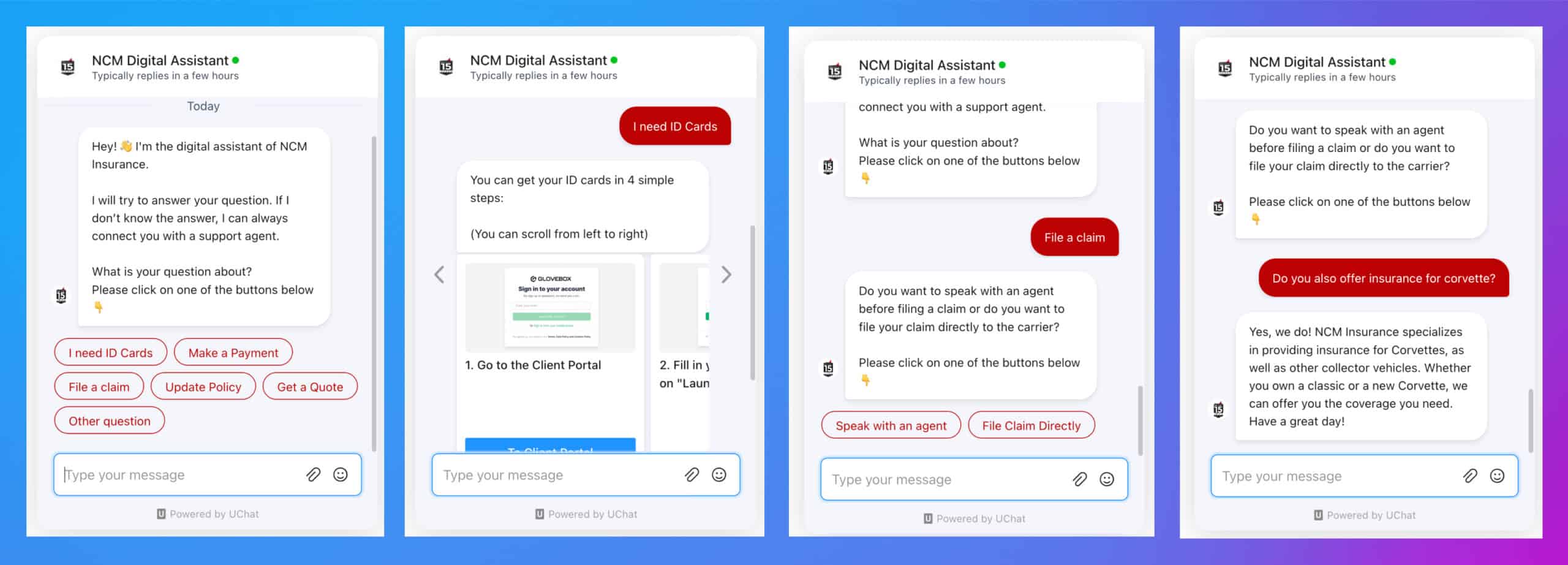
NCM Insurance is an insurance provider that handles policies for high-value vehicles.
This is an example of insurance chatbot that help customers with account-related questions and policy tasks.
User asks:
“I need ID cards” and “How do I update my policy?”. In this case, instead of manually typing it out, the user clicks on the relevant buttons.
Chatbot replies:
The chatbot guides the user step by step based on their selection. For example, it may provide step by step instructions. Or, it can ask a few follow-up questions and then direct them to choose the option they want:
What happens next:
The user completes the task without needing to contact support. If something is more complex, the chatbot can connect them to an agent.
SaaS Help Chatbot
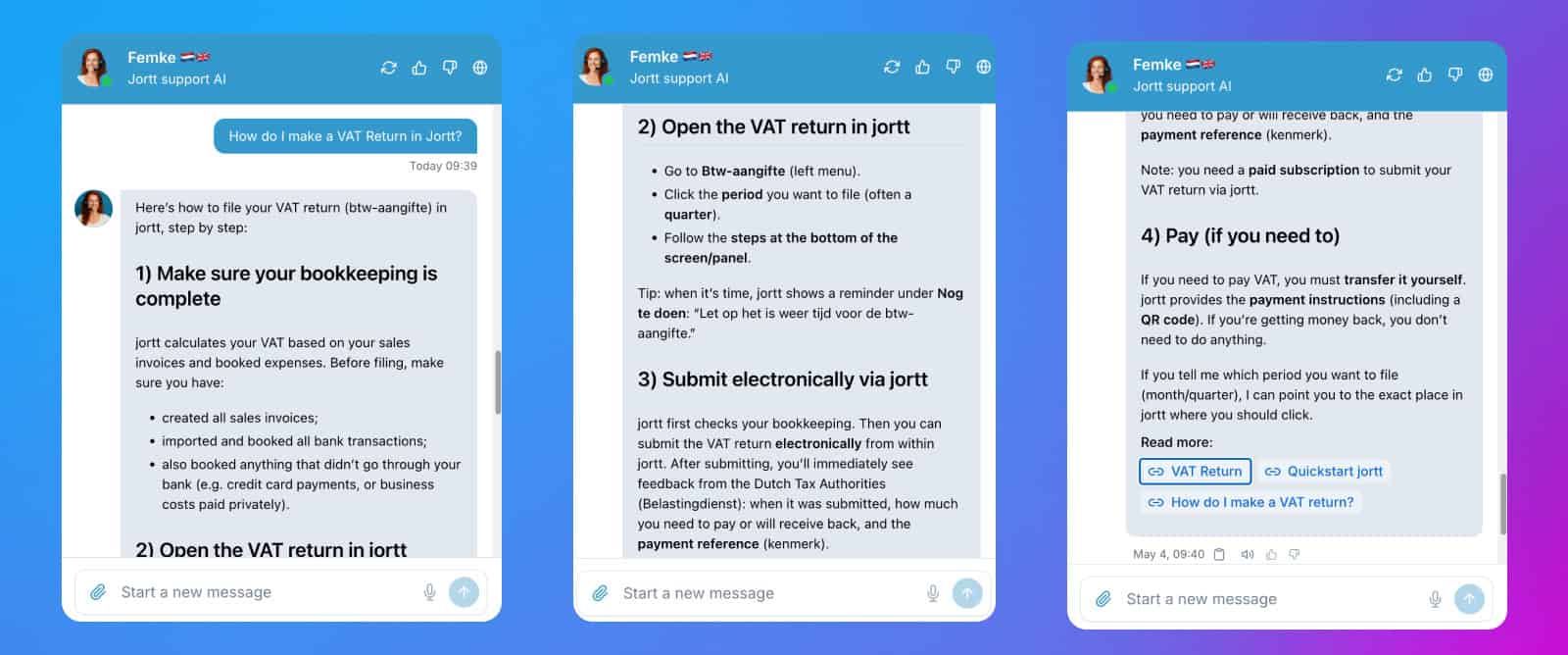
Jortt is an accounting platform from the Netherlands that uses an AI chatbot trained on its knowledge base.
Instead of searching through documentation, users can ask questions directly.
User asks:
“How do I make a VAT return in Jortt?”
Chatbot replies:
The chatbot gives a detailed, step-by-step answer. For example:
- What needs to be prepared first
- Where to click inside the platform
- How to submit the VAT return via Jortt
- What to expect after submission
It also includes links to relevant help articles for more details:
What happens next:
The user can complete the task in the platform immediately without contacting support.
Business Hours and Contact Details
A local service business, like a dental clinic or repair company, may use an FAQ chatbot to answer basic contact questions.
These questions are simple. But they still take time away from the team if people ask them every day.
User asks:
“What time are you open?”
Chatbot replies:
“We’re open Monday to Friday from 9 AM to 6 PM. On Saturdays, we’re open from 10 AM to 2 PM. You can call us at 020-1234567 or send an email to support@dental.com
What happens next:
The question is resolved instantly. No human support needed.
Common FAQ Chatbot Use Cases
Now that you’ve seen real examples, let’s group the most common ways businesses use FAQ chatbots today.
Most FAQ chatbot use cases fall into a few clear categories.
Customer Support Automation
Customer support is the most common use case for FAQ chatbots.
Most businesses receive a lot of repetitive questions every day. These include questions about pricing, account access, delivery times, or return policies.
An FAQ chatbot can handle these questions instantly. This reduces the number of support tickets and allows your team to focus on more complex conversations.
If needed, the chatbot can still pass the conversation to a human.
Help Center and Documentation Support
Many companies already have help centers or knowledge bases. The problem is that users often don’t want to search through articles to find an answer.
An FAQ chatbot solves this by acting as a layer on top of your documentation. Instead of browsing, users can ask a question and get a direct answer or the exact article they need.
This makes existing content easier to use and improves the overall support experience.
eCommerce FAQs (Shipping, Returns, Payments)
eCommerce stores deal with a lot of predictable questions.
Customers often ask about:
- Shipping times
- Delivery costs
- Return policies
- Payment methods
These are perfect for FAQ eCommerce chatbots because the answers are clear and repeat frequently.
As you saw in the earlier examples, chatbots can not only answer these questions but also guide users to take action. They can help them track an order or start a return.
SaaS Product FAQs
SaaS companies use FAQ chatbots to help users navigate their product.
This includes questions like:
- How to set up an account
- How to use specific features
- Troubleshooting basic issues
Instead of searching through documentation, users can ask the chatbot directly and get a clear answer.
This improves onboarding and reduces the number of support requests, especially for simple product questions.
Types of FAQ Chatbots
Not all FAQ chatbots work the same way. The main difference is how the chatbot decides what to reply when a user asks a question.
There are three common types. Each comes with its own strengths and limitations.
Rule-Based FAQ Chatbots
Rule-based chatbots are the simplest type. They follow predefined questions and answers.
When a user clicks a button or uses specific keywords, the chatbot responds with a fixed reply.
For example:
- User clicks “Shipping information” → chatbot shows delivery details
- User types “return policy” → chatbot sends the return instructions
Everything is structured and predictable.
Best for:
- Strict FAQs
- Compliance-sensitive information
- Simple, repetitive questions
Limitations:
- Doesn’t handle unexpected questions well
- Requires you to define every path in advance
Rule-based chatbots are reliable, but they’re not very flexible.
AI-Powered FAQ Chatbots
AI-powered chatbots are more flexible.
Instead of relying only on predefined rules, they try to understand what the user means, even if the question is phrased differently.
For example:
- “Where is my order?” or “Do you know when my order will arrive?”
- “Can I track my delivery?” or “Where can I see my tracking link?”
- “Has my package shipped yet?” or “Did you already send my order?”
An AI chatbot can recognize that these questions are similar and provide the same answer.
Best for:
- Handling variations of the same question
- Larger knowledge bases
- More natural conversations
Limitations:
- Less predictable than rule-based systems
- Depends on the quality of your content and setup
AI chatbots are more powerful, but they require more careful setup.
Hybrid FAQ Chatbots
Most real-world FAQ chatbots are hybrid. As their name suggests, they combine rule-based flows with AI understanding.
For example:
- Buttons handle common, structured questions
- AI answers open-ended or unexpected questions
This approach gives you the best of both worlds:
- Control where it matters
- Flexibility where it’s needed
Best for:
- Most businesses
- Scaling chatbot automation
- Balancing accuracy and usability
In practice, hybrid chatbots are the most common setup. They provide a good balance between reliability and flexibility.
Benefits and Limitations of FAQ Chatbots
FAQ chatbots can be very useful, but only when they’re used for the right types of questions. Let’s look at both chatbot pros and cons.
Benefits of FAQ Chatbots
Instant Answers for Common Questions
The biggest benefit is speed. When someone asks a simple question, the chatbot can respond immediately.
No waiting for an email reply. No support queue. No delay. This is especially useful for questions like shipping times, pricing, returns, login help, or business hours.
Research shows that 90% of customers think an immediate response is very important. And 60% consider “immediate” as under 10 minutes. A chatbot provides exactly that.
Reduced Support Workload
FAQ chatbots can take repetitive questions away from your support team.
Instead of answering the same question dozens of times, your team can focus on conversations that need human help. This saves time and makes support easier to manage.
24/7 Availability
Surveys show that over 60% of customers expect 24/7 availability. FAQ chatbots are always available.
They can answer questions during evenings, weekends, holidays, and outside normal business hours. That means customers can still get help, even when your team is offline.
Consistent Responses
A chatbot gives the same answer every time.
That’s useful for questions about policies, pricing, opening hours, shipping rules, or refunds. It reduces the chance of different agents giving different answers.
Faster Customer Satisfaction
When customers get answers quickly, they are less likely to become frustrated. For simple questions, speed is often more important than speaking to a human.
If the chatbot can solve the issue instantly, the customer gets what they need and moves on.
Limitations of FAQ Chatbots
Not Suitable for Complex Issues
FAQ chatbots are best for simple, repeated questions. They are not ideal for situations that require detailed investigation, human judgment, or empathy.
For example, complaints, billing disputes, or sensitive personal issues should usually be handled by a real person.
Requires Regular Updates
A chatbot is only helpful if its answers are accurate. If your pricing, policies, products, or opening hours change, your chatbot needs to be updated too.
Otherwise, it may give outdated information.
Poor Setup Leads to Frustration
A badly built chatbot can make the experience worse.
For example, the chatbot can
- Keep giving irrelevant answers
- Trap users in a loop
- Fail to offer a way to reach a human
If any of that happens, customers will get frustrated. That’s why proper setup is important. A good FAQ chatbot should answer common questions clearly and escalate when it can’t help.
How to Build an FAQ Chatbot
Building an FAQ chatbot is simpler than most people think.
You don’t need to be technical. But you do need a clear structure.
The process looks like this:
- Identify your most common questions
- Create clear, helpful answers
- Choose how the chatbot will respond
- Use a tool to build and train your chatbot
- Set up escalation to a human
- Test and improve over time
Let’s go through each step.
1. Identify Your Most Common Questions
Start with your support inbox, chat logs, or help desk.
Look for questions that come up again and again, like:
- “Where is my order?”
- “What are your prices?”
- “How do I log in?”
- “What is your refund policy?”
These are the best candidates for chatbot automation. If a question is repeated often, it’s usually worth turning into a chatbot response.
2. Create Clear, Helpful Answers
Once you have your FAQs, write answers that are:
- Simple and direct
- Easy to understand
- Up to date
Avoid long explanations. Focus on giving the user exactly what they need.
If possible, include links to:
- Help center articles
- Account pages
- Relevant actions (like tracking an order)
3. Choose How the Chatbot Will Respond
There are two common approaches:
- Suggested options (buttons): Users click a question instead of typing
- Free text input: Users type their question, and the chatbot matches it
Most FAQ chatbots use a mix of both.
Buttons make navigation easier. Free text makes the chatbot more flexible.
For example, my client NCM Insurance had a lot of customers contacting them for routine requests. Things like making a payment, finding an ID card, starting a claim, or changing policy details.
So we set up a chatbot to guide people through those requests step by step.
When a customer opens the chat, they don’t need to explain everything from scratch. They can simply pick the topic they need help with. From there, the chatbot points them to the right next step inside the customer portal:
This is where buttons are useful. They keep the conversation focused and make it easier for customers to find the right answer quickly.
That’s a good example of using buttons for predictable questions, while still keeping the experience simple for customers.
4. Use a Chatbot Tool to Build and Train Your Chatbot
Once you have your questions and answers, you need a tool to turn them into a working chatbot.
One of the easiest and best chatbot platforms to use for this is Chatbase.
With tools like this, you can:
- Upload your website or help center information
- Add your FAQ questions and answers
- Let the chatbot learn from your content
In most cases, the chatbot can start answering questions about your data within minutes. You can also test the chatbot yourself and improve its answers over time by adjusting responses when needed.
5. Set Up Escalation to a Human
No chatbot can handle everything.
That’s why it’s important to include a clear path to human support.
For example:
- “Talk to support”
- “Contact an agent”
- “Submit a request”
When the chatbot can’t solve the problem, it should pass the conversation along with context included.
Pro Tip: If a conversation needs to be escalated, you can also do it via email. This gives you as a business more time to reply to it and the customer still feel they got the help they need. Win-win.
6. Test and Improve Over Time
Once your chatbot is live, the work isn’t done.
Review conversations regularly to see:
- Which questions are handled well
- Where users get stuck
- What new questions appear
Then update your chatbot accordingly. Most improvements come from small adjustments over time.
When Should You Use an FAQ Chatbot?
An FAQ chatbot makes sense when you have a lot of simple questions that repeat often. It works best when the answers are already clear, and your team spends too much time responding to the same things manually.
Here are the main signs that an FAQ chatbot is a good fit.
You Get a High Volume of Repetitive Questions
FAQ chatbots are most useful when customers keep asking the same questions.
For example:
- “What are your prices?”
- “Where is my order?”
- “How do I reset my password?”
- “What is your return policy?”
If these questions show up every day, automating them can save your team a lot of time.
Your Support Team Has Limited Capacity
Small support teams often need to handle many conversations at once.
An FAQ chatbot can answer the easy questions first. That way, your team can focus on the conversations that actually need a human response.
You Already Have Well-Defined FAQs
FAQ chatbots work best when your answers are clear and documented.
If you already have a help center, FAQ page, or internal support docs, that’s a strong starting point.
The chatbot can use that content to answer questions faster.
Customers Need Faster Responses
Sometimes customers ask simple questions right before making a decision.
For example, they might want to know your shipping time, refund policy, or pricing before buying. If they don’t get an answer quickly, they may leave.
An FAQ chatbot helps by responding immediately.
When Not to Use an FAQ Chatbot
FAQ chatbots are useful, but they aren’t the right solution for every situation.
You probably shouldn’t rely on one if most of your support requests are complex, unique, or sensitive.
For example, a chatbot is not ideal when:
- The issue requires deep investigation
- The customer is upset or frustrated
- The situation needs human judgment
- The questions are different every time
It also may not be worth building one if you only receive a small number of repeated questions.
In that case, a better FAQ page or clearer website content might be enough.
It’s simple:
- Use an FAQ chatbot when there are lots of repetitive questions, and the answers are clear
- Use a human when the situation needs context, empathy, or complex decision-making
Is an FAQ Chatbot Right for You?
An FAQ chatbot automates common questions. It provides quick answers without adding to your support workload.
It works best when your situation looks like this: You receive a high volume of similar questions, and your team doesn’t have the capacity to answer them all quickly.
In that case, an FAQ chatbot is a clear win. It takes pressure off your team and gives customers faster answers at the same time.
But it’s not the right solution for everything.
If most of your conversations are complex, require context, or involve sensitive situations, a chatbot won’t be enough. Those are better handled by humans.
So this isn’t really a choice between automation and people. It’s about using each where they work best.
Let the chatbot handle the simple, repetitive questions. Let your team focus on the conversations that need judgment, flexibility, or empathy. If you’re not sure where to start, keep it simple.
Start with your top 10 most common questions. Turn those into chatbot responses. Then monitor how it performs and expand from there.
Your Next Step
And that’s it! You now understand what FAQ chatbots are, their pros and cons, and whether you should use a chatbot yourself.
The logical next step is to make your own chatbot. For a full tutorial on how to do that, click on my guide below:
