


By Joren Wouters • Updated on

Chatbot platforms help businesses automate conversations across websites and messaging apps.
They allow you to:
- Capture leads automatically
- Answer customer questions 24/7
- Run marketing sequences and broadcasts
- Route conversations to support teams
- Connect chats to your CRM, ecommerce store, or other tools
However, be aware that chatbots can’t do everything. They don’t:
- Automatically grow your audience
- Replace human support entirely
- Work without proper setup and optimization
Chatbot platforms are also very different from one another.
Some platforms specialize in website chatbots, while others support multiple channels.
Some are designed for AI-powered customer support, while others some focus heavily on marketing automation.
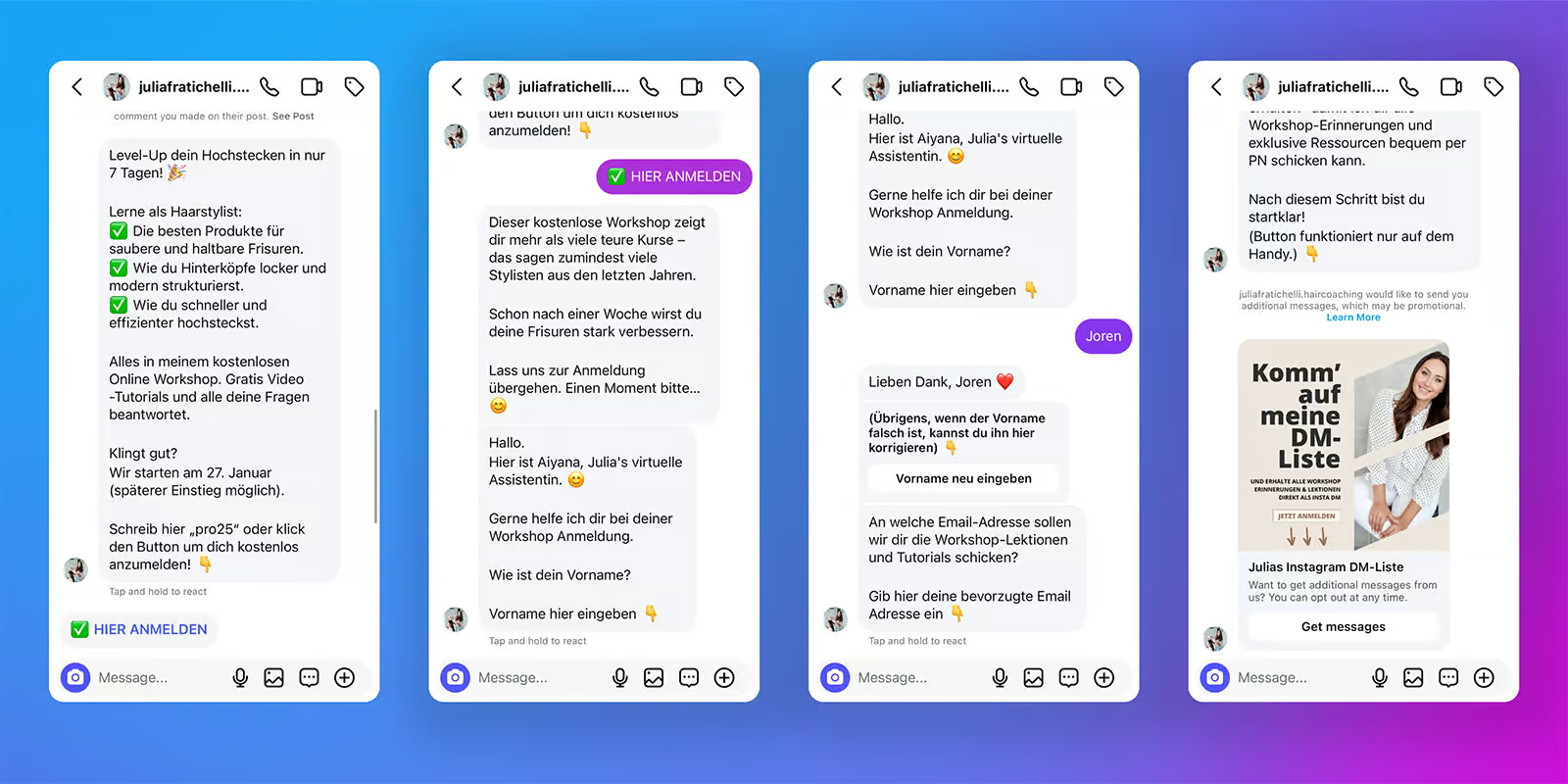
For example, here’s how Julia Fratichelli (a hair and makeup coach) used an Instagram chatbot to auto-DM users who comment on her post:
Now let’s compare the best options!
Best for: Marketing Automation on Instagram, WhatsApp & Facebook
Rating: 4.5/5 ⭐
Manychat is one of the best chatbot platforms for automating marketing and customer support. It’s easy to use, thanks to its simple interface and Flow Builder, making it ideal for beginners.
This platform is perfect for marketing automation on Instagram, WhatsApp and Facebook. You can send broadcasts, create message sequences, set up rules, and even test different strategies with A/B testing. These features make it a powerful tool for getting more leads and connecting with your audience.
Manychat is also great for customer support. It has a built-in live chat that lets you switch from automated messages to a real person when needed.
Likewise, Manychat also offers AI Tools. They include an AI Flow Builder Assistant and intent recognition. This can make your chatbot smarter and more helpful.
Pros
- Excellent for marketing automation, especially on Instagram, WhatsApp and Facebook
- Easy-to-use Flow Builder and beginner-friendly interface
- Unlimited Custom Fields & Tags
- Integrates with WhatsApp, Instagram, Facebook, SMS & Telegram
- Built-in live chat makes switching to a human agent easy
- Send broadcasts, Sequences and Rules
- Built-in AI: Intents, AI Steps & AI Flow Builder Assistant
- Direct Integrations + Zapier/Make Integrations
Cons
- You need separate workflows for each channel
- Translating your chatbot to other languages is hard
Pricing
- Free Plan: Includes basic features for up to 1,000 contacts
- Pro Plan: Starts at $15/month
- AI Add-On: Costs $29/month
Bonus: Click the button below to get 1 month of Manychat Pro for free (discount code appears) 👇
Read my full Manychat review | Read Manychat Beginner Tutorial
Best for: AI Beginners
Rating: 4.1/5 ⭐
Chatbase is the go-to platform if you need a chatbot that can quickly train itself on your data and answer questions about it. It’s incredibly easy to use, and you can set up a chatbot in under 10 minutes. This makes it perfect for beginners or businesses that need a fast and simple solution.
To get started, you just upload documents or share website links. Chatbase will learn from your data and be ready to respond to questions right away.
You can even edit the chatbot’s answers if needed. If you want, you can do this manually. Or, you can use the Suggestions feature, which highlights missing information in your training data.
The system will automatically learn from these updates. This unique feature means your chatbot gives the best responses over time.
It’s also possible to connect Chatbase with various applications using AI Actions. They allow your chatbot to carry out actions when someone asks for it. For example, an AI action can check whether a product is in stock.
Likewise, you can also hand over a chat to a human by using the Zendesk livechat integration.
While Chatbase is great for quick and easy setups, it’s mostly suited for basic Q&A use cases. If you’re looking for more advanced features like custom chatbot flows, you may need to explore other options.
Pros
- Perfect for quick implementation of AI-powered customer support
- Beginner-friendly and easy to set up
- Lets you upload documents or URLs to train your chatbot fast
- Built-in AI-powered knowledge base
- Connect with other apps using AI Actions
- Livechat integrations with Zendesk, Salesforce, Hubspot, Zoho Desk & Freshdesk
- Easily change responses of your chatbot
Cons
- Limited customization beyond basic Q&A
- Mostly suited for quick, simple AI setups
- No built-in live chat
Pricing
- Free Plan: Includes 50 message credits and training on 400KB of content
- Hobby Plan: $40/month, offering 50 message credits and training on 10MB
Best for: Omnichannel Bots for Small and Medium Businesses

Rating: 4.5/5 ⭐
UChat is ideal for businesses that want to manage many messaging channels. It supports over 10 channels, including WhatsApp, Facebook, Instagram, and Telegram. You can build one chatbot and publish it across all of them with a single click.
The platform comes with a drag-and-drop Flow Builder that makes creating chatbot workflows simple. But, it may take a bit longer for new users to fully grasp its features compared to some other tools.
UChat is ideal for combining marketing and customer support functions. Just like Manychat, it offers tools like broadcasts, sequences, and rules for effective lead generation.
Customer support is also seamless with UChat’s built-in live chat. This allows conversations to be handed over to human agents when needed.
UChat also has keyword recognition and intent detection. Plus, it integrates directly with ChatGPT for smarter automation.
On top of that, it connects with over 50 tools, including Zapier and Make, so it’s easy to integrate with your existing software.
Pros
- Easy to deploy across more than 10 messaging channels
- Easy-to-use Flow Builder for creating chatbots
- Combines marketing and support functions in one platform
- Perfect for small to medium businesses needing an omnichannel solution
- Direct integration with ChatGPT for advanced automation
- Built-in Live Chat
- Over 50 direct integrations, including Zapier & Make
Cons
- Higher learning curve for beginners
- Basic analytics
Pricing
- Free Plan: Available with basic features
- Paid Plan: Starts at $15/month
If you want to get started with UChat, click the button below to get my 100% discount code:
Best for: Advanced AI Support Chatbots
Rating: 4.1/5 ⭐
Botpress is a top platform for building AI-driven customer support chatbots. Just like UChat, you can create one chatbot and publish it across 10 channels.
It offers a flow builder and built-in AI features. This gives you the flexibility to create custom chatbot flows and use the power of AI in your chatbot.
Botpress stands out due to its cutting-edge AI capabilities. With this platform, you can:
- Train your chatbot on a custom knowledge base
- Change responses to match a specific personality
- Summarize conversations automatically
- Interpret images that users upload
- Translate chatbot interactions into the user’s language
It’s one of the most advanced AI chatbot platforms available.
While it excels in customer support, it can have a high learning curve for beginners.
Likewise, Botpress isn’t ideal for marketing on Facebook or Instagram. Setting up the platform for these channels requires technical steps, such as creating a Meta Developer App. The standard plan also offers only basic analytics.
Pros
- Flow Builder
- Unlimited variables
- Built-in AI features, including knowledge base training, image recognition, and conversation summarizing
- Publish your chatbot on 10 channels
- Website widget in own branding
- Direct integrations with Zendesk & Zapier
- Built-in live chat
Cons
- High learning curve for beginners
- Technical setup needed for Facebook and Instagram connections
- No marketing capabilities for Facebook and Instagram
- Live chat available only on the $495/month plan
- Basic analytics on the standard plan
Pricing
- Free Plan: Includes up to 500 messages
- Pay-as-You-Go Plan: Starts at $5/month
Best for: AI Chatbots on Websites

Rating: 4.2/5 ⭐
Voiceflow is an excellent platform if you need an AI Chatbot on your website or phone system. Just like Botpress, it combines the simplicity of a drag-and-drop Flow Builder with the power of AI. So it’s easy to create custom chatbot flows and train an AI Knowledge base on your data.
Voiceflow’s flexibility makes it perfect for lead generation and customer support chatbots. Thanks to the platform’s intuitive interface, you can set up flows in minutes, even if you’re a beginner.
They’re easy to work with, much easier than Botpress. Speaking of which, check my comparison of Voiceflow vs Botpress if you’re intested in comparing the two.
But, Voiceflow is limited to website chatbots and telephony. It does not support other channels unless connected though an API. It also lacks live chat functionality and provides only minimal analytics.
I’d recommend it if you want to have an AI chatbot on a website or phone system, and Voiceflow is one of the best for that. But if you want to use chatbots with other channels, there are better options.
Pros
- Easy-to-use Flow Builder for quick chatbot setup
- Flexible chatbot customization without a steep learning curve
- Built-in AI features: Intents, entities, and knowledge base training
- Native website widget for seamless integration
- Very good free plan, ideal for small businesses
Cons
- Limited to website and phone
- No built-in live chat or live chat integration
- Minimal analytics
Pricing
- Free Plan: 50 knowledge base sources, unlimited flows & 100 AI credits
- Paid Plan: Starts at $60/month
Bonus: Click the button below to get 1,000 free AI credits for Voiceflow 👇
Best for: All-in-One Website Chatbots for Small and Medium Businesses

Rating: 4.0/5 ⭐
Tidio is a great platform for small and medium businesses that want an all-in-one website chatbot. It combines live chat, AI-powered features, and easy-to-create chatbot flows. So it’s good for both marketing and customer support.
With its flow builder, you can set up chatbots within minutes. Tidio also includes proactive messaging, which lets you engage website visitors before they reach out. The built-in AI assistant, Lyro, can answer questions automatically based on your data. Plus, live chat agents can take over conversations when needed.
Tidio supports integration across multiple channels, including websites, Facebook, Instagram, and WhatsApp. However, while you can use it on these channels, it lacks direct marketing features for them.
Also, Lyro (AI assistant) and custom flows can’t be used simultaneously, which limits advanced use cases.
Pros
- Easy-to-use Flow Builder for quick chatbot creation
- Use conditions in your chatbot flows
- Proactive messaging to engage website visitors
- Built-in live chat for seamless customer support
- AI assistant (Lyro) for automated answers
- Supports websites, Facebook, Instagram, and WhatsApp
Cons
- No marketing capabilities on Facebook, Instagram, and WhatsApp
- Lyro and custom flows cannot work together at the same time
- Limited analytics for chatbot performance
- Requires Zapier for external integrations
Pricing
- Free Plan: Basic features of Tidio, up to 100 reached visitors
- Paid Plan: Starts at $33/month
Bonus: Click the button below to get 20% off on all Tidio plans 👇
Best for: Omnichannel Support Bots for Enterprise

Rating: 4.5/5 ⭐
Intercom is great for Omnichannel chatbots for enterprise. With Intercom, you can create chatbots on 5 channels, including websites, WhatsApp and Instagram.
With its intuitive flow builder, you can create your advanced chatbot flows in minutes. Likewise, you can use its AI features to train the chatbot on your data.
What Intercom really stands out for is its chat widget on websites. It’s one of the best-looking widgets on the market. And you can also pro-actively engage with website visitors, using series, banners and tours.
Likewise, you can use its live chat feature to hand off conversations to agents whenever needed.
It also integrates with over 100 applications, so it’s easy to connect with your existing tech stack. While it offers powerful tools, its pricing and features can be too expensive for small businesses.
Pros
- Easy-to-use Flow Builder
- Advanced website widget with proactive messaging and marketing features
- Built-in AI for knowledge base training and intent recognition
- Assign unlimited custom fields & tags
- Supports publishing across websites, WhatsApp, Instagram, Facebook and SMS
- Many marketing features
- Extensive direct integrations with over 100 tools
- Strong analytics for tracking chatbot performance
Cons
- Expensive for small and medium businesses
- No marketing possibilities for Facebook or Instagram
- Interface may feel overwhelming for new users
Pricing
- Paid Plans: Start at $39 per seat/month
- 14 day Free Trial on every plan
Best for: AI Agents with Large Customer Support Teams

Rating: 4.5/5 ⭐
Freshchat is great for customer support teams that want to use AI Agents at scale.
With Freshchat, you can:
- Build AI Agents and train them on your own knowledge sources
- Link them to AI actions to handle common support requests, such as processing refunds or finding out order status
- Refine their responses over time as new questions come in
Getting started is straightforward. When the AI can’t help, you can pass chats to live agents automatically using auto-assignment rules.
Freshchat also handles high message volumes without getting messy. It has tools like a shared inbox, internal collaboration, and proactive messages.
The platform supports seven messaging channels, including WhatsApp and Instagram. On top of that, Freshchat connects with 400+ other tools, so it’s easy to plug into your existing workflows.
Pros
- Affordable solution for large customer support teams
- Smart tools like queue management, team collaboration, and proactive messaging
- Built-in AI: Intents, Self Service, Copilot
- Livechat with Auto-Assignment and Automations
- Supports 7 channels, including WhatsApp and Instagram
- Over 400 direct integrations for streamlined workflows
- Advanced Analytics: Many Reports & Add Custom Reports
Cons
- Proactively sending messages on website cannot be connected to specific chatbot flows
- Mostly suited for support teams, not complex marketing needs
- Some features are hidden within the interface
Pricing
- Free Plan: Live chat for up to 10 agents
- Paid plan starts at $19/agent/month (comes with 500 AI agent sessions)
- AI Add-on: $49 per 100 AI agent sessions

Keep up the great work! Thank you so much for sharing a great post.
Thank you, Vishnu! I’m glad you like it!