

Freshdesk (formerly Freshchat) has grown from a live chat tool into a complete customer support platform. But is it the right one for your business?
To find out, I trained its AI agent on a website, built a workflow that looks up Shopify orders, tested its answers and replied to tickets with its AI Copilot.
Below I’ll share whether I recommend it, what it costs and where the setup slowed me down.
Our Verdict
Our Verdict
Freshdesk is one of the most complete customer support platforms for businesses that want AI and a human support team to work together.
You can build AI agents that you train on your website, files and Q&As, and connect them to tools like Shopify to look up orders. When the AI can’t help, the conversation lands in an omnichannel inbox, where Freddy AI Copilot helps your team reply faster.
On top of that, you get detailed reports, an AI you can ask about your support data, and over 800 integrations.
It’s great for support teams of every size, and especially for larger teams, since you manage roles, shifts and SLAs in one place. Plans start at $35 per agent/month with 500 AI agent sessions included, and every plan has a 14-day free trial.
Pros
- Easy-to-use interface
- AI agents you train on URLs, files, articles and Q&As
- AI workflows that connect your AI agent to tools like Shopify
- Omnichannel inbox to hand conversations over to your team
- Freddy AI Copilot summarizes tickets and writes replies
- Built-in and custom reports, plus Freddy AI Insights
- 800+ integrations in the Freshworks Marketplace
Cons
- Connecting tools can need help from their support team
- No marketing features, like proactive website messages
- Email needs its own AI agent, so you maintain two

What is Freshdesk?
Freshdesk is an all-in-one customer support platform from Freshworks. Its AI agents reply to your customers automatically, and when they can’t help, they hand the conversation over to your team in a built-in help desk.
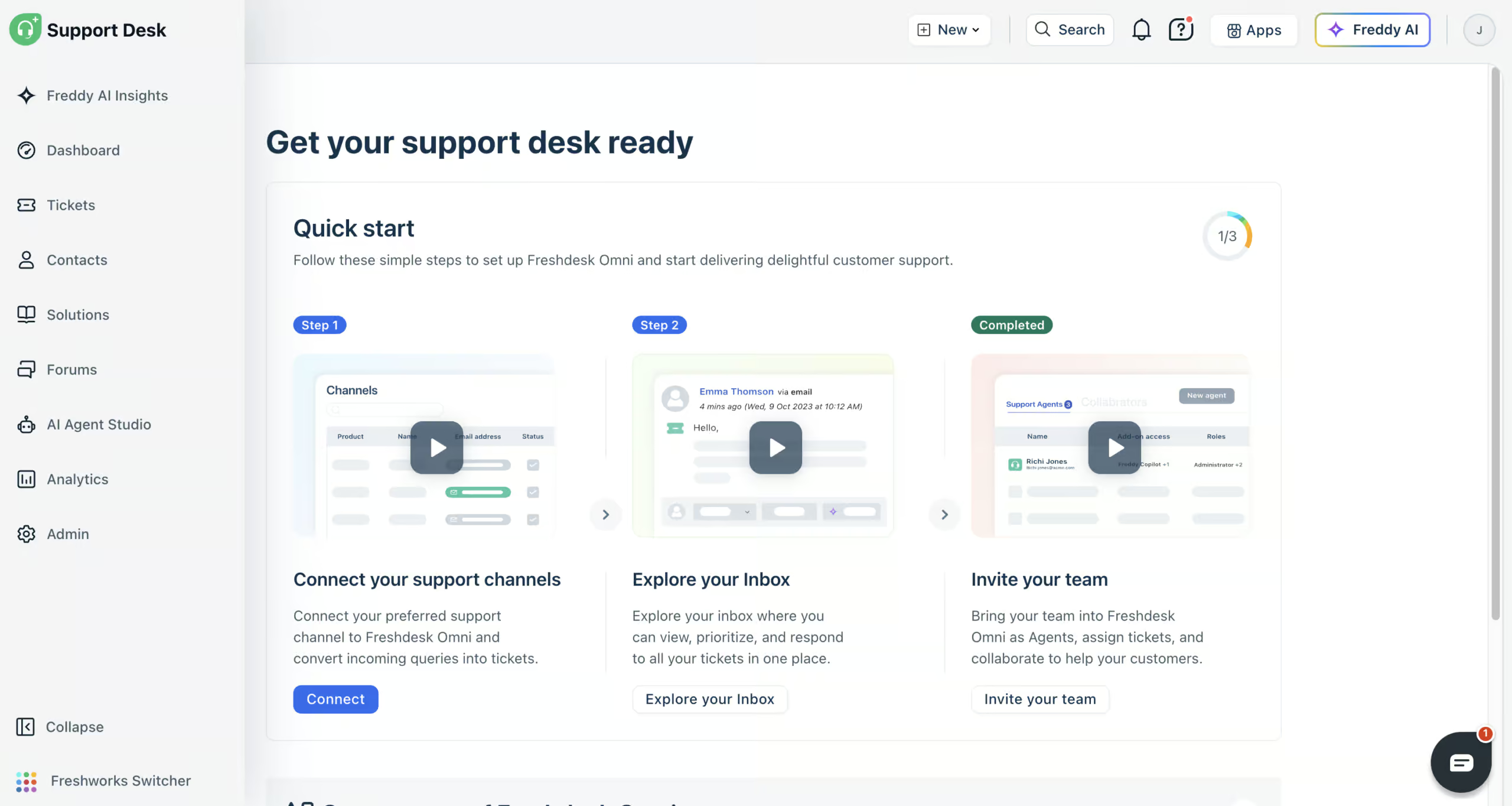
And because it connects to your other tools, like Shopify, you can run your entire customer support from one place. This is what you see when you log in:
Note: Freshchat is now part of Freshdesk Omni, so that’s the name you’ll see on the Freshworks website and pricing page. In this review, I simply call it Freshdesk.
Freshdesk at a Glance
Here are the most interesting features that I found in Freshdesk while testing it:
Freddy AI agents: You can build AI agents and train them on your website, files, help articles and Q&As. So they answer customer questions for you:
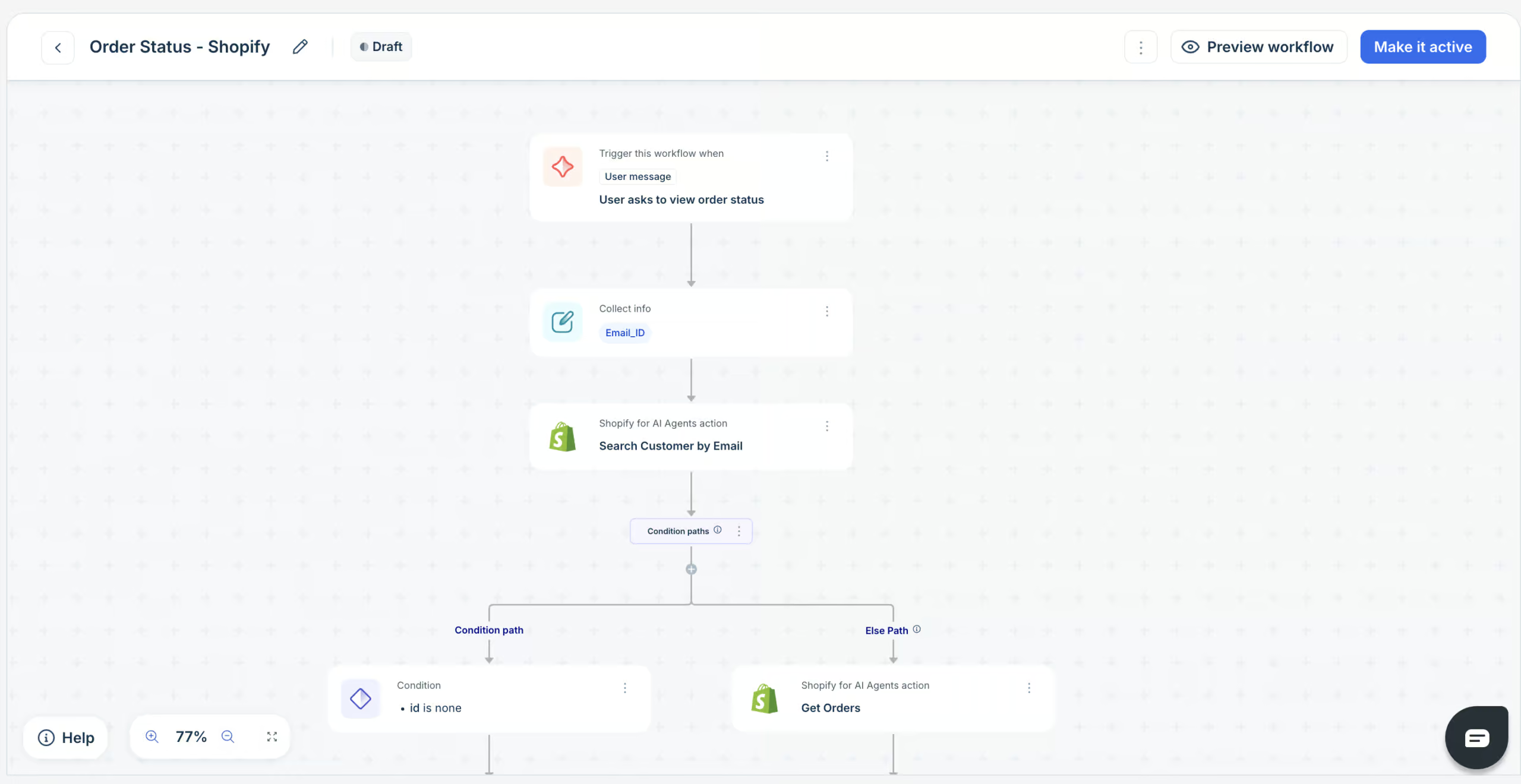
AI workflows: Your AI agent can take action in your other tools, like looking up the status of an order in Shopify:
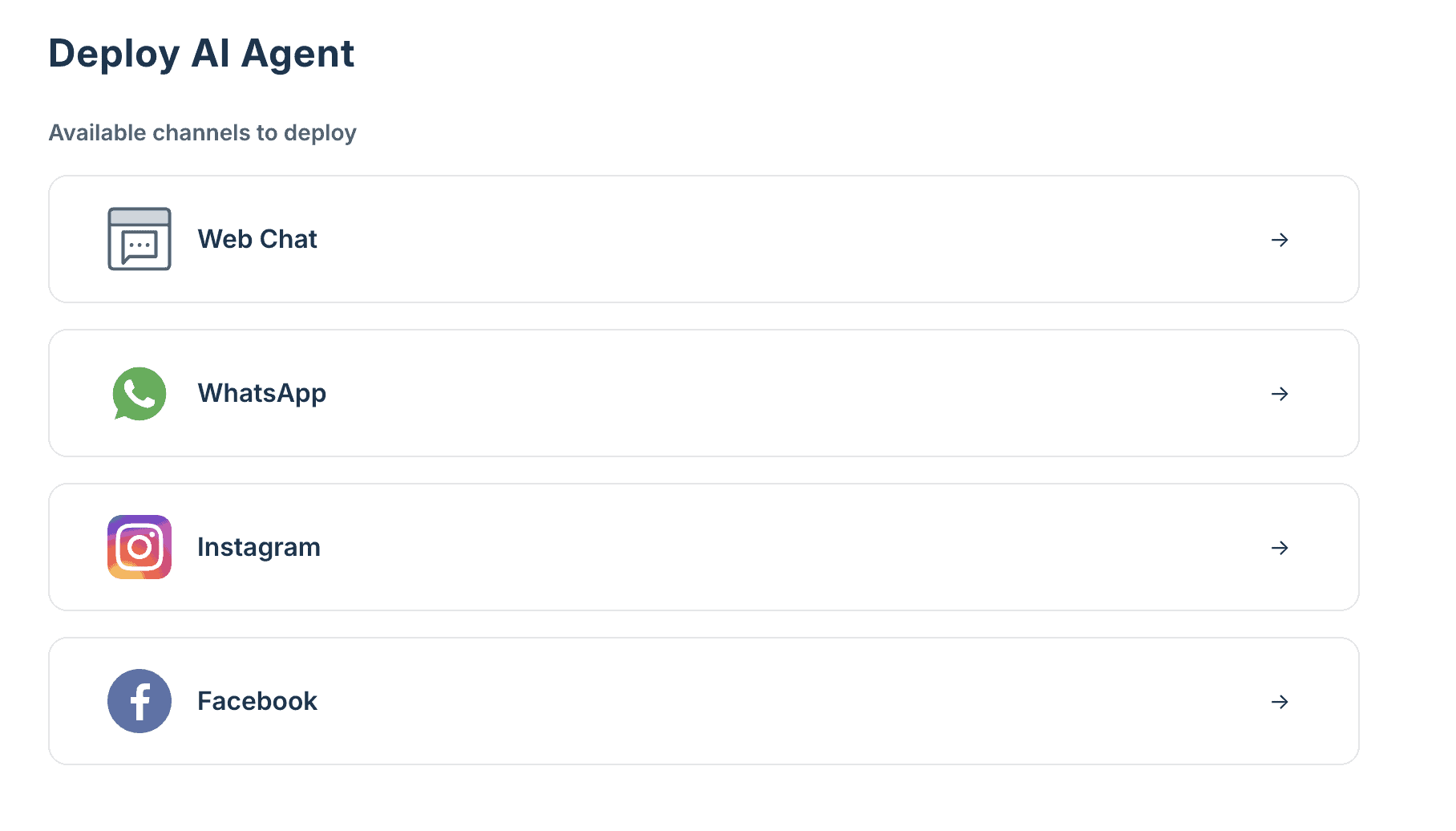
Multichannel support: Put your AI agent live on your website, WhatsApp, Instagram and Facebook. And your help desk also handles email, SMS and phone calls:
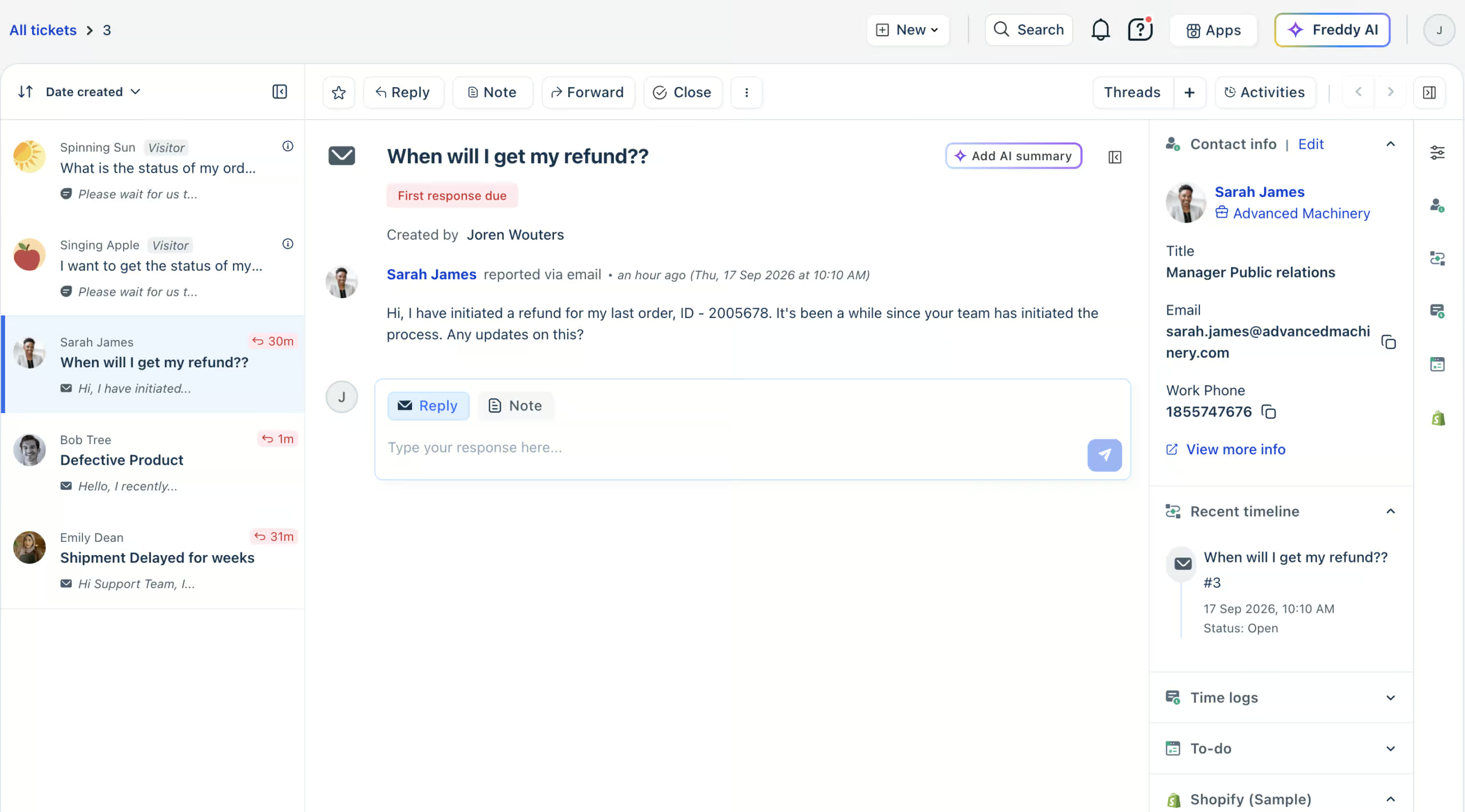
Omnichannel inbox: Every conversation from every channel lands in one inbox. So your team can take over the moment your AI agent can’t help:
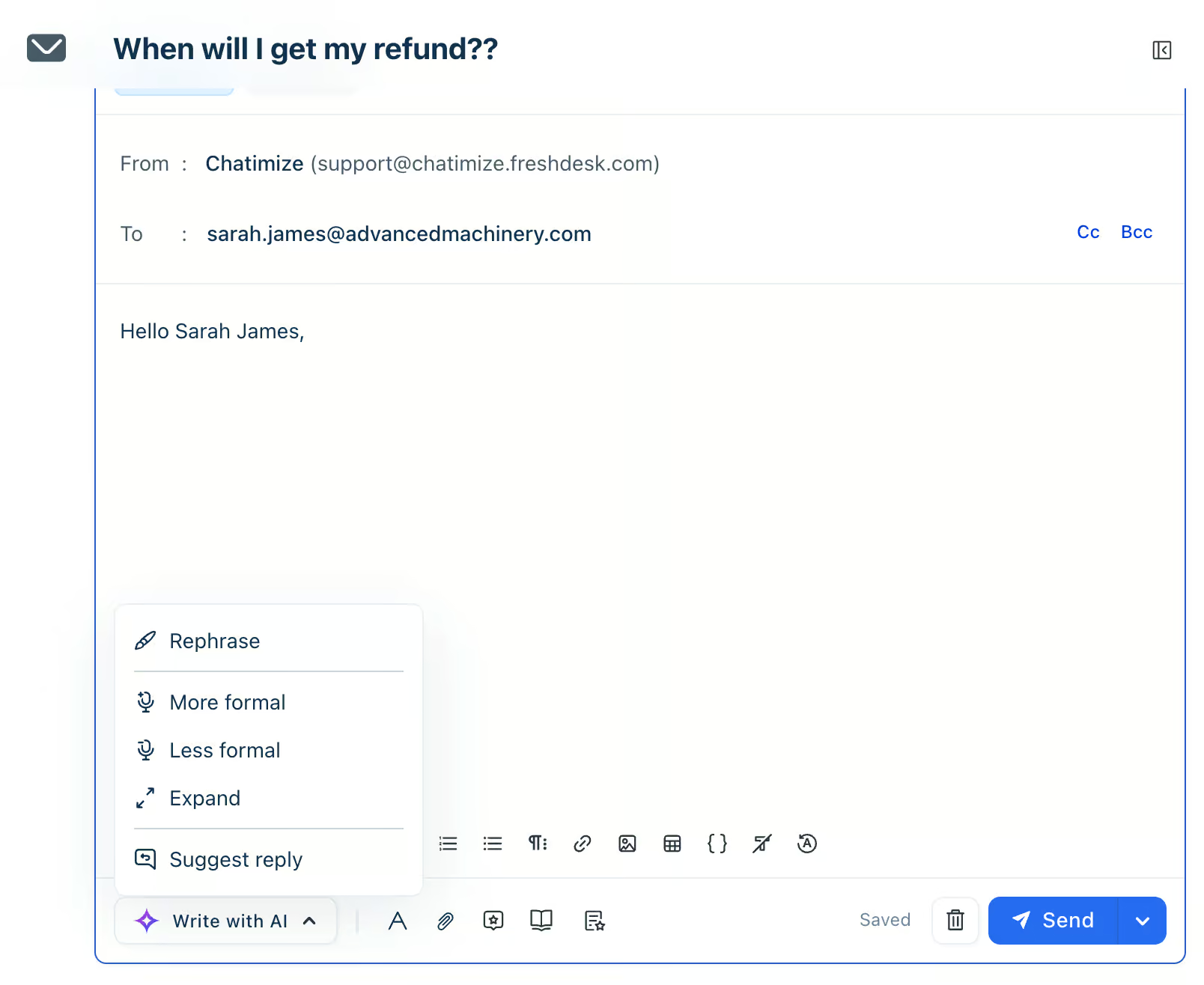
Freddy AI Copilot: Your support team replies faster, because Copilot summarizes tickets and writes replies for them:
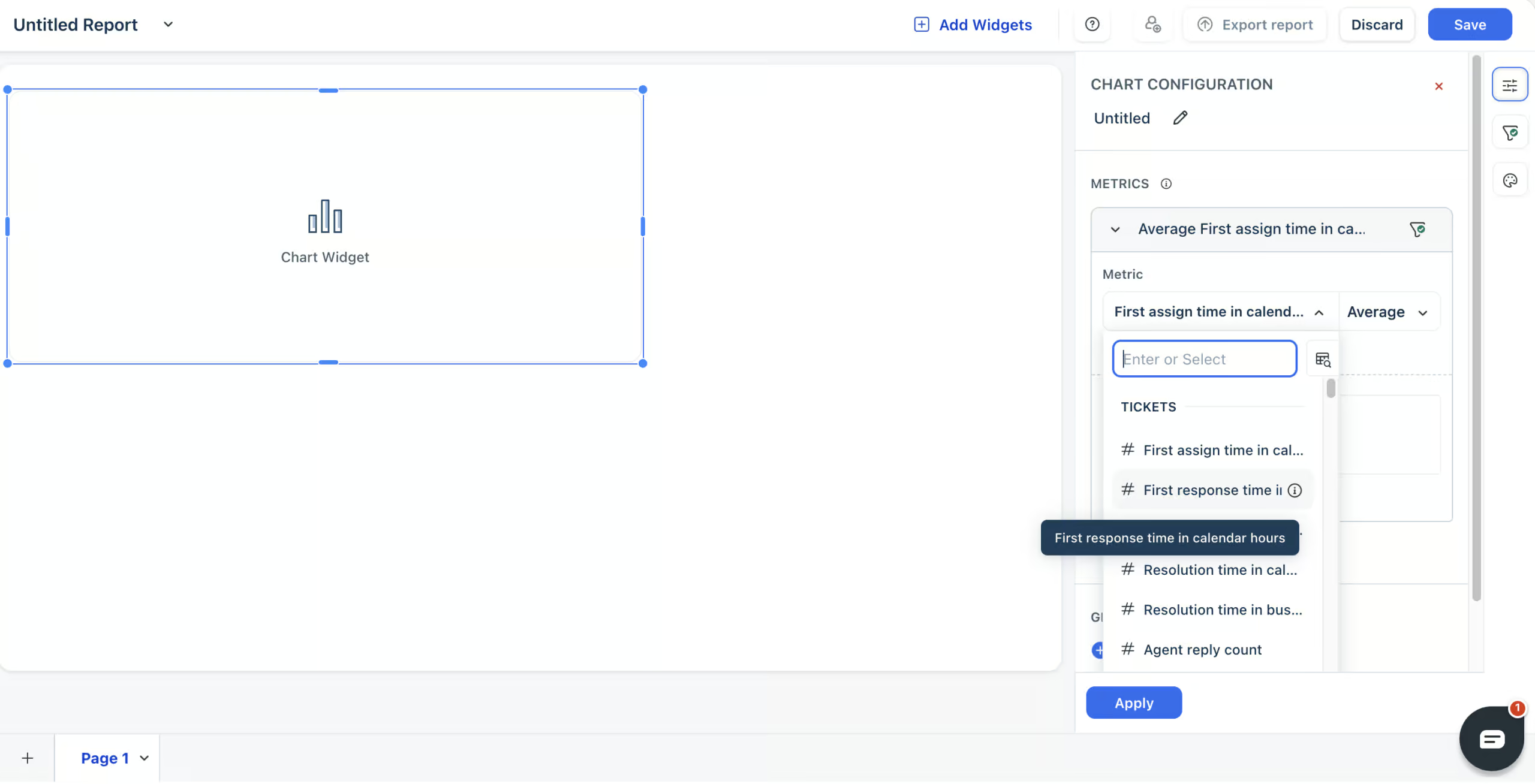
Analytics and custom reports: Freshdesk has a built-in report for almost anything. And when one is missing, you build your own with exactly the metrics you want:
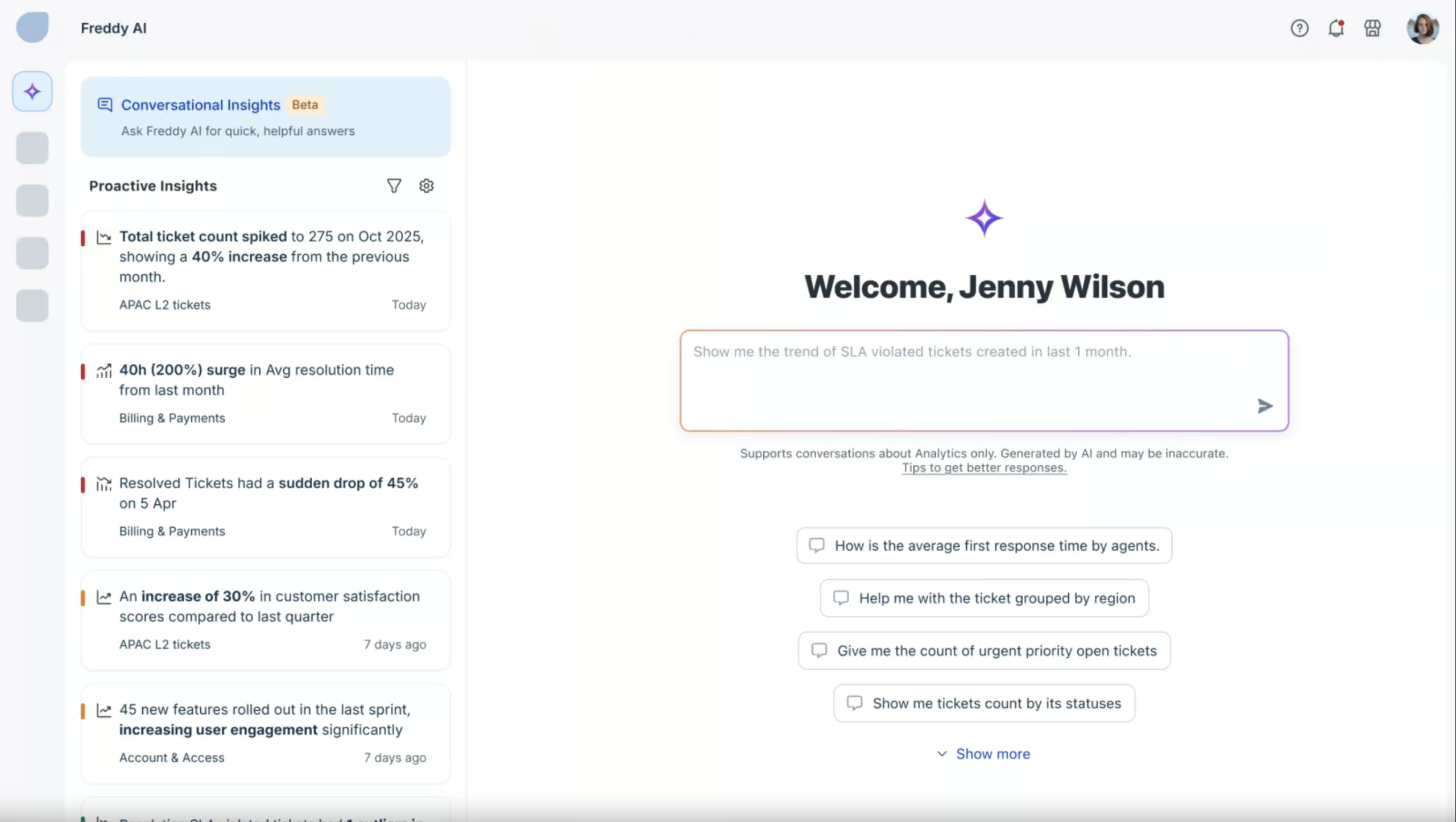
AI analytics: Ask Freddy AI Insights a question about your support data in plain words, and get the answer right away:
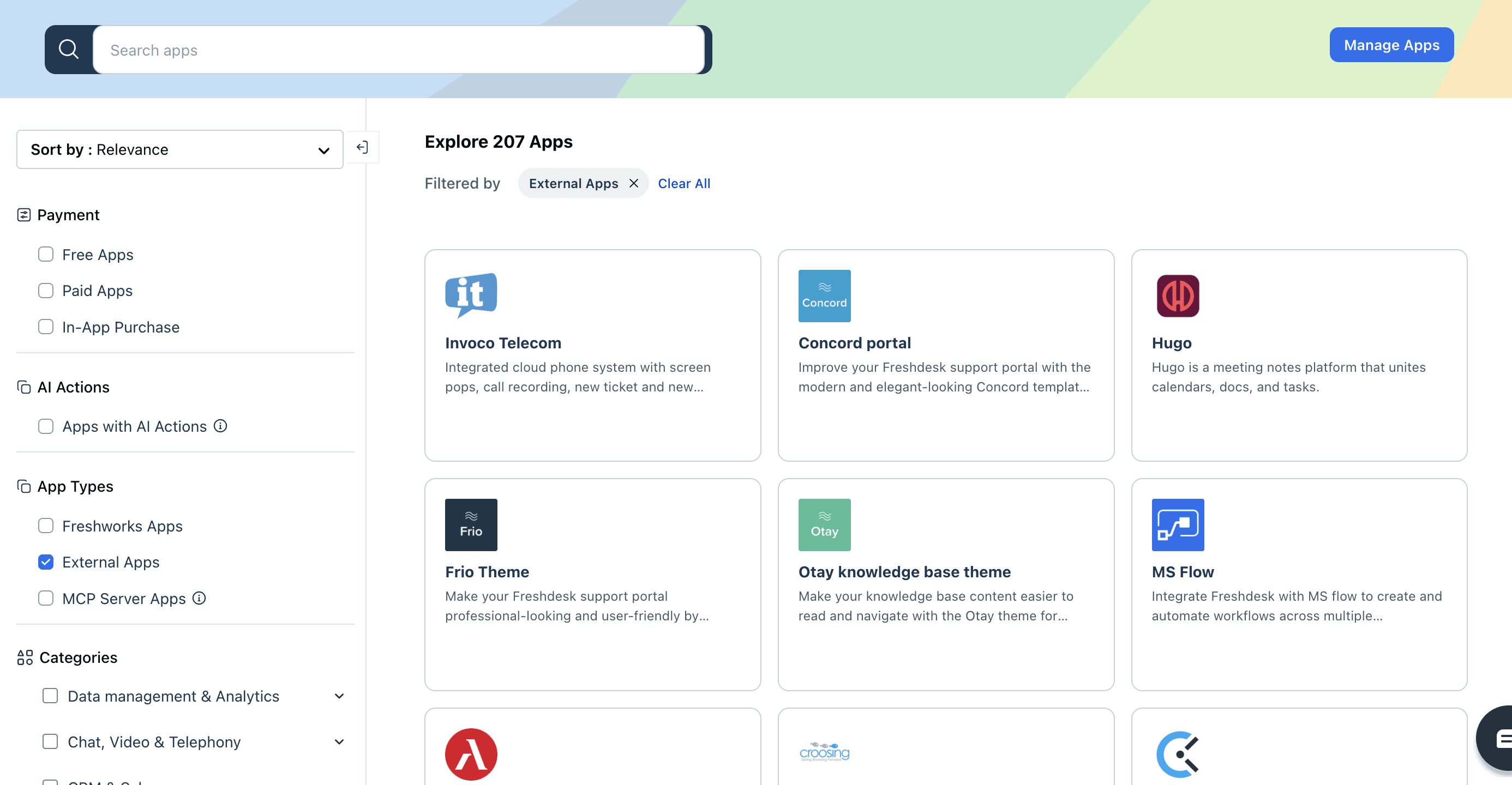
Original source: Freshworks 800+ integrations: Connect Freshdesk to tools like Shopify, Salesforce and Slack from the Freshworks Marketplace:
How Freshdesk Works
Freshdesk is easy to use. The interface is clear, and when you log in, the Quick start on your dashboard walks you through the first steps. You connect your channels, explore your inbox and invite your team:
From top to bottom, the menu on the left takes you to everything else:
- Freddy AI Insights: an AI you can ask questions about your support data
- Dashboard: your starting point, with the Quick start guide
- Tickets: your inbox with every customer conversation
- Contacts: everyone who reached out to you, and the companies they work for
- Solutions: your knowledge base with help articles
- Forums: community forums where your customers can ask questions
- AI Agent Studio: where you build and manage your AI agents
- Analytics: your built-in and custom reports
- Admin: the settings for your channels, team and workflows
The heart of Freshdesk is its AI agent. Building one takes four steps, and an overview page shows you exactly where you are:
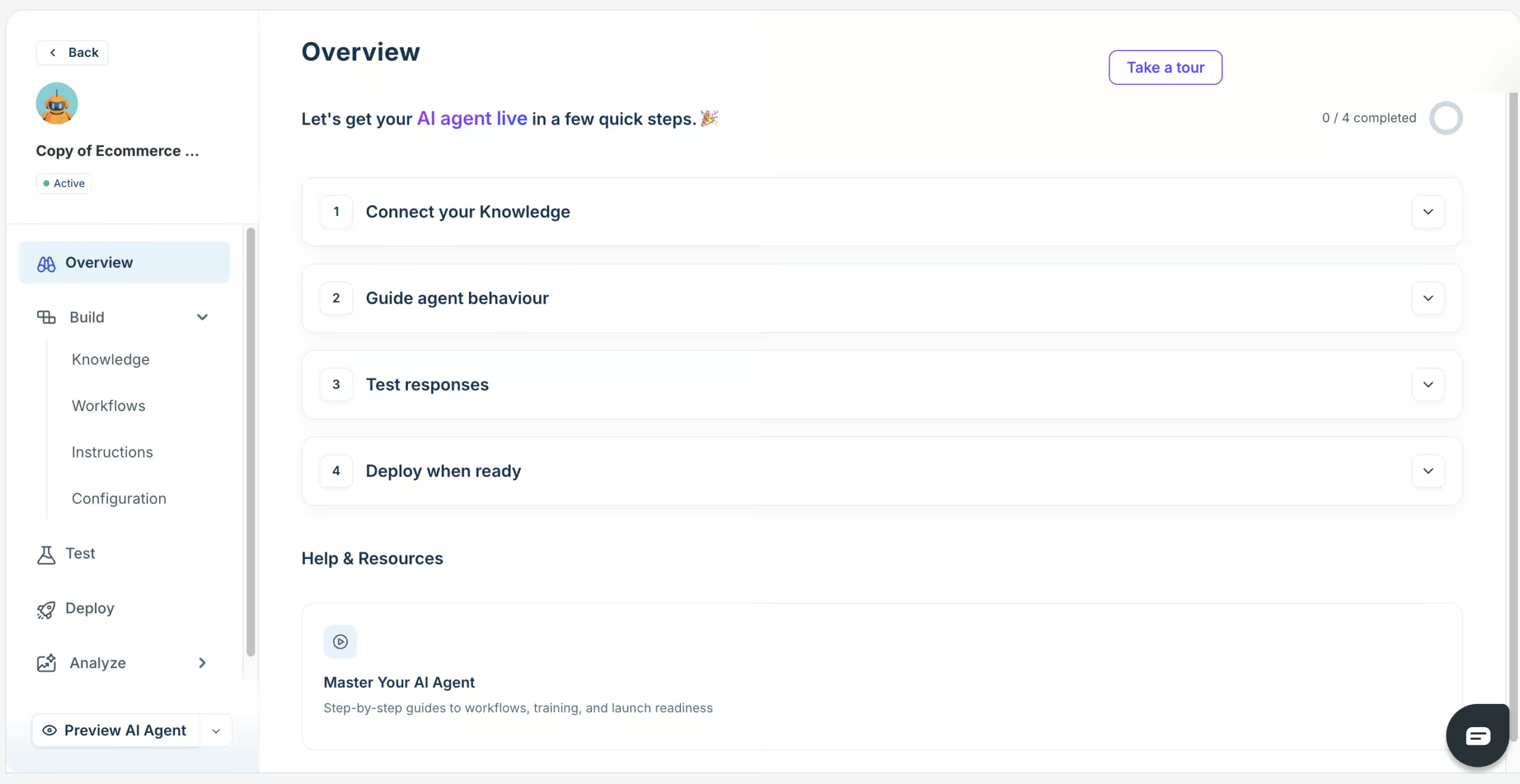
- Connect your knowledge: you give the AI agent your website, files, help articles and Q&As to learn from
- Guide its behavior: you connect it to workflows, so it can take action in tools like Shopify, and give it instructions about your business
- Test its answers: you ask it the questions your customers ask, and check what it replies
- Put it live: on your website, WhatsApp, Instagram and Facebook
Overall, it’s pretty easy to set up. The one step that took me longer was connecting my Shopify store to a workflow. I go through each step, including that one, in the AI agent section below.
Flow Builder Create chatbot dialogs with a visual flow builder. Create chatbot dialogs with a visual flow builder. | |
| Ease of useHow easy is it to use the platform? On a scale of 1 to 5. | 4.5 |
| Ease of setupHow easy is it to set up your chatbot? On a scale of 1 to 5. | 4 |
| Test chatbotIs it possible to test the chatbot before putting your new flows or changes live? |
Freshdesk AI Agents
Freshdesk’s AI agents are called Freddy AI agents. They answer your customers’ questions based on your own knowledge, and they can take action in your other tools.
When you create one, you first choose between two types. A chat AI agent works on your website, WhatsApp, Instagram and Facebook, while an email AI agent replies to customer emails:
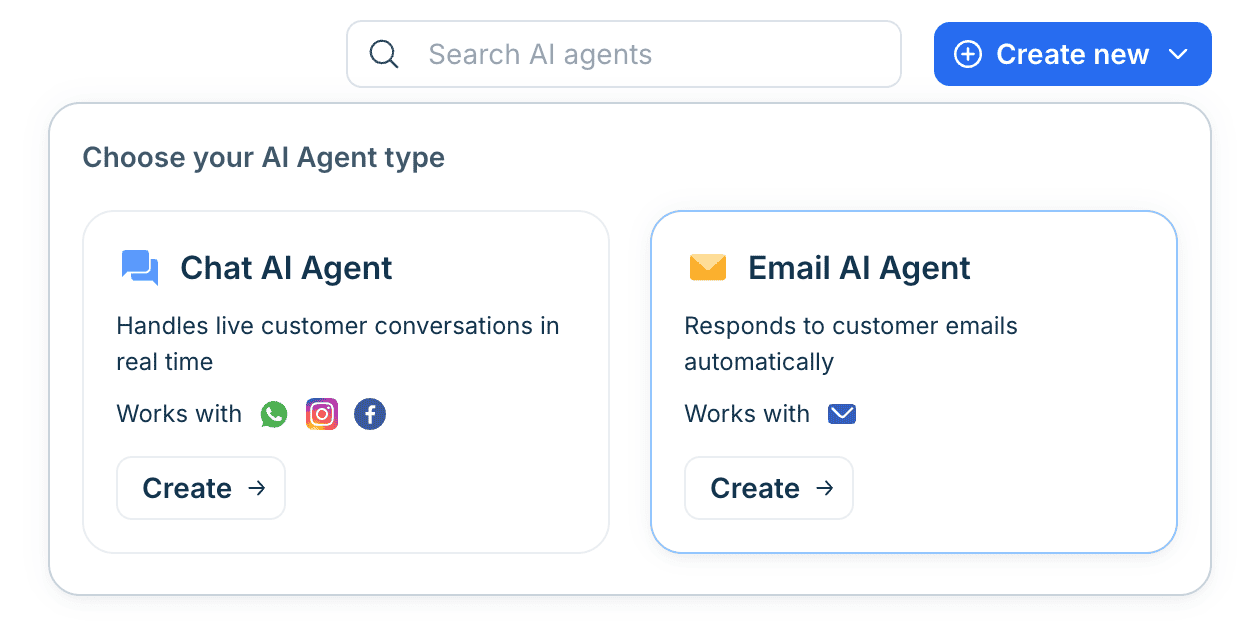
That’s a drawback. If you want AI on both chat and email, you need to build and maintain two agents that do practically the same thing.
And the email AI agent can’t use workflows, so it can’t look up an order in Shopify for your customer.
Training your Freshdesk AI agent
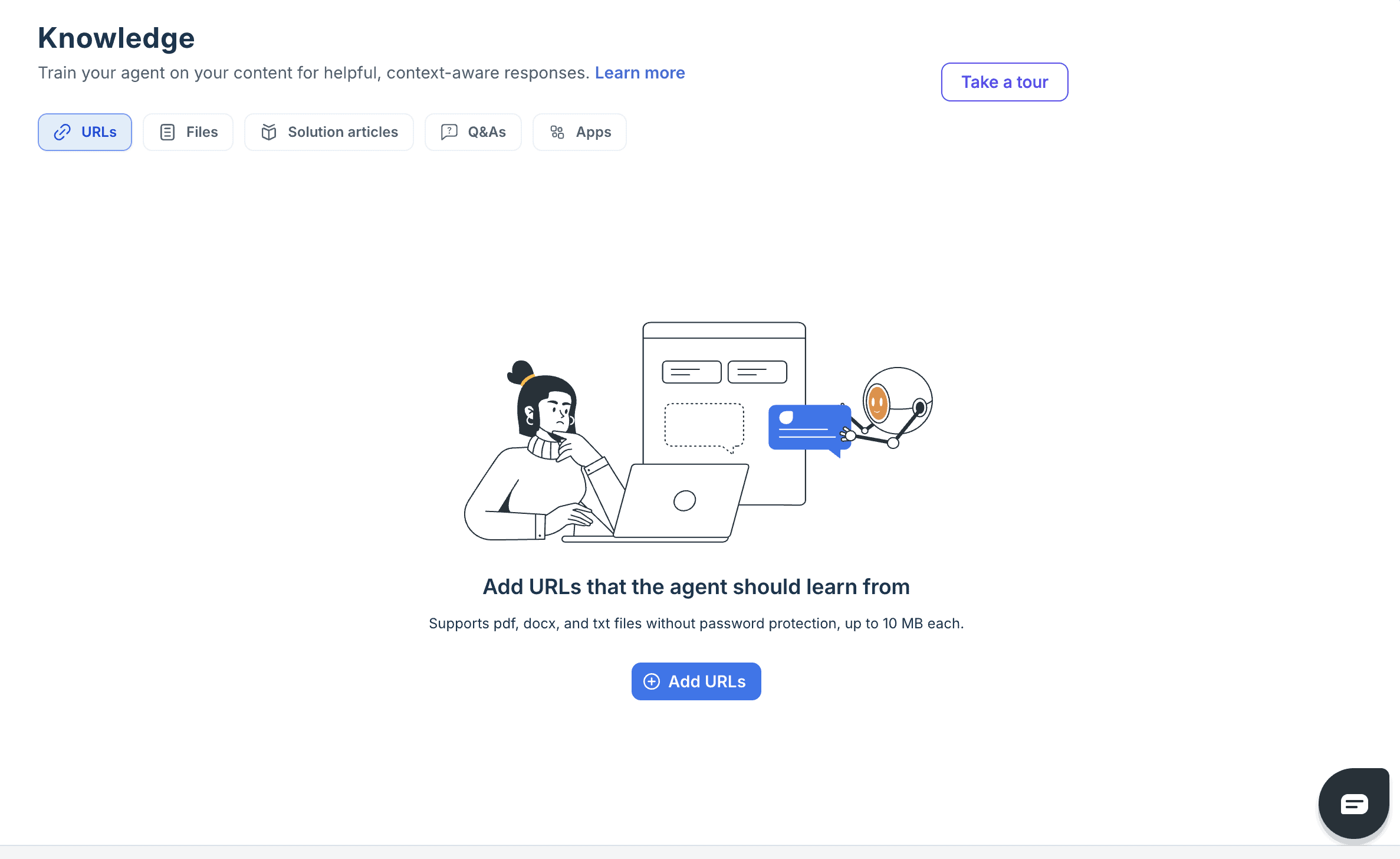
You can train your AI agent on URLs from your website, files, solution articles from your knowledge base and Q&As. I added a website URL to test it, and it started training on that page right away:
Files can be PDF, Word or text files of up to 10 MB each. So you can also give it things like your return policy or product manuals.
How Freshdesk AI agents use tools
Workflows let your AI agent do things for your customers in your other tools, like checking an order’s status in Shopify.
I built one that does exactly that. The AI agent asks for the customer’s email address, searches for them in Shopify and gets their orders:
With Preview workflow, you see what the AI agent does step by step before you put it live. That makes it much easier to spot a mistake.
But this is also where setup got harder. I connected the Shopify app, and the workflow still didn’t work. It looks easy to set up, but you’ll likely need Freshdesk’s support team to get it running, and that costs you time.
Giving your AI agent instructions
Next, you describe your business in a few sentences and give the AI agent custom instructions.
For example, to never guess a refund amount, and to hand the conversation to a human when order data is missing:
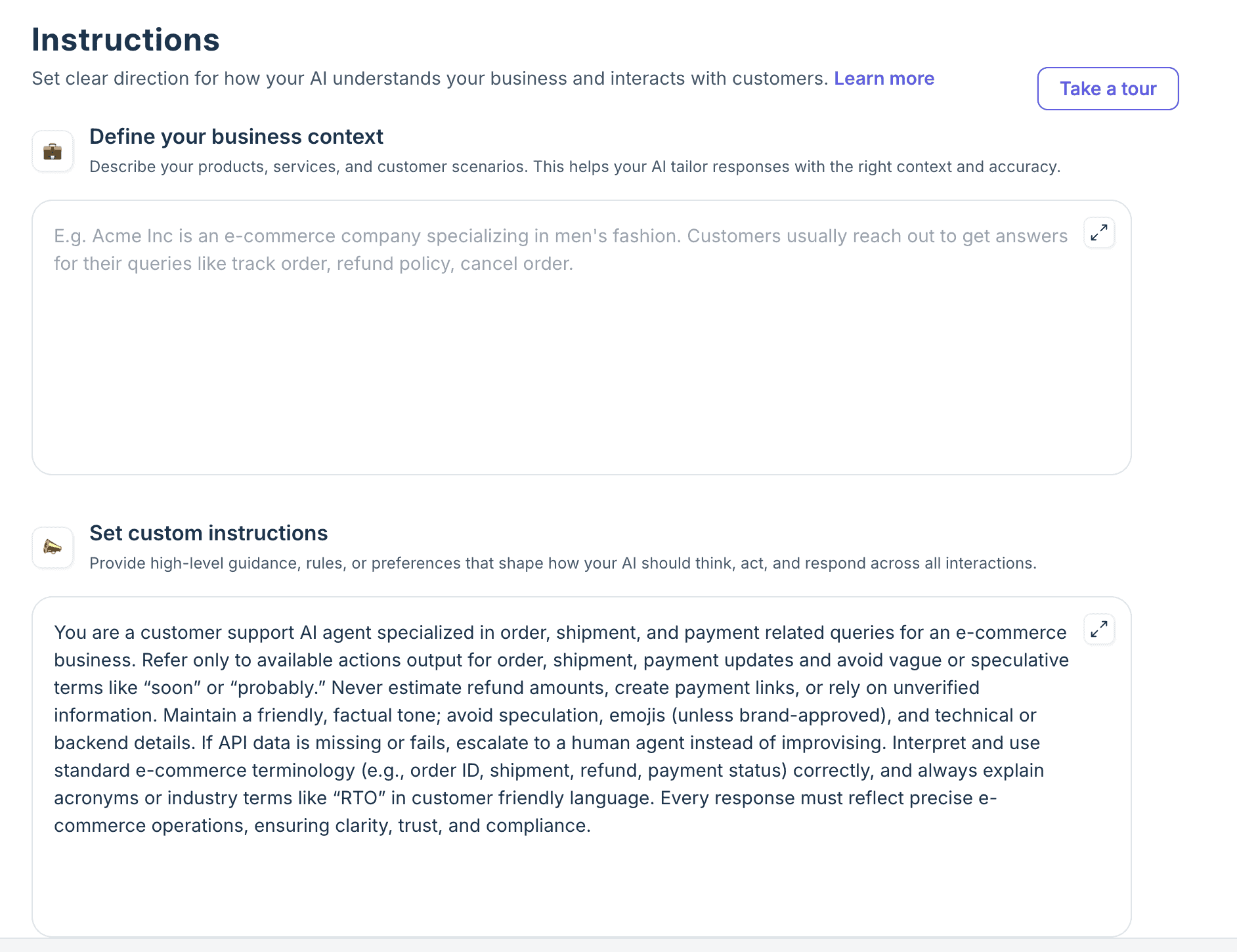
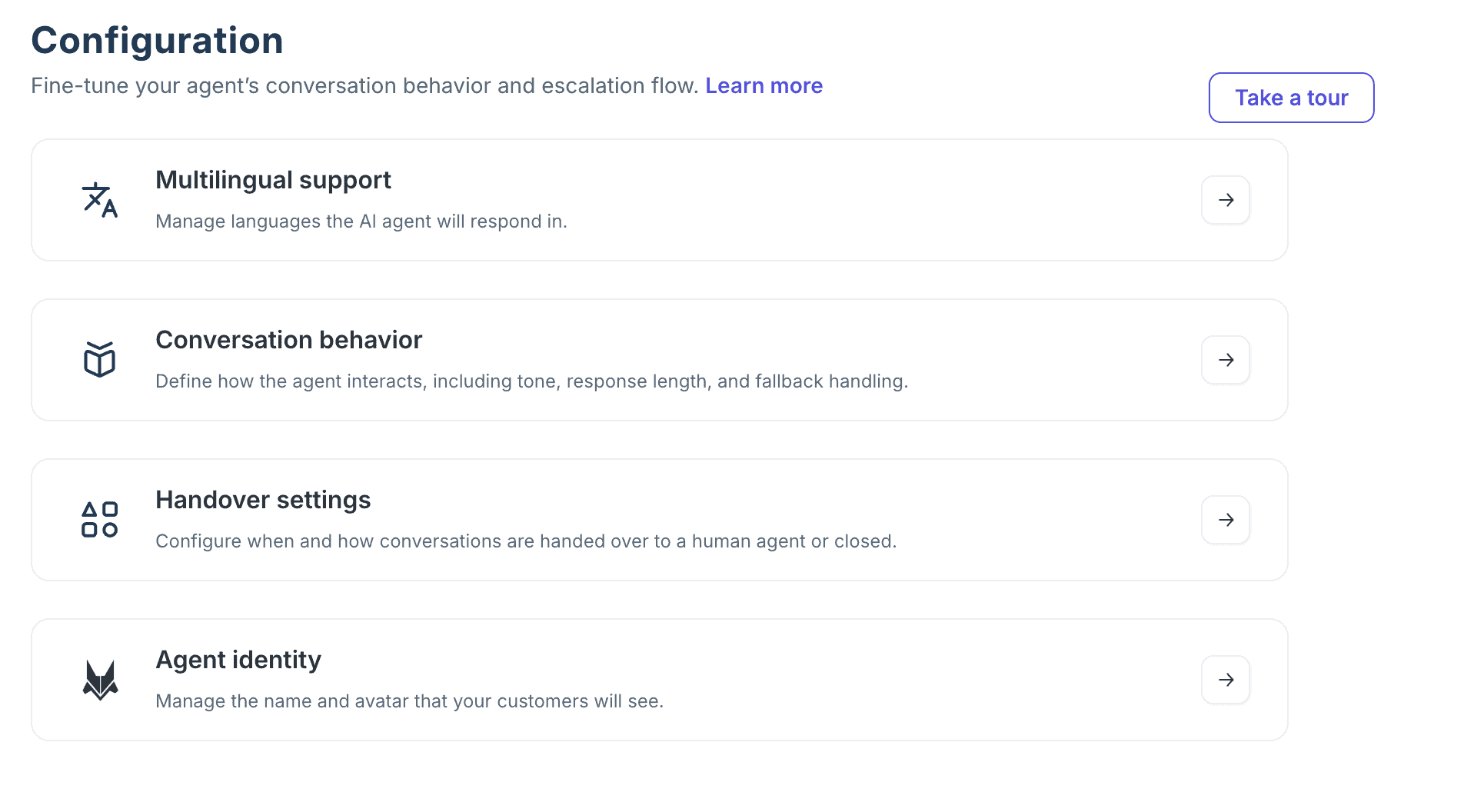
In the settings, you choose which languages it replies in, its tone and the length of its answers.
You also decide when it hands a conversation over to your team, and which name and avatar your customers see:
Testing and launching your AI agent
Before it goes live, you can test your AI agent by asking it questions, like “What is your return policy?”.
Once you’re happy with its answers, you put it live on your website, WhatsApp, Instagram and Facebook:
After that, Freshdesk shows you how your AI agent performs over time. And on the Improve page, it finds knowledge gaps: the questions your AI agent couldn’t answer. It even suggests the fix, like a new help article or an edit to an existing one, which you accept or reject:
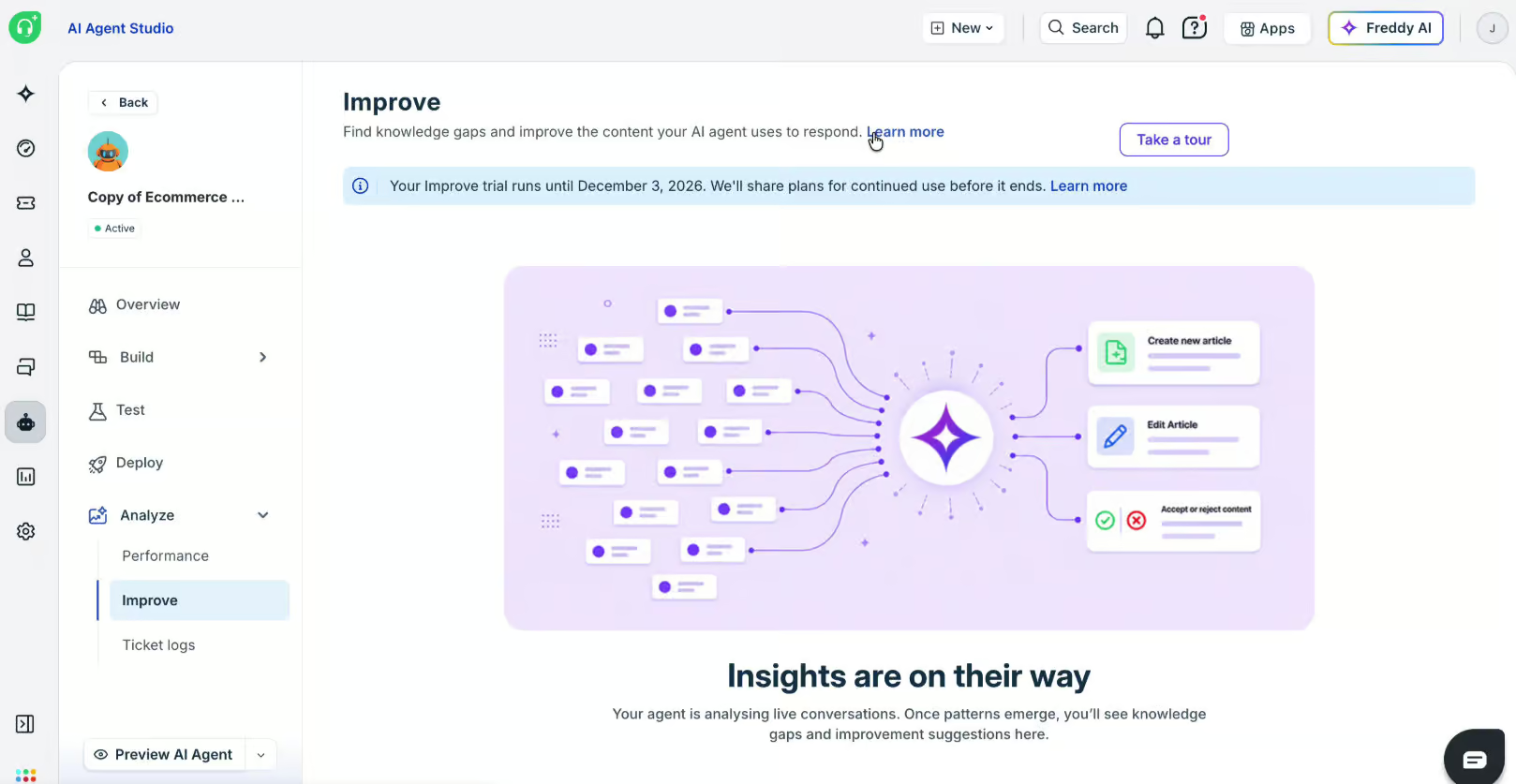
So you know exactly what to add, and your AI agent answers more questions without your team.
| Keyword recognitionTrigger chatbot flow based on certain words or phrases a user says to the chatbot. | |
| IntentsTrigger a chatbot flow by understanding the intent of the user. | |
| EntitiesCapture specific information from sentences. For example, if a user says “veggie pizza”, the chatbot can understand it’s not a regular pizza, but a veggie pizza. | |
| AI Knowledge BaseCan you train your chatbot on a knowledge base (like your website or articles) and then your chatbot automatically answer questions about it? | |
| NLP integrationsDoes it have a direct integration with NLP platforms, such as Dialogflow? | |
| LLM integrationsDoes it have a direct integration with LLM platforms, such as ChatGPT and Claude? |
Freshdesk Omnichannel Inbox
When your AI agent can’t help, the conversation goes to your team in Freshdesk’s omnichannel inbox. And around that inbox, Freshdesk gives you two more things: Freddy AI Copilot, which makes your team faster, and settings to organize a support team of any size.
Let’s start with the inbox itself. Every ticket from every channel ends up there, so your team never has to switch between tools:
On the right, you see everything about the customer you’re helping: their contact info, their recent conversations and even their Shopify orders. So your team can answer “Where’s my order?” without asking the customer for details first.
And with the Freshdesk apps for iOS and Android, your team can also reply from their phone.
Freddy AI Copilot
Freddy AI Copilot is an AI assistant that works inside that inbox, and it makes your team a lot faster. With one click, it summarizes a ticket, so whoever picks it up knows what happened without reading the whole conversation:
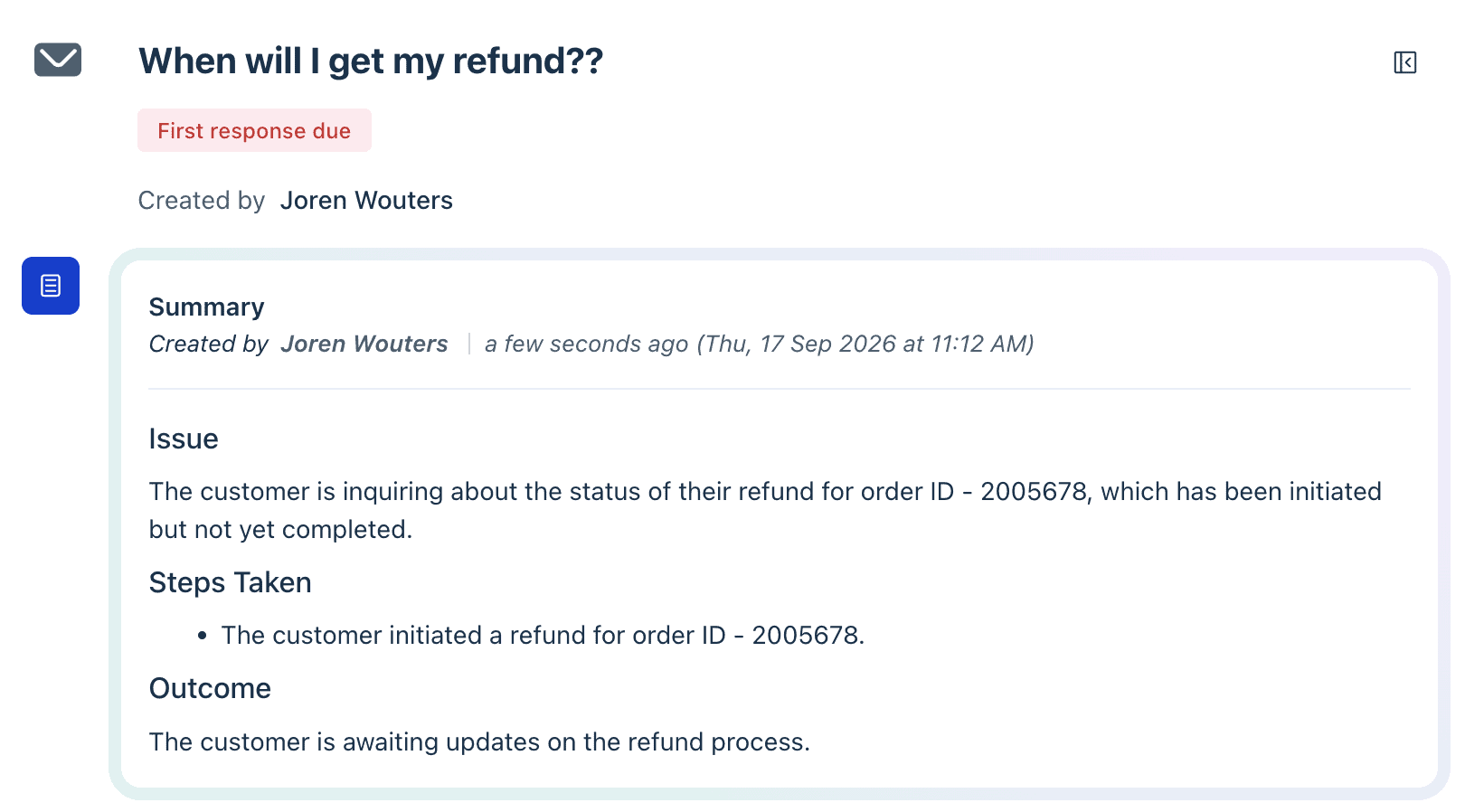
It also writes replies for your team. You can let it suggest a reply, rephrase what you wrote, or make it more or less formal:
On top of that, Copilot translates messages and helps resolve tickets. Because your team no longer writes every reply from scratch, they work through tickets much faster, and they can even help customers in languages they don’t speak.
Managing your support team
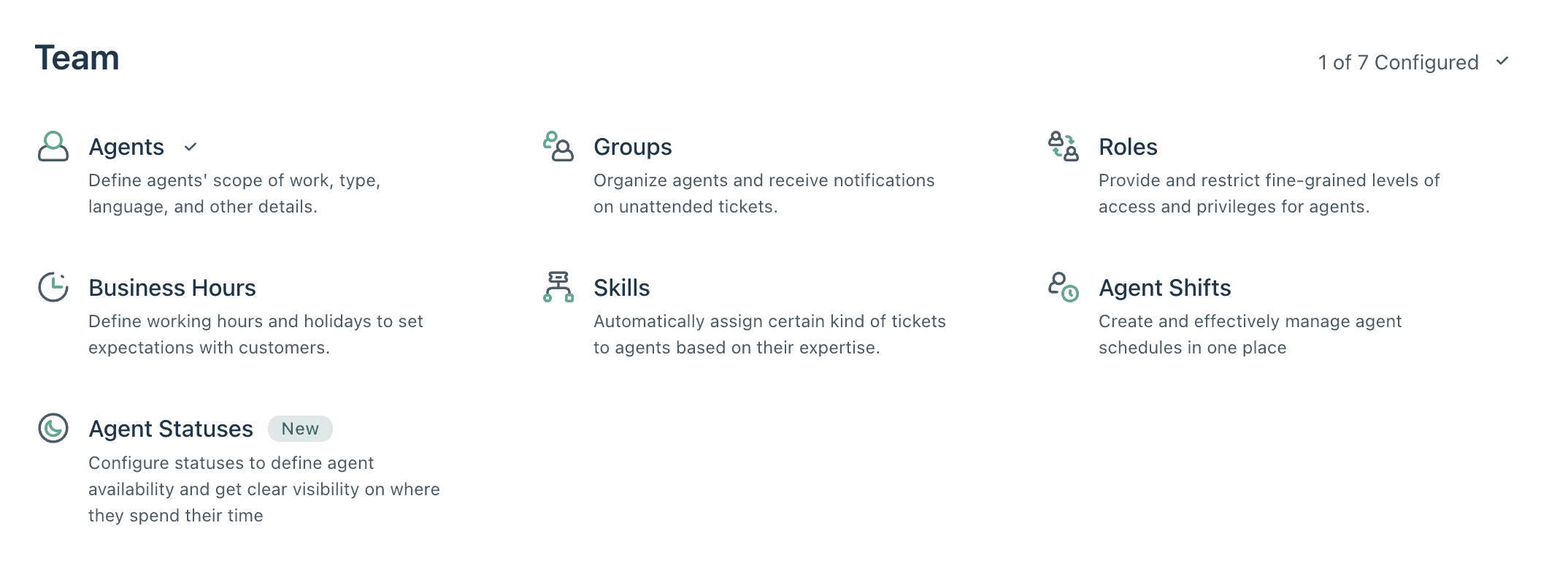
A faster team is only half of it. The more people work in your inbox, the more it matters that every ticket reaches the right person in time. Freshdesk is built for that: in the admin settings, you set up your agents, groups, roles, skills, shifts, business hours and agent statuses:
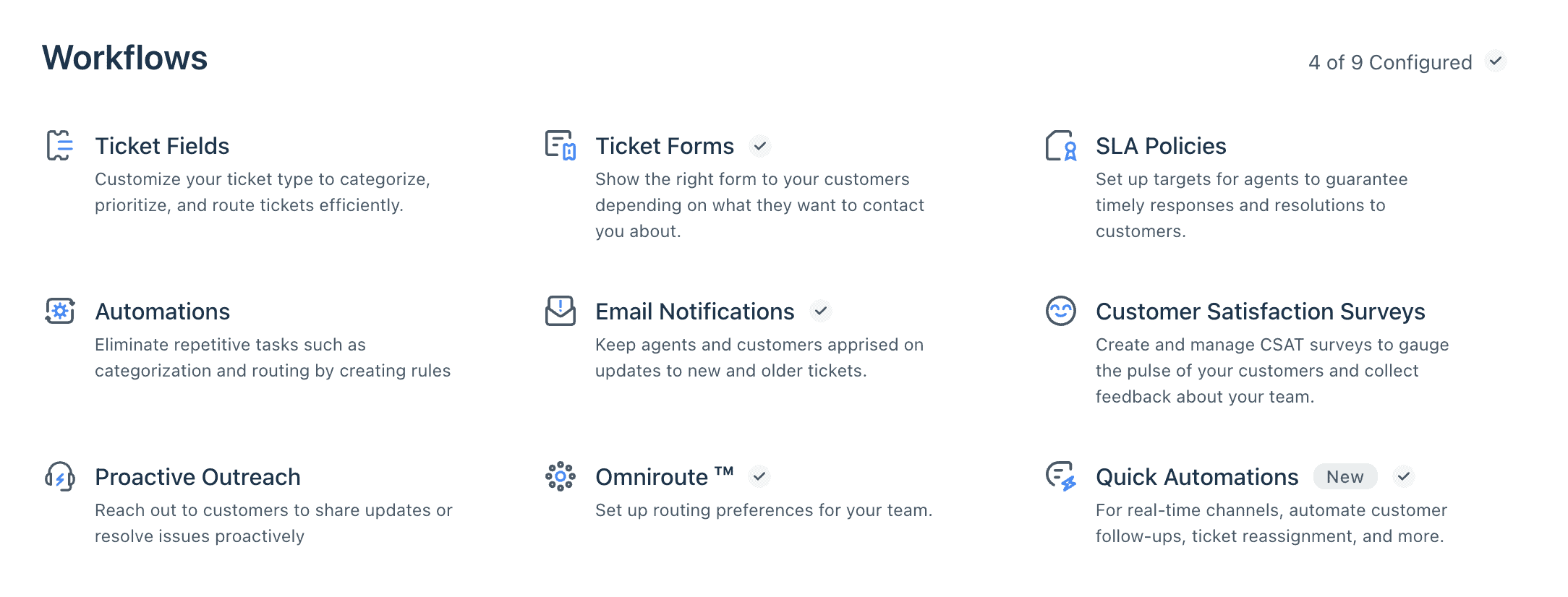
You can also set up help desk workflows. These don’t reply to customers, but handle things in the background. They route tickets, track your SLA targets, send email notifications and run customer satisfaction surveys:
That’s what makes Freshdesk a great fit for bigger teams. You manage your whole support team, and how every ticket moves through it, from one platform.
| Built-in live chatDoes it have a built-in live chat, so you can hand over a conversation to a support agent? | |
| Live chat integrationDoes it have a direct integration with a third-party livechat application? | |
| Auto-Assignment RulesCan you set up rules so that conversations get automatically assigned to agents in livechat? |
Freshdesk Analytics and AI Insights
Freshdesk comes with a huge amount of analytics. There’s a long list of built-in reports, from your AI agent’s performance and Copilot’s value to your SLAs and agent performance:
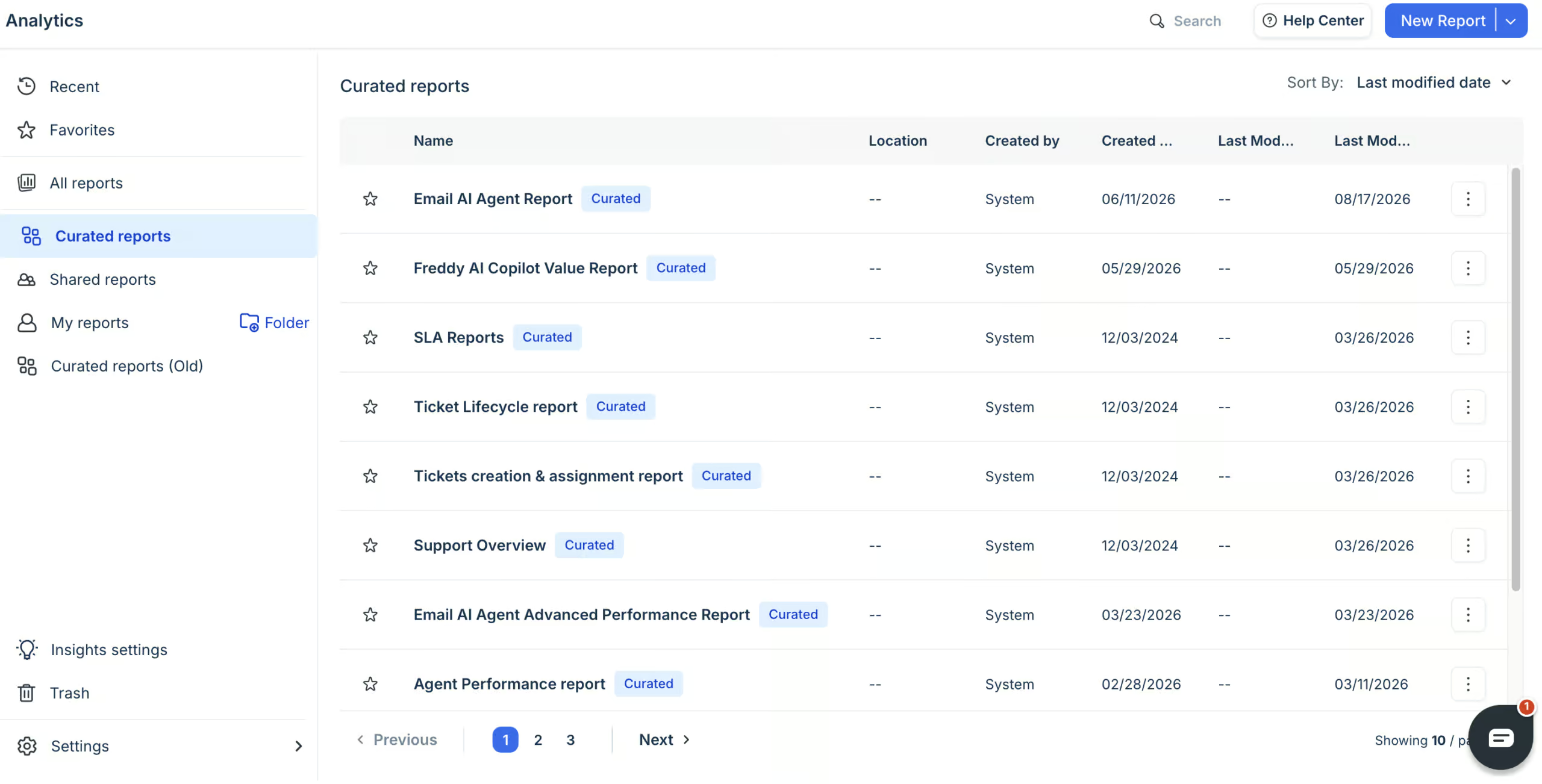
And if the report you need is missing, you build your own. You add a chart, pick the metric you want to see, like the average first response time, and save it:
That matters because every support team measures success differently. With custom reports, you track exactly the numbers your business cares about.
Then there’s Freddy AI Insights, an AI you can talk to about your support data. You ask something like “How is the average first response time by agents?” and get the answer right away. It also warns you when something changes, like a sudden spike in tickets:
| DashboardDashboard that provides general analytics of your chatbot. | |
| Flow analyticsCan you analyze how users are going through your chatbot flows? | |
| User inputGet the input from users that your chatbot didn’t understand. | |
| Sent messagesThe number of messages that were sent by your chatbot. | |
| Open rateThe percentage of chatbot users that opened a message inside your chatbot. | |
| Click rateThe percentage of chatbot users that click on a button inside your chatbot. | |
| Conversion rateThe percentage of users that converted through your chatbot. For example, the percentage of users that gave their email address | |
| Fall back rateThe percentage of interactions where the chatbot did not know an answer to a question. | |
| Agent analyticsCan you analyze the performance of live chat agents? | |
| Custom event trackingCan you create custom events and analyze how many times these happened? | |
| Custom dashboards/reportsCan you create your own dashboard or reports? |
Freshdesk Channels and Integrations
Freshdesk brings all your customer channels into one help desk, and it connects to the other tools you already use. But your AI agent works on fewer channels, and with fewer ready-made integrations, than your support team does.
Channels
You can connect 7 channels to your Freshdesk help desk:
- Website chat
- Facebook Messenger
- SMS
- Phone
So your team handles every customer conversation from the same inbox.
Your AI agent works on fewer channels. The chat AI agent runs on your website, WhatsApp, Instagram and Facebook, and email needs its own email AI agent. Phone calls do come into Freshdesk, but there’s no AI agent that answers them.
The website widget is basic. You can match it to your brand with your logo, colors and titles, and choose where it shows up on your page:
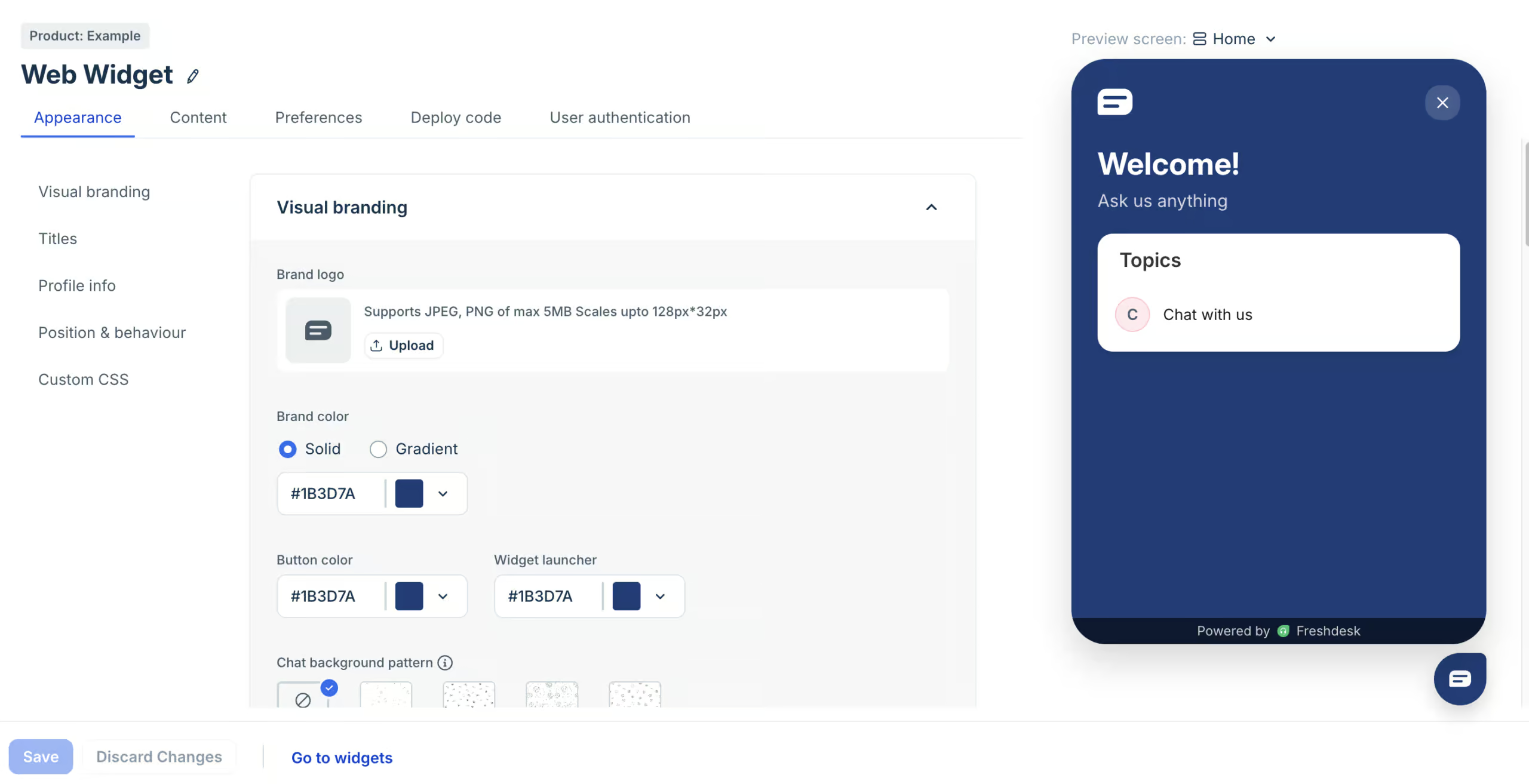
But you can’t send proactive messages from it, like a discount for visitors who stay on a page for a while. The same goes for Facebook, Instagram and WhatsApp. Freshdesk has no marketing features, because it’s built purely for customer support.
| WebsiteCan you publish your chatbot on your website? | |
| FacebookCan you publish your chatbot on Facebook? | |
| InstagramCan you publish your chatbot on Instagram? | |
| WhatsappCan you publish your chatbot on WhatsApp? | |
| TelegramCan you publish your chatbot on Telegram? | |
| SMSCan you publish your chatbot on SMS? | |
| SlackCan you publish your chatbot on Slack? | |
| EmailCan you publish your chatbot on email? | |
| Merge contacts across channelsCan you merge contacts across channels, when the same person contacts you over multiple channels? |
Integrations
Freshdesk has over 800 integrations in the Freshworks Marketplace. Some are built by Freshworks and some by other companies, and they include ecommerce tools like Shopify, CRMs like Salesforce, and team tools like Slack, Microsoft Teams and Jira:
Your AI agent’s workflows have fewer ready-made integrations. But if the tool you need isn’t there, you can build your own custom action that connects to any tool with an API.
Some integrations run on connector app tasks, which cost $80 per 5,000 tasks on every plan. So if you connect a lot of tools, include that in your budget.
| Direct integrationsHow many direct integrations does it have with other applications? | 250+ |
| ZapierDirect integration with Zapier, one of the largest integration platforms in the world. | |
| MakeDirect integration with Make (formerly Integromat), one of the largest integration platforms in the world. | |
| Make API CallsCan you call an API inside your chatbot flow to send or get data from other applications? | |
| WebhooksCan the platform send automatic notifications of all the messages and events going on in your chatbot? |
Freshdesk Pricing
Freshdesk has no free plan, but there’s a 14-day free trial. After that, you pay per agent:
Once you’ve used what’s included in your plan, you can buy add-ons:
- Extra AI agent sessions: $49 per 100 sessions
- Freddy AI Copilot: $35 per agent/month, on the Pro and Enterprise plans
- Connector app tasks: $80 per 5,000 tasks
| Free trialDoes the chatbot platform provide a free trial? | |
| Free planDoes the chatbot platform provide a free plan? | |
| Price per monthWhat is the lowest price per month to create a chatbot with this platform? In US Dollars. | $35 |
| Monthly pricing available?Is it possible to pay monthly? | |
| Money back guaranteeIs there a money-back guarantee in case you are not satisfied with the platform? |
Is Freshdesk Worth It?
So, should you use Freshdesk?
Yes, absolutely.
Freshdesk is one of the most complete customer support platforms I’ve tested. I was really impressed by how much you can do with it.
You build AI agents that answer questions and look up orders, your team takes over in a built-in help desk, and you connect it all to your channels and tools. On top of that, you get detailed reports and an AI you can ask about them.
And the price is fair for everything you get. With a well-trained AI agent, one person on the $35 Growth plan can handle the customer support of an entire business, and the 500 included AI agent sessions go a long way.
Even a team of five pays $175 per month, and extra AI agent sessions only cost $0.49 each. So I highly recommend checking it out:
That said, there are three drawbacks to keep in mind before you choose Freshdesk:
- Setup takes longer than it looks: my Shopify workflow didn’t work right away, and you’ll likely need their support team to fix that
- No marketing features: you can’t send proactive messages on your website or run campaigns on Facebook, Instagram and WhatsApp
- Email needs its own AI agent, so you maintain two agents that do the same job
So if you want a tool that grows your sales on Instagram or WhatsApp, Freshdesk isn’t the right fit. But if you want to automate your customer support, it’s one of the best platforms out there.
Frequently Asked Questions
What happened to Freshchat?
Freshchat is now part of Freshdesk Omni, the customer support platform from Freshworks. Its live chat, AI agents and messaging channels now sit inside Freshdesk, together with the help desk.
Is Freshdesk free to use?
No, Freshdesk Omni doesn’t have a free plan. But every plan comes with a 14-day free trial, so you can test it before you pay. After that, plans start at $35 per agent/month.
What is Freshdesk used for?
Freshdesk is used to run customer support. Its AI agents answer customer questions automatically, and your team handles the rest in one inbox, across channels like email, website chat, WhatsApp and Instagram.
What type of businesses use Freshdesk?
Businesses of all sizes use Freshdesk, from small online stores to large companies with big support teams. Some of the industries that use it include technology, retail and telecom.
Is Freshdesk legit?
Yes, Freshdesk is a legit platform. It’s made by Freshworks, a publicly traded software company that serves more than 74,000 businesses worldwide.
What is Freshworks?
Freshworks is the company behind Freshdesk. They also make other business software, such as Freshsales for sales teams and Freshservice for IT support.
Is the Freshdesk AI agent good?
Yes. You can train it on your website, files and Q&As, and connect it to tools like Shopify, so it answers questions and looks up orders for your customers. The main drawback is that connecting those tools can take longer than expected.
What are the Freshdesk plans?
Freshdesk Omni has three plans, all priced per agent:
- Growth ($35/agent/month): 500 AI agent sessions, omnichannel support, a knowledge base and reports
- Pro ($95/agent/month): everything in Growth, plus a multilingual help desk, advanced analytics and the option to add Freddy AI Copilot
- Enterprise ($143/agent/month): everything in Pro, plus Freddy AI Insights, skill-based routing and custom objects
