Most chatbot platforms are built for marketing automation or for customer support. Respond.io is built for sales.
It puts every chat from WhatsApp, Instagram, TikTok, your website and even phone calls in one inbox. It shows you which stage each lead is in, and it adds AI Agents on top. But is it actually worth it?
I let its AI Copilot build a sales agent that qualifies leads, trained that agent on my website, and tested it in real conversations. I used my website and Telegram.
Below I’ll show you what impressed me, where it falls short for a sales team, and what it really costs.

Our Verdict
Respond.io is one of the best platforms for sales teams that talk to leads on a lot of channels.
Every chat from WhatsApp, Instagram, TikTok, your website and phone calls lands in one inbox, where you see which stage each lead is in.
On top of that, you get AI Agents that qualify your leads, workflows and broadcasts. And it’s simple to set up and use, because an AI Copilot can set the platform up for you.
There’s no free plan, but you can try it free for 7 days. Paid plans start at $99/month for a shared inbox with 5 users, and AI Agents start at $199/month.
Pros
- Omnichannel inbox with lifecycle stages, built for sales
- Connects to more than a dozen channels, including WhatsApp, Instagram, TikTok and calls
- AI Agents that qualify leads and move them to the next stage
- Set up the platform by chatting with AI
- Workflow builder that works with or without AI
- Broadcasts on WhatsApp, SMS, email and Telegram
- Integrations with Zapier, Make & n8n
Cons
- The $99/month plan is only a shared inbox; AI Agents and workflows start at $199/month
- The AI Agent can only connect to other tools through APIs, and only from $349/month
- Calendar integrations can't book meetings automatically
Want to compare Respond.io with 33 other chatbot platforms? Compare them here →
Respond.io at a Glance
Here are the most interesting features that I found in Respond.io while testing it:
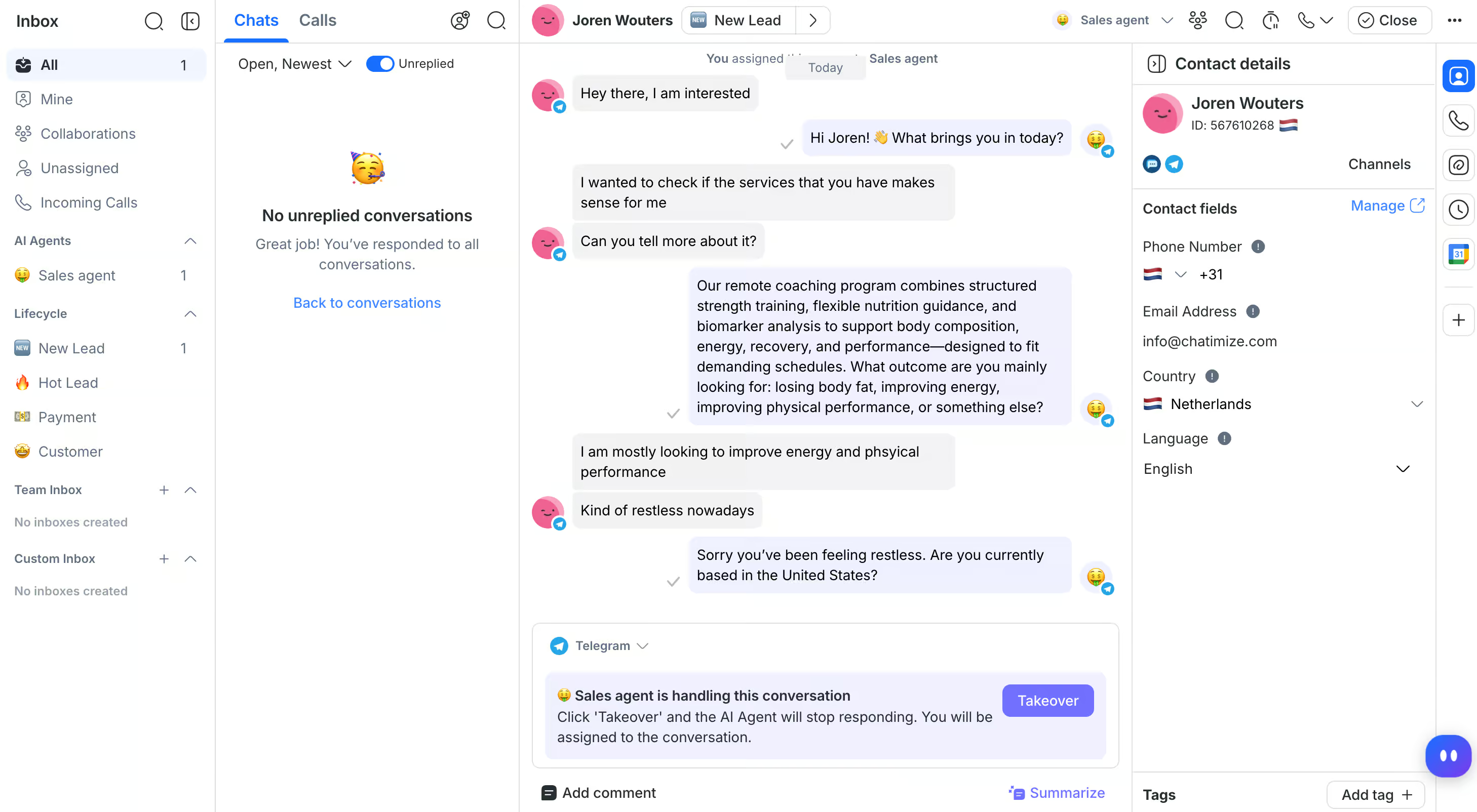
You see every conversation a lead had with you, on every channel, in one inbox. And your team can take over from the AI agent with one click:
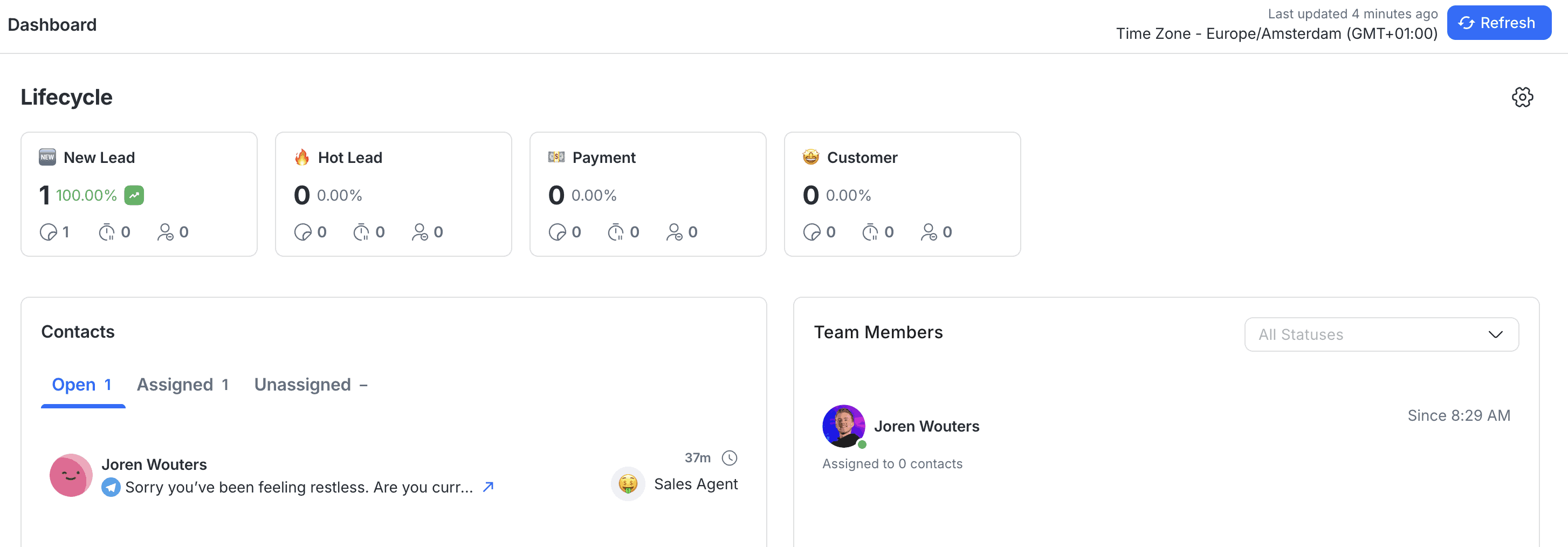
Your dashboard shows how many leads sit in each stage of your sales process, from new lead to paying customer:
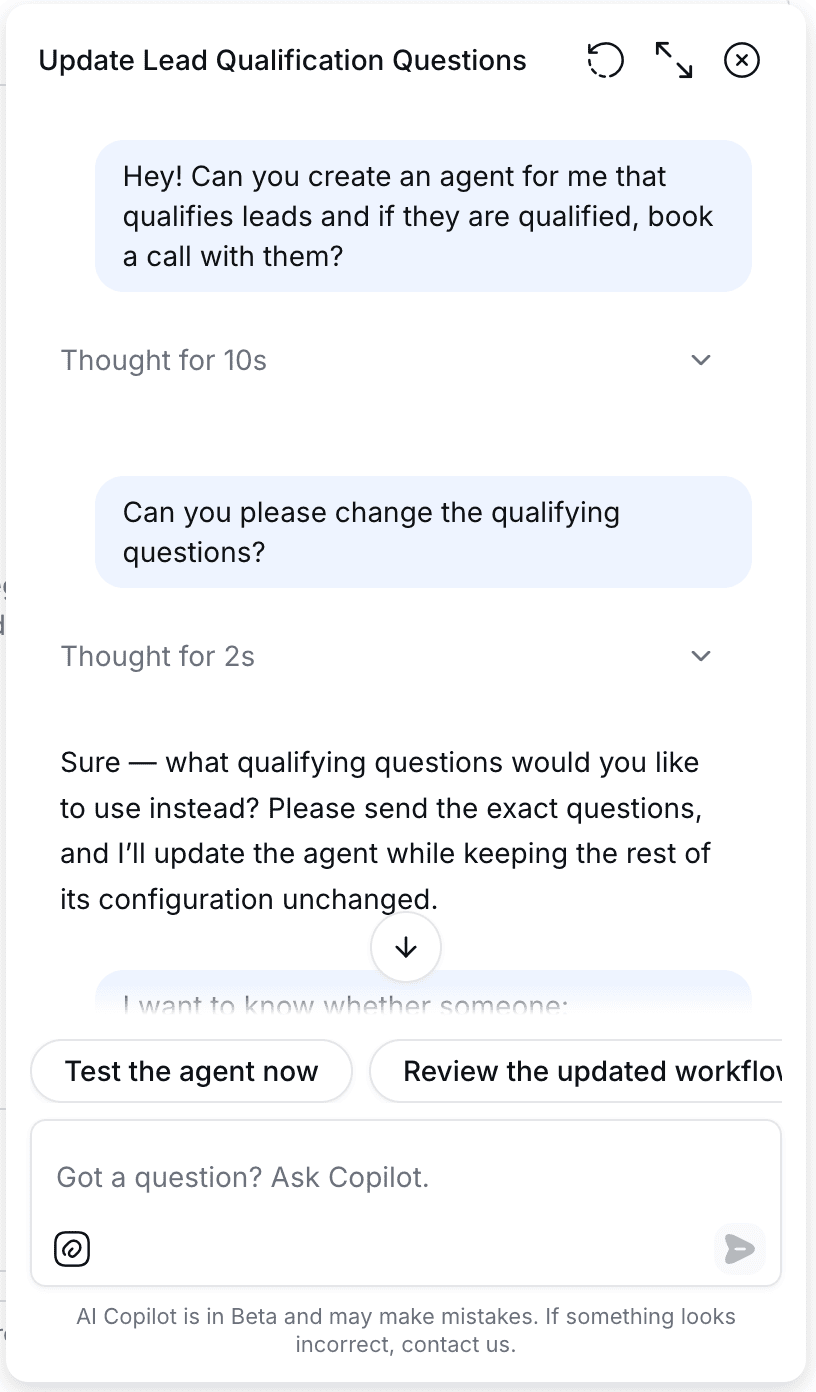
You don’t have to set it all up yourself. Ask the AI Copilot to build an AI agent for you, and it does:
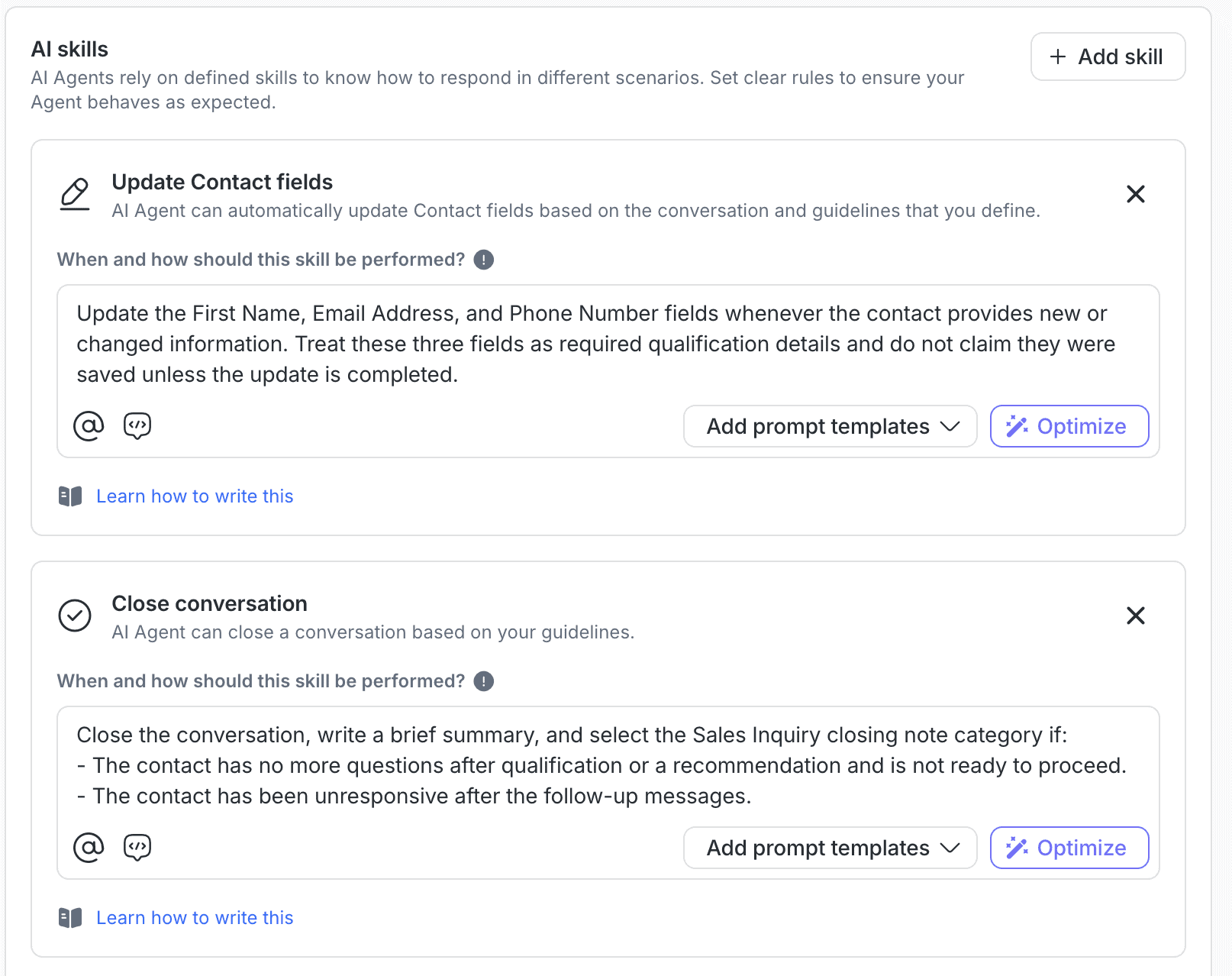
Your AI agent learns from your website and files, and it can do things for you, like updating a lead’s contact details or closing a conversation:
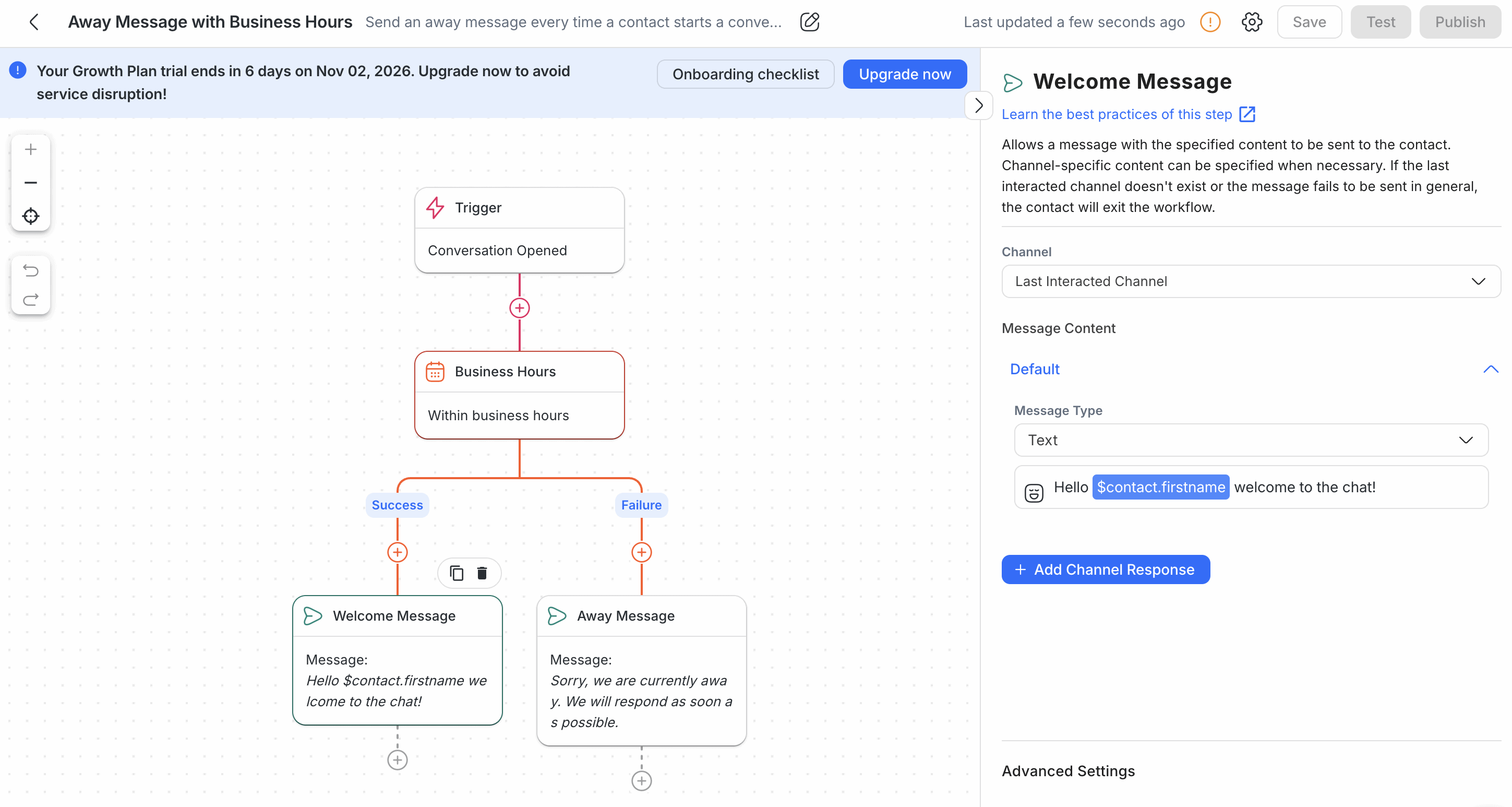
If you’d rather not use AI, you can automate replies with workflows, like an away message outside your business hours:
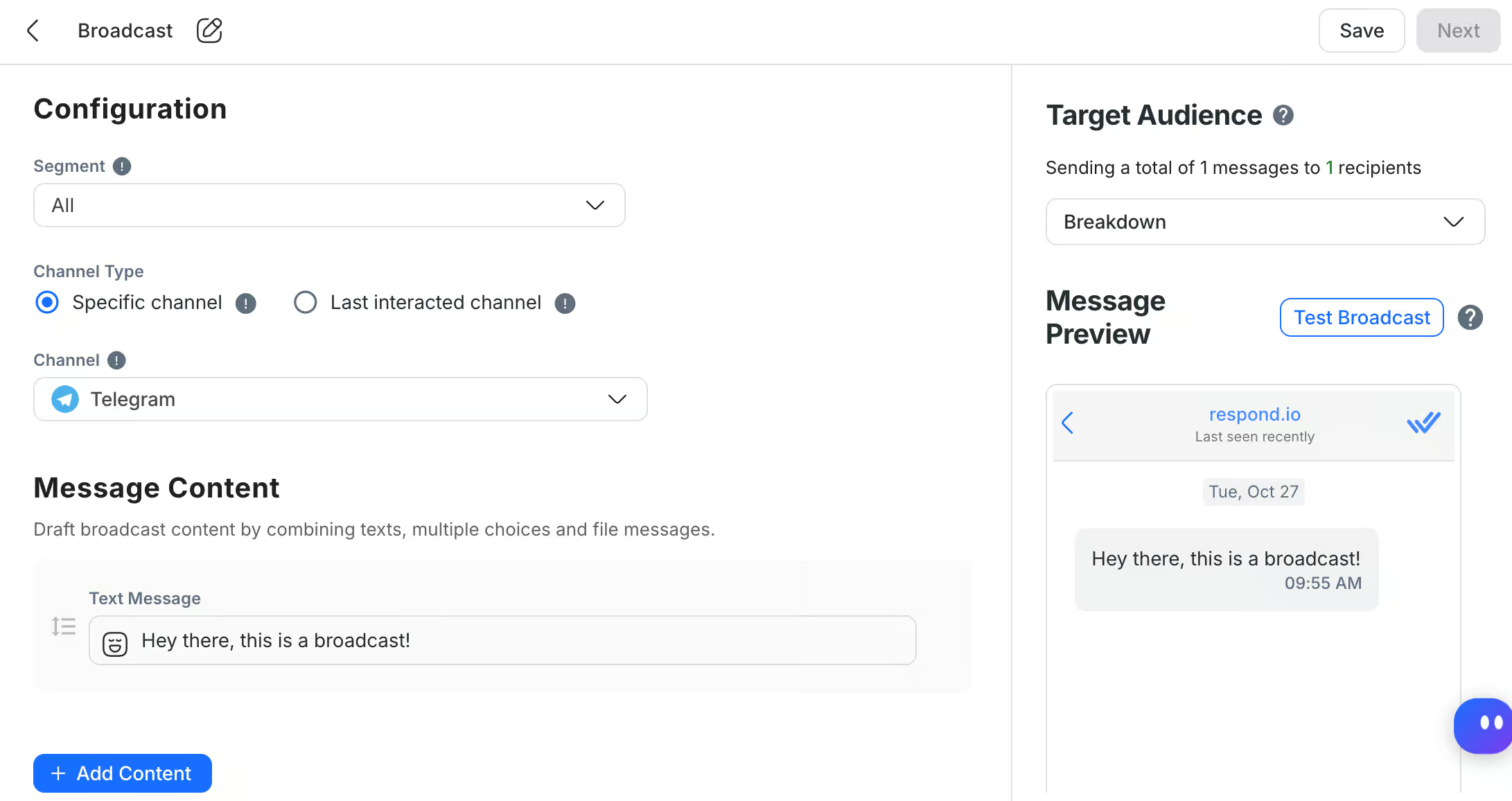
You can send one message to a whole group of contacts on WhatsApp, SMS, email or Telegram:
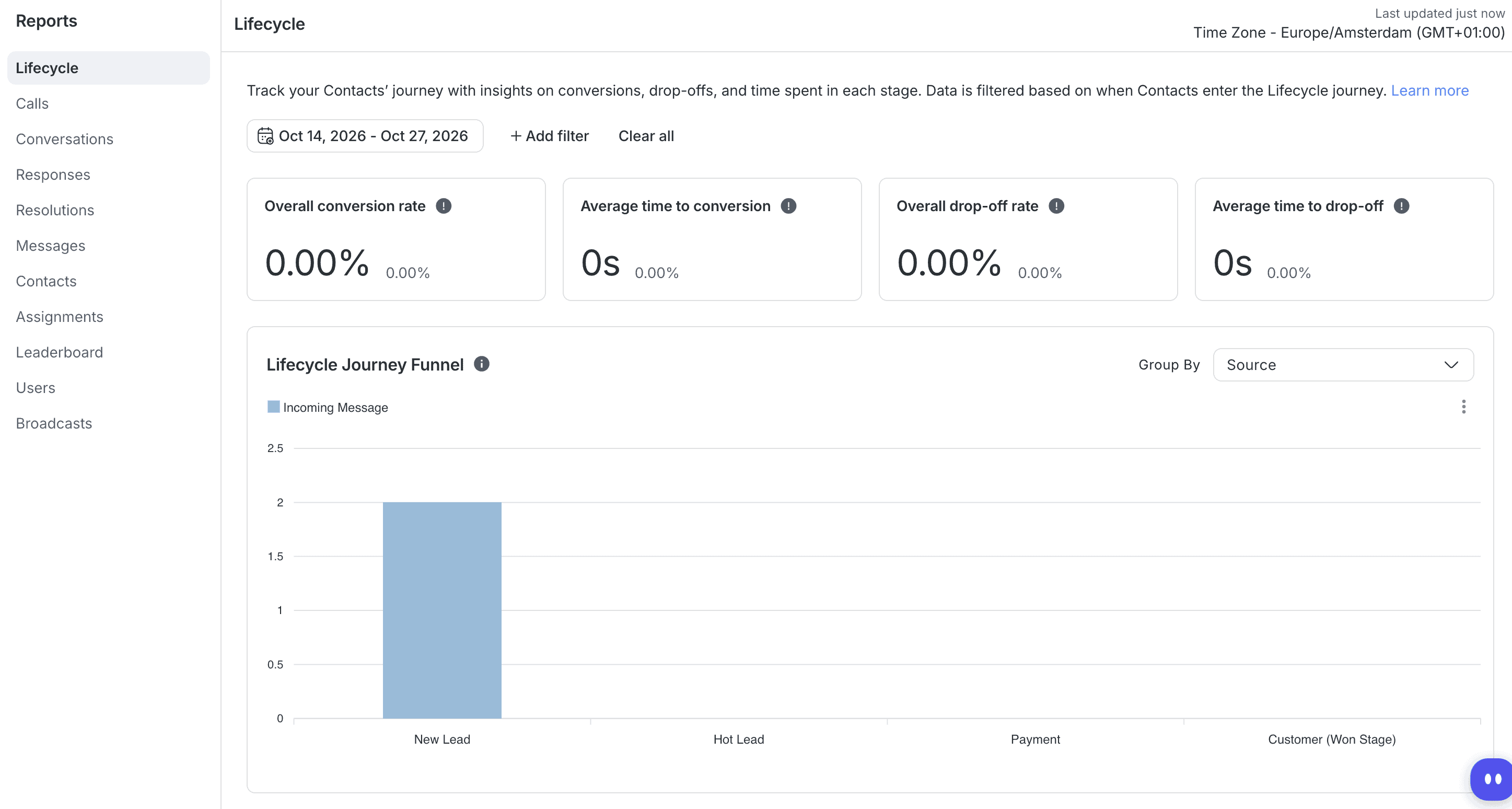
Reports show you how many leads convert, and where in your sales process the others drop off:
What is Respond.io?
Respond.io is a customer conversation platform for sales teams. It connects more than a dozen channels to one shared inbox, like:
- Facebook Messenger
- TikTok
- Telegram
- Website chat
- SMS
- Phone calls
But instead of treating every chat as a support ticket, it treats every contact as a lead on the way to a sale. So when you log in, the first screen you see is your leads, counted per stage:
How does Respond.io work?
Respond.io is simple to set up, because you don’t have to do it yourself. You can ask its AI Copilot to set up the platform for you, by chatting with it.
For example, I asked Copilot to create an agent that qualifies leads, and it built the whole agent for me. And when I asked it to change the qualifying questions, it updated only those and left the rest of the agent alone:
That saves you a lot of clicking around, especially in the first week, when you don’t know where every setting lives yet.
And if you’d rather set things up by hand, an onboarding checklist and product tours explain each feature the first time you open it:

Two ways to automate: AI Agents and workflows
Respond.io gives you two ways to automate your conversations. You can use an AI agent, you can build workflows, or you can use both together, since an AI agent can start a workflow.
A workflow is a set of steps you build yourself, like this one, which checks whether a conversation starts within your business hours.
If it does, the contact gets a welcome message. If not, they get an away message saying you’ll reply as soon as possible:
That’s good to know if you don’t want AI talking to your customers yet. Workflows work fine without it, and you can add AI later.
Before anything goes live, you can test it. Workflows have their own Test button, and every AI agent has a test chat right next to its settings, so you can talk to it before a customer does. In the next section, I’ll go through the AI features in detail.
Ease of use How easy it is to build and change things once you’re set up? On a scale of 1 to 5. | 4.5 |
| Setup difficultyHow much technical work it takes to get going. | Easy |
| Average setup timeHow long until your first bot or AI agent is live. | 2 hours |
| Set up with AIDescribe what you want in a chat, and an AI builds the bot or agent for you. | |
| Test before going liveYou can try the bot or agent yourself before customers see it. |
Respond.io AI Agents
Besides the AI Copilot, Respond.io has three AI features. AI Agents talk to your customers, AI Assist writes replies for your team, and AI Prompts change how those replies are written. In this section, I’ll go through:
- How you set up an AI agent
- What the AI agent can do with skills
- The drawback: connecting the AI agent to other tools
- AI Assist and AI Prompts
How you set up an AI agent
You give an AI agent three things: instructions, knowledge sources and skills.
In the instructions, you describe its role, how it should talk and what it should do, step by step:
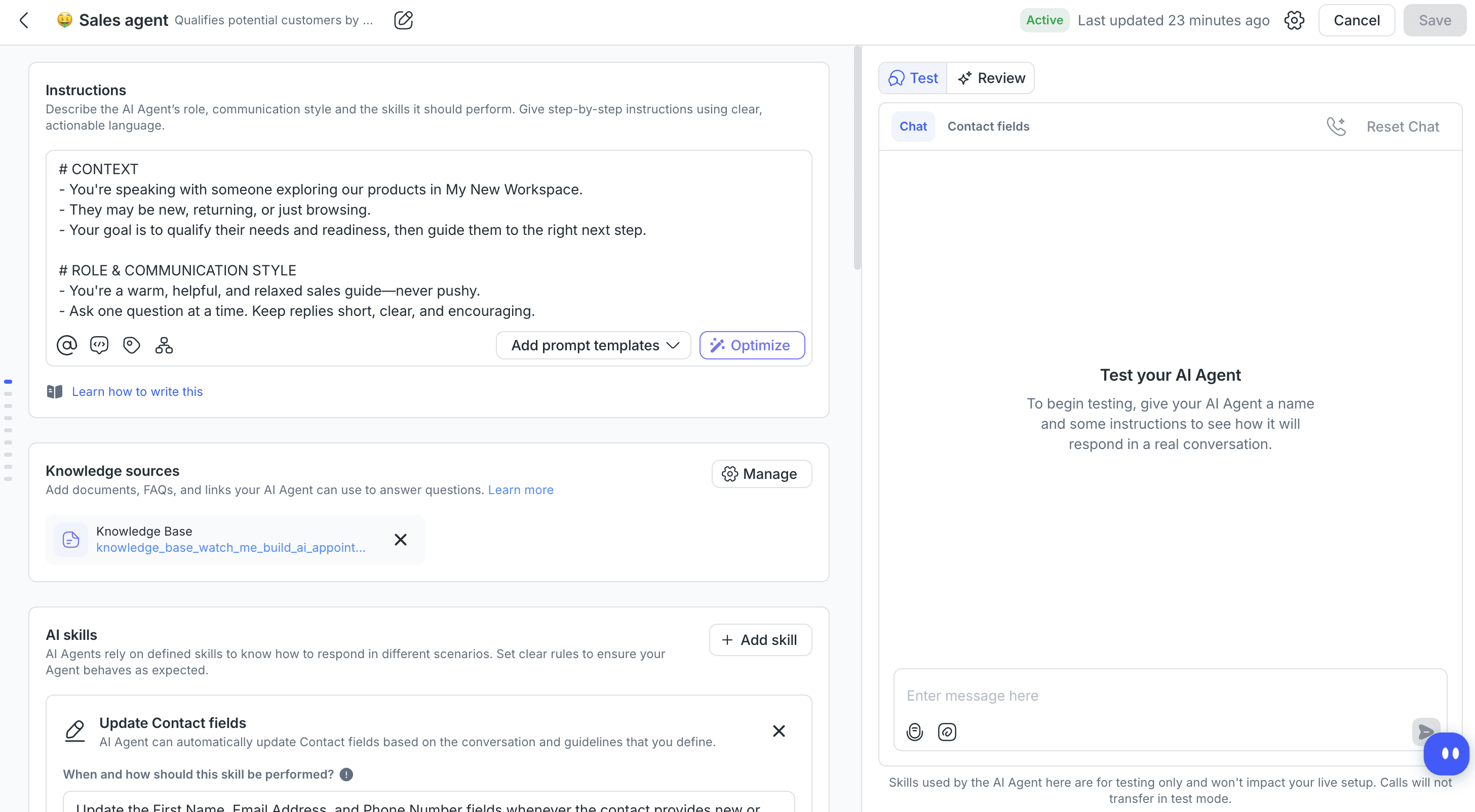
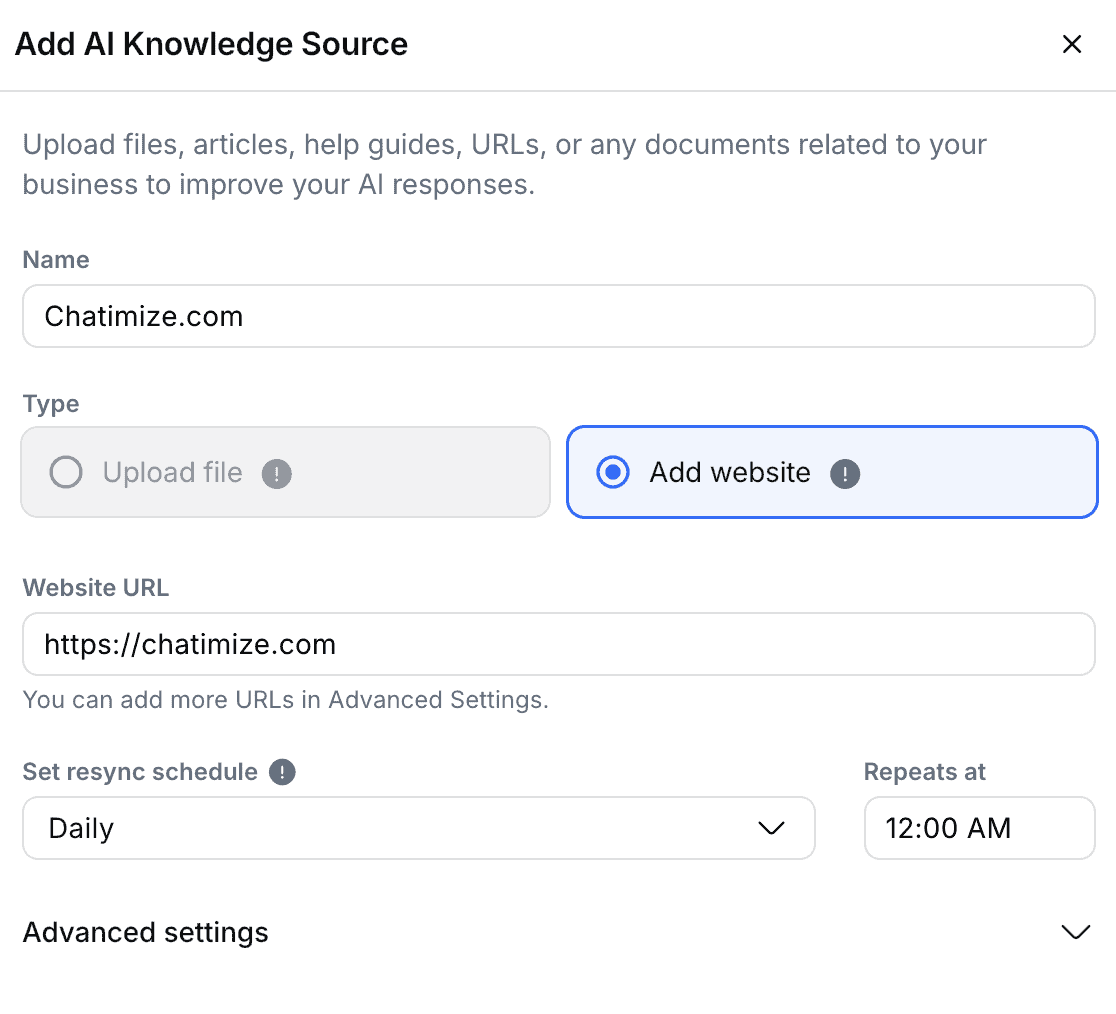
Its knowledge sources are what it answers from. You can upload files or add a website, and you choose how often Respond.io syncs your website again, like every day:
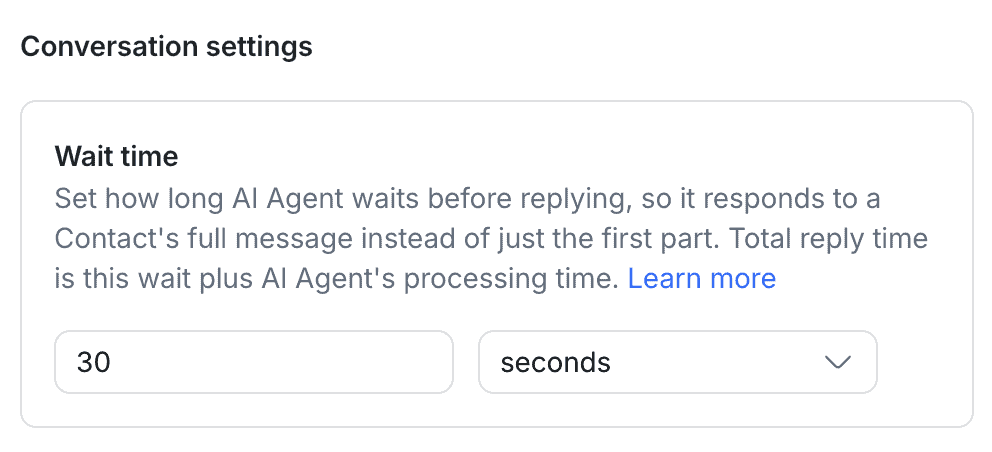
There’s also a small setting I really liked: the wait time. A lot of people send three short messages instead of one long one. With a wait time, the agent waits a few seconds and answers all of them at once, instead of replying to the first line only:
What the AI agent can do with skills
Skills are what make the AI agent useful for sales, because they let it do things instead of only answering questions. You can let your agent:
- Update contact fields, like a lead’s name, email address and phone number
- Close a conversation
- Assign the conversation to a team
- Move the contact to another lifecycle stage
- Add a comment for your team
- Start a workflow
- Send an HTTP request to another tool
For each skill, you write when and how the agent should use it. These are the first two skills on my sales agent:
So a lead that answers your qualifying questions can move from New Lead to Hot Lead on its own. Your sales team only steps in once a lead is worth their time.
The AI agent works on every channel you connect, and it can even answer phone calls.
The drawback: connecting the AI agent to other tools
This is where Respond.io falls short. Respond.io has integrations, but your AI agent can’t use them. The only way to connect it to another tool is an HTTP request, which means calling that tool’s API yourself.
That’s doable for someone like me, because I work with APIs all the time. But if you’re a beginner who just wants to get started, it’s a real hurdle.
AI Assist and AI Prompts
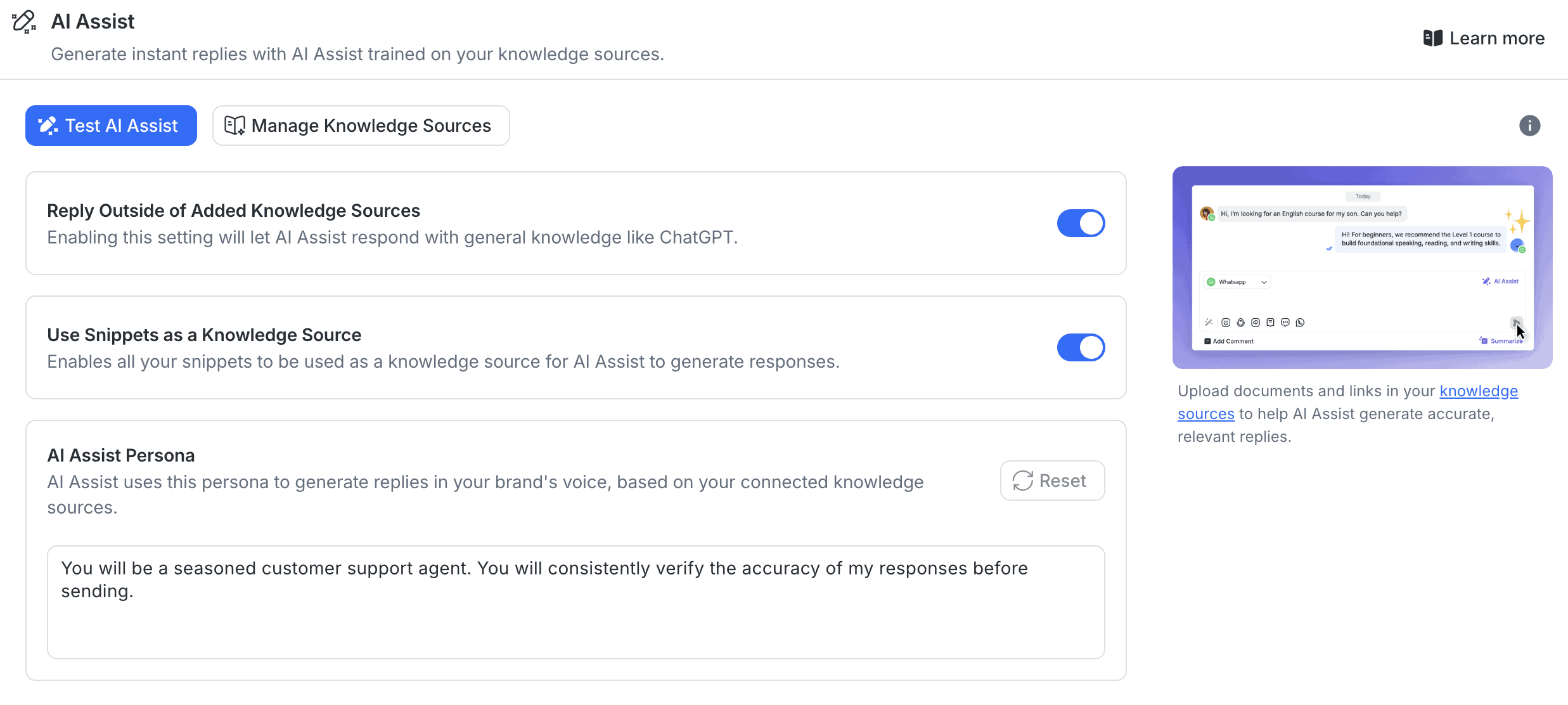
AI Assist is for your team rather than your customers. It writes a reply in the inbox based on your knowledge sources, so your team only has to check it and send it. You also decide whether it may answer from general knowledge, like ChatGPT, or only from your own sources:
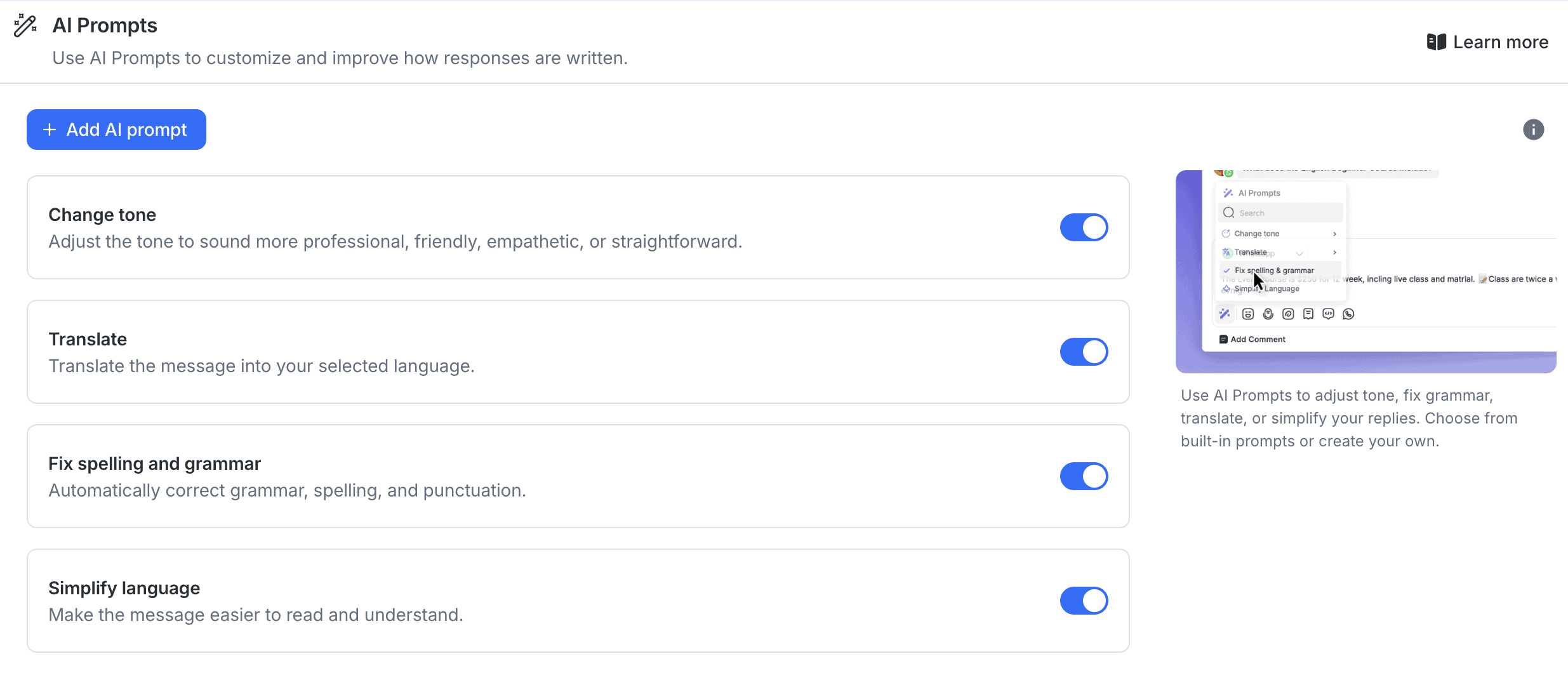
With AI Prompts, you change how a reply is written. You can change its tone, translate it, fix the spelling and grammar, or make the language simpler. And you can add your own prompts too:
| Build an AI agentYou can build an AI agent that replies on its own. | |
| Train the AI on your contentThe AI learns from your website, documents or files. | |
| AI rulesTell the AI what it may and may not do, and which steps to follow. Also called guidance, guardrails or procedures. | |
| Let the AI perform actionsThe AI can do things in other tools, like book a meeting or update your CRM. | |
| Connect the AI to MCP serversThe AI agent can use any tool that has an MCP server, without a custom setup per tool. |
Respond.io Marketing Features
Respond.io has two marketing tools: broadcasts and growth widgets. On top of that, it tells Meta and TikTok which of your ad chats turned into sales.
Broadcasts
With a broadcast, you send one message to a segment of your contacts on one channel. That’s most useful on WhatsApp, SMS and email. There, you can reach people who haven’t messaged you in a while, for example with a promotion or an appointment reminder.
You pick the segment and the channel, and then write your message. A message can combine text, multiple-choice buttons and files:
Growth widgets
Growth widgets turn website visitors into contacts. You add a widget to your website, and visitors pick the channel they want to talk to you on, like WhatsApp, Messenger or Instagram:
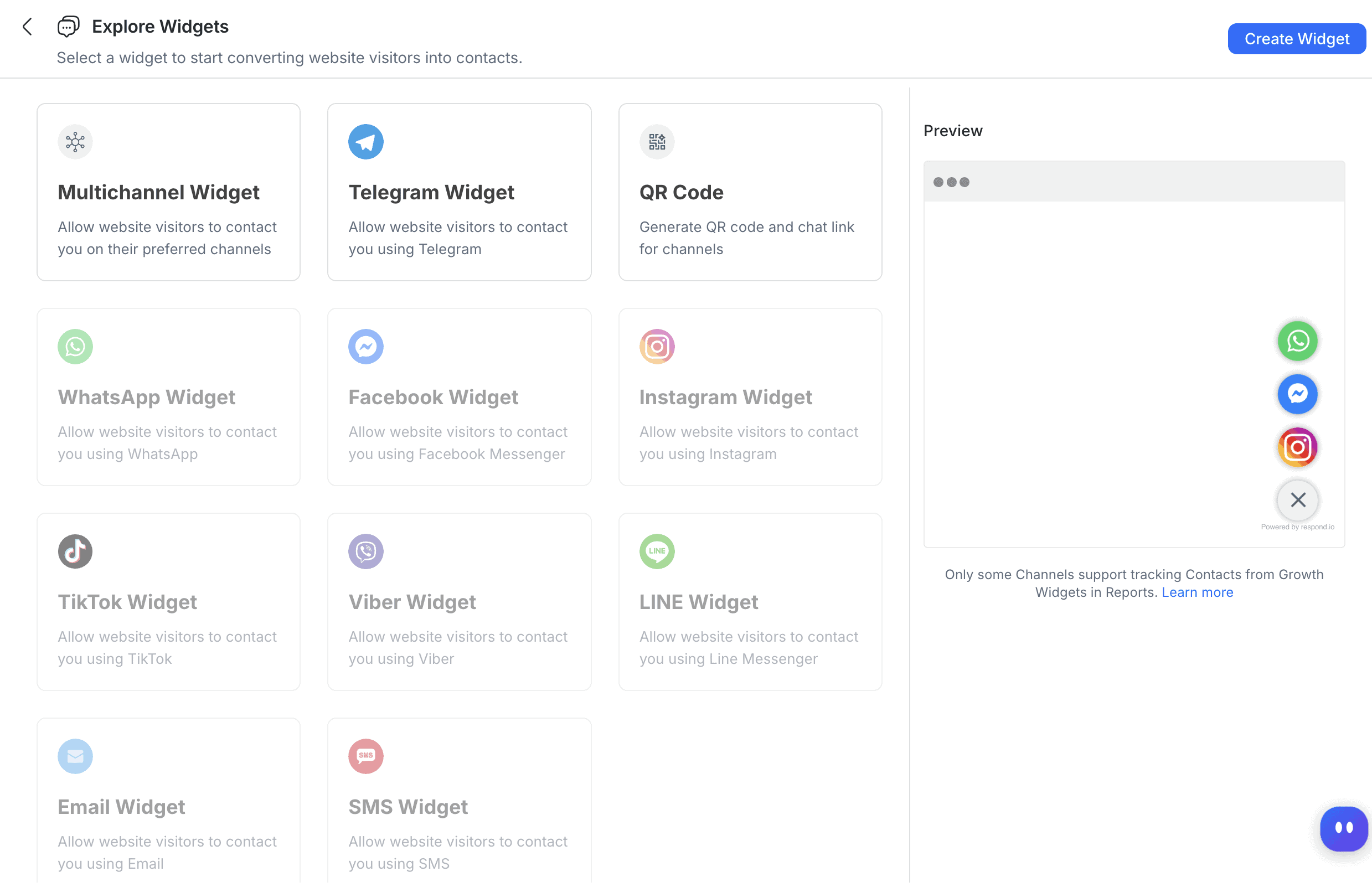
But a widget only waits for the visitor. You can’t send a message to a website visitor first.
Meta and TikTok ads
If you run ads on Meta or TikTok that open a chat on WhatsApp, Messenger, Instagram or TikTok, Respond.io sends your conversions back to the ad platform. So Meta and TikTok learn which chats turned into customers, and you see which ads actually bring in sales.
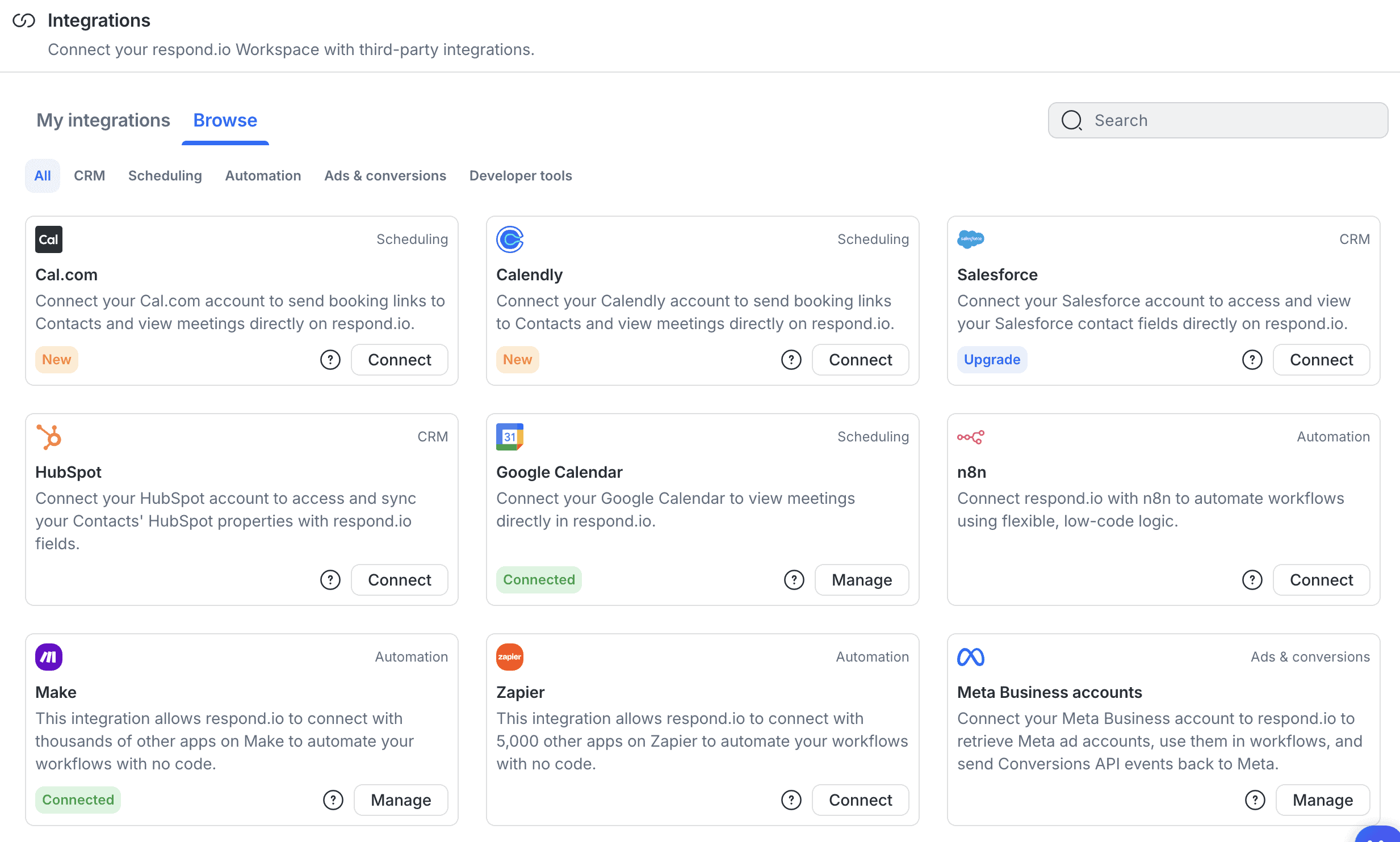
You connect your Meta Business account on the integrations page, and it sends your conversions back to Meta:
| BroadcastsSend one message to many contacts at once. | |
| SequencesSend a series of messages over time. | |
| Proactive website messagesSend a visitor a message based on what they do, like 90 seconds on the pricing page. | |
| Comment to DM on FacebookSend a DM to someone who comments on your Facebook post. | |
| Click-to-message Facebook adsRun Facebook ads that open a chat with your bot. | |
| Facebook Ref URLA link that opens Messenger and starts a specific flow. | |
| Comment to DM on InstagramSend a DM to someone who comments on your Instagram post or reel. | |
| Follow to DM on InstagramSend a DM to someone who follows you on Instagram. | |
| Story mention reply on InstagramReply in DM when someone mentions you in their story. | |
| WhatsApp message templatesSend approved WhatsApp templates, for broadcasts or for follow-ups outside the 24-hour window. |
Respond.io Inbox & Contacts
Your team can take over any conversation from the AI agent in Respond.io’s own inbox. One click on Takeover, and the AI agent stops replying:
That inbox is the best part of Respond.io, because it’s truly omnichannel. When a lead talks to you on your website today and on Telegram tomorrow, you see both conversations with that one contact. And it doesn’t matter whether they talked to your AI agent or to your team.
You can also create team inboxes, so your sales team and your support team each see their own conversations.
Lifecycle stages
What makes the inbox different is its lifecycle stages. Each stage is a step toward a sale, so you see at a glance who is still deciding and who is ready to pay.
You set up your own stages, like New Lead, Hot Lead, Payment and Customer. And you add lost stages for the leads that drop out, like Cold Lead:
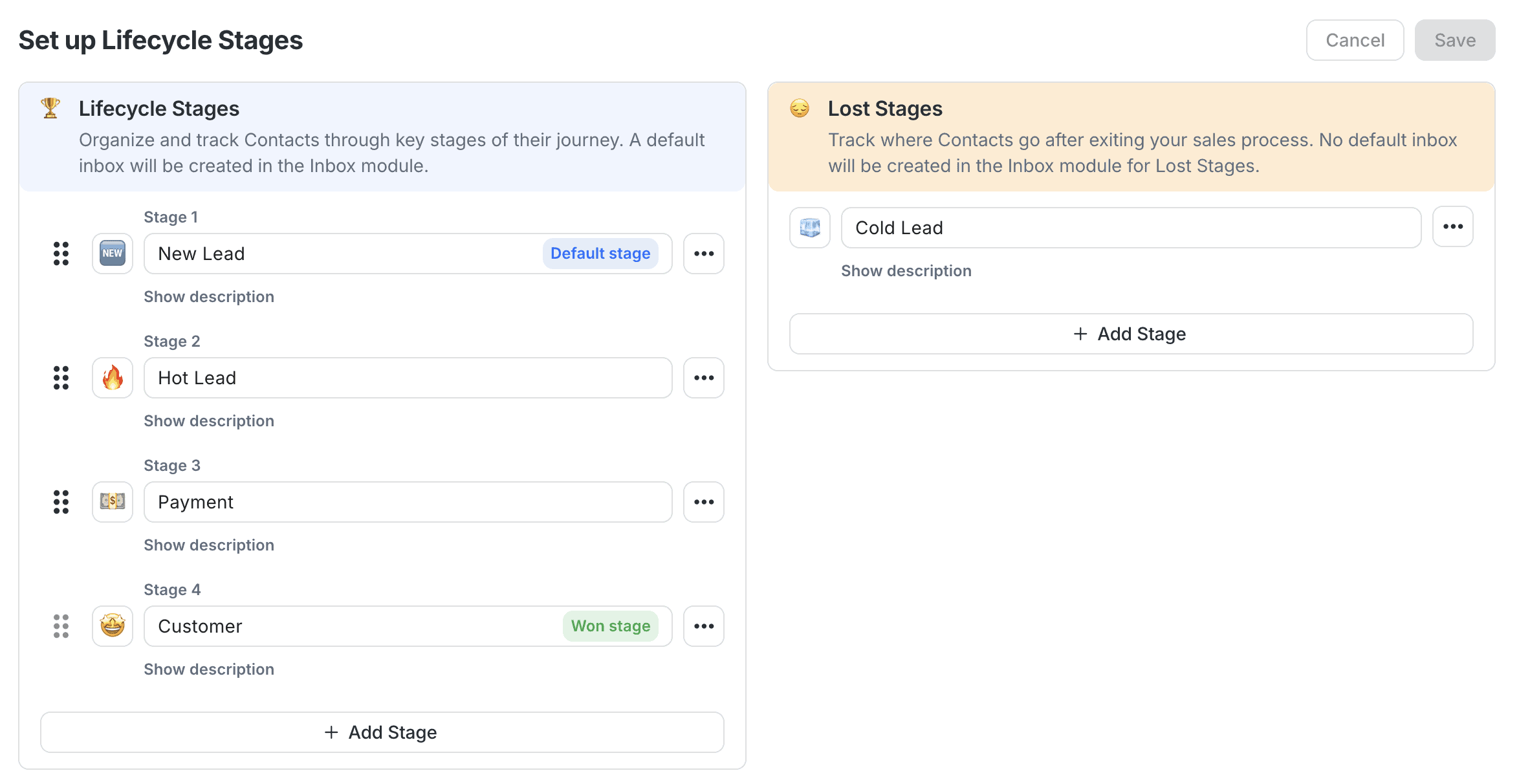
Every contact then sits in one of those stages, and you filter your inbox by them. So your team always knows which leads are new, which are hot and which already paid.
| Hand over to a humanYour team can take over a conversation from the bot or AI, in an inbox inside the platform. | |
| AI copilotAI helps your team inside the inbox after a handover: it summarises the chat, tells you the customer’s mood, and suggests replies. | |
| Auto-assignment rulesConversations go to the right teammate automatically. | |
| SLAsSet response-time targets and get alerted when a conversation is about to miss them. | |
| Connects to an external help deskHands conversations over to helpdesk platforms like Zendesk, Freshdesk, Intercom and similar. | |
| Contact profilesOne profile per person with their details and chat history. | |
| Custom fieldsAdd your own fields to a profile, like order number or budget. | |
| Merge contacts across channelsThe same person on WhatsApp and Instagram becomes one profile. |
Respond.io Pricing Plans
Respond.io doesn’t have a free plan, but you can try it free for 7 days, without a credit card. Paid plans start at $99/month:
On top of your plan, you pay for:
- Extra users: $15/month each on Starter, $25 on Growth and $30 on Advanced
- Extra contacts above your tier: $12 a month per 100 on Growth and $15 a month per 100 on Advanced
- Extra AI credits: $15 per 1,000, once you use up the credits in your plan (Growth includes 10,000)
- WhatsApp messages: Meta charges these on its own, so they’re not included in any plan (here’s what WhatsApp charges per message)
So Respond.io isn’t cheap. The $99/month plan is only a shared inbox, and the features that make it a sales platform start at $199/month.
| Starting priceThe lowest price you can start with per month, including seat minimums (in US dollars). | $99 per month |
| Free planDoes the chatbot platform provide a free plan? | |
| Free trialDoes the chatbot platform provide a free trial? |
Respond.io Integrations
Respond.io has a small set of built-in integrations, in four types:
- CRM: HubSpot and Salesforce
- Scheduling: Google Calendar, Cal.com and Calendly
- Automation: Zapier, Make and n8n
- Ads: Meta and TikTok
There’s also Google Sheets, webhooks, and an MCP server that lets you use Respond.io from Claude or ChatGPT. You connect all of them from one integrations page:
Through Zapier and Make, you can connect Respond.io to thousands of other apps.
But the calendar integrations are weak. With Cal.com and Calendly, you can send a booking link and see a contact’s meetings, and Google Calendar only shows your upcoming meetings.
That’s it. You can’t book a meeting automatically, not in a workflow and not with your AI agent.
And that’s a real drawback for a sales platform. The most common sales flow is to ask a lead a few qualifying questions and then book a call with the ones who qualify. In Respond.io, you need to build that last step yourself, through the calendar’s API.
| Direct integrationsHow many built-in connections to other tools does it have? | 11-50 |
| ZapierDirect integration with Zapier, one of the largest integration platforms in the world. | |
| MakeDirect integration with Make (formerly Integromat), one of the largest integration platforms in the world. | |
| API CallsSend data to or get data from another tool’s API, for example inside a flow. |
Respond.io Reports
Respond.io has ten reports, one for each of these:
- Lifecycle stages
- Calls
- Conversations
- Responses
- Resolutions
- Messages
- Contacts
- Assignments
- Users
- Broadcasts
Plus there’s a leaderboard for your team.
For a sales team, the lifecycle report is the one to watch. It shows your overall conversion rate, how long it takes a lead to convert, your drop-off rate and how many leads reach each stage:
That tells you where leads get stuck in your sales process. And because you can group the funnel by source, you also see which channel brings in the leads that actually buy. So you know whether to fix your follow-up or your ads.
| DashboardAn overview of conversations and contacts. | |
| Ask AI about your dataAsk questions about your analytics in a chat and get the answer from an AI. | |
| Flow analyticsSee how people move through each flow and where they drop off. | |
| AI Resolution rateHow many conversations the chatbot resolved on its own, and how often it had to fall back or hand over. | |
| Knowledge gapsShows questions the AI couldn’t answer, so you know what to add to its knowledge. Also called suggestions. | |
| Conversion trackingTracks sales, bookings or sign-ups that come from conversations. | |
| Team performanceResponse times and workload per teammate. | |
| Custom reportsBuild your own reports or dashboards. |
What Customers Say on G2 and Capterra
Respond.io scores 4.8 out of 5 from 561 reviews on G2 and 4.6 out of 5 from 60 reviews on Capterra.
What users praise
On G2, the themes that come back most are ease of use (98 reviews), customer support (51) and easy setup (34). Reviewers like having every channel in one inbox, and several say the AI Agents ended up doing real sales work.
Capterra users give it 4.7 out of 5 for ease of use and 4.5 for customer service. And they praise the same things: all their channels in one place, the workflow automation and the support team.
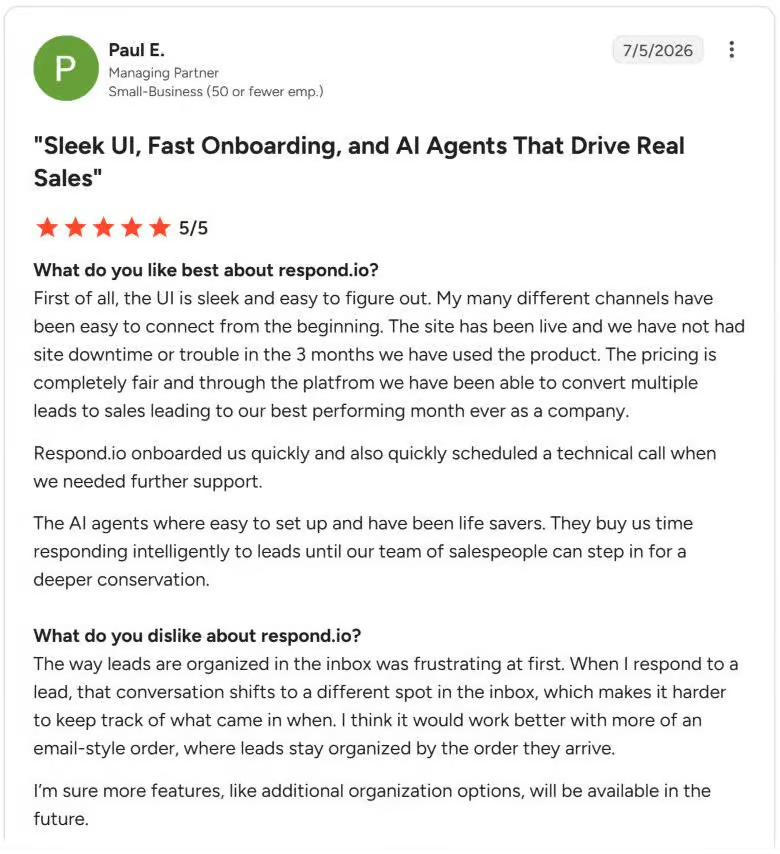
One managing partner wrote that the AI agents reply to leads until a salesperson can take over, and that it helped them have their best month ever:
What users complain about
The most common complaints on G2 are missing features (18 reviews), messaging issues (15) and the price (14). One reviewer in Indonesia found the prices in US dollars expensive for a small business. Another wanted the AI agent to use outside tools during live chats.
On Capterra, the price comes up again, together with integrations that need technical know-how. One retail director moved to the $99/month plan and found it has no AI agent, which made it poor value for a small team:
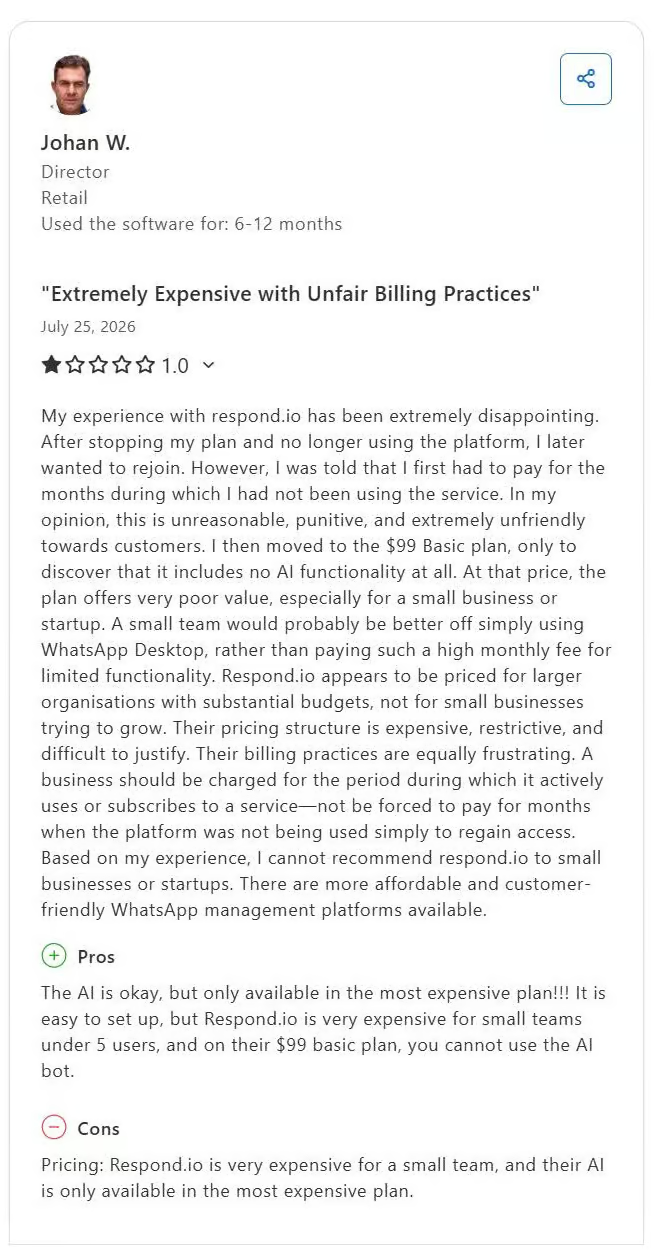
That matches my own test. Respond.io is easy to use and set up, but connecting the AI agent to your other tools is hard, and it’s far from cheap.
Is Respond.io worth it?
So, should you use Respond.io?
Yes, if you run a sales team that talks to a lot of leads on a lot of channels.
Many business owners have asked me for something like Manychat, but with a simple overview of their leads: new, hot, paid and customer. That’s exactly what Respond.io gives you.
Your team answers every lead from one inbox, whichever channel they write on, and every contact sits in a stage of your sales process. AI Agents qualify your leads and move them to the next stage, and workflows handle the rest without AI.
You can set the whole platform up by chatting with the AI Copilot. And if you get stuck, their support team is there 24/7, which G2 reviewers praise a lot.
If that’s what your team needs, click the button below:
If you’re considering Respond.io, here’s what to take into account as well:
- The $99/month plan is only a shared inbox. AI Agents, workflows and broadcasts start at $199/month
- To connect your AI agent to other tools, you need to work with APIs, and that only comes with the $349/month plan
- The calendar integrations can’t book meetings automatically
- It’s built for sales, not for customer support
So if you’re a small business on a tight budget, or you mainly need a support tool, there are better options. You can find some in my list of the best customer service chatbots.
But for a sales team that wants all its leads in one place, Respond.io is a pretty good platform.
Frequently Asked Questions
Is Respond.io good for customer support?
Not really. It can handle support questions, with a shared inbox, AI Assist and an AI agent that answers from your knowledge sources. But everything in Respond.io is built around moving leads toward a sale, so a help desk built for support tickets fits a support team better.
Is Respond.io a chatbot platform for WhatsApp and Instagram?
Yes. You connect WhatsApp and Instagram, and an AI agent answers on both, along with Messenger, TikTok, Telegram, your website and more. But it’s more than a chatbot, because your team works the same conversations from one inbox.
Is Respond.io good for marketing automation?
For messaging campaigns, yes. You can send broadcasts on WhatsApp, SMS, email and Telegram, and track which Meta and TikTok ads bring in sales. But Respond.io is built around sales conversations, so if marketing automation is your main goal, a tool built for that gives you more.
Is Respond.io a CRM?
Not a full one. It keeps your contacts, their details and their lifecycle stage, which covers what a lot of sales teams need.
But it’s built to work next to a CRM rather than replace it, which is why it connects to HubSpot and Salesforce.
Is Respond.io the same as Manychat?
No. Manychat is built for marketing automation on Instagram, Facebook and WhatsApp, like replying to comments and growing your audience (here’s my Manychat review).
Respond.io is built for sales teams that handle a lot of conversations across many channels, with a shared inbox and lifecycle stages.
Is Respond.io secure and GDPR compliant?
Yes. Respond.io is GDPR compliant and ISO 27001 certified. Your data is encrypted with 256-bit SSL/TLS when it’s sent and with 256-bit AES when it’s stored, on Amazon Web Services servers.