


Businesses know chatbots exist. But when it comes to actually using them, most people get stuck.
Should you use a chatbot for lead generation? Customer support? Sales? And which setup actually fits your business?
That’s where things can get unclear.
Because chatbots can be useful in many different ways. In fact, research shows that 74% of customers prefer chatbots. But depending on your goals, the right use case can look completely different.
In this guide, I’ll walk you through 15 real-world chatbot use cases I’ve seen in the last 6 years creating chatbots. I’ve separated them into into three categories: customer support, marketing and sales.
You’ll see:
- Which use cases apply to your situation
- How businesses are using them in practice
- Which channels work best (like WhatsApp, Instagram, Facebook, or your website)
This way, you can quickly identify the use case that makes the most sense for your business, and start implementing it.
Let’s dive in!
Customer Support Chatbot Use Cases
Customer support is where chatbots often deliver the fastest return.
Most businesses receive the same questions over and over again. And answering them manually takes time and money. Research shows chatbots can cut costs by 30%.
A chatbot can handle these conversations instantly, reduce workload, and improve response times at the same time.
Let’s go through the most important customer support chatbot use cases.
1. FAQ Automation
What it is:
FAQ automation means using a chatbot to answer common questions automatically.
These are usually repetitive questions like:
- “What are your opening hours?”
- “How much does this cost?”
- “Do you offer refunds?”
Example:
One of my clients, NCM Insurance, was getting many calls about simple tasks like payments, ID cards, claims, and policy updates.
So I built them an insurance chatbot that acts like a digital front desk. When customers open the chat, they can choose what they need help with. Then the bot guides them to the right place inside the customer portal:
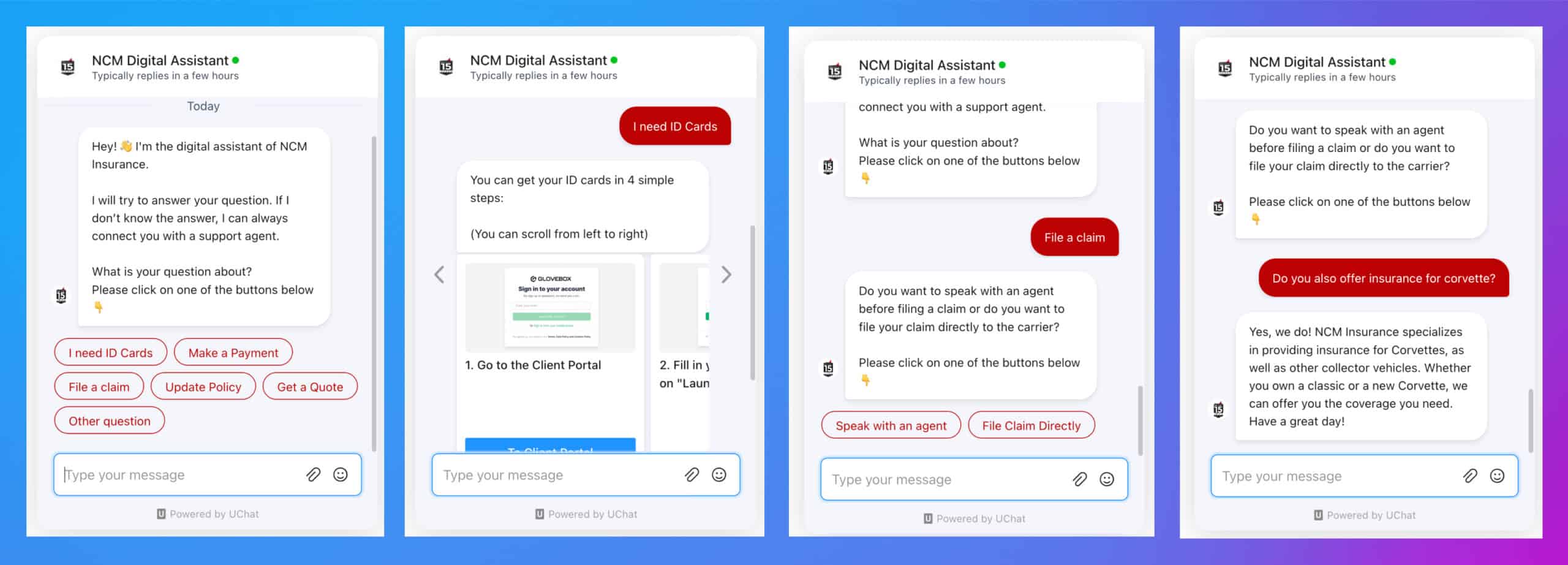
That way, customers can self-serve without calling support.
Best channels:
- Website
Why it works:
It’s simple to set up and immediately reduces the number of support requests your team has to handle. This is usually the first use case businesses should implement.
Read more: How to Auto Reply to Instagram DM Messages
2. Order Status Lookup
What it is:
Customers can check the status of their order directly through a chatbot.
Example:
A customer asks: “Where is my order?”.
The chatbot gets the order status and responds with:
- Shipping status
- Estimated delivery date
- Tracking information
Best channels:
- Website
Why it works:
Order status is one of the most common support requests. Automating it saves time and gives customers instant updates. They don’t need to contact support.
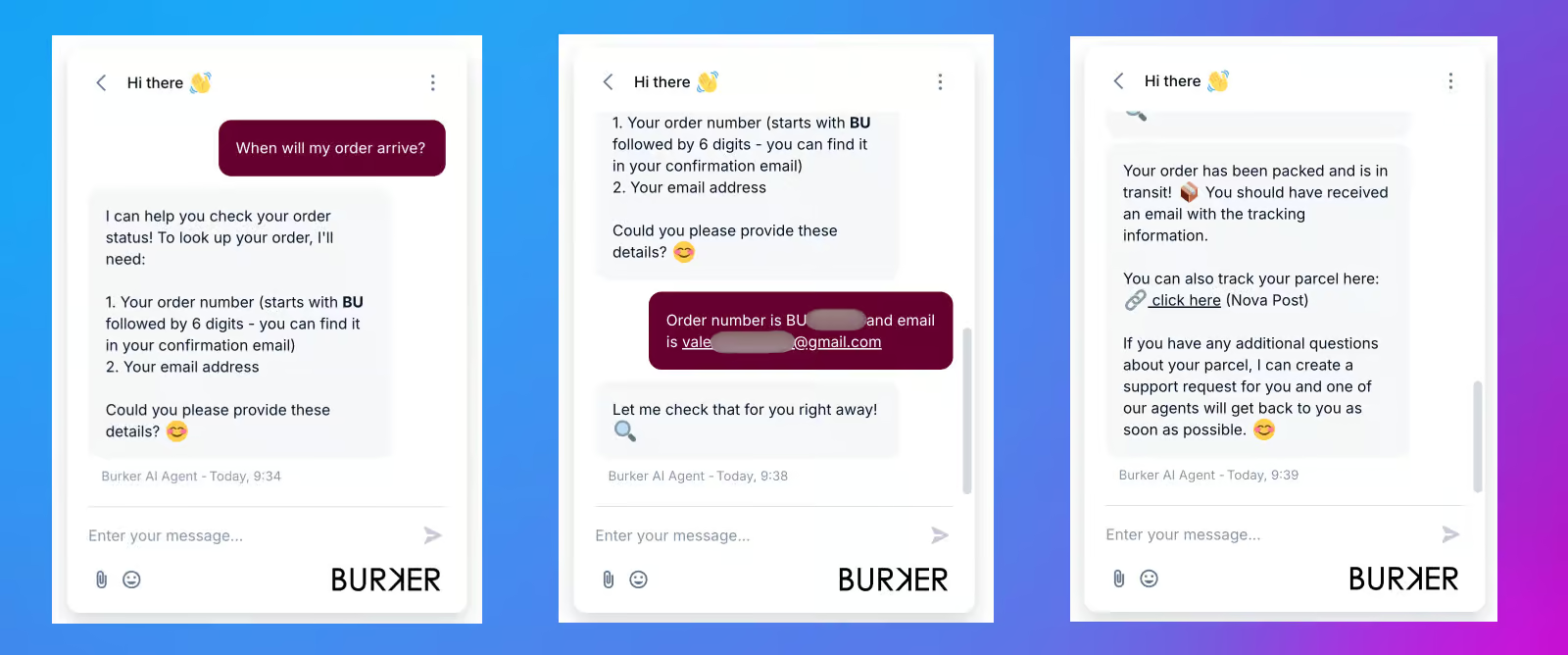
Here’s an example chatbot used by Burker, an eCommerce company I work for:
3. Returns & Refund Handling
What it is:
A chatbot guides customers through the process of returning a product or requesting a refund.
Example:
A customer wants to return an item they bought.
The chatbot asks a few questions, such as:
- What is the order number?
- What is the reason for the return?
Then it provides clear instructions or next steps.
Best channels:
- Website
Why it works:
Returns and refunds usually follow a structured process. A chatbot can standardize this process and reduce confusion. This makes it easier for customers to complete their request.
4. Ticket Creation & Routing
What it is:
When a chatbot can’t solve a problem, it can collect the necessary details and create a support ticket.
It can also route the request to the right team or department.
Example:
A customer reports an issue that requires human help.
Instead of a vague message that doesn’t help, the chatbot asks structured questions:
- What is the issue?
- When did it happen?
- Can you provide additional details?
Based on the answers, the chatbot creates a ticket and sends it to the appropriate team.
Best channels:
- Website
Why it works:
This speeds up support resolution.
Instead of going back and forth to collect information, your team receives complete, structured requests from the start.
Read more: How to Use Manychat in 2026 (Beginner Tutorial)
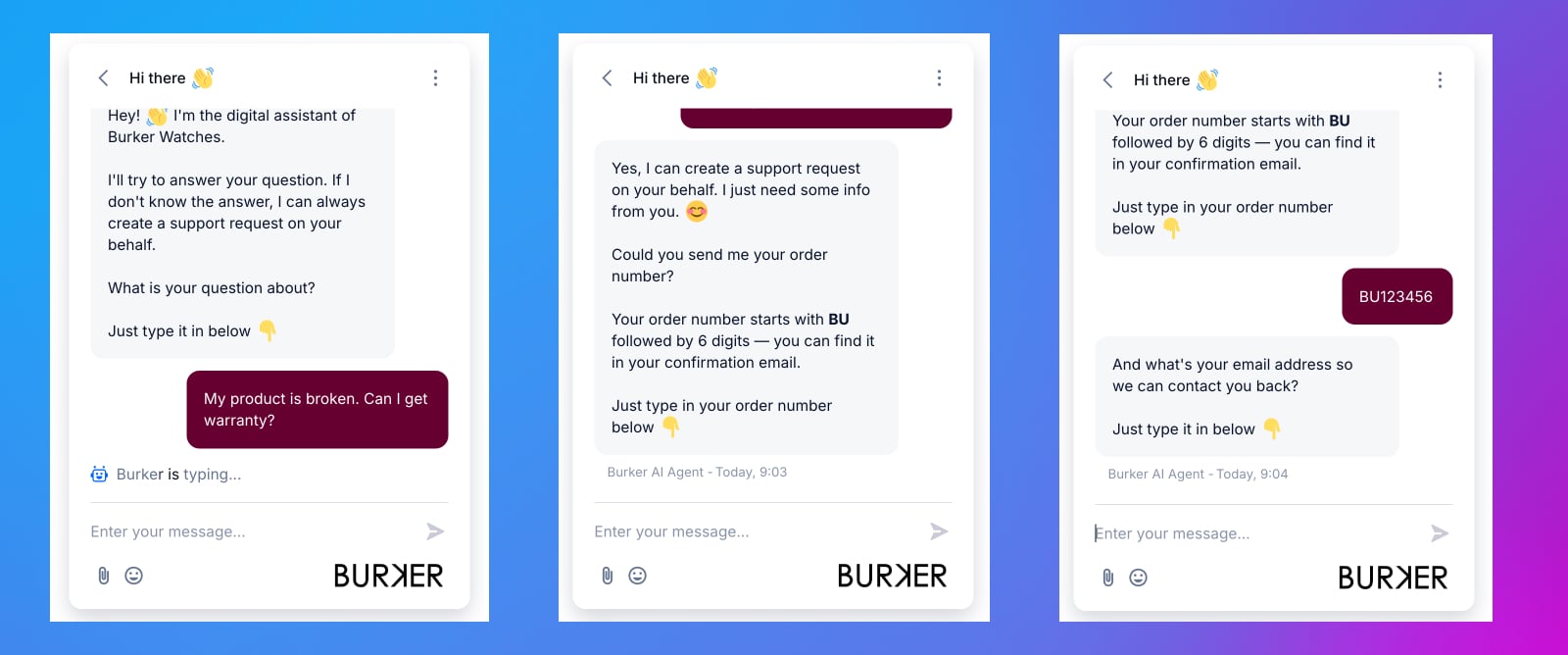
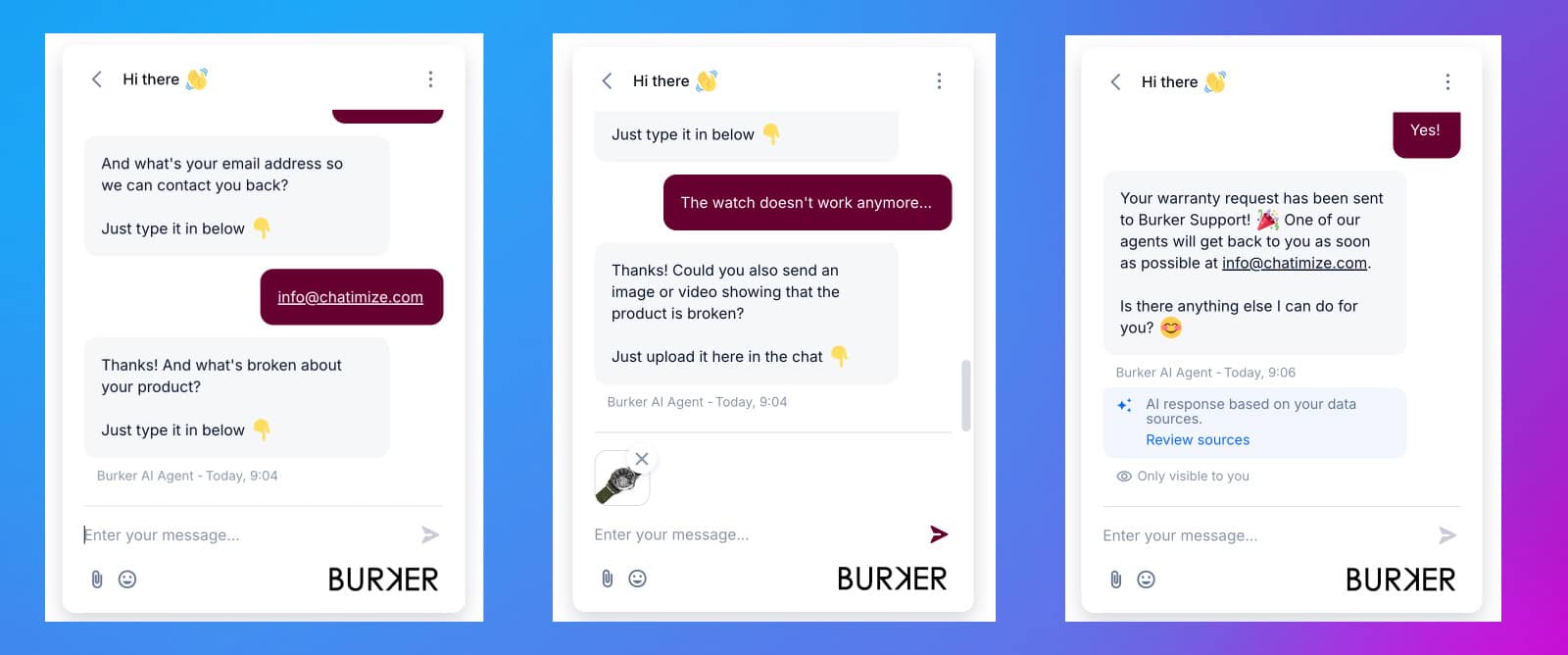
I’ll share Burker’s chatbot again, but this time, used for warranty requests:
5. Customer Feedback Collection
What it is:
A chatbot can ask customers for feedback after an interaction or purchase.
This can include:
- Ratings
- Reviews
- Satisfaction scores
Example:
After a support conversation or purchase, the chatbot asks:
- “How was your experience?”
- “Would you recommend us?”
Customers can respond directly in the chat.
Best channels:
- Website
Why it works:
It’s easier for customers to leave feedback when it’s quick and convenient. Plus, they’re more likely to leave positive feedback immediately after the interaction or purchase.
This helps you:
- Improve your service
- Identify issues
- Collect testimonials for social proof
Marketing Chatbot Use Cases
Chatbots are especially powerful for marketing.
Why?
Because they let you turn passive engagement into real conversations.
Instead of someone just liking a post or visiting your website, you can immediately start a conversation with them. This lets you capture their details, and then guide them to the next step.
Let’s go through the most effective marketing chatbot use cases.
6. Lead Magnet Delivery
What it is:
Lead magnet delivery is when a chatbot automatically sends a free resource to someone after they interact with your content. For instance, this can be an ebook, checklist, or template.
Example:
Let’s take a look at an Instagram chatbot example with one of my clients, Claire Bartholic from The Planted Runner. We used an Instagram DM automation to give away her free Ultimate Nutrition Guide ebook.
We set up a chatbot so that when someone commented “GUIDE” on one of her posts, the chatbot sent an automatic DM. It asked for their name and email, and delivered the ebook:
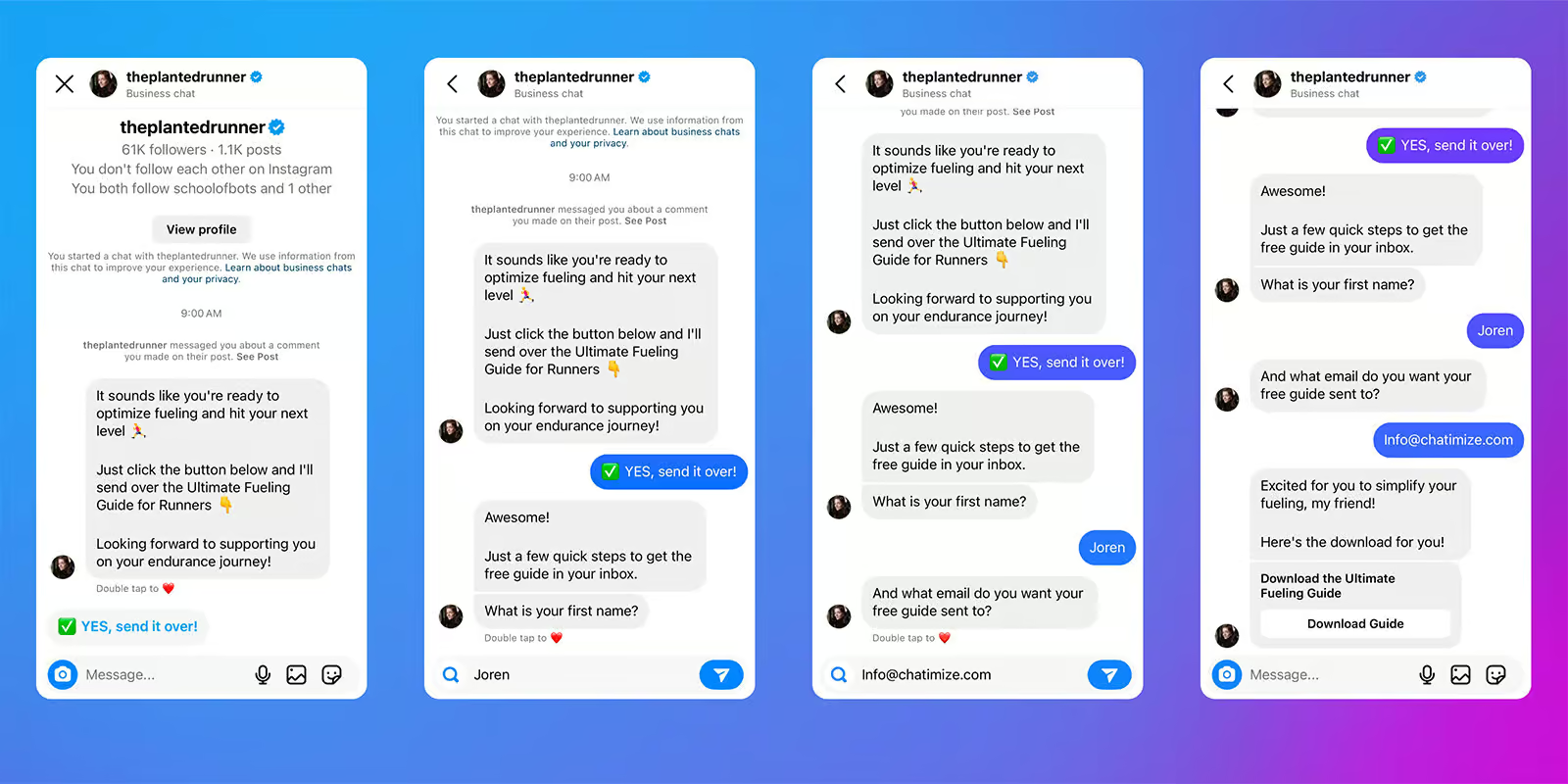
The flow had 3,373 people who started the automation, and 2,602 people submitted their details. That’s a 77% conversion rate.
Best channels:
Why it works:
Typically, brands use landing pages to turn their audiences into leads. But then people need to go away from Instagram and fill out a form. By using a chatbot, their audience can stay on Instagram so it removes friction. People don’t need to:
- Fill out a form
- Check their email
- Switch between platforms
- Confirm anything
They get the resource immediately, inside the same platform they’re already using.
Studies show that conversion rate for traditional contact forms is 2-5%, but for AI chatbots it’s 10-20%. Our experience with clients is that these lead magnet funnels typically convert at 50% with organic traffic.
Read more: Social Media Chatbots: Complete Guide, Use Cases & Best Platforms
7. Quiz Funnels
What it is:
A quiz funnel is a chatbot that asks users a series of questions. Then, it recommends a product, service, or next step based on their answers.
Example:
Let’s say someone visits a skincare brand’s Instagram page because they want to find the right product for their skin type.
Instead of sending them to a product page with dozens of options, the chatbot asks a few simple questions:
- What’s your skin type?
- What’s your main concern?
- What’s your budget?
Based on the answers, the chatbot recommends the most relevant product.
That makes the experience feel more personal. It also helps the business understand what the customer is looking for.
Best channels:
Why it works:
Quiz funnels feel interactive and personalized. Instead of showing generic offers, you guide users based on their situation. At the same time, you’re collecting valuable data and qualifying leads.
This makes them especially useful for:
- Coaching businesses
- Service providers
- eCommerce brands with many products
Here’s an example of how I would create a Quiz funnel on Instagram:

8. Giveaway & Contest Automation
What it is:
A chatbot can automatically manage giveaway entries and follow up with participants. Instead of manually checking comments, sending DMs, or confirming entries, the chatbot handles the process for you.
Example:
Someone comments on your giveaway post with a specific keyword, for example “WIN.”
The chatbot sends them a DM and confirms their entry. It can then ask a simple follow-up question, such as their email address or which product they’re most interested in.
Best channels:
Why it works:
Giveaways already generate a lot of engagement. A chatbot helps you capture that attention and turn it into leads.
Instead of just getting likes and comments, you start conversations and build a list of interested users.
9. Webinar & Event Registration
What it is:
Chatbots can handle the full registration flow for webinars, workshops, or events. Chatbots can send reminders for the webinar as well. Getting people registered is one thing, but getting people to show up is even more important.
Example:
We made an Instagram DM automation for my client Brian Yang to automate his webinar registrations.
When someone commented “webinar” on his post, the chatbot sent a DM. It:
- Confirmed their interest
- Asked for their name and email
- Automatically registered them for the webinar
After signing up, attendees received reminders directly in their Instagram DMs (at 2 days, 1 day, and 30 minutes before the event).
This flow generated 2,055 webinar signups and achieved a 60% show-up rate. This is significantly higher than the typical 35–45% webinar attendance rate.
Best channels:
Why it works:
This reduces friction compared to traditional registration forms.
It also allows you to:
- Send reminders
- Follow up before the event
- Keep everything on one platform and in one conversation
That usually leads to higher registration and attendance rates.
10. Content Distribution (Broadcasts)
What it is:
You can use chatbots to send messages to your audience, such as new content, offers, or updates.
Best channels:
- Telegram
Why it works:
Messages sent through chat platforms typically get:
- Higher open rates
- Faster responses
Studies show that WhatsApp message open rate is 98%, compared to only 20% for email. These channels feel way more direct and immediate.
Pro Tip: Broadcasting is limited on platforms like Instagram and Facebook. That’s why WhatsApp and Telegram are usually the better choice here.
11. Website Visitor Engagement (On-Site Chatbots)
What it is:
An on-site chatbot engages visitors while they’re browsing your website.
Example:
A visitor lands on your site. The chatbot asks: “What are you looking for today?” and guides them to the right page or offer.
Best channels:
- Website
Why it works:
Most website visitors leave without taking action. A chatbot helps you:
- Start a conversation
- Understand intent
- Guide users toward conversion
This is an especially useful chatbot automation for small businesses that want to make the most out of their existing traffic.
For example, if you are on the pricing page of CashController (cashflow software product), you automatically get a pop-up message after 30 seconds:
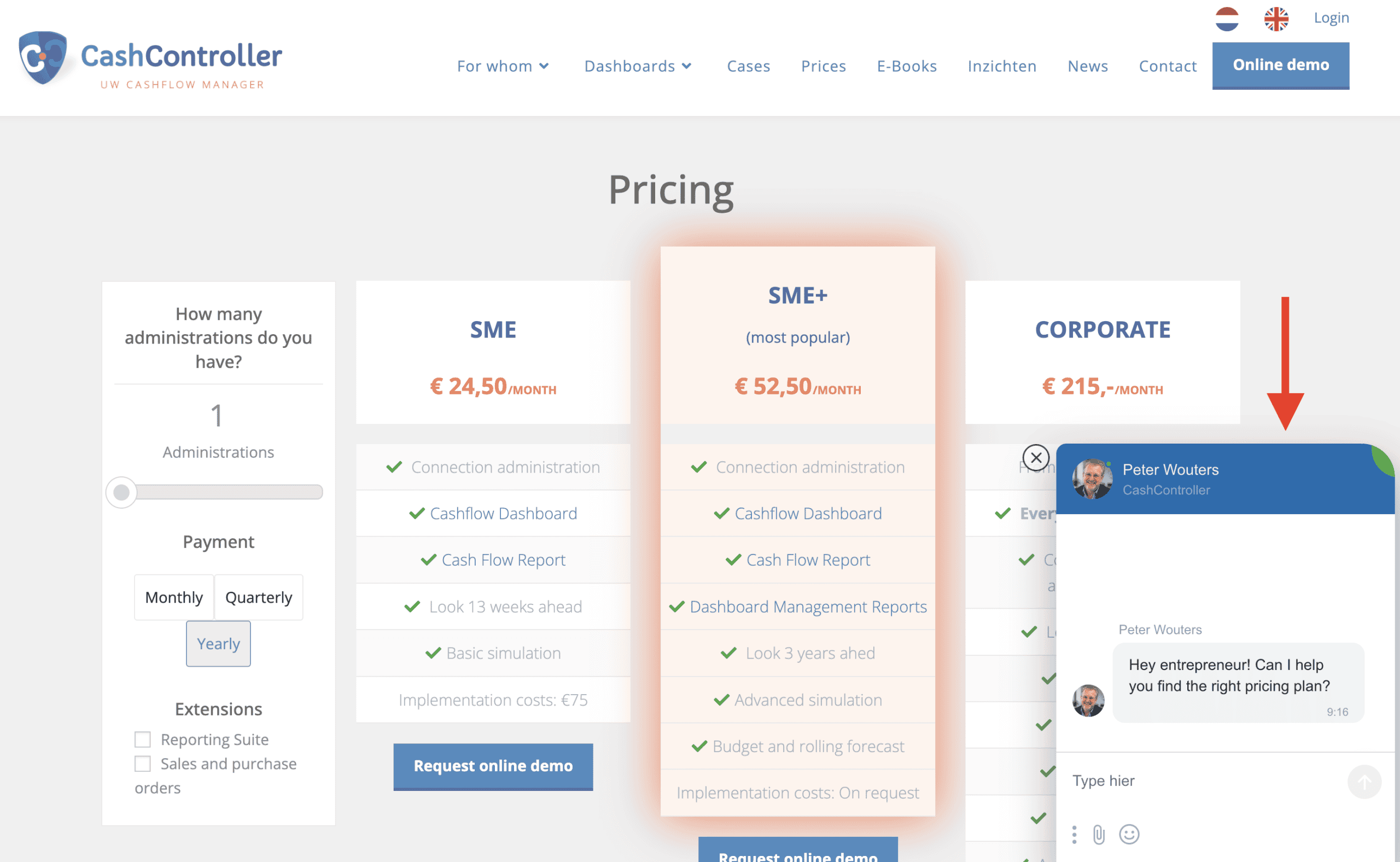
This helps them start conversations with visitors with high intent to buy their tool. And by guiding them in the right direction, they can turn them into customers.
Sales Chatbot Use Cases
Chatbots don’t just help with marketing. They can also play a direct role in generating revenue.
A chatbot can guide potential customers through the entire buying process. That way, it’s not necessary to rely on forms, emails, or back-and-forth messages.
Many businesses already use chatbot automation to handle these conversations at scale.
Let’s look at the most effective sales chatbot use cases!
12. AI Setter (Lead Qualification + Booking + Q&A)
What it is:
An AI setter is a chatbot that handles early-stage sales conversations.
It can:
- Qualify leads
- Answer common questions
- Book appointments automatically
This is all done without a human agent involved.
Example:
Let’s say someone is interested in your service and sends a message asking for more information.
Instead of a sales rep jumping in immediately, the chatbot asks a few key questions:
- What are you looking for?
- What’s your budget?
- When do you want to get started?
Based on the answers, the chatbot can either:
- Book a call directly
- Continue answering questions
Best channels:
- Website
Why it works:
This replaces a large part of manual sales conversations.
Instead of spending time on unqualified leads, your team only talks to people who are actually a good fit.
This type of setup is commonly built using Instagram chatbots, where the chatbot can:
- Ask questions
- Respond instantly
- Book appointments automatically
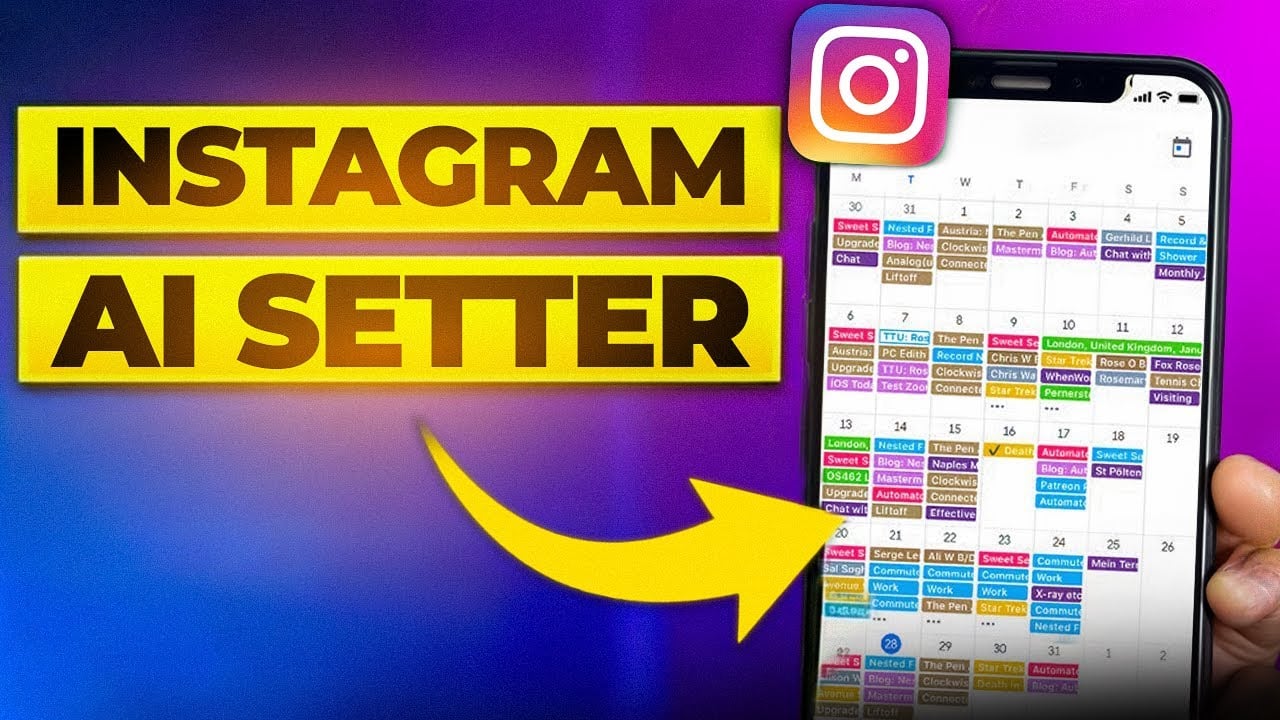
Here’s an example of how an AI Setter works on Instagram:
13. Product Recommendations
What it is:
A chatbot can recommend products based on what the customer is looking for.
Instead of browsing through dozens of options, users get guided to the right product through a short conversation.
Example:
Someone visits an online store but isn’t sure what to buy. The chatbot asks a few simple questions, like:
- What are you looking for?
- What’s your budget?
- Any specific preferences?
Based on their answers, the chatbot suggests the most relevant products.
Best channels:
- Website
Why it works:
This mimics the experience of a salesperson in a physical store. Instead of leaving users to figure things out on their own, you guide them step-by-step.
This is especially common with eCommerce chatbots that improve conversions and sales.
14. Abandoned Cart Recovery
What it is:
Abandoned cart recovery means following up with users who added items to their cart but didn’t complete the purchase.
Example:
A customer adds products to their cart but leaves before checking out. If you have their WhatsApp number, you can send a follow-up message reminding them about their cart or offering help.
For example: “Hey, you left something in your cart. Do you still want to complete your order?”
Best channels:
Pro Tip: This only works if you have the customer’s WhatsApp number.
Why it works:
Compared to email, messages sent via chat are more likely to be seen and answered. This makes it a very effective way to recover lost sales.
This usually relies on WhatsApp chatbots, since you need a direct way to reach the customer after they leave your site.
15. Upselling & Cross-Selling
What it is:
Upselling and cross-selling means recommending additional or higher-value products to customers.
- Upselling → encouraging a higher-tier option
- Cross-selling → suggesting related products
Example:
A customer is about to purchase a product.
The chatbot can suggest:
- A premium version
- Complementary products
For example:
- “Do you also want to add this accessory?”
- “Upgrade to the premium version for extra features.”
Best channels:
- Website
Why it works:
The timing is crucial. Customers are already interested and close to making a decision.
A well-timed suggestion can increase the total order value. Many eCommerce businesses use chatbot-driven flows to present these offers at the right moment.
Which Chatbot Is Best for Your Business Function?
Here’s a simple way to match chatbot types to your business function:
| Business Function | Best Chatbot(s) | Why |
|---|---|---|
| Marketing | Manychat | Best for Instagram and Facebook automation, great for lead generation, giveaways, and webinar funnels |
| Sales | Manychat, Tidio | ManyChat works well for social and WhatsApp funnels, while Tidio is great for website-based sales flows and eCommerce |
| Customer Support | Tidio, Chatbase, Freshchat | Tidio is very good for eCommerce support, Chatbase is perfect when just starting out, and Freshchat fits larger support teams |
The right chatbot depends on two things:
- Where your customers spend their time
- What you need the chatbot to do
For example,
- A coaching business with an Instagram audience will benefit most from a platform like Manychat
- A hotel handling booking inquiries would see better results with WhatsApp automation
- An eCommerce store dealing with daily support requests will need a website-focused tool like Tidio
Most businesses get better results if they start simple.
Instead of trying to automate everything at once, focus on one channel and one use case first. The fastest results often come from automating tasks you do manually, like answering FAQs or qualifying leads.
If you want to explore your options in more detail, check out our guide to best chatbot platforms or browse our in-depth chatbot reviews to compare tools based on your needs.
Your Next Step
Now you’ve seen how chatbots can be useful for marketing, sales, and customer support.
The next step is to pick a use case that fits your business and start there. You don’t need to automate everything at once to see results.
Once you’ve chosen your use case, you can set up your first chatbot and start testing it in practice.
I actually have a step-by-step tutorial, where you can learn to set up your own chatbot. If that’s something that interests you, click the button below:
How To Create a Chatbot in Less Than 10 Minutes
Frequently Asked Questions
Are chatbots only useful for large businesses?
No. In fact, some of the highest ROI chatbot use cases work best for small businesses and solo founders.
For example, lead generation flows or FAQ automation can replace hours of manual work every week. Without a chatbot, you’d need to respond to every message yourself or hire someone to do it.
That’s why smaller businesses often see results faster. A chatbot takes over repetitive tasks immediately, without needing a large team.
Can a single chatbot handle marketing, sales, and support at the same time?
It depends on how the chatbot is built.
A simple chatbot usually handles one task, like answering FAQs or capturing leads. But more advanced setups can combine multiple flows, such as lead generation, qualification, and support..
In practice, many businesses start with one function and expand over time. For example:
- Start with FAQ automation
- Then add lead qualification
- Then include booking or sales flows
You don’t need to build everything at once. It’s often better to keep things focused and grow step by step.
Do chatbots work better on some channels than others?
Yes, and in many cases, the channel is more important that the chatbot itself. Different platforms are a better fit for different use cases. For example:
- Broadcast messages work well on WhatsApp and Telegram
- Lead generation works best on Instagram and Facebook
- Product recommendations are best on websites
Choosing the wrong channel can limit what your chatbot can do. So try to match the use case with the platform where your audience is already active.
What happens when a chatbot gets it wrong?
This can happen at some point, and that’s normal. The goal isn’t to make a perfect chatbot from day one. The goal is to handle the majority of simple conversations correctly.
For anything more complex, you should always have a fallback.
This can include:
- A “talk to a human” option
- A default reply when the chatbot doesn’t understand
- Routing the conversation to your team
A well-designed chatbot doesn’t try to do everything. It handles what it can, and hands off the rest.
How long does it take to see results from a chatbot?
It depends on the use case, but results can come quickly.
Lead generation chatbots can start producing results within hours of going live, especially on platforms like Instagram where engagement is immediate. Customer support chatbots usually need a few weeks to show their impact
More advanced setups may take longer to optimize, but simple use cases often deliver value almost immediately.
Is a chatbot the same as an AI assistant?
Not exactly, but they’re closely related. A chatbot is a broad term that includes different types of systems.
Some chatbots are rule-based. They follow predefined flows and respond to specific inputs. These are reliable and work well for structured, simple tasks like FAQs or lead capture.
Others use AI. These can understand more open-ended questions and respond more flexibly.
Both fall under the “chatbot” category. The right choice depends on your use case.
For many businesses, simple rule-based flows are enough to get results. AI becomes more useful when you need to handle more complex or unpredictable conversations.
